
1. Introduction
The FANTECH Crypto II WG7V2 is a high-performance wireless gaming mouse engineered for precision and versatility. It offers dual-mode connectivity, 6 programmable buttons, and durable Huano Blue Shell switches, making it suitable for both gaming and productivity tasks. This manual provides essential information for setting up, operating, maintaining, and troubleshooting your device.
2. Package Contents
Verify that all items listed below are included in your package:
- FANTECH Crypto II WG7V2 Gaming Mouse
- USB Dongle (for 2.4GHz wireless connection)
- USB-C Data Cable
- Quick Start Guide
- Warranty Card
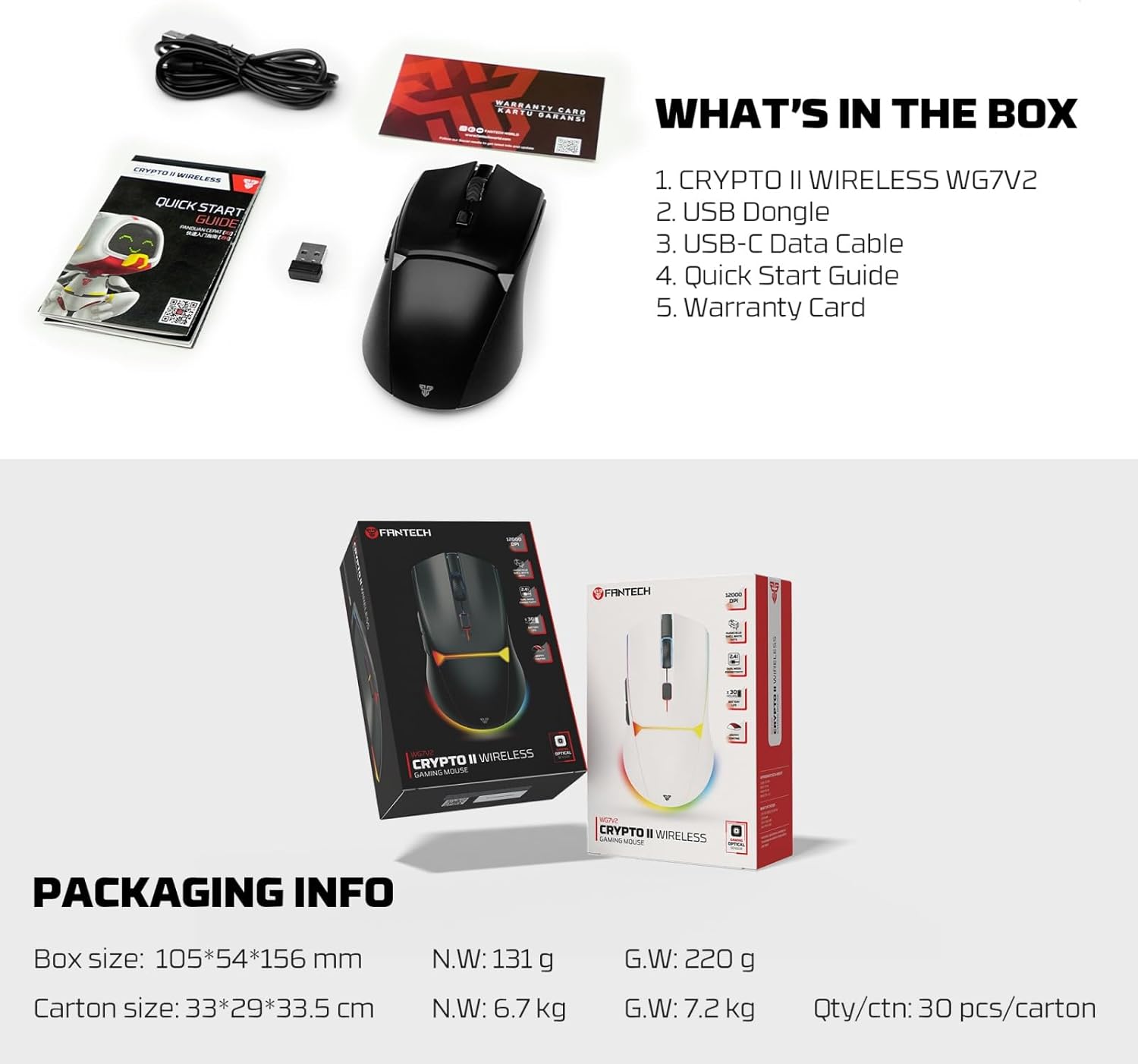
Image: All items included in the FANTECH Crypto II WG7V2 retail package.
3. Setup
3.1 Wireless Mode (2.4GHz)
- Locate the USB dongle within the mouse's storage compartment or in the packaging.
- Insert the USB dongle into an available USB port on your computer.
- Turn on the mouse using the power switch located on the underside of the device.
- The mouse should automatically connect to your computer. If not, refer to the troubleshooting section.
3.2 Wired Mode
- Connect one end of the provided USB-C data cable to the mouse.
- Connect the other end of the USB-C data cable to an available USB port on your computer.
- The mouse will function immediately in wired mode and will also charge its internal battery.

Image: The mouse supports both wired USB-C and 2.4GHz wireless StrikeSpeed connections.
3.3 Software Installation (Optional)
For advanced customization of buttons, macros, DPI settings, and lighting effects, download the official FANTECH software from the FANTECH website. Follow the on-screen instructions for installation.
4. Operating Instructions
4.1 Button Functions
The FANTECH Crypto II WG7V2 features 6 programmable buttons:
- Left Click: Primary action.
- Right Click: Secondary action/context menu.
- Scroll Wheel (Click): Middle click/universal scroll.
- DPI Button: Cycles through preset DPI levels.
- Forward Button: Navigates forward in web browsers/applications.
- Backward Button: Navigates backward in web browsers/applications.

Image: Overview of the FANTECH Crypto II WG7V2 mouse with its key features.
4.2 DPI Adjustment
Press the dedicated DPI button (usually located behind the scroll wheel) to cycle through different sensitivity levels. The mouse's indicator light may change color to indicate the current DPI setting.
4.3 Charging the Mouse
Connect the mouse to your computer using the provided USB-C cable. The mouse will charge automatically. A low battery indicator (often an LED light) will notify you when charging is required. The mouse offers up to 30 hours of continuous wireless operation on a single charge.

Image: The mouse features a 30-hour battery life, PTFE skates for smooth gliding, and supports 6 macro functions.
4.4 Programmable Buttons and Macros
Utilize the FANTECH software to customize the 6 programmable buttons. You can assign complex commands, macros, and shortcuts to enhance your gaming or productivity workflow.
4.5 Ergonomics and Grip
The mouse features a symmetrical shape and a grippy coating, designed to accommodate various grip styles including palm, claw, and fingertip, ensuring comfort and stability during extended use.

Image: The symmetrical shape of the mouse provides a comfortable and precise gaming experience for multiple grip styles.

Image: The grippy coating ensures the mouse stays firmly in your grasp during intense sessions.
4.6 Huano Blue Shell Switches
The mouse is equipped with Huano Blue Shell White Dot micro switches, rated for 20 million clicks. These switches provide crisp, precise click feedback and are optimized for rapid-fire actions and prolonged use.

Image: The Huano Blue Shell White Dot switches offer high durability and precise click feedback.
5. Maintenance
5.1 Cleaning
To maintain optimal performance, regularly clean your mouse:
- Use a soft, lint-free cloth slightly dampened with water or a mild cleaning solution to wipe the surface of the mouse.
- Avoid using harsh chemicals, abrasive cleaners, or solvents.
- Use compressed air to clear dust and debris from crevices and around the scroll wheel.
- Ensure the mouse is powered off and disconnected from any power source before cleaning.
5.2 Storage
When not in use for extended periods, store the mouse in a cool, dry place away from direct sunlight and extreme temperatures. Ensure the mouse is fully charged before long-term storage to preserve battery health.
6. Troubleshooting
6.1 Mouse Not Responding
- Check Power: Ensure the mouse is turned on and has sufficient battery charge. Connect it via USB-C cable to charge.
- Wireless Connection: For wireless mode, ensure the USB dongle is securely plugged into a working USB port. Try a different USB port.
- Wired Connection: For wired mode, ensure the USB-C cable is securely connected to both the mouse and the computer. Try a different USB port or cable.
- Re-pair (Wireless): If the connection is lost, try turning the mouse off and on again. If issues persist, consult the FANTECH software for re-pairing options.
6.2 Erratic Cursor Movement
- Clean Sensor: Dust or debris on the optical sensor can cause erratic movement. Clean the sensor area on the underside of the mouse with a soft cloth.
- Surface: Ensure you are using the mouse on a suitable, non-reflective surface or a quality mouse pad.
- Interference: In wireless mode, other wireless devices might cause interference. Move the mouse closer to the USB dongle or try a different USB port.
6.3 Buttons Not Responding
- Software Conflict: If using customization software, ensure it is up-to-date and not conflicting with other applications. Try resetting button assignments to default.
- Physical Obstruction: Check for any physical debris preventing button presses.
7. Specifications
| Feature | Detail |
|---|---|
| Model Number | CRYPTO II WG7V2 |
| Connectivity | Dual-Mode (2.4GHz Wireless, USB-C Wired) |
| Buttons | 6 Programmable Buttons |
| Switches | Huano Blue Shell White Dot (20 Million Clicks) |
| Battery Life | Up to 30 hours |
| Skates | 100% Virgin PTFE |
| Movement Detection Technology | Optical |
| Product Dimensions | 4.96 x 2.64 x 0.1 inches |
| Item Weight | 4.2 ounces |
| Batteries | 2 AA batteries required (Note: Product description states 30-hour battery life, implying rechargeable. Please verify battery type if this conflicts.) |
8. Warranty and Support
8.1 Warranty Information
Your FANTECH Crypto II WG7V2 Wireless Gaming Mouse comes with a limited warranty. Please refer to the included Warranty Card in your package for detailed terms and conditions, including warranty duration and coverage. Keep your proof of purchase for warranty claims.
8.2 Customer Support
For technical assistance, troubleshooting, or general inquiries, please visit the official FANTECH website or contact their customer support. Contact information can typically be found on the FANTECH website or on the Warranty Card.


