Introduction
This manual provides detailed instructions for the proper setup, operation, maintenance, and troubleshooting of your BAOFENG AR-152 PRO Ham Radio. Please read this manual thoroughly before using the device to ensure safe and efficient operation.
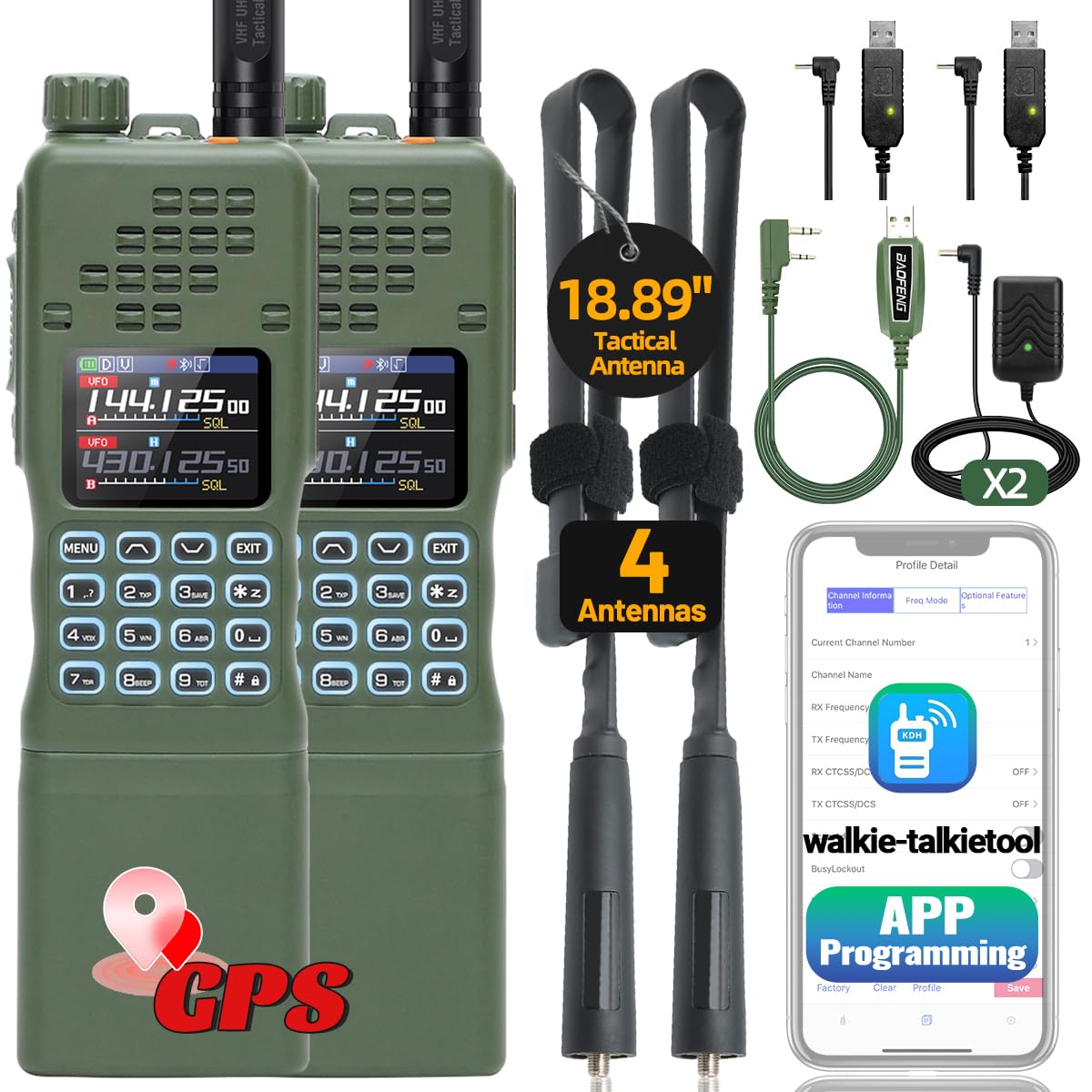
Figure 1: BAOFENG AR-152 PRO Ham Radio
Key Features
- 10W High Power Output for Long Range Communication
- Built-in GPS Function for Location Tracking
- APP Programming via Mobile Device
- Frequency Duplication (Copy Frequency)
- NOAA Weather Receiver with 10 Channels
- FM Radio and VOX Functionality
- Multiple Antennas (21CM and 48CM Tactical Antenna)
- 12000mAh Rechargeable Battery with USB Charging Support
Setup
1. Package Contents
Verify that all items are present in the package:
- 2 x BAOFENG AR-152 PRO Radios
- 2 x 12000mAh Batteries
- 2 x 21CM Antennas
- 2 x 48CM Tactical Antennas
- 2 x Headsets
- 2 x USB Charger Cables
- 2 x Wall Chargers
- 1 x Programming Cable
- 1 x User Manual
2. Battery Installation and Charging
Before first use, fully charge the radio's battery.
- Align the battery with the back of the radio and slide it into place until it clicks securely.
- Connect the USB charger cable to the 2.5mm charging port on the side of the battery.
- Plug the USB cable into the wall charger or any compatible USB power source (e.g., power bank, laptop, car charger).
- The charging indicator light will be red during charging and turn green when fully charged.
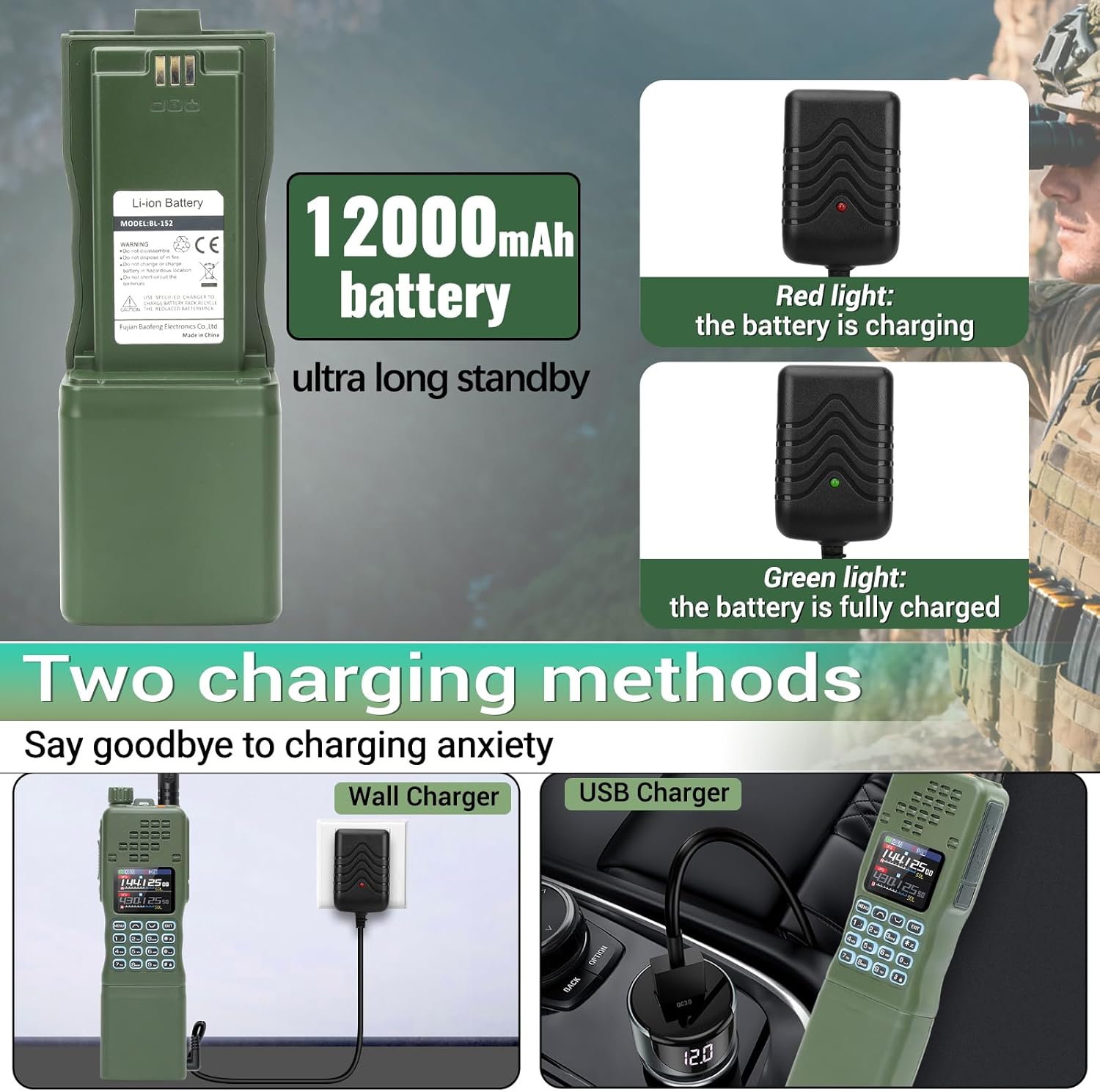
Figure 2: Battery installation and charging options
3. Antenna Attachment
Select the appropriate antenna for your communication needs and attach it to the radio.
- Screw the desired antenna (21CM standard or 48CM tactical) clockwise onto the antenna connector at the top of the radio until it is finger-tight. Do not overtighten.

Figure 3: Attaching the tactical antenna
4. APP Programming
The AR-152 PRO supports programming via a mobile application, eliminating the need for complex cables for basic frequency management.
- Turn on the radio and navigate to the Bluetooth settings to ensure it is enabled.
- Download and install the 'walkie-talkietool' or 'Radio Tool (AR152Pro Serirs)' application on your mobile device.
- Open the app and connect to your AR-152 PRO radio via Bluetooth.
- Follow the in-app instructions to read current radio settings, modify frequencies, and write new settings to the radio.

Figure 4: Wireless APP Programming
Video 1: Guide to APP Programming for BAOFENG AR-152 PRO Ham Radio.
Operating Instructions
1. Power On/Off and Volume
- To power on the radio, rotate the top knob clockwise. To power off, rotate it counter-clockwise.
- Adjust the volume by rotating the same knob.
2. Channel Selection and Frequency Duplication
The radio supports up to 1000 channels and features frequency duplication.
- Use the keypad to directly input frequencies or navigate through stored channels.
- To use the frequency duplication feature, activate the function (refer to the on-screen menu or APP for specific steps) and place the AR-152 PRO near another radio to quickly copy its frequency.
Video 2: Overview of BAOFENG AR-152 PRO features, including frequency copy and GPS.
3. Tri-Power Switching (High/Mid/Low)
Adjust the transmission power to optimize battery life and range.
- The AR-152 PRO offers High (10W), Mid (8W), and Low (4W) power settings.
- Access this setting through the radio's menu or the mobile application to select the desired power level.

Figure 5: Tri-Power Output Settings
4. GPS Function
The built-in GPS provides real-time location information.
- Activate the GPS function via the radio's menu.
- The display will show your current latitude and longitude coordinates. This feature can be used for location tracking and enhancing communication effectiveness in group settings.

Figure 6: GPS Positioning Display
5. NOAA Weather Radio
Receive weather forecasts and emergency alerts.
- Access the NOAA Weather Receiver function through the radio's menu.
- The radio can receive 10 NOAA weather channels, providing critical information during adverse weather conditions.

Figure 7: NOAA Weather Radio Function
6. FM Radio
The radio includes an FM broadcast receiver.
- Navigate to the FM Radio option in the menu to listen to FM broadcasts.
Maintenance
1. Cleaning
- Wipe the radio's exterior with a soft, damp cloth. Do not use harsh chemicals or abrasive cleaners.
- Ensure all ports are free from dust and debris.
2. Storage
- Store the radio in a cool, dry place away from direct sunlight and extreme temperatures.
- If storing for extended periods, remove the battery and charge it periodically to maintain its health.
Troubleshooting
| Problem | Possible Cause | Solution |
|---|---|---|
| Radio does not power on | Battery is depleted or not properly installed. | Charge the battery or ensure it is securely attached. |
| No signal or poor reception | Incorrect frequency/channel, antenna not properly attached, or out of range. | Verify frequency/channel settings. Check antenna connection. Move to an area with better line-of-sight. |
| Cannot program via APP | Bluetooth not enabled on radio or mobile device, incorrect model selected in app, or app not updated. | Ensure Bluetooth is active on both devices. Select 'AR-152 PRO (BLE inside)' in the app. Update the app to the latest version. |
| Short battery life | High power setting, frequent transmission, or aging battery. | Use lower power settings when possible. Reduce transmission time. Consider replacing the battery if it's old. |
Specifications
| Feature | Detail |
|---|---|
| Model Number | AR-152 PRO |
| Output Power | 10W (High/Mid/Low Tri-Power Switching) |
| Channels | 1000 |
| Battery Capacity | 12000mAh (9V battery included) |
| Special Features | GPS Function, APP Programming, Frequency Duplication, NOAA Weather Receiver, FM Radio, VOX, DTMF |
| Antennas Included | 21CM Antenna, 48CM Tactical Antenna |
| Charging Methods | USB Charger Cable, Wall Charger |
| Item Weight | 4.05 pounds |
| Package Dimensions | 11.34 x 8.07 x 5.59 inches |
| Water Resistance Level | Not Water Resistant |
Warranty
Based on the provided product information, there is no explicit warranty stated for this product. Please refer to the retailer's return policy for details on returns or exchanges.
Support
For technical assistance, programming software, or any other inquiries, please contact the after-sales service provided by the seller. They will actively assist you with your needs.


