
1. Introduction
This manual provides essential instructions for the safe operation, assembly, maintenance, and troubleshooting of your MZK 3-in-1 Electric Leaf Blower, Vacuum, and Mulcher. Please read this manual thoroughly before using the product to ensure proper function and safety. Keep this manual for future reference.
Safety Information
Always wear appropriate personal protective equipment (PPE) including eye protection, hearing protection, and gloves when operating the unit. Ensure the power cord is in good condition and avoid operating in wet conditions. Keep bystanders, especially children and pets, at a safe distance from the operating area.
2. Product Components
The MZK 3-in-1 unit combines the functions of a leaf blower, vacuum, and mulcher. Familiarize yourself with the main components:
- Main Motor Unit with Handle
- Blower Tube
- Vacuum Tube (often the same as blower tube, or a wider attachment)
- Collection Bag (50L capacity)
- Mode Selector Switch
- Power Cord Connection
- Support Wheels (for vacuum mode)
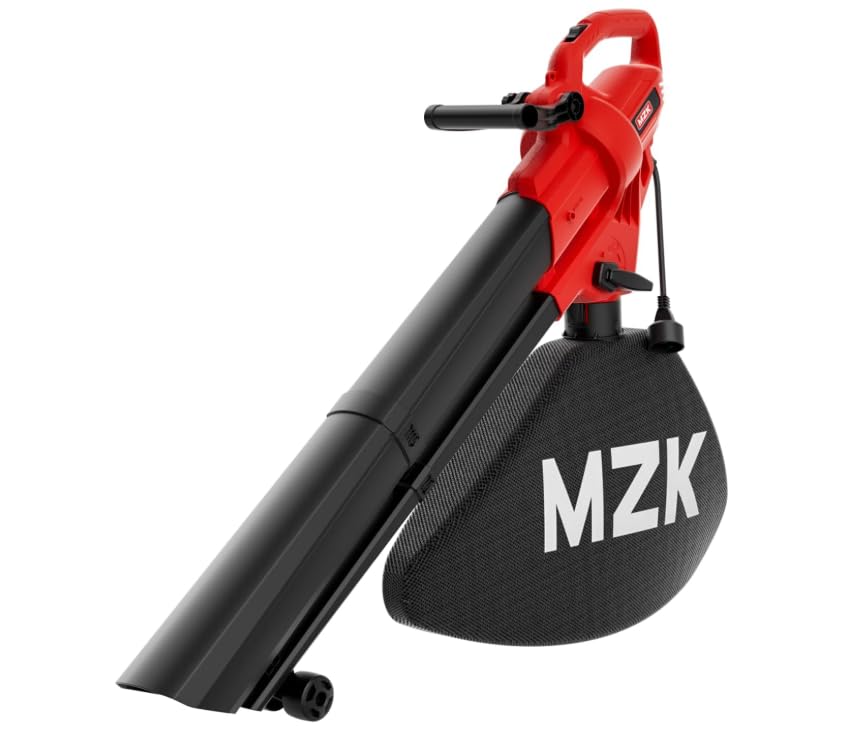
Figure 2.1: MZK 3-in-1 Electric Leaf Blower, Vacuum, and Mulcher. This image displays the assembled unit in what appears to be vacuum mode, with the collection bag attached and the main tube extending forward, supported by small wheels.
3. Setup and Assembly
Before first use, some assembly is required. Ensure the unit is unplugged from the power source during assembly.
3.1 Attaching the Blower Tube
- Align the blower tube with the outlet port on the main motor unit.
- Twist or push the tube until it securely locks into place. Refer to any alignment arrows or locking mechanisms.
3.2 Attaching the Vacuum Tube and Collection Bag
- Ensure the blower tube is removed if you are switching from blower mode.
- Attach the wider vacuum tube to the intake port of the motor unit. Secure it firmly.
- Connect the collection bag to the exhaust port. Ensure the bag's opening is fully seated and secured to prevent debris leakage.
- If applicable, attach the support wheels to the vacuum tube for easier maneuverability.
4. Operating Modes
Your MZK unit offers three distinct functions:
4.1 Blower Mode
Ideal for clearing leaves and debris from hard surfaces like driveways and patios. The unit delivers up to 480 CFM of air volume and wind speeds up to 169 MPH (380 km/h).
- Ensure the blower tube is securely attached.
- Verify the mode selector is set to 'Blower'.
- Direct the airflow to move debris into piles.
4.2 Vacuum Mode
Designed for collecting leaves and light debris into the collection bag.
- Ensure the vacuum tube and collection bag are correctly installed.
- Set the mode selector to 'Vacuum'.
- Move the vacuum tube over the debris to suction it into the bag.
4.3 Mulcher Function
When operating in vacuum mode, the unit's internal impeller mulches collected leaves, reducing their volume for easier disposal or composting.
- This function operates automatically when in vacuum mode.
- Avoid vacuuming large, hard objects as they can damage the mulching impeller.
5. Operation
5.1 Power Connection
Connect the unit's power cord to a suitable outdoor-rated extension cord. Ensure the extension cord is rated for the unit's power requirements and is in good condition. Plug the extension cord into a grounded electrical outlet.
5.2 Starting and Stopping
- To start: Press the ON/OFF switch to the 'ON' position.
- To stop: Press the ON/OFF switch to the 'OFF' position.
5.3 General Usage Tips
- Always hold the unit firmly with both hands during operation.
- For blowing, sweep the nozzle from side to side to move debris effectively.
- For vacuuming, move the nozzle slowly over the debris. Do not force the unit.
- Empty the collection bag regularly to maintain optimal vacuum performance and prevent clogging.
- Avoid operating the unit in dusty conditions without proper respiratory protection.
6. Maintenance
Regular maintenance ensures the longevity and efficient operation of your MZK unit. Always unplug the unit before performing any maintenance.
6.1 Cleaning
- Wipe the exterior of the unit with a damp cloth. Do not use harsh chemicals or abrasive cleaners.
- Clean the air intake vents to prevent overheating.
- Inspect the blower/vacuum tubes for any blockages and clear them as needed.
6.2 Collection Bag
- Empty the collection bag frequently, especially when vacuuming wet leaves, to prevent clogging and maintain suction.
- Inspect the bag for tears or damage. Replace if necessary.
6.3 Storage
- Store the unit in a dry, secure location, out of reach of children.
- Ensure the unit is clean and dry before storing.
- Coil the power cord neatly to prevent damage.
7. Troubleshooting
If you encounter issues with your MZK unit, refer to the following common problems and solutions:
| Problem | Possible Cause | Solution |
|---|---|---|
| Unit does not start | No power supply; Faulty switch; Damaged cord | Check power connection and outlet; Inspect power cord for damage; Contact customer support if switch is faulty. |
| Low blowing/vacuum power | Blocked tube/intake; Full collection bag; Incorrect mode selection | Clear any blockages; Empty collection bag; Ensure correct mode is selected. |
| Excessive vibration/noise | Debris in impeller; Loose components | Unplug and inspect impeller for debris; Tighten any loose screws; Contact customer support if problem persists. |
| Leaves not mulching effectively | Wet leaves; Impeller damage | Avoid vacuuming wet leaves; Inspect impeller for damage (unplugged). |
If the problem persists after attempting these solutions, please contact MZK customer support.
8. Specifications
- Brand: MZK
- Model Name: Leaf Vacuum (ET1712-RM)
- Power Source: AC Corded Electric
- Air Volume: Up to 480 CFM
- Air Speed: Up to 169 MPH (380 km/h)
- Collection Bag Capacity: 50 Liters
- Functions: Blower, Vacuum, Mulcher
- Item Weight: 6 Pounds
- Product Dimensions: 12"L x 3"W x 17"H
- Color: Black, Red
9. Warranty and Support
For warranty information or technical assistance, please refer to the warranty card included with your product or contact MZK customer support directly. Keep your purchase receipt as proof of purchase.
MZK Customer Support: Please visit the official MZK website or refer to your product packaging for contact details.