1. Introduction
The Redragon H260 Hylas Wired Gaming Headset is designed to provide an immersive audio experience for gaming across multiple platforms. Featuring 50mm audio drivers, a noise-canceling microphone, and dynamic RGB backlighting, this headset aims for comfort and clear communication during extended gaming sessions.
Key features include:
- Immersive Audio: 50mm drivers deliver crisp highs and deep lows for a full sound experience.
- Clear Communication: Omnidirectional noise-canceling microphone reduces background noise.
- Comfortable Design: Adjustable headband and soft memory foam earpads for prolonged use.
- Multi-Platform Compatibility: Connects to PC, PS4, Xbox One, NS, and other devices with 3.5mm connections.
- Dynamic RGB Lighting: Enhances the gaming aesthetic.
- Durable Connection: Gold-plated 3.5mm jack for reliable audio transmission.
2. Package Contents
Verify that all items are present in the package:
- Redragon H260 Hylas Wired Gaming Headset
- 3.5mm Audio/Microphone Splitter Adapter
- User Manual (this document)
3. Product Overview
Familiarize yourself with the main components of your Redragon H260 Hylas headset.
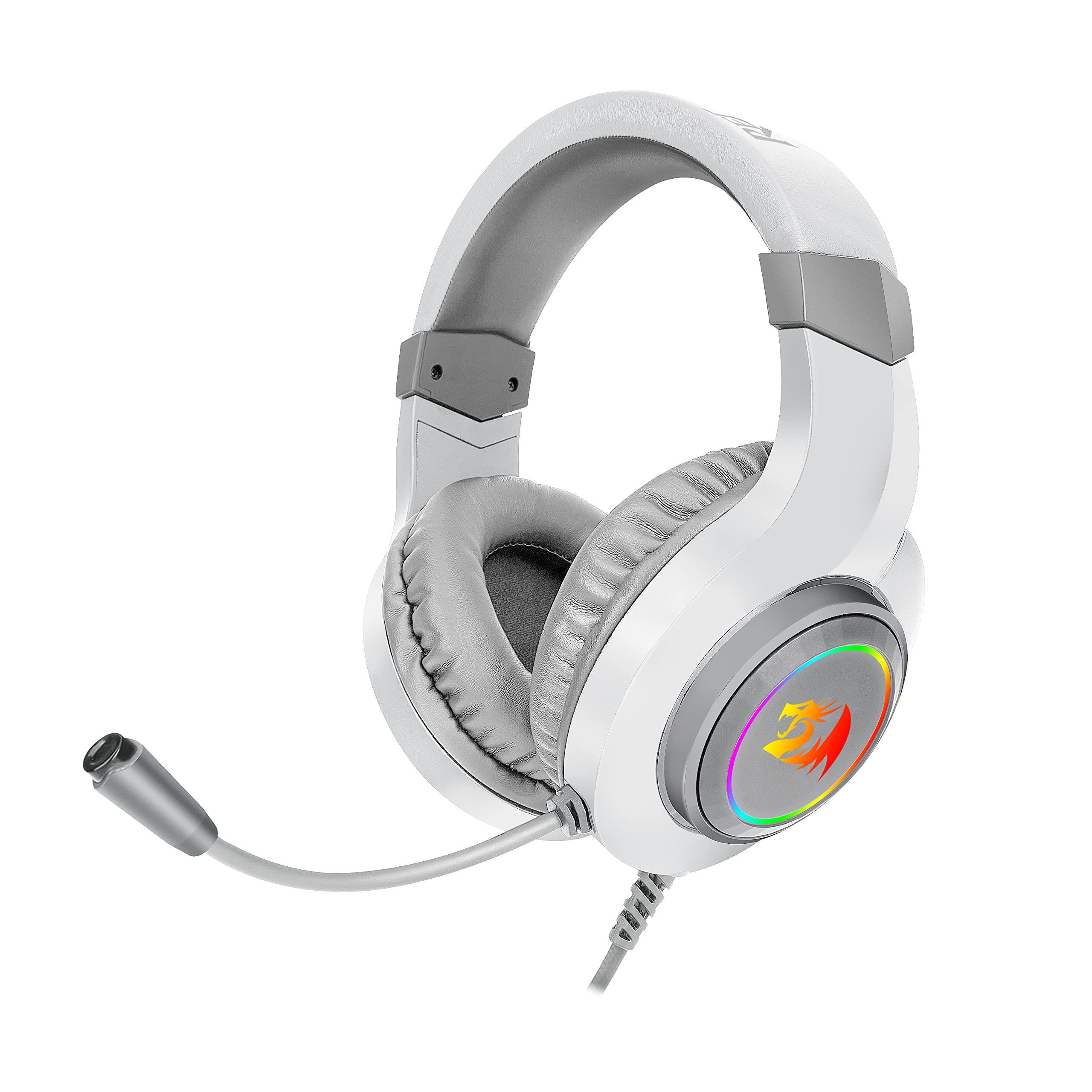
Figure 3.1: Front view of the Redragon H260 Hylas headset, showcasing the RGB illuminated earcups and adjustable microphone.
- Adjustable Headband: Allows for a customized and comfortable fit.
- Memory Foam Earpads: Designed for comfort during long gaming sessions and passive noise isolation.
- 50mm Audio Drivers: Located within the earcups, providing high-quality stereo sound.
- Noise-Canceling Microphone: Flexible and omnidirectional, positioned for clear voice pickup.
- In-line Controls: Typically located on the cable for volume adjustment and microphone mute.
- 3.5mm Audio Jack: Main connection for audio and microphone.
- USB Connector: Powers the dynamic RGB backlighting.

Figure 3.2: Detail of the soft memory foam earpads, designed for comfort.

Figure 3.3: Detail of the adjustable headband, allowing for a personalized fit.
4. Setup
Follow these steps to connect your Redragon H260 Hylas headset to your device.
4.1 Connecting to PC (Separate Audio/Mic Ports)
- Locate the 3.5mm audio and microphone ports on your PC. These are typically color-coded (green for audio, pink for microphone) or labeled with icons.
- Connect the headset's 3.5mm audio jack to the green audio port on your PC.
- Connect the headset's 3.5mm microphone jack to the pink microphone port on your PC.
- Plug the USB connector into an available USB port on your PC to power the RGB lighting.
- Adjust audio settings in your operating system to ensure the headset is selected as the default playback and recording device.
4.2 Connecting to PC/PS4/Xbox One/NS (Single 3.5mm Combo Jack)
Some devices, such as laptops, PS4 controllers, Xbox One controllers, and Nintendo Switch, use a single 3.5mm combo jack for both audio and microphone. Use the included splitter adapter for these connections.
- Connect the headset's 3.5mm audio jack (green) and 3.5mm microphone jack (pink) into the corresponding inputs on the provided 3.5mm audio/microphone splitter adapter.
- Plug the single 3.5mm connector from the splitter adapter into the combo audio jack on your device (e.g., controller, laptop).
- Plug the USB connector into an available USB port on your device (if available and desired for RGB lighting). For consoles, this might be a port on the console itself or a USB power adapter.
- Adjust audio settings on your device to ensure the headset is recognized and selected for audio output and microphone input.

Figure 4.1: Headset connectors: dual 3.5mm jacks for audio/mic and a USB connector for RGB.
5. Operating Instructions
5.1 Wearing the Headset
- Adjust the headband by sliding the earcups up or down until they fit comfortably over your ears.
- Ensure the earpads fully enclose your ears for optimal sound isolation and comfort.
5.2 Volume Control
The headset features an in-line volume control wheel on the cable. Rotate the wheel up to increase volume and down to decrease volume.
5.3 Microphone Usage
The flexible microphone can be adjusted to your preferred position. For optimal voice clarity, position the microphone approximately 1-2 inches from your mouth.
- Mute Function: Use the in-line switch on the cable to quickly mute or unmute the microphone.
- Noise-Canceling: The omnidirectional microphone is designed to reduce ambient noise, focusing on your voice.

Figure 5.1: Detail of the flexible, adjustable microphone.
5.4 RGB Lighting
The dynamic RGB backlighting on the earcups is powered via the USB connection. If the USB is not connected, the RGB lighting will not activate. There are no direct controls on the headset to change RGB patterns or turn it off if the USB is connected.
6. Maintenance
Proper care will extend the life of your headset.
- Cleaning: Use a soft, dry cloth to wipe down the earcups and headband. For earpads, a slightly damp cloth can be used, but ensure they are completely dry before use. Do not use harsh chemicals or abrasive materials.
- Storage: Store the headset in a clean, dry place away from extreme temperatures and direct sunlight. Avoid placing heavy objects on the headset.
- Cable Care: Avoid sharp bends or excessive pulling on the cable to prevent damage. Use the included Velcro strap to manage excess cable length.
7. Troubleshooting
If you encounter issues with your headset, refer to the following common solutions.
7.1 No Sound from Headset
- Ensure the 3.5mm audio jack is fully inserted into the correct port on your device or splitter.
- Check the in-line volume control on the headset cable and ensure it is turned up.
- Verify that the headset is selected as the default audio output device in your device's sound settings.
- Test the headset with another device to rule out a device-specific issue.
7.2 Microphone Not Working
- Ensure the 3.5mm microphone jack is fully inserted into the correct port on your device or splitter.
- Check the in-line microphone mute switch and ensure it is in the 'unmute' position.
- Verify that the headset microphone is selected as the default recording device in your device's sound settings.
- Ensure the application you are using (e.g., game, chat software) is configured to use the correct microphone input.
7.3 RGB Lighting Not Working
- Ensure the USB connector is securely plugged into a powered USB port on your device.
- Test the USB connection with another USB port or device.
8. Specifications
| Feature | Specification |
|---|---|
| Model Name | Hylas |
| Item Model Number | H260 |
| Connectivity Technology | Wired (3.5mm audio/mic, USB for RGB) |
| Driver Size | 50mm |
| Ear Placement | Over Ear |
| Microphone Type | Omnidirectional, Noise-Canceling |
| Lighting | Dynamic RGB Backlight |
| Compatibility | PC, PS4, Xbox One, NS, and other 3.5mm devices |
| Item Weight | 1.01 pounds (approx. 458g) |
| Package Dimensions | 8.86 x 7.83 x 4.13 inches |
9. Warranty and Support
Redragon products are manufactured to high quality standards. For information regarding warranty coverage, please refer to the warranty card included with your purchase or visit the official Redragon website.
For technical support, troubleshooting assistance beyond this manual, or to inquire about replacement parts, please contact Redragon customer service through their official website or the retailer where the product was purchased.
Official Redragon Website: www.redragonusa.com (or relevant regional site)


