
Introduction
This manual provides comprehensive instructions for the safe and effective use of your Walker's Restrictor Bluetooth Earbuds. These earbuds are designed to provide hearing protection with a 24 dB Noise Reduction Rating (NRR) while offering Bluetooth connectivity for audio and communication. Please read this manual thoroughly before operating the device.
Safety Information
WARNING: This product contains chemicals known to the State of California to cause cancer and birth defects or other reproductive harm.
Always ensure proper fit and use of the earbuds to achieve the stated Noise Reduction Rating. Improper use may result in hearing damage.
Package Contents
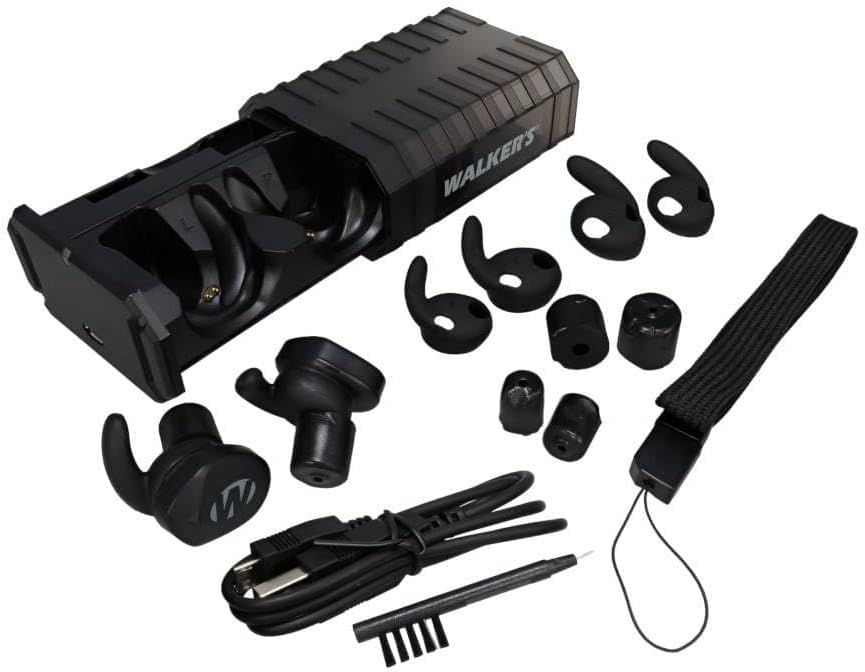
Image: The Walker's Restrictor Bluetooth Earbuds, their charging case, various sizes of Sure-Lock fins and foam tips, a Micro USB charging cable, a cleaning brush, and a wrist lanyard.
- Walker's Restrictor Bluetooth Earbuds (Left and Right)
- Portable Charging Case
- Micro USB Charging Cable
- Multiple sizes of Sure-Lock Fins
- Multiple sizes of Foam Tips
- Cleaning Brush
- Wrist Lanyard
Setup
1. Charging the Earbuds and Case
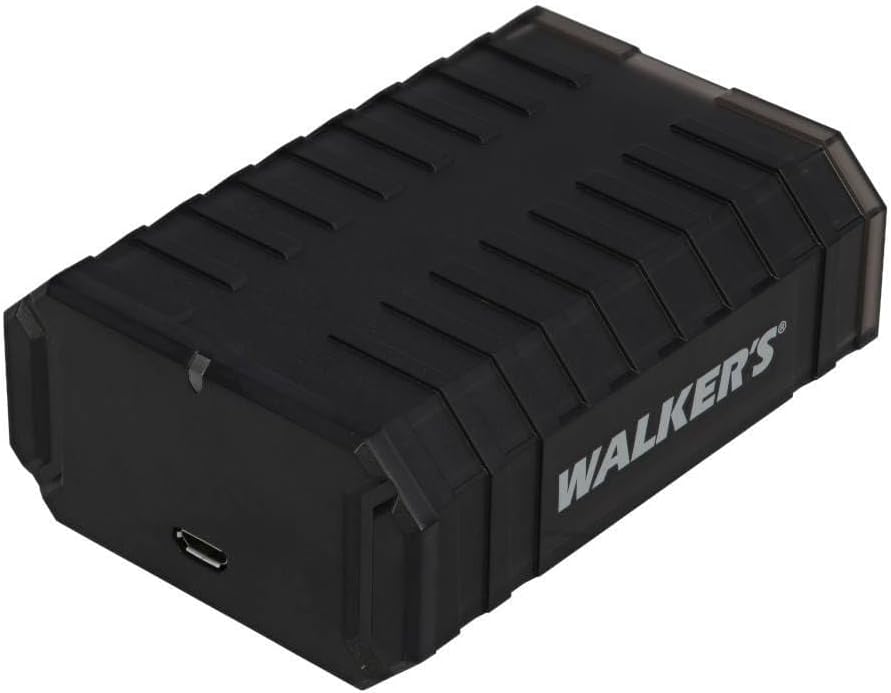
Image: The closed charging case for the Walker's Restrictor Bluetooth Earbuds, showing the Micro USB charging port on the side.
- Insert the earbuds into their respective slots in the charging case.
- Connect the Micro USB charging cable to the charging port on the case and to a USB power source.
- The indicator lights on the case will show charging status. Ensure the case and earbuds are fully charged before first use.
2. Inserting Earbuds

Image: A pair of Walker's Restrictor Bluetooth Earbuds, showing their ergonomic shape and the "W" logo.
- Select the appropriate size of Sure-Lock fins and foam tips for a comfortable and secure fit. A proper seal is crucial for optimal noise reduction.
- To insert, gently compress the foam tip by rolling it between your fingertips.
- Insert the earbud into your ear canal and hold it in place for 10-15 seconds to allow the foam to expand and create a seal.
- Adjust the Sure-Lock fin to fit snugly against your ear's concha for added stability.
3. Bluetooth Pairing
- Ensure the earbuds are charged and powered on.
- On your mobile device, navigate to the Bluetooth settings.
- Select "Walker's BT 2.0" from the list of available devices to pair.
- A voice prompt will confirm successful connection.
4. App Installation

Image: A person's hands holding the product packaging for Walker's Restrictor Bluetooth Earbuds, with a smartphone displaying the companion app interface in the background.
Download the Walker's companion application from your device's app store. This app allows for advanced control and customization of your earbuds.
Operating Instructions
Power On/Off
- To power on, press and hold the button on each earbud for approximately 2 seconds until you hear the "Walker's" voice prompt.
- To power off, press and hold the button on each earbud for more than 8 seconds.
Using the Control App
The Walker's application provides detailed control over your earbuds:
- Separate Volume Control: Adjust the volume for each earbud independently.
- Sleep Modes: Program various sleep modes for power saving.
- Battery Charge Indication: Monitor the battery level of each earbud.
- Sound Quality Modes: Switch between four distinct operation modes.
Operation Modes
The earbuds feature 4 program settings to adapt to different environments:
- Universal: Standard listening mode.
- High Frequency: Enhances high-frequency sounds.
- Power Boost: Amplifies ambient sounds for increased awareness.
- Clear Voice: Optimizes for speech clarity.
Sound Activated Compression (SAC)
The earbuds utilize Sound Activated Compression (SAC) technology. When a loud sound, such as a gunshot, occurs, the system will automatically and instantly reduce that sound to a safe level (24 dB NRR). Ambient sound amplification will return to the set level after the loud noise subsides.

Image: A person wearing Walker's Restrictor Bluetooth Earbuds while at a shooting range, demonstrating their use in an active environment.
Bluetooth Audio Control
- Volume Control: Swipe up or down on the left earbud to adjust music volume.
- Pause/Play: Tap the left earbud once to pause or resume music playback.
- Bluetooth connectivity range is approximately 75 feet, but may vary based on environment and obstacles.
Maintenance
- Cleaning: Use the provided cleaning brush to remove debris from the earbuds and charging case. Do not wash the earbuds or case with water or cleaning solutions.
- Storage: Store the earbuds in their charging case when not in use to protect them and ensure they remain charged.
- Battery Care: For optimal battery life, avoid fully discharging the earbuds frequently. Charge regularly.
Troubleshooting
| Problem | Possible Solution |
|---|---|
| Earbuds not charging | Ensure the Micro USB cable is securely connected to both the case and the power source. Verify the charging case itself has power. Clean charging contacts if necessary. |
| Earbuds not pairing with device | Ensure earbuds are powered on and in pairing mode. Turn off and on your device's Bluetooth. Forget the device in your Bluetooth settings and attempt to re-pair. |
| App connectivity issues | Ensure earbuds are connected via Bluetooth to your phone. Close and reopen the app. Restart your phone. Check for app updates. |
| Poor sound quality or inconsistent noise reduction | Verify earbuds are properly inserted and a good seal is achieved with the correct size foam tips. Check for debris in the earbud speakers. Ensure battery levels are sufficient. |
| Wind noise interference | While the earbuds feature dynamic wind reduction, strong winds may still cause some interference. Adjust your position or consider alternative hearing protection in extremely windy conditions. |
Specifications
- Model: Restrictor Bluetooth
- Noise Reduction Rating (NRR): 24 dB
- Connectivity: Bluetooth
- Battery: Rechargeable Lithium
- Charging Port: Micro USB
- Material: Plastic
- Manufacturer: Walker's
- ASIN: B0FT48NSGP (Parent), B08DDKH21R (Variant)
Warranty and Support
For detailed warranty information and customer support, please refer to the official Walker's website or contact their customer service department directly. Contact information can typically be found on the product packaging or the manufacturer's website.

