
1. Product Overview
The JIEHOME X5 Golf Rangefinder is a versatile and precise laser measuring device designed for golf, hunting, archery, and other outdoor activities. It features advanced measurement modes, a long-range capability, and a rechargeable battery for extended use.

Image: JIEHOME X5 Golf Rangefinder, showcasing its compact design.
2. Package Contents
Upon opening your JIEHOME X5 Golf Rangefinder package, you should find the following items:
- 1 x JIEHOME X5 Golf Rangefinder
- 1 x Carry Case
- 1 x USB-C Charging Cable
- 1 x Carabiner
- 1 x Hand Strap
- 1 x User Manual (this document)
- 1 x Lens Cleaning Cloth

Image: All items included in the JIEHOME X5 Golf Rangefinder package.
3. Setup and Charging
3.1 Initial Charging
The JIEHOME X5 Rangefinder is equipped with a rechargeable 750mAh Lithium-Ion battery. Before first use, it is recommended to fully charge the device.
- Locate the USB-C charging port on the side of the rangefinder.
- Connect the provided USB-C charging cable to the rangefinder and a compatible USB power source (e.g., computer, wall adapter).
- The charging indicator will show red while charging and turn green when fully charged.
A full charge supports up to 20,000 measurements. The device features a 20-second auto-off function to conserve battery when not in operation.

Image: JIEHOME X5 Rangefinder connected for USB-C charging.
3.2 Power On/Off
To power on the device, press the power button located on the top of the rangefinder. To power off, the device will automatically shut down after 20 seconds of inactivity, or you can manually turn it off by holding the power button.
4. Operating Modes
The JIEHOME X5 Golf Rangefinder offers 7 professional modes to suit various measurement needs:
- Scan Mode
- Flag Locking Mode
- Flag Locking + Slope Compensation Mode
- Coach Mode (Triangulation Feature)
- Coach + Slope Compensation Mode
- Vertical/Horizontal Measuring Mode
- Speed Mode
Use the 'Mode' button to cycle through the available modes. The current mode will be displayed in the viewfinder.
4.1 Slope Switch Functionality
The rangefinder features an external slope switch, allowing you to easily toggle slope compensation on or off. This is crucial for compliance with USGA & R&A tournament rules, where slope-adjusted distances are typically not permitted.
- Slope On: Provides elevation-adjusted distances, useful for practice and understanding true playing distance on sloped terrain.
- Slope Off: Provides direct line-of-sight distance, making the device tournament compliant.
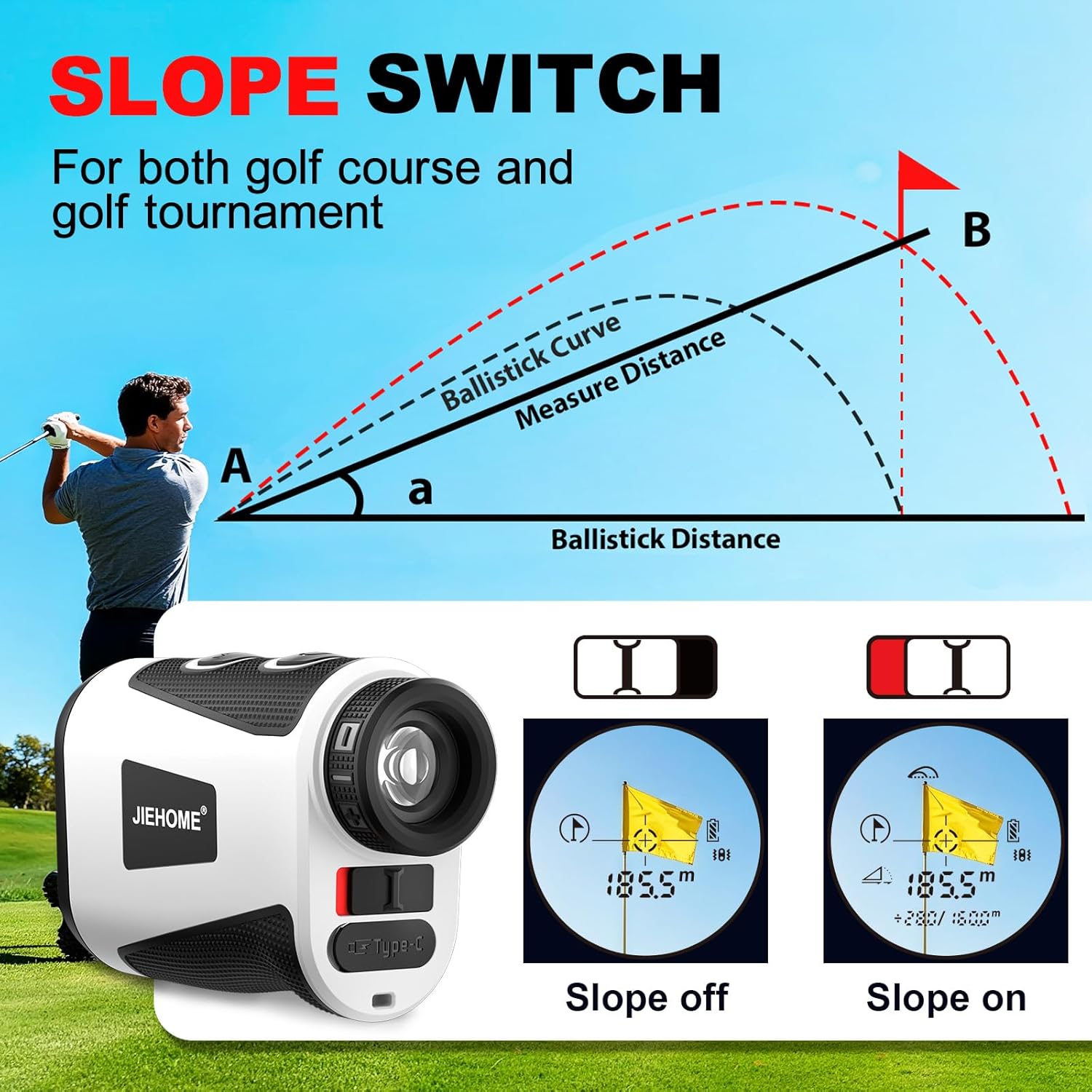
Image: Explanation of the Slope Switch feature, showing its application for both golf course play and tournaments.
4.2 Coach Mode (Triangulation Feature)
The innovative Coach Mode, powered by advanced triangulation, allows you to instantly calculate the distance between any two points. This is particularly useful for blind shots, doglegs, and complex layouts where the pin might be out of sight, aiding in strategic course management.
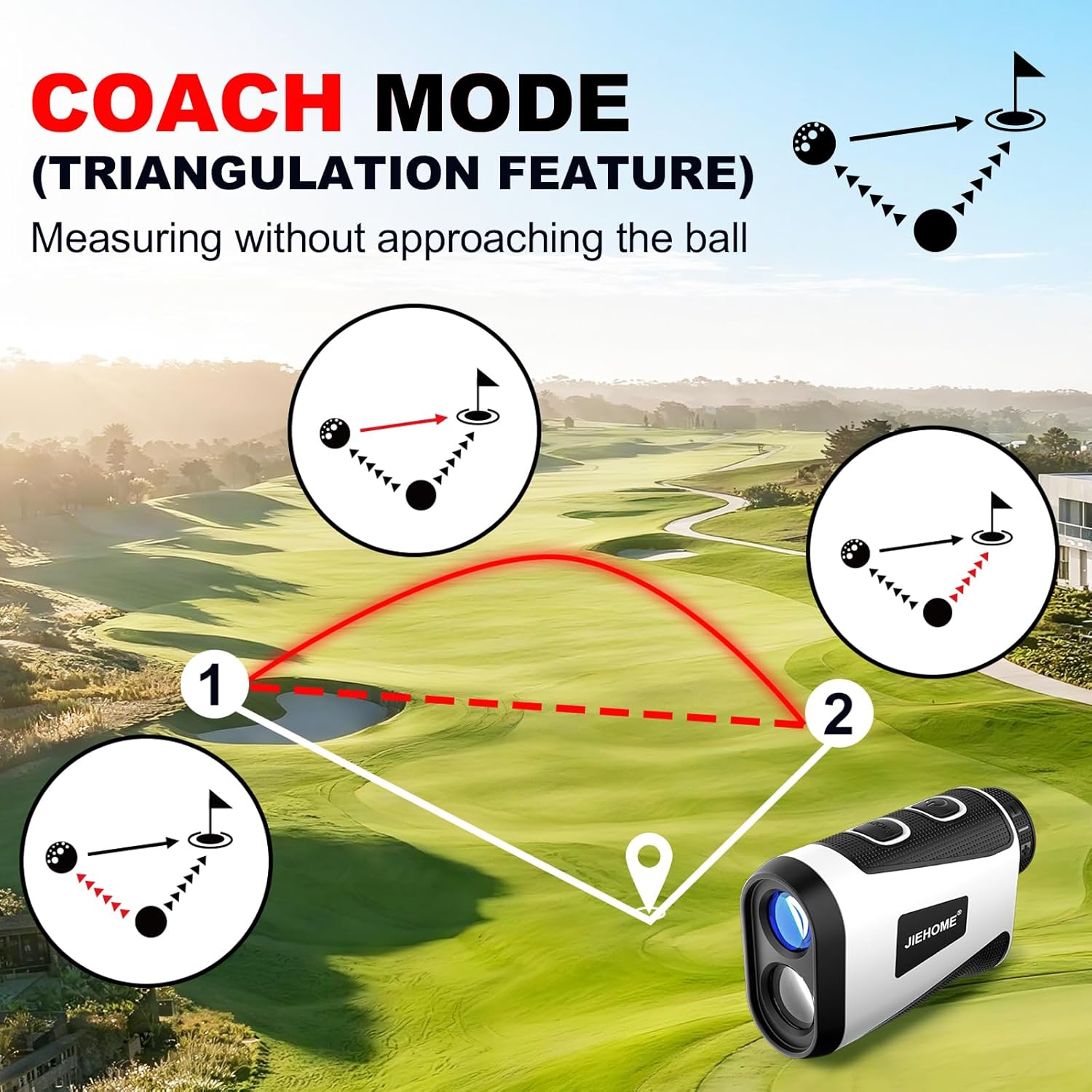
Image: Visual representation of the Coach Mode (Triangulation Feature) for measuring distances between two points.
4.3 Flag Locking Mode with Pulse Vibration
This mode allows for quick and accurate locking onto the flagstick, even with shaky hands. Once the flag is locked, the device provides a pulse vibration confirmation, ensuring you have targeted the correct object and not background elements.

Image: Flag Lock feature with pulse vibration for accurate targeting.
4.4 Other Measurement Modes
- Scan Mode: Activate the power button while consistently targeting various objects in succession to get continuous distance readings.
- Vertical/Horizontal Measuring Mode: Deactivate slope compensation when aiming at the target, determining both horizontal and vertical distances.
- Speed Mode: Press the power button while tracking a moving object to gauge its speed.

Image: Visuals for Horizontal & Vertical Distance, Speed Measurement, and Continuous Scan modes.
4.5 Magnification and Range
The JIEHOME X5 Rangefinder offers a 1,200-yard range with a ±1 yard accuracy. It features 7x magnification and fully multi-coated lenses for a bright, sharp view, reducing glare and enhancing contrast.

Image: Displaying the measuring range and magnification capabilities.
5. Maintenance
5.1 Lens Cleaning
To maintain optimal clarity and performance, regularly clean the lenses of your rangefinder. Use the provided lens cleaning cloth or a soft, lint-free cloth. Avoid using abrasive materials or harsh chemicals that could damage the lens coatings.
5.2 Storage
When not in use, store the rangefinder in its protective carry case to prevent scratches, dust accumulation, and impact damage. The built-in strong magnet allows it to attach securely to a golf cart for convenient access during play.

Image: Magnetic, compact, and portable design of the rangefinder, including its carry case.
6. Troubleshooting
If you encounter any issues with your JIEHOME X5 Golf Rangefinder, please consider the following:
- No Power: Ensure the battery is fully charged. Connect the device to the USB-C charging cable and allow sufficient time for charging.
- Inaccurate Readings: Ensure the lenses are clean and free from smudges or debris. Verify that the correct measurement mode is selected for your environment (e.g., slope on/off).
- Difficulty Locking Target: Ensure you have a clear line of sight to the target. Use Flag Locking Mode for smaller targets like flagsticks.
- Display Issues: Check battery level. If issues persist, contact customer support.
7. Specifications
| Brand | JIEHOME |
| Model Name | X5 Rangefinder |
| Color | X5 White |
| Material | Plastic |
| Sport | Archery, Golf, Hunting |
| Item Weight | 144 Grams |
| Battery Type | Lithium-Ion (750mAh) |
| Are Batteries Included | Yes |
| Magnification | 7X |
| Measuring Range | Up to 1200 Yards |
| Accuracy | ±1 Yard |
| Laser Class | Class 1 (output power < 5mW) |
8. Warranty and Support
JIEHOME is committed to providing high-quality products and excellent customer service.
- Standard Warranty: The JIEHOME X5 Golf Rangefinder comes with a 1-year warranty.
- VIP Warranty: VIP customers receive an extended 2-year warranty.
- Customer Support: For any questions, concerns, or support needs, please contact the JIEHOME service team. Our service team is ready to help!
For more information, please visit the JIEHOME Store.