1. Introduction
Thank you for choosing the Schellenberg Powerlift 4-Channel Remote Control. This device is designed to provide convenient and secure operation of your Schellenberg garage door and outdoor gate operators. Please read this manual carefully before installation and use to ensure proper function and safety.
What's Included:
- 1 x Powerlift Wireless Hand Transmitter
- 1 x Integrated 12V Battery
- 1 x Instruction Manual
2. Safety Instructions
- Keep the remote control out of reach of children.
- Do not operate the gate or garage door if people or objects are in the path of movement.
- Ensure the gate or garage door is visible during operation.
- Do not expose the remote control to extreme temperatures, moisture, or direct sunlight.
- Dispose of batteries according to local regulations.
3. Product Overview
The Schellenberg Powerlift remote control offers a convenient way to manage up to four different gate or garage door operators. Its compact design and secure radio frequency ensure reliable performance.
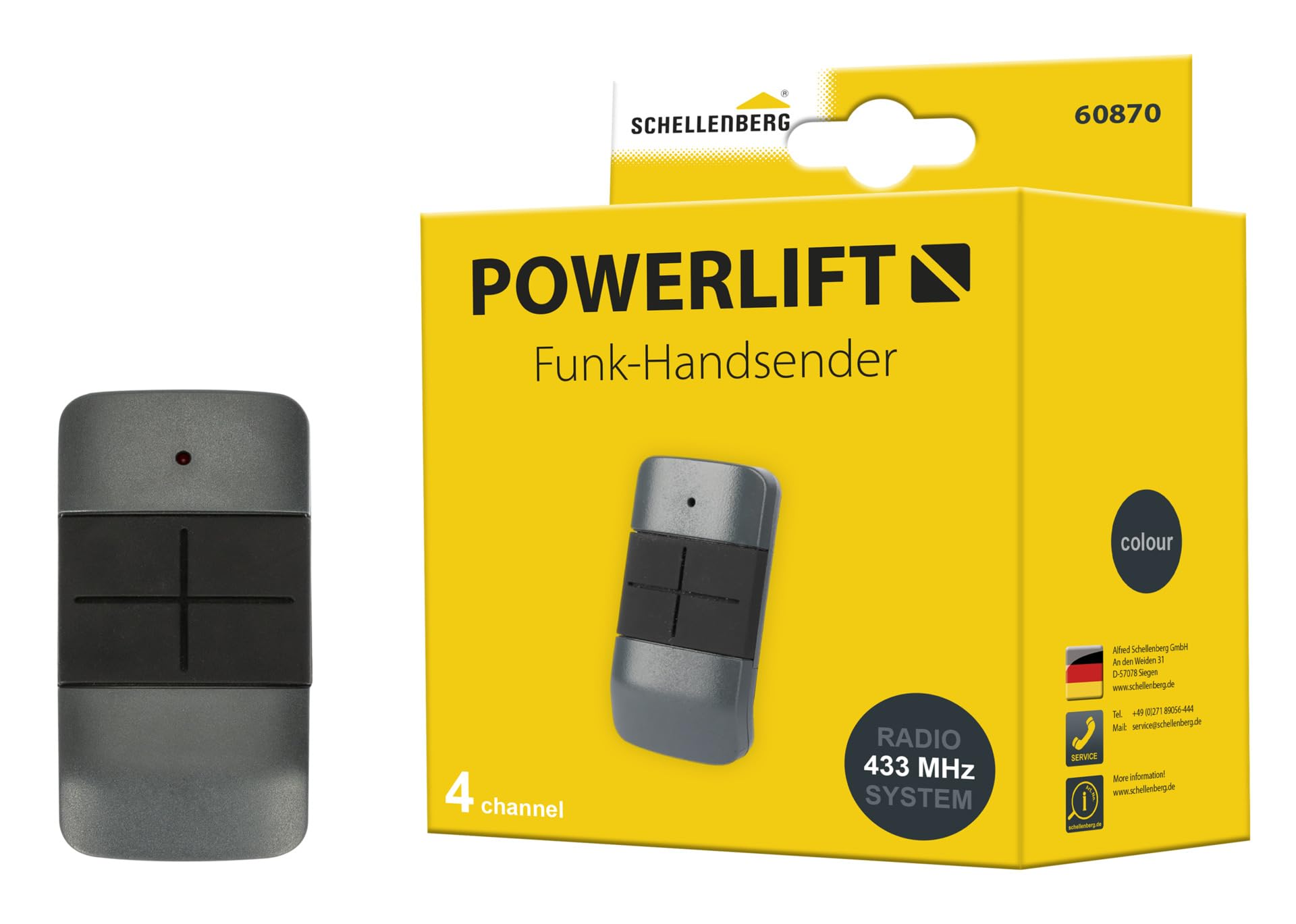
Image 1: The Schellenberg Powerlift 4-Channel Remote Control.
Key Features:
- Handy remote control for Schellenberg garage door and outdoor gate operators.
- Easy programming for up to 4 Schellenberg gate operators.
- Secure coding against scanning, preventing unauthorized access.
- 433.92 MHz radio frequency, range up to 40 m in open areas.
- Can be used by multiple users or as a secondary device.

Image 2: Diagram highlighting the remote control's features, including ease of use, secure coding, and multi-device programming.
4. Setup
4.1 Battery Installation
The remote control comes with an integrated 12V battery. If replacement is needed, follow these steps:
- Locate the battery compartment on the back of the remote control.
- Carefully open the compartment using a small screwdriver or coin.
- Remove the old battery and insert a new 12V alkaline battery, ensuring correct polarity.
- Close the battery compartment securely.
4.2 Programming the Remote Control
The programming process involves pairing the remote control with your Schellenberg garage door or gate operator. Refer to your operator's manual for specific programming instructions, as steps may vary. Generally, the process involves:
- Activate the programming mode on your Schellenberg operator (usually by pressing a 'Learn' or 'Program' button).
- Within a short timeframe, press the desired button on your Powerlift remote control.
- The operator will typically indicate successful pairing (e.g., a light flash or sound).
- Repeat for up to four different operators using different buttons on the remote.

Image 3: A person demonstrating the use of the remote control to open a garage door.
5. Operating Instructions
Once programmed, operating your gate or garage door is simple:
- Opening/Closing: Press the programmed button on the remote control once to activate the associated operator. The gate or door will begin to open or close.
- Stopping: Press the same button again during movement to stop the gate or door.
- Reversing: If the gate or door is stopped, pressing the button again will reverse its direction.

Image 4: Convenient operation of the garage door from inside a vehicle using the remote control.

Image 5: The remote control can be attached to a visor clip for easy access in a vehicle (clip sold separately).
6. Maintenance
- Cleaning: Wipe the remote control with a soft, dry cloth. Do not use abrasive cleaners or solvents.
- Battery Replacement: Replace the 12V battery when the operating range decreases or the indicator light no longer illuminates. Refer to Section 4.1 for battery installation instructions.
- Storage: Store the remote control in a dry place, away from direct sunlight and extreme temperatures.
7. Troubleshooting
| Problem | Possible Cause | Solution |
|---|---|---|
| Remote control does not work. | Dead battery. Incorrect programming. Out of range. | Replace battery. Re-program the remote control (see Section 4.2). Move closer to the operator. |
| Reduced operating range. | Low battery. Radio interference. Obstructions. | Replace battery. Check for sources of interference (e.g., other wireless devices). Ensure a clear line of sight. |
| Gate/door opens/closes unexpectedly. | Accidental button press. Interference. | Ensure remote is not pressed accidentally. Check for interference. Re-program if necessary. |
8. Specifications
| Feature | Detail |
|---|---|
| Brand | Schellenberg |
| Model | 60870 |
| Dimensions (L x W x H) | 6.7 x 3.5 x 1.6 cm |
| Weight | 21 g |
| Radio Frequency | 433.92 MHz |
| Range (open field) | Up to 40 m |
| Number of Channels | 4 |
| Battery Type | 1 x 12V Alkaline (included) |
| Material | Acrylonitrile Butadiene Styrene (ABS) |
| Compatible Devices | Schellenberg garage door and outdoor gate operators |
| Country of Origin | China |

Image 6: Detailed dimensions of the remote control in millimeters.
9. Warranty and Support
For warranty information and technical support, please refer to the official Schellenberg website or contact their customer service directly. Keep your purchase receipt as proof of purchase.


