
T TICCI T3VB
TICCI T3VB Vibrating Alarm Watch User Manual
Model: T3VB | Brand: T TICCI
1. Introduction and Overview
The TICCI T3VB Vibrating Alarm Watch is designed to assist users with daily reminders through vibration, audible alarms, or both. It features a large, easy-to-read digital display, an LED backlight for low-light conditions, and a countdown timer. This watch is suitable for seniors, individuals with hearing impairments, and anyone needing consistent reminders for medication, hydration, or daily tasks.

Image: The TICCI T3VB watch being used in different daily activities, highlighting its versatility for reminders.
2. Key Features
- Up to 8 Daily Alarms: Set up to eight independent alarms per day with options for vibration only, sound only, or both.
- Easy-Read Large Display: Features big digits for clear viewing of time, year, month, date, and day of the week.
- LED Backlight: Provides bright illumination for visibility in low-light environments.
- Countdown Timer: Integrated timer supports intervals from 15 minutes up to 24 hours for various routines.
- Water-Resistant Design: Suitable for daily splashes, hand-washing, and rain. Not intended for swimming, hot water, or diving.
- Lock Feature: Prevents accidental changes to settings once configured.
- Durable Construction: Features a stainless steel case and a polyurethane band.

Image: Visual representation of the watch's multi-functional capabilities, including its alarm and display features.
3. Setup Guide
3.1 Initial Power On and Time Setting
- Activate Watch: The watch comes with a C battery pre-installed. If the display is off, press any button to activate it.
- Enter Setting Mode: Press and hold the MODE button (usually located on the side) until the time digits begin to flash.
- Adjust Time: Use the UP and DOWN buttons to adjust the hours. Press MODE again to move to minutes, then adjust. Repeat for year, month, and date.
- Select 12/24 Hour Format: While setting the time, you can toggle between 12-hour and 24-hour formats using the UP or DOWN button when the hour is flashing.
- Exit Setting Mode: Press MODE once more after setting all parameters, or wait for the watch to automatically exit setting mode after a period of inactivity.
3.2 Setting Alarms (Up to 8)
- Access Alarm Mode: Press the MODE button repeatedly until you see "ALARM" or an alarm icon on the display.
- Select Alarm Slot: Use the UP or DOWN buttons to cycle through the 8 available alarm slots (e.g., AL1, AL2, etc.).
- Set Alarm Time: With the desired alarm slot selected, press and hold the SET button (or MODE, depending on the specific button layout) until the alarm time digits flash. Adjust hours and minutes using UP and DOWN.
- Choose Alarm Type: After setting the time, you can usually select the alarm type:
- Vibration only
- Sound (beep) only
- Both vibration and sound
- Activate/Deactivate Alarm: Once set, ensure the alarm is activated. An alarm icon (e.g., a bell or vibration symbol) should appear on the display next to the alarm number. If not, press a designated button (often START/STOP or LIGHT) to toggle it on/off.
- Save Settings: Press MODE or SET to save and exit the alarm setting for that slot. Repeat for other alarms as needed.
4. Operating Instructions
4.1 Using the LED Backlight
To illuminate the display in dark conditions, press the LIGHT button (typically located on the top left of the watch face). The backlight will remain active for a few seconds.

Image: The watch display with its LED backlight activated, demonstrating enhanced visibility.
4.2 Using the Countdown Timer
- Access Countdown Mode: Press the MODE button repeatedly until "TIMER" or a countdown icon appears.
- Set Countdown Time: Press and hold the SET button until the digits flash. Use UP and DOWN to set the desired hours and minutes for the countdown. The timer can be set from 15 minutes up to 24 hours.
- Start/Stop Countdown: Press the START/STOP button to begin the countdown. Press it again to pause.
- Reset Countdown: While paused, press the RESET button (often the DOWN button in timer mode) to return to the initial set time.
- Alarm at End: When the countdown reaches zero, the watch will activate its alarm (vibration/sound based on your general alarm settings or a specific timer setting if available).
4.3 Using the Stopwatch
- Access Stopwatch Mode: Press the MODE button repeatedly until "STOPW" or a stopwatch icon appears.
- Start/Stop: Press the START/STOP button to begin timing. Press again to pause.
- Lap/Split Time: While the stopwatch is running, press the LAP button (often the BACKLAP button) to record a lap time without stopping the main timer.
- Reset: While the stopwatch is paused, press the RESET button (often the DOWN button in stopwatch mode) to clear the time to zero.
4.4 Lock Feature
To prevent accidental changes to your settings, the watch includes a lock feature. To activate the lock, press and hold the LOCK button (or a combination of buttons as indicated in the watch's specific instructions, often UP and DOWN simultaneously). A "LOCK" indicator will appear on the display. Repeat the action to unlock the watch.
5. Maintenance
5.1 Water Resistance Guidelines
The TICCI T3VB watch is designed with 3ATM water resistance, making it suitable for everyday exposure to water such as hand-washing, splashes, and rain. It is important to note the following limitations:
- Do NOT wear the watch while swimming or diving.
- Avoid exposure to hot water, such as in hot showers, saunas, or hot tubs, as high temperatures can compromise the watch's water-resistant seals.
- Ensure all buttons are not pressed while the watch is wet or submerged.
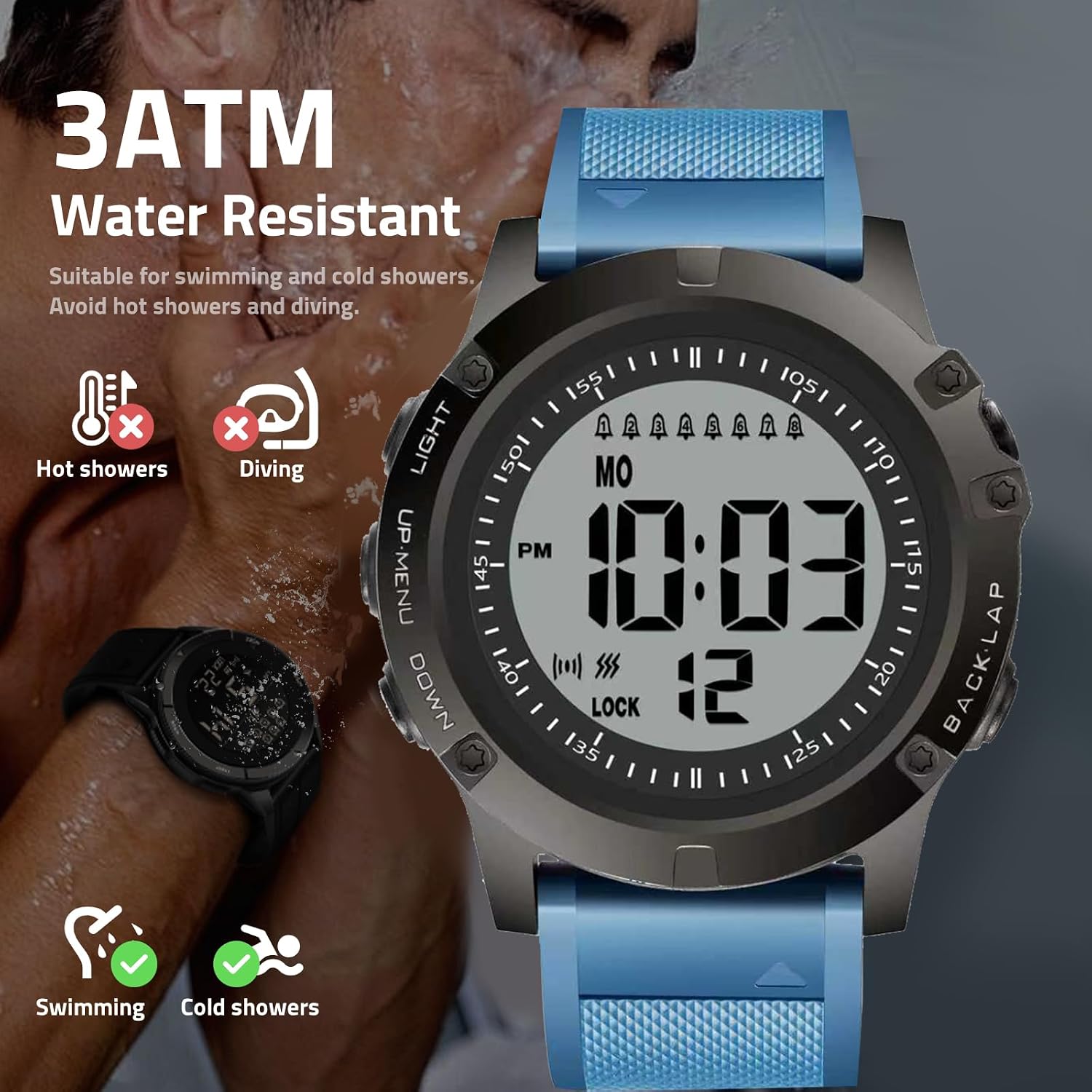
Image: Water resistance details for the watch, highlighting appropriate and inappropriate water exposure.
5.2 Cleaning Your Watch
To clean the watch, wipe it gently with a soft, damp cloth. Avoid using harsh chemicals, solvents, or abrasive cleaners, as these can damage the watch's finish or components.
5.3 Battery Replacement
The watch uses 1 C battery. When the display dims or functions become unreliable, it may be time to replace the battery. Battery replacement should ideally be performed by a qualified technician to ensure the water resistance seal is maintained. If replacing yourself, use the correct battery type and ensure the back cover is securely fastened.
6. Troubleshooting
- Watch not turning on/display is blank:
- Check if the battery needs replacement.
- Ensure the battery is correctly inserted.
- Alarms not activating:
- Verify that the alarm is set to "ON" in the alarm settings.
- Confirm the correct time and alarm type (vibration, sound, or both) are selected.
- Check if the watch is in "Lock" mode, which might prevent alarms from sounding or vibrating if configured that way.
- Buttons are unresponsive:
- Check if the watch is in "Lock" mode. Unlock it to regain full button functionality.
- Ensure no debris is lodged around the buttons.
- Display is dim or flickering:
- The battery may be low and require replacement.
- Extreme temperatures can affect display performance. Allow the watch to return to a moderate temperature.
7. Specifications
| Model Number | T3VB |
| Brand | T TICCI |
| Display Type | Digital |
| Screen Size | 2.1 Inches |
| Case Material | Stainless Steel |
| Band Material | Polyurethane |
| Water Resistance | 3 Meters (3ATM) - Splash, rain, hand-washing resistant. Not for swimming or hot water. |
| Battery Type | 1 C battery (included) |
| Human Interface Input | Buttons |
| Closure Type | Buckle |
| Dimensions (Approx.) | 54mm (case width), 58mm (lug-to-lug), 26mm (band width) |

Image: Detailed dimensions of the watch and its large digit display.
8. Warranty Information
The TICCI T3VB Vibrating Alarm Watch comes with a limited warranty. For specific details regarding the warranty period and coverage, please refer to the warranty card included with your product packaging or contact customer support.
T TICCI is committed to customer satisfaction and offers a "No-worry Service" to address any issues you may encounter with your watch. Please do not hesitate to reach out for assistance.
9. Customer Support
For further assistance, technical support, or warranty claims, please contact T TICCI customer service. Refer to the contact information provided in your product packaging or visit the official T TICCI brand store online.
Online Brand Store: T TICCI Store on Amazon
Ask a question about this manual
Ask about setup, troubleshooting, compatibility, parts, safety, or missing instructions. Manuals+ will review the question and use this page’s manual context to help answer it.