
1. Introduction
This manual provides detailed instructions for the assembly, operation, and maintenance of your Jocoevol Corner Display Cabinet. Please read this manual thoroughly before assembly and use to ensure proper function and safety.
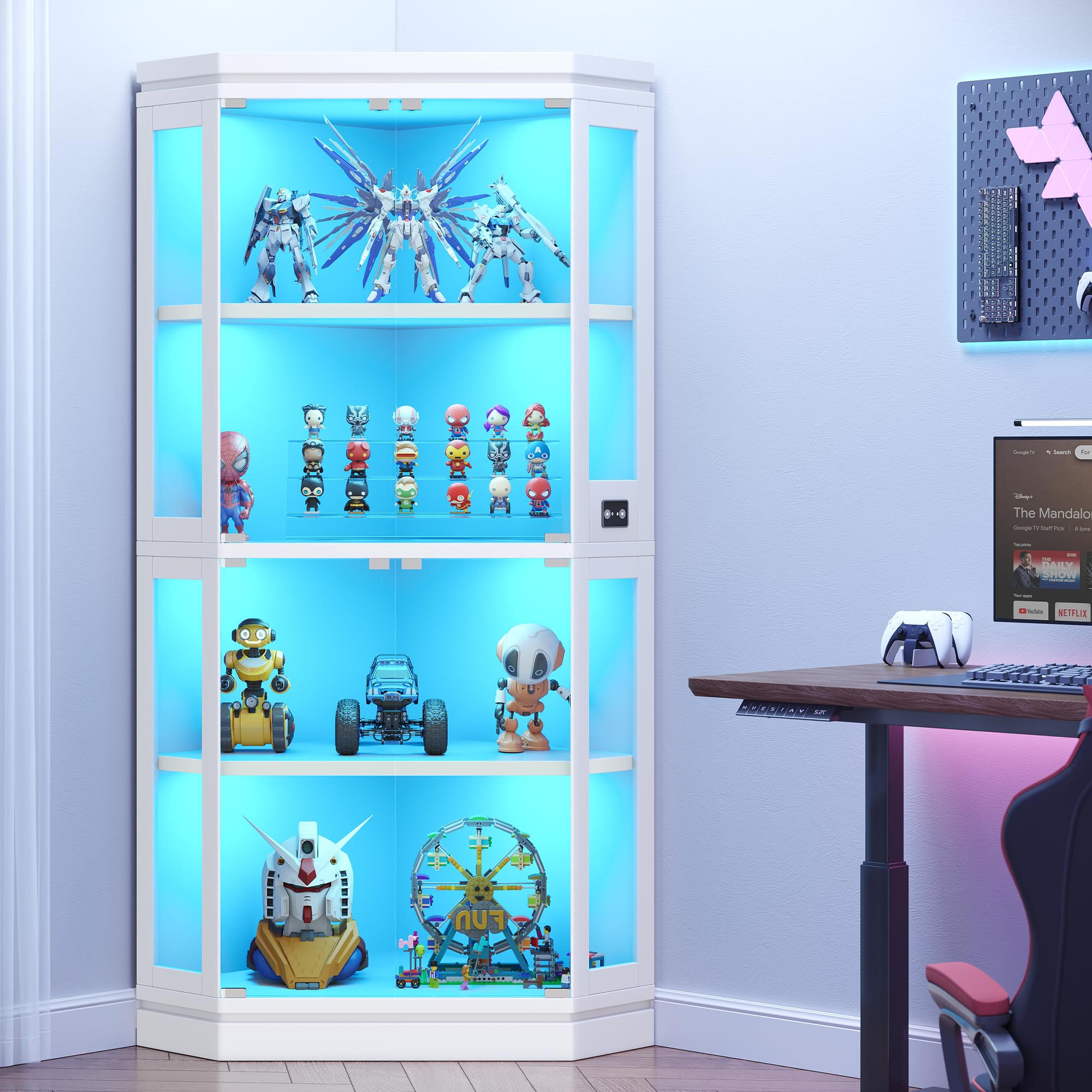
Figure 1: Jocoevol Corner Display Cabinet. This image shows the assembled cabinet with items displayed inside, highlighting its corner design and lighting.
2. Safety Information
WARNING:
- Always assemble the cabinet with at least two people to prevent tip-over.
- Keep the cabinet away from heat sources and do not place heavy objects on the top shelf to prevent tip-over.
- Be cautious when handling the glass doors and shelves to avoid breakage.
- Always follow the assembly instructions carefully to ensure safe installation.
3. Product Overview
The Jocoevol Corner Display Cabinet is designed to showcase your collectibles with integrated RGB lighting and smart features. It offers a space-saving corner design and adjustable shelving.
Key Features:
- Pop-Up Glass Doors: Handle-free push-to-open design with magnetic latches for smooth operation. High-definition tempered glass ensures clear visibility and dust protection.
- RGB Lighting and APP Control: Each layer features RGB LED strips controllable via a mobile app (Bluetooth). Choose from 16 million colors, adjust brightness, and customize lighting modes. A built-in microphone allows lights to sync with music.
- Large Storage Space: Measures 33.5"L x 22.4"D x 67"H with four spacious shelves. Features four tempered glass doors and acrylic side panels. The fenced top provides additional display or storage space. Upper and lower shelves are removable and adjustable.
- Smart Human Sensor: Automatically turns lights on when approached (within 2-3 meters) and off one minute after departure.
- Easy Assembly: Includes clear instructions, numbered parts, and pre-drilled holes for efficient setup (approx. 40 minutes with two people).

Figure 2: Product dimensions and materials. The cabinet measures 33.4 inches wide, 67.1 inches tall, and 22.4 inches deep. It features glass doors, acrylic side panels, and wood construction. Each shelf can hold up to 30 lbs.
4. Assembly Instructions
Assembly of the Jocoevol Corner Display Cabinet requires two people and approximately 40 minutes. All necessary parts are numbered, and pre-drilled holes are provided for convenience. Please refer to the included assembly video for a visual guide.
Video 1: Assembly Guide for Jocoevol Corner Display Cabinet. This video provides a step-by-step visual demonstration of how to assemble the cabinet, including attaching panels, installing lights, and securing glass doors.
General Assembly Steps:
- Unpack all components and verify against the parts list.
- Assemble the base frame according to the numbered diagrams.
- Attach the side panels and back panels.
- Install the LED light strips and ensure wiring is correctly routed.
- Carefully install the tempered glass doors and shelves.
- Secure all connections and ensure the cabinet is stable.
- Connect the power supply for the RGB lighting system.
5. Operating Instructions
5.1 Pop-Up Glass Doors
To open a glass door, gently press on the door panel. The magnetic latch will release, and the door will pop open. To close, push the door firmly until the magnetic latch engages.

Figure 3: Detail of the push-to-open mechanism for the glass doors, showing the handleless design.
5.2 RGB Lighting and App Control
The cabinet's RGB LED lighting can be controlled via a mobile application. Follow these steps:
- Download the "Lotus Lamp X" application from your device's app store (Google Play or Apple App Store). You can find the download link here: Lotus Lamp X App Download.
- Ensure Bluetooth is enabled on your mobile device.
- Open the "Lotus Lamp X" app and follow the on-screen instructions to connect to your cabinet's lighting system.
- Within the app, you can:
- Switch between 16 million colors.
- Adjust brightness levels (0% to 100%).
- Select various fun lighting modes.
- Utilize the built-in microphone feature to sync lights with ambient music.

Figure 4: Examples of RGB lighting options, including blue, warm, and white light, with a brightness adjustment slider.

Figure 5: Screenshots of the mobile application interface for controlling the RGB lights, showing settings, DIY color options, RGB color picker, and music sync modes.
5.3 Smart Human Sensor
The cabinet is equipped with an intelligent human body sensing system. To activate this feature, locate the function switch on the right control panel and turn it on. The lights will automatically illuminate when a person approaches within 2-3 meters and will turn off automatically one minute after the person walks away.

Figure 6: Illustration of the smart human sensor feature, showing the lights activating as a person approaches the cabinet. The sensor detects movement within 10-13 feet.
6. Maintenance
- Cleaning: Use a soft, damp cloth to clean the cabinet surfaces. Avoid abrasive cleaners or harsh chemicals that may damage the finish or glass. For glass surfaces, use a glass cleaner.
- Dusting: Regularly dust the interior and exterior of the cabinet to maintain clarity and prevent dust buildup on collectibles.
- Glass Care: Handle glass doors and shelves with care to prevent scratches or breakage.
- Light System: Ensure the LED strips and wiring are free from obstruction or damage. If any issues arise with the lighting, refer to the troubleshooting section or contact support.
7. Troubleshooting
7.1 Lighting Issues
- Lights not turning on:
- Check if the power adapter is securely plugged into both the cabinet and a working power outlet.
- Verify that the function switch for the human sensor is in the ON position if you are using that feature.
- Ensure the mobile app is correctly connected via Bluetooth and the lights are not set to 0% brightness.
- Lights flickering or inconsistent:
- Check all cable connections for looseness.
- Ensure the power adapter is providing stable power.
- Try restarting the mobile app and reconnecting.
7.2 Door Operation
- Doors not opening/closing smoothly:
- Inspect the magnetic latches for any obstructions or damage.
- Ensure the doors are properly aligned on their hinges.
7.3 Stability Issues
- Cabinet feels wobbly:
- Ensure all screws and fasteners are tightened securely.
- Verify the cabinet is placed on a flat, level surface.
- Confirm the anti-tipping device is properly installed and secured to the wall.
8. Specifications
| Feature | Detail |
|---|---|
| Brand | Jocoevol |
| Model Name | Corner Display Cabinet |
| Item Model Number | C-1665 |
| Color | White |
| Product Dimensions | 22.4"D x 33.5"W x 67"H |
| Item Weight | 98 Pounds |
| Material | Tempered Glass, Metal or Engineered Wood |
| Number of Shelves | 4 |
| Special Features | APP Control, RGB LED Light, Smart Human Sensor |
| Mounting Type | Floor Mount |
| Assembly Required | Yes (2 people, approx. 40 minutes) |
9. Warranty and Support
For warranty information or technical support, please refer to the manufacturer's official website or contact Jocoevol customer service directly. Contact details are typically found on the product packaging or the brand's online store.
If you have any questions about your Jocoevol Corner Display Cabinet, please feel free to contact us. We are committed to providing top-quality service.