
1. Introduction
Thank you for choosing the AVAPOW TJ18 Jump Starter and AP18 Tire Inflator. This manual provides essential information for the safe and effective operation, maintenance, and troubleshooting of your devices. Please read this manual thoroughly before use and retain it for future reference.
2. Safety Information
Always observe the following safety precautions to prevent injury or damage to the devices:
- Wear eye protection when operating the jump starter.
- Ensure adequate ventilation when charging or operating the devices.
- Keep the devices away from children and unauthorized personnel.
- Do not short-circuit the jump starter clamps.
- Connect the jump starter clamps to the correct battery terminals (red to positive, black to negative).
- Do not expose the devices to rain, moisture, or extreme temperatures.
- Do not attempt to disassemble or modify the devices.
- Avoid over-inflating tires; always refer to the vehicle manufacturer's recommended tire pressure.
3. Package Contents
Verify that all items are present in your package:
- AVAPOW TJ18 Jump Starter
- AVAPOW AP18 Tire Inflator
- Smart Jump Cables
- USB-C Charging Cable
- Air Hose with Screw Connector
- Various Nozzle Adapters
- Storage Bag
- User Manual (this document)
4. Product Overview
4.1 AVAPOW TJ18 Jump Starter
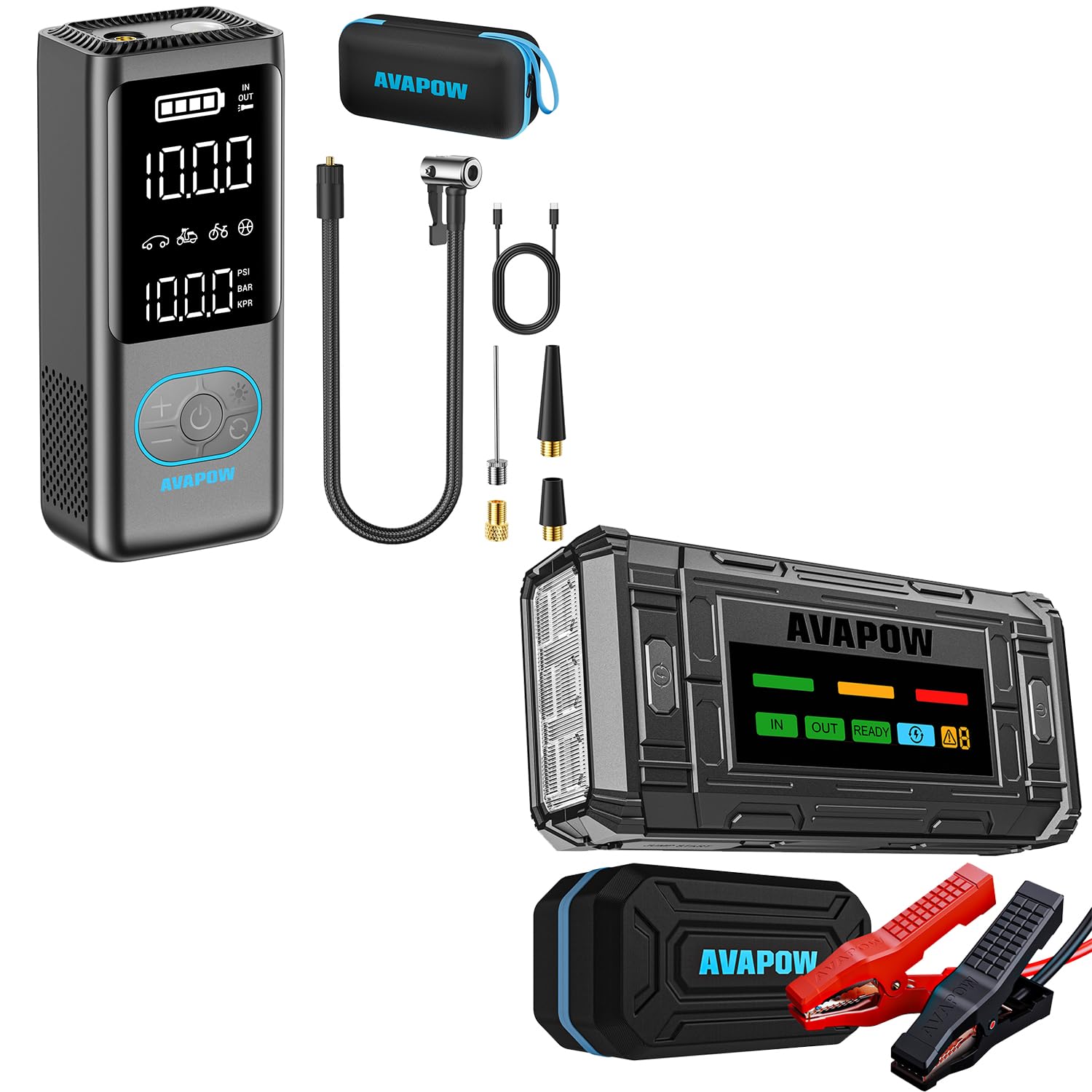
This image displays the AVAPOW TJ18 Jump Starter alongside the AP18 Tire Inflator, showcasing their compact design and key features. The TJ18 Jump Starter features a robust casing, a clear digital display, multiple output ports, and a dedicated jump start port. The AP18 Tire Inflator is shown with its digital screen and air hose connection.
The TJ18 Jump Starter is equipped with a 4-inch digital LED screen that displays real-time battery level, voltage, and operational alerts. It includes a USB-C PD 18W input/output port, dual USB output ports for charging mobile devices, a 12V DC output port for powering accessories, a jump start port for connecting the smart jump cables, and an integrated LED flashlight.
4.2 AVAPOW AP18 Tire Inflator
The AP18 Tire Inflator features a digital display for pressure readings and settings, control buttons for mode selection and pressure adjustment, an air hose connection port, and an integrated LED light for illumination in low-light conditions. It is designed for portability and ease of use.
5. Setup: Charging the Jump Starter
Before initial use, fully charge the AVAPOW TJ18 Jump Starter. It is recommended to recharge the device after each use and every 3-6 months if stored, to maintain optimal battery health.
- Connect the supplied USB-C charging cable to the USB-C PD port on the TJ18 Jump Starter.
- Connect the other end of the USB-C cable to a compatible USB wall adapter (not included) or a car charger.
- The digital display will show the charging status and battery level. Charge until the display indicates 100% or 'FULL'.
- A full charge typically takes approximately 2.5 hours.
6. Operating the Jump Starter
Use the TJ18 Jump Starter to start 12V vehicles with dead batteries.
6.1 Pre-Jump Check
- Ensure the jump starter is at least 50% charged.
- Turn off all vehicle accessories (lights, radio, AC).
- Place the vehicle in 'Park' (automatic) or 'Neutral' (manual) and engage the parking brake.
6.2 Connecting the Jump Cables
- Insert the blue plug of the smart jump cables into the jump start port on the TJ18 Jump Starter. Ensure a firm connection.
- Connect the red (+) clamp to the positive (+) terminal of the vehicle's battery.
- Connect the black (-) clamp to the negative (-) terminal of the vehicle's battery.
- The smart cable indicator light will show the connection status. A solid green light indicates a correct connection.
6.3 Starting the Vehicle
- Normal Mode (Low-Voltage Battery): If the smart cable indicator is solid green, proceed to start the vehicle.
- Force Start Mode (Completely Dead Battery): If the smart cable indicator does not turn solid green (e.g., flashes red/green or remains off), the battery may be completely dead. Press and hold the 'BOOST' button on the smart cable for 3 seconds until the indicator turns solid green. You have 30 seconds to start the vehicle.
- Start the vehicle's engine. If it doesn't start immediately, wait 30 seconds before attempting again. Do not crank for more than 3 seconds per attempt.
6.4 Disconnecting the Cables
- Once the vehicle starts, immediately remove the black (-) clamp from the vehicle's battery.
- Then, remove the red (+) clamp from the vehicle's battery.
- Disconnect the smart jump cables from the TJ18 Jump Starter.
6.5 Using the Flashlight and Power Bank Functions
- Flashlight: Press and hold the power button on the TJ18 to turn on the LED flashlight. Press again to cycle through modes (solid, strobe, SOS). Press and hold to turn off.
- Power Bank: Connect your devices to the USB-A or USB-C output ports using appropriate cables to charge them. The 12V DC output can power compatible 12V accessories.
7. Operating the Tire Inflator
Use the AP18 Tire Inflator to inflate vehicle tires, bicycle tires, sports balls, and other inflatables.
- Ensure the AP18 Tire Inflator is adequately charged.
- Screw the air hose securely onto the air hose port of the AP18.
- Attach the other end of the air hose to the tire valve stem. For other inflatables, use the appropriate nozzle adapter.
- Turn on the AP18. The digital display will show the current tire pressure.
- Use the '+' and '-' buttons to set the desired target pressure. The unit can be switched between PSI, BAR, KPA, and KG/CM² using the mode button.
- Press the start button to begin inflation. The inflator will automatically stop once the preset pressure is reached.
- Disconnect the air hose from the tire valve and then from the AP18.
- The AP18 also features an LED light for use in dark conditions. Press the light button to activate.
8. Maintenance
- Cleaning: Wipe the devices with a soft, dry cloth. Do not use harsh chemicals or abrasive cleaners.
- Storage: Store the devices in a cool, dry place, away from direct sunlight and extreme temperatures. Keep them in the provided storage bag.
- Battery Care: For optimal battery life, fully charge the TJ18 Jump Starter every 3-6 months, even if not in use. Avoid completely draining the battery for extended periods.
- Inspect cables and hoses regularly for any signs of damage or wear. Replace if necessary.
9. Troubleshooting
| Problem | Possible Cause | Solution |
|---|---|---|
| TJ18 Jump Starter does not turn on. | Battery is completely discharged. | Charge the jump starter fully. |
| Vehicle does not start after jump-starting. | Incorrect cable connection; vehicle battery too damaged; other vehicle issues. | Check cable polarity. Try Force Start Mode. Consult a mechanic if the issue persists. |
| Smart cable indicator shows error. | Reverse polarity; short circuit; battery voltage too low. | Disconnect and reconnect clamps correctly. If battery is completely dead, use Force Start. |
| AP18 Tire Inflator does not inflate. | Air hose not securely connected; battery low; target pressure not set. | Ensure all connections are tight. Charge the inflator. Set a target pressure above current. |
| Inflator stops prematurely. | Target pressure reached; overheating. | Check target pressure. Allow device to cool down if used continuously for a long period. |
10. Specifications
10.1 AVAPOW TJ18 Jump Starter
- Peak Current: 3000A
- Engine Compatibility: Up to 8.0L Gas / 8.0L Diesel
- Output Ports: USB-C PD 18W, Dual USB, 12V DC
- Display: 4-inch LED Digital Screen
- Operating Temperature: -4°F to 140°F (-20°C to 60°C)
- Recharge Time: Approximately 2.5 hours (via USB-C PD)
10.2 AVAPOW AP18 Tire Inflator
- Maximum Pressure: 150 PSI
- Display: Digital Pressure Gauge
- Units: PSI, BAR, KPA, KG/CM²
- Features: Auto Shut-off, LED Light
11. Warranty and Support
AVAPOW products are designed for reliability and performance. This product typically comes with a limited warranty covering manufacturing defects. For specific warranty terms, registration, or technical support, please visit the official AVAPOW website or contact our customer service team through the retailer where the product was purchased. Please have your model number (TJ18, AP18) and purchase information ready when contacting support.
Website: www.avapow.com (Conceptual link, please refer to actual product packaging for official website)


