
1. Introduction
Thank you for choosing the Ayybboo Kids Digital Watch MR8207BK. This manual provides detailed instructions on how to set up and operate your new digital watch, including time, date, alarm, stopwatch, and LED light functions. Please read this manual carefully to ensure proper use and maintenance of the watch.
2. Product Features
- Digital time display with 12/24H format option.
- Seven-color LED backlight for visibility in low light conditions.
- 30M water resistance suitable for daily use (washing hands, splashes, sweat).
- Alarm clock function.
- Stopwatch function for timing activities.
- Calendar display (month, date, day of week).
- Comfortable and adjustable silicone band with a stainless steel buckle.
3. Watch Components
Familiarize yourself with the buttons and display elements of your Ayybboo Kids Digital Watch MR8207BK:

Image: Front view of the Ayybboo Kids Digital Watch MR8207BK, highlighting the 'Light', 'Mode', 'Start', 'Reset', 'Date', and 'Alarm' buttons, along with the 'Week', 'Hour', 'Minute', and 'Second' display areas.
- LIGHT Button: Activates the LED backlight. Long press to change light color.
- MODE Button: Cycles through display modes (Time, Stopwatch, Alarm, Time Setting).
- START Button: Used to start/stop stopwatch, set values in setting mode, or quickly view the date.
- RESET Button: Used to reset stopwatch, switch between setting items, or quickly view the alarm time.
4. Setup Instructions
4.1 Setting Time and Date
- From the normal time display, press the MODE button three times until the seconds start flashing.
- Press the RESET button twice to switch to the hour setting. The hour will flash.
- Press the START button to adjust the hour. Note: 'H' indicates 24-hour format, 'A' indicates AM, and 'P' indicates PM in 12-hour format.
- Press the RESET button once to switch to the minute setting. The minutes will flash.
- Press the START button to adjust the minutes.
- Press the RESET button once to switch to the month setting. The month will flash.
- Press the START button to adjust the month.
- Press the RESET button once to switch to the day setting. The day will flash.
- Press the START button to adjust the day.
- Press the RESET button once to switch to the day of the week setting. The day of the week will flash.
- Press the START button to adjust the day of the week.
- Press the MODE button to confirm and exit the setting mode.
Video: Demonstrates how to set the date and time on the Ayybboo Kids Watch MR8207BK. It shows navigating through the settings using the 'Mode' and 'Reset' buttons and adjusting values with the 'Start' button for hours, minutes, month, day, and day of the week.
Video: Illustrates the process of setting the date and alarm on the Ayybboo Kids Watch MR8207BK. It covers adjusting the month, day, and day of the week, as well as setting the alarm time.
4.2 Switching 12/24H Time Format
- From the normal time display, press the MODE button three times until the seconds start flashing.
- Press the START button to toggle between 12-hour ('A' for AM, 'P' for PM) and 24-hour ('H') formats.
- Press the MODE button to confirm and exit the setting mode.
Video: Shows how to switch between 12-hour and 24-hour time formats on the Ayybboo Kids Watch MR8207BK. It demonstrates pressing the 'Mode' button to enter setting mode and then using the 'Start' button to change the format.
4.3 Setting the Alarm
- From the normal time display, press the MODE button twice to enter alarm setting mode. The hour will flash.
- Press the START button to adjust the alarm hour.
- Press the RESET button to switch to the alarm minute setting. The minutes will flash.
- Press the START button to adjust the alarm minutes.
- Press the MODE button to confirm and exit the alarm setting mode.
4.4 Turning Hourly Chime On/Off
- From the normal time display, press and hold the RESET button, then press the MODE button.
- If the hourly chime is off, the days of the week (SMTWTFS) on the display will not have a border.
- If the hourly chime is on, the days of the week (SMTWTFS) on the display will appear with a black border.
Video: Demonstrates how to turn the hourly chime on or off for the Ayybboo Kids Watch MR8207BK. It shows the visual indicator on the watch face (border around days of the week) when the chime is active or inactive.
5. Operating Instructions
5.1 Using the Stopwatch Function
- From the normal time display, press the MODE button once to enter stopwatch mode. The display will show '0:00 00'.
- Press the START button to begin timing.
- Press the START button again to pause the stopwatch.
- Press the START button once more to resume timing.
- To reset the stopwatch, press the RESET button while the stopwatch is paused.
- Press the MODE button to return to the normal time display.
Video: Demonstrates how to use the stopwatch function on the Ayybboo Kids Watch MR8207BK. It shows starting, pausing, resuming, and resetting the stopwatch timer.
5.2 Activating and Changing LED Lights
- Press the LIGHT button once to turn on the LED backlight.
- To change the color of the LED light, press and hold the LIGHT button. The watch will cycle through the available colors. Release the button when your desired color is displayed.
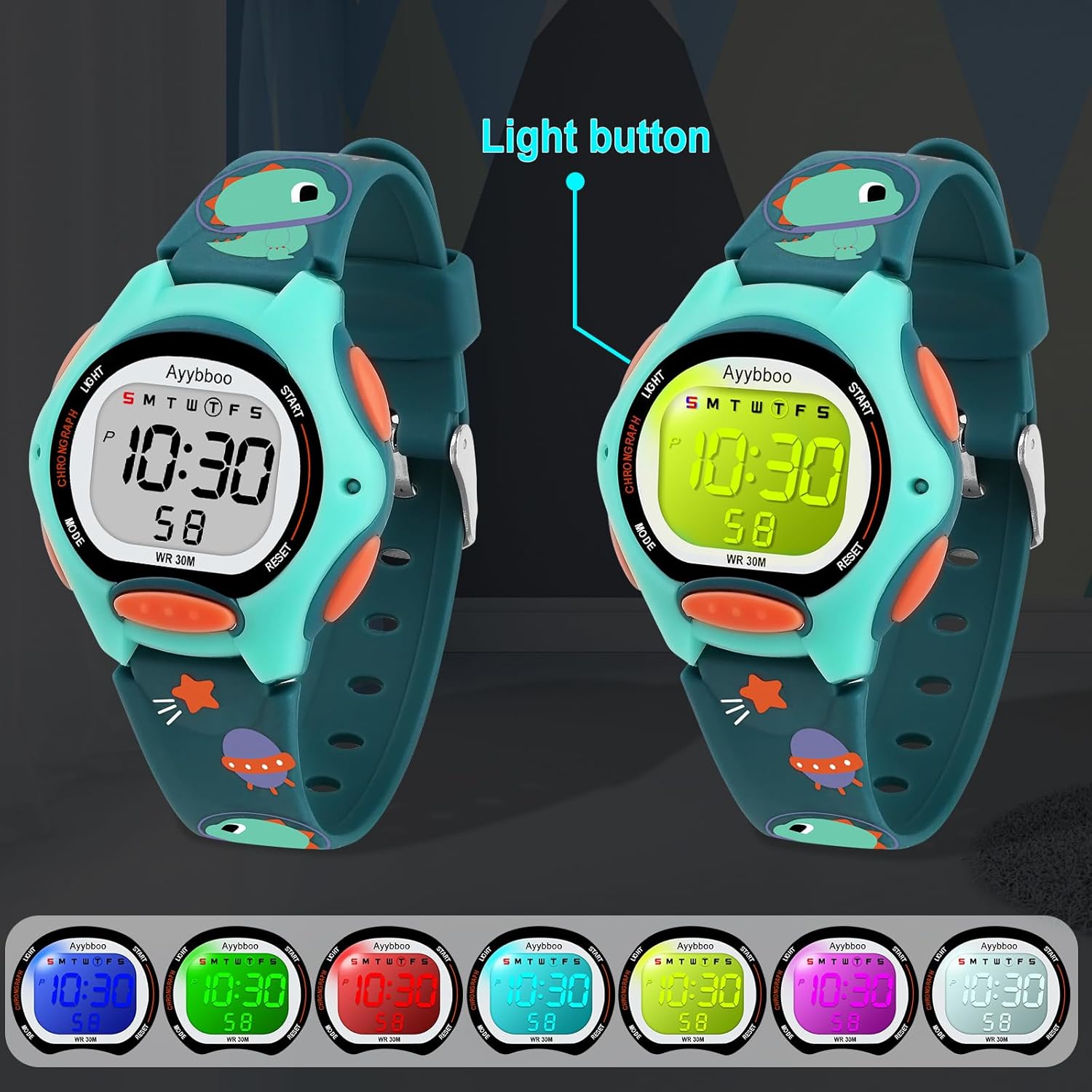
Image: The Ayybboo Kids Digital Watch MR8207BK with an arrow pointing to the 'Light' button, and a series of smaller watch faces below showing the different LED backlight colors available.
Video: Demonstrates how to activate and change the colorful LED lights on the Ayybboo Kids Digital Watch MR8207BK. It shows pressing the 'Light' button for illumination and holding it to cycle through different colors.
6. Maintenance and Care
6.1 Water Resistance
The Ayybboo Kids Digital Watch MR8207BK is designed with 30M water resistance, making it suitable for daily activities such as washing hands, sweating, and splashes. However, due to the presence of buttons for various functions, the watch is not fully sealed. Avoid prolonged immersion in water and refrain from operating the buttons while the watch is submerged to prevent water damage.

Image: A child happily playing with a water gun, wearing the Ayybboo Kids Digital Watch MR8207BK, with water splashing around, demonstrating the watch's 30M water resistance for daily activities.
6.2 Band Care
The watch features a soft, comfortable band and a stainless steel clasp that is easily adjustable to fit various wrist sizes. To maintain the band's condition, clean it regularly with a soft, damp cloth. Avoid harsh chemicals or abrasive materials that could damage the band or watch casing.

Image: A close-up of a child's wrist wearing the Ayybboo Kids Digital Watch MR8207BK, showing the adjustable strap and buckle mechanism.
7. Troubleshooting
- Display is blank: The battery may be depleted. Replace the battery.
- Time is incorrect: Follow the 'Setting Time and Date' instructions to reset the time.
- Buttons are unresponsive: Ensure the watch is not in a locked mode (if applicable) or try resetting the watch by removing and reinserting the battery (professional assistance recommended).
- Water inside the watch: Discontinue use immediately and seek professional repair. Water damage is often not covered under warranty if buttons were pressed underwater or if submerged beyond specified limits.
8. Specifications
| Feature | Detail |
|---|---|
| Model Number | MR8207BK |
| Brand | Ayybboo |
| Display Type | Digital |
| Watch Movement Type | Japanese Automatic |
| Power Source | Battery Powered (1 Nonstandard Battery required) |
| Water Resistance Depth | 30 Meters |
| Case Material Type | Acrylonitrile Butadiene Styrene |
| Band Material Type | Resin |
| Clasp Type | Buckle |
| Case Diameter | 1.42 Inches |
| Case Thickness | 0.67 Inches |
| Band Width | 0.55 Inches |
| Band Length | 8.66 Inches |
| Item Weight | 0.07 Pounds |
| Age Range Description | Kid (5-13 years old recommended) |

Image: Detailed diagram of the Ayybboo Kids Digital Watch MR8207BK showing its dimensions including dial case thickness, product weight, and band length and width.
9. Warranty and Support
Ayybboo is committed to providing quality products and excellent customer service. Your Ayybboo Kids Digital Watch MR8207BK comes with a Lifetime Warranty. We also offer a 30-day return policy and 90-day free replacement service.
For any questions, concerns, or support needs, please contact our customer service team:
- Email: ayybbooservice@outlook.com
- We aim to provide 24-hour service.
