1. Introduction
This manual provides detailed instructions for the assembly, operation, and maintenance of your QUW Farmhouse 6 Drawer Dresser with an integrated charging station. Please read this manual thoroughly before assembly and use to ensure safe and proper operation.
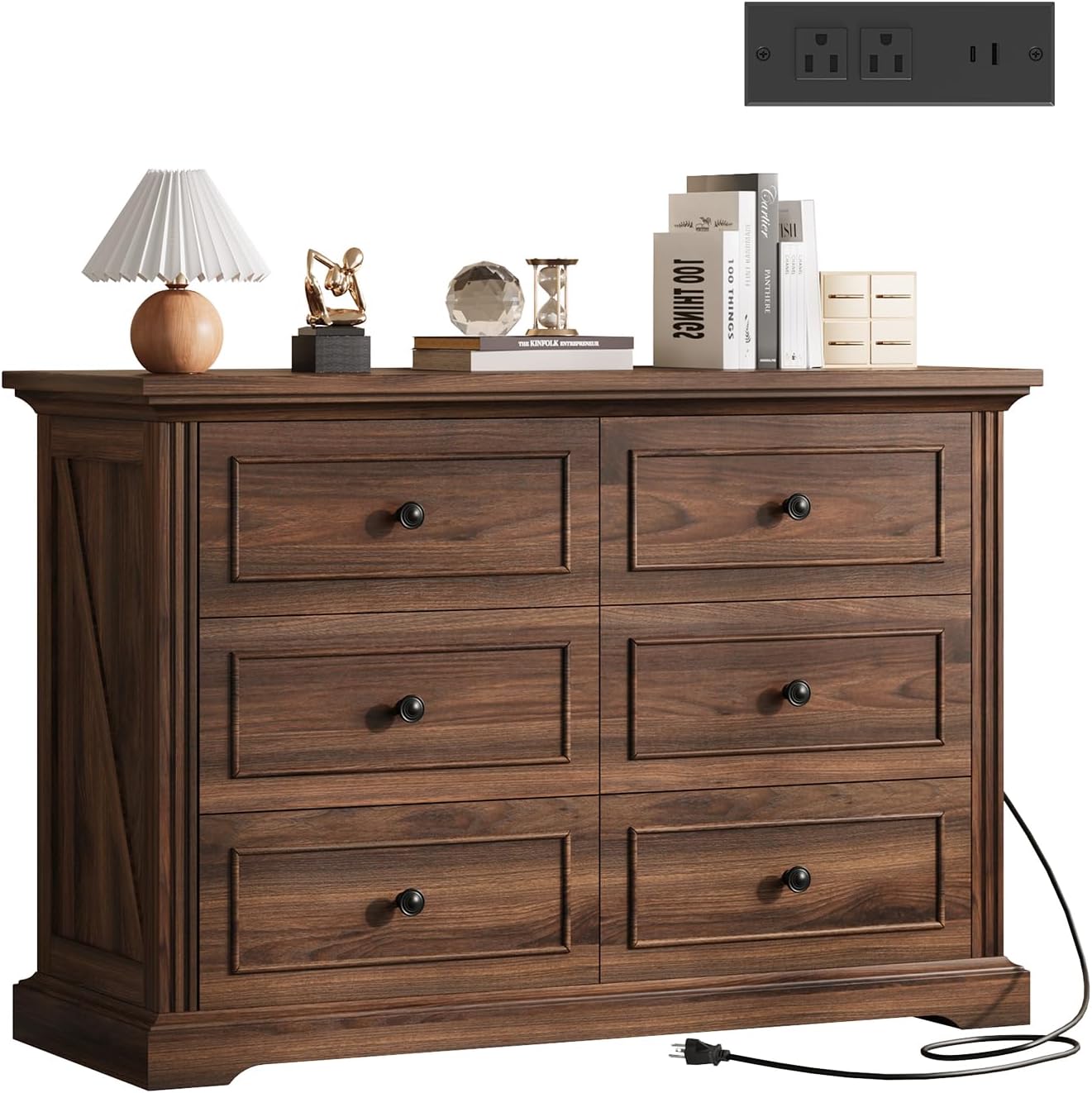
Image 1.1: The QUW Farmhouse 6 Drawer Dresser in Dark Walnut, featuring six drawers and an integrated charging station on the top surface.
2. Safety Information
To prevent injury and damage, adhere to the following safety guidelines:
- Anti-Tipping Device: Always install the included anti-tipping device. This is crucial for preventing the dresser from falling over, especially in households with children or pets.
- Weight Distribution: Distribute weight evenly across drawers. Place heavier items in lower drawers to enhance stability.
- Assembly: Assemble the dresser on a soft, clean surface to prevent scratches. Ensure all screws and fasteners are securely tightened before use. Periodically check and retighten fasteners as needed.
- Electrical Safety: The charging station is designed for indoor use only. Do not expose it to moisture. Do not overload the outlets. If the power cord is damaged, discontinue use and contact customer support.
- Placement: Place the dresser on a level surface. Avoid placing it near heat sources or in direct sunlight to prevent material degradation.
3. Package Contents
Before beginning assembly, verify that all components and hardware are present. Refer to the included assembly diagram for a complete list of parts. If any parts are missing or damaged, do not proceed with assembly; contact QUW customer support immediately.
4. Setup and Assembly
Assembly is required for this dresser. Follow the step-by-step instructions provided in the separate assembly guide included with your product. Key steps include:
- Unpacking: Carefully unpack all components and lay them out on a protected surface.
- Frame Assembly: Assemble the main frame of the dresser according to the diagrams.
- Drawer Assembly: Construct each of the six drawers, ensuring smooth operation of the drawer slides.
- Charging Station Installation: Securely install the charging station into the designated slot on the dresser top.
- Anti-Tipping Device Installation: Attach the anti-tipping device to the back of the dresser and secure it to a wall stud. This step is mandatory for safety.

Image 4.1: The assembled QUW Farmhouse 6 Drawer Dresser positioned in a bedroom, showcasing its aesthetic integration into a living space.

Image 4.2: Detailed view highlighting the stable and sturdy base, decorative side strips, and chic metal handles of the dresser.
5. Operating Instructions (Charging Station)
The integrated charging station provides convenient power access for your electronic devices.
- Power Connection: After assembly, plug the 6.5-foot power cord from the charging station into a standard wall outlet.
- AC Outlets: Use the two AC outlets for devices requiring standard wall power.
- USB Ports: Use the USB-A and USB-C ports for charging compatible smartphones, tablets, and other USB-powered devices.
- Usage: Ensure devices are properly connected. The charging station is designed for low-power electronics. Avoid plugging in high-wattage appliances.

Image 5.1: An overhead view of the dresser, illustrating the integrated charging station with AC and USB ports, and the spacious drawers open for storage.
6. Maintenance
Proper care will extend the life and appearance of your dresser:
- Cleaning: Wipe surfaces with a soft, damp cloth. Avoid harsh chemicals or abrasive cleaners, which can damage the finish.
- Spills: Clean spills immediately to prevent staining or water damage.
- Hardware: Periodically check all screws and fasteners to ensure they remain tight. Retighten as necessary.
- Drawer Slides: If drawers become stiff, a small amount of silicone lubricant can be applied to the slides.
7. Troubleshooting
| Problem | Possible Cause | Solution |
|---|---|---|
| Drawers do not slide smoothly. | Misaligned slides, loose screws, or debris in tracks. | Check alignment of drawer slides. Ensure all screws are tight. Clean tracks of any debris. Apply silicone lubricant if needed. |
| Charging station not working. | Not plugged in, power outlet issue, or overloaded. | Ensure the power cord is securely plugged into a functional wall outlet. Test the outlet with another device. Do not overload the charging station with high-power devices. |
| Dresser feels unstable. | Anti-tipping device not installed, uneven floor, or loose fasteners. | Verify the anti-tipping device is correctly installed and secured to the wall. Place the dresser on a level surface. Check and tighten all assembly fasteners. |
8. Specifications
| Feature | Detail |
|---|---|
| Brand | QUW |
| Model Name | 6 Drawer Dresser |
| Model Number | FHC48SC6D-DW |
| Color | Dark Walnut |
| Product Dimensions (D x W x H) | 15"D x 47"W x 33"H |
| Item Weight | 112.6 Pounds |
| Charging Station | 2 AC Outlets, 1 USB-A Port, 1 USB-C Port |
| Power Cord Length | 6.5 feet |
| Assembly Required | Yes |
| Room Type | Bedroom, Living Room, Hallway, Entryway |

Image 8.1: A detailed diagram illustrating the overall dimensions of the dresser (47"W x 15.6"D x 33.3"H), inner drawer dimensions (18.7"L x 11.2"W x 5.1"D), and the 6.5-foot power cord length for the charging station.
9. Warranty and Support
For warranty information or technical support, please contact QUW customer service. Keep your purchase receipt and model number (FHC48SC6D-DW) handy for faster service. You can typically find contact information on the manufacturer's website or through your retailer.
Manufacturer: QUW
ASIN: B0FSZ18Y5H


