
Voukad BLG-HT-006
Voukad BLG-HT-006 Beard Trimmer Instruction Manual
Model: BLG-HT-006 | Brand: Voukad
1. Introduction
Thank you for choosing the Voukad BLG-HT-006 Beard Trimmer. This all-in-one grooming kit is designed for precise trimming, edging, and sculpting of hair on the beard, face, neck, mustache, head, chest, legs, and nose. It features 40 adjustable length settings, a waterproof design for easy cleaning, and a long-lasting battery for consistent performance.
2. Package Contents
Please check the box for the following items:
- 1x Voukad BLG-HT-006 Beard Trimmer Unit
- 1x U-shaped Beard Trimmer Attachment
- 1x Detailer Trimmer Attachment
- 1x Nose Hair Trimmer Attachment
- 2x Adjustable Comb Guards (for 1-40mm length settings)
- 1x USB-C Charging Cable
- 1x Cleaning Brush
- 1x Lubricating Oil Bottle
- 1x Storage Pouch
- 1x User Manual

Image: The Voukad Beard Trimmer unit with its precision dial and two adjustable comb attachments.
3. Setup
3.1 Initial Charging
Before first use, fully charge the trimmer. Connect the USB-C charging cable to the trimmer and plug the other end into a compatible USB power adapter (not included). The trimmer requires approximately 240 minutes for a full charge, providing up to 240 minutes of cordless runtime.
3.2 Attaching/Detaching Trimmer Heads
To attach a trimmer head (U-shaped, detailer, or nose trimmer), align the head with the main unit and gently push until it clicks into place. To detach, firmly pull the head away from the unit.
3.3 Attaching/Detaching Comb Guards
For the U-shaped beard trimmer, select one of the two adjustable comb guards. Slide the comb onto the trimmer head until it securely locks. Ensure the comb is properly seated before use. To remove, gently pull the comb off the head.
4. Operating Instructions
4.1 Power On/Off
Press the power button to turn the trimmer on or off. The display will illuminate when powered on.
4.2 Adjusting Trimming Length
With an adjustable comb guard attached, rotate the precision dial on the trimmer body to select your desired hair length. The dial offers 40 settings, from 1mm to 40mm, in 0.5mm steps. Ensure the trimmer is off when adjusting the comb or head.

Image: Overview of the trimmer's features, including the precision dial for length adjustment.
4.3 Trimming Techniques
- Beard and Face: Use the U-shaped trimmer with an adjustable comb. Start with a longer setting and gradually reduce it until you achieve the desired length. Move the trimmer against the direction of hair growth for an even cut.
- Detailing and Edging: Use the detailer trimmer attachment for precise lines, edges, and intricate styling around the beard, mustache, and sideburns.
- Nose Hair: Attach the nose hair trimmer. Gently insert the trimmer tip into your nostril or ear canal and move it in a circular motion to trim unwanted hair.
- Body Hair: The U-shaped trimmer with comb guards can also be used for trimming hair on the chest, underarms, legs, and other body areas.
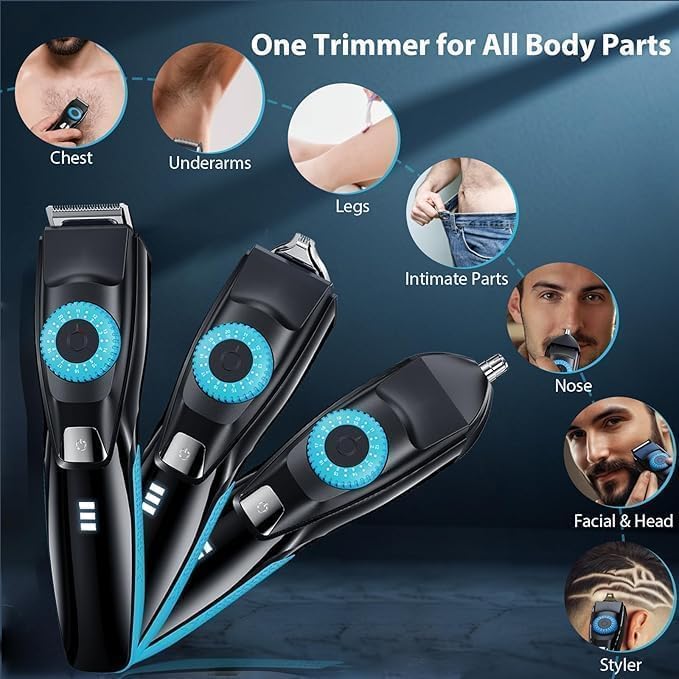
Image: The trimmer is versatile for various body parts, including chest, underarms, legs, intimate areas, nose, face, and head.
4.4 Travel Lock Function
To prevent accidental activation during travel, the trimmer may feature a travel lock. Consult the included quick guide for specific instructions on how to activate and deactivate this function.
5. Maintenance
5.1 Cleaning
The Voukad BLG-HT-006 trimmer is IPX7 waterproof, allowing for easy cleaning under running water. After each use:
- Turn off the trimmer and detach the comb guard and trimmer head.
- Rinse the trimmer head and comb guard under warm running water to remove hair clippings.
- Use the provided cleaning brush to remove any stubborn hair from the blades and internal components.
- Rinse the main unit if necessary, ensuring the charging port cover is securely closed.
- Allow all parts to air dry completely before reassembling or storing.

Image: The trimmer is water-resistant for easy cleaning under running water.
5.2 Lubrication
Regularly apply a small drop of the provided lubricating oil to the trimmer blades to maintain optimal performance and extend blade life. Apply oil after every few uses or when the trimmer feels less smooth.

Image: Close-up of the ultra-sharp stainless steel blades, which benefit from regular lubrication.
6. Troubleshooting
- Trimmer not turning on: Ensure the trimmer is fully charged. If the screen flashes and the power button cannot turn it on, press and hold the power button for 5 seconds to reset the machine.
- Poor trimming performance: Clean the blades thoroughly and apply lubricating oil. Ensure the comb guard is correctly attached.
- Battery not charging: Check the USB-C cable and power adapter for damage. Ensure the cable is securely connected to both the trimmer and the power source.
7. Specifications
| Feature | Detail |
|---|---|
| Model Number | BLG-HT-006 |
| Brand | Voukad |
| Blade Material | Stainless Steel |
| Power Source | Battery Powered (Lithium-Ion) |
| Charging Time | 240 minutes |
| Runtime | Up to 240 minutes |
| Adjustable Length Settings | 40 (0.5mm to 40mm) |
| Waterproof Rating | IPX7 |
| Included Components | Trimmer, 3 Attachments, 2 Combs, Charging Cable, Cleaning Brush, Oil, Pouch |
| UPC | 850071880922 |
8. Warranty and Support
The Voukad BLG-HT-006 Beard Trimmer comes with a lifetime warranty. To activate your warranty and ensure peace of mind, please register your product on the Voukad website. An activation code is provided in the packaging. For any issues or support, please contact Voukad customer service via the email provided in your product documentation.
Important: Before charging, ensure the machine is completely dry. If the screen flashes and the power button cannot be turned on, press and hold the power button for 5 seconds to reset the machine.
Ask a question about this manual
Ask about setup, troubleshooting, compatibility, parts, safety, or missing instructions. Manuals+ will review the question and use this page’s manual context to help answer it.