
Introduction
Welcome to the Our Place Wonder Oven Pro. This 8-in-1 digital air fryer oven is designed to simplify your cooking experience with multiple functions including air frying, baking, roasting, toasting, broiling, dehydrating, proofing, and reheating. This manual provides essential information for safe operation, setup, maintenance, and troubleshooting to ensure optimal performance of your appliance.
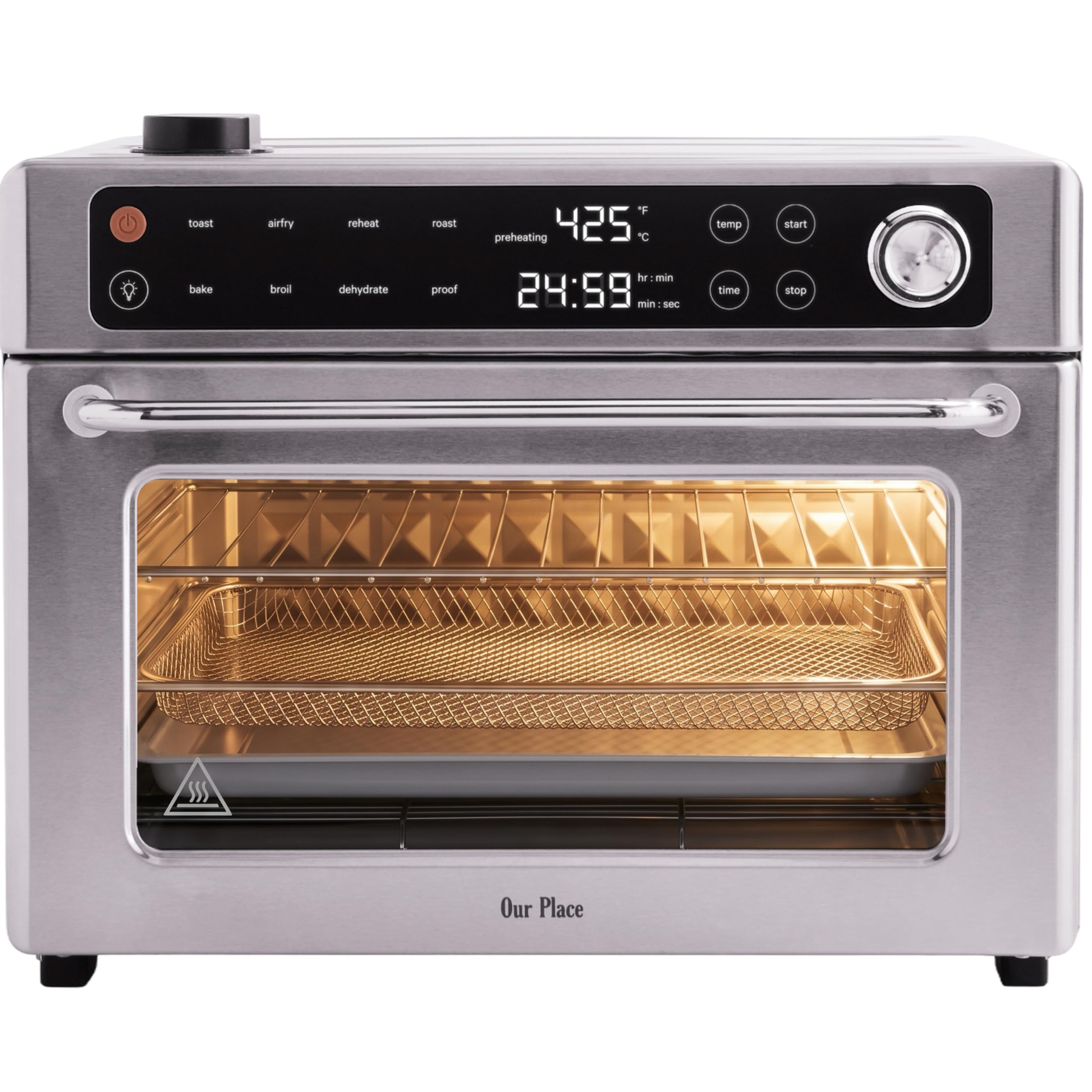
Image: The Our Place Wonder Oven Pro in a stainless steel finish, showcasing its sleek design.
Important Safeguards
Please read all instructions carefully before using the appliance. Failure to follow these instructions may result in electric shock, fire, or serious injury.
- Electrical Safety: Ensure the voltage matches your power outlet. Do not immerse the cord, plug, or appliance in water or other liquids.
- Placement: Place the oven on a stable, heat-resistant surface. Maintain adequate clearance (at least 4 inches) from walls and other appliances for proper ventilation.
- Hot Surfaces: The exterior and interior surfaces become hot during and after operation. Use oven mitts when handling hot components or reaching into the oven.
- Supervision: Close supervision is necessary when any appliance is used by or near children.
- Accessories: Use only accessories recommended by the manufacturer.
- Cleaning: Always unplug the appliance and allow it to cool completely before cleaning.
- Maintenance: Do not attempt to repair the appliance yourself. Contact qualified service personnel for any repairs.
What's Included
Your Our Place Wonder Oven Pro comes with the following components:
- Wonder Oven Pro Unit
- Large Bake Tray
- Large Air Fry Basket
- Large Wire Rack
- Crumb Tray

Image: The Wonder Oven Pro displaying its dimensions (13"H x 16.8"W x 13.3"D) and the included non-toxic accessories.
Setup
- Unpacking: Carefully remove all packaging materials and accessories from the oven.
- Initial Cleaning: Wipe down the interior and exterior of the oven with a damp cloth. Wash all accessories (bake tray, air fry basket, wire rack, crumb tray) with warm, soapy water, rinse, and dry thoroughly.
- Placement: Place the oven on a flat, stable, heat-resistant countertop. Ensure there is at least 4 inches of space on all sides for proper air circulation.
- Power Connection: Plug the power cord into a grounded electrical outlet.
- First Use Burn-Off: Before cooking food, operate the oven empty for approximately 15 minutes at 400°F (200°C) to burn off any manufacturing residues. A slight odor or smoke is normal during this process. Ensure the area is well-ventilated.
Operating Instructions
The Wonder Oven Pro features an intuitive digital touchscreen panel for precise control over your cooking.

Image: Detailed view of the digital touchscreen interface with labeled controls for cooking mode, temperature, time, and start/stop.
Digital Touchscreen Panel
- ON/OFF Button: Powers the oven on or off.
- Cooking Mode Buttons: Select from Air Fry, Bake, Roast, Toast, Broil, Dehydrate, Proof, Reheat.
- Temperature (Temp) Button: Adjust cooking temperature.
- Time Button: Adjust cooking time.
- Dial Knob: Rotate to increase or decrease temperature and time settings. Press to confirm selection.
- Start/Stop Button: Initiates or pauses the cooking cycle.
- Light Button: Turns the interior oven light on or off.
Cooking Functions

Image: Visual representation of the eight distinct cooking functions available with the Wonder Oven Pro.
To use any function:
- Place food on the appropriate accessory (air fry basket, bake tray, or wire rack) and insert into the desired rack level.
- Press the ON/OFF button to power on the oven.
- Select the desired cooking mode (e.g., Air Fry, Bake).
- Adjust the temperature using the Temp button and Dial Knob.
- Adjust the cooking time using the Time button and Dial Knob.
- Press the Start/Stop button to begin cooking.
Steam Infusion
The Wonder Oven Pro features a steam infusion function to help lock in moisture and revive leftovers. To use this feature:
- Locate the water reservoir on the top of the oven.
- Add 1-2 teaspoons of water into the reservoir before or during cooking, as desired.
- The steam will infuse into the cooking chamber, resulting in softer, juicier food and crispier exteriors.

Image: Demonstration of adding water for steam infusion and the resulting soft, tender food.
Faster Cooking and Preheating
The oven's premium quartz and stainless steel heating elements, combined with a powerful 360° convection system, allow for faster preheating and more efficient cooking compared to traditional ovens. This results in evenly cooked food with crispy edges and consistent browning.

Image: Interior design of the oven, illustrating the advanced heating technology for optimized cooking.
Care and Maintenance
Regular cleaning and maintenance will extend the life of your Wonder Oven Pro.
- Always Unplug: Before cleaning, ensure the oven is unplugged from the power outlet and has cooled completely.
- Exterior Cleaning: Wipe the exterior with a soft, damp cloth. Do not use abrasive cleaners or scouring pads, as they may damage the finish.
- Interior Cleaning: The stainless steel interior can be wiped with a damp cloth and mild detergent. For stubborn food residue, a non-abrasive sponge can be used. Ensure the interior is dry before next use.
- Accessories: The bake tray, air fry basket, wire rack, and crumb tray are designed for easy hand washing with warm, soapy water. Rinse thoroughly and dry completely.
- Crumb Tray: Empty the crumb tray regularly to prevent grease buildup and potential fire hazards.
- Door: Clean the glass door with a glass cleaner or a damp cloth.

Image: The interior of the Wonder Oven Pro, demonstrating its easy-to-clean design.
Troubleshooting
If you encounter any issues with your Wonder Oven Pro, refer to the table below for common problems and solutions.
| Problem | Possible Cause | Solution |
|---|---|---|
| Oven does not turn on. | Not plugged in; Power outlet issue; ON/OFF button not pressed. | Ensure the power cord is securely plugged in. Check the power outlet with another appliance. Press the ON/OFF button. |
| Food is not cooking evenly. | Overcrowding; Incorrect temperature/time; Accessories not placed correctly. | Avoid overcrowding the oven. Adjust temperature and time settings as per recipe. Ensure accessories are on the correct rack level. |
| Excessive smoke during cooking. | Food residue; High-fat food; Crumb tray full. | Clean the oven interior and accessories thoroughly. Reduce fat content or use a drip tray. Empty and clean the crumb tray. |
| Digital display not working. | Power interruption; Malfunction. | Unplug the oven for a few minutes, then plug it back in. If the issue persists, contact customer support. |
Specifications
| Feature | Detail |
|---|---|
| Brand | Our Place |
| Model Name | Wonder Oven Pro |
| Model Number | APL.LWP.ESN.SLS |
| Color | Stainless Steel |
| Capacity | 30 Quarts |
| Product Dimensions (D x W x H) | 13.25"D x 16.75"W x 13"H |
| Item Weight | 18 pounds |
| Wattage | 1700 watts |
| Control Type | Touch Control |
| Temperature Range | 80°F to 450°F |
| Number of Shelves | 3 |
| Special Features | Adjustable Rack, LED Display, Large Capacity, Steam Feature, Timer |
| Included Components | Crumb Tray, Large Air Fryer Basket, Large Bake Tray, Wire Rack, Wonder Oven Pro |
Warranty and Support
For warranty information and customer support, please refer to the official Our Place website or contact their customer service directly. Keep your purchase receipt for warranty claims.
Visit the official Our Place store for more products and support: Our Place Store


