
Introduction
The Qanba Sapphire Arcade S1 is a high-performance leverless arcade controller designed for precision and responsiveness in fighting games. This officially licensed product is compatible with PlayStation 5, PlayStation 4, and PC, offering a seamless gaming experience across multiple platforms. This manual provides essential information on setting up, operating, customizing, and maintaining your S1 controller.

Figure 1: Front view of the Qanba Sapphire Arcade S1 Leverless Controller.
Product Overview
The Qanba Sapphire S1 features a robust design with advanced components to enhance your gaming performance. Key features include:
- Cherry Silver Switches: Equipped with high-speed and precise Cherry Silver switches for optimal input.
- 18 Programmable Buttons: Fully programmable buttons allow for customization of key stroke sensitivity and key assignments.
- RGB LED Lighting: Vibrant RGB LED lighting system on buttons and side panels for an immersive gaming environment.
- 3 Button Assignment Profiles: Easily switch between three customizable button layout profiles with a single touch.
- Ergonomic Design: Includes an ergonomic memory foam wrist rest for comfort during extended gaming sessions.
- Detachable Type-C USB Cable: Ensures portability and durability.
- Head-Up Display (HUD): Provides visual feedback for button inputs.
- Customizable Artwork: The top plate artwork can be changed to personalize your controller.
- Anti-slip Mat: Full-surface anti-slip mat on the bottom for stable placement on laps or desks.
- Shoulder Strap Attachment Points: For convenient transport.
- 3.5mm Audio Jack: Stereo headphone/microphone jack (PC not supported).

Figure 2: Side view of the controller showcasing the RGB LED lighting.

Figure 3: Bottom view of the controller, highlighting the anti-slip mat.
Setup
- Connect the USB Cable: Connect the detachable Type-C USB cable to the controller and your gaming system (PlayStation 5, PlayStation 4, or PC).
- Select Platform Mode: Use the MODE switch on the controller to select the appropriate platform (PS5, PS4, or PC).
- Plug & Play: The controller is designed for plug-and-play functionality. No driver installation or complex settings are required for immediate use on supported platforms.
- Audio Connection (Optional): For audio output and microphone input (PlayStation only), connect a 3.5mm stereo headset to the dedicated jack on the controller.
Operating Instructions
Basic Controls
The Qanba Sapphire S1 features standard PlayStation input buttons, directional buttons, and additional function buttons:
- Input Buttons: Triangle, Circle, Cross, Square, R1, R2, R3, L1, L2, L3, M1, M2, M3, C.
- Directional Buttons: Left, Down, Right, Up.
- Touchpad/Touchpad Button: For in-game touchpad functions.
- Create Button: Functions as the SHARE button when connected to PlayStation 4.
- Option Button: Functions as the OPTIONS button when connected to PlayStation 4.
- PS Button: PlayStation system button.
Function Switches and Buttons
- MODE Switch: Toggles compatibility between PlayStation 5, PlayStation 4, and PC.
- Button Map Profile Switch (1/2/3): Selects between three saved button mapping profiles.
- LED Switch (LED/OFF): Turns the main LED lighting on or off.
- Touchpad Click Switch (TP/C): Configures touchpad click functionality.
- LOCK/UNLOCK Switch: Disables certain buttons to prevent accidental inputs during gameplay.
- GLOW Button: Cycles through various ambient light modes for the RGB LEDs.
- MUTE Button: Mutes the microphone connected to the 3.5mm jack (with LED indicator).

Figure 4: Control panel showing the button mapping profile switches.

Figure 5: Head-Up Display (HUD) providing visual feedback for button presses.
Customization
Adjustable Button Stroke
The Qanba buttons feature a 3-level adjustable stroke. Use the included tool to modify the button stroke to your preferred sensitivity. This allows for fine-tuning the feel of each button press.
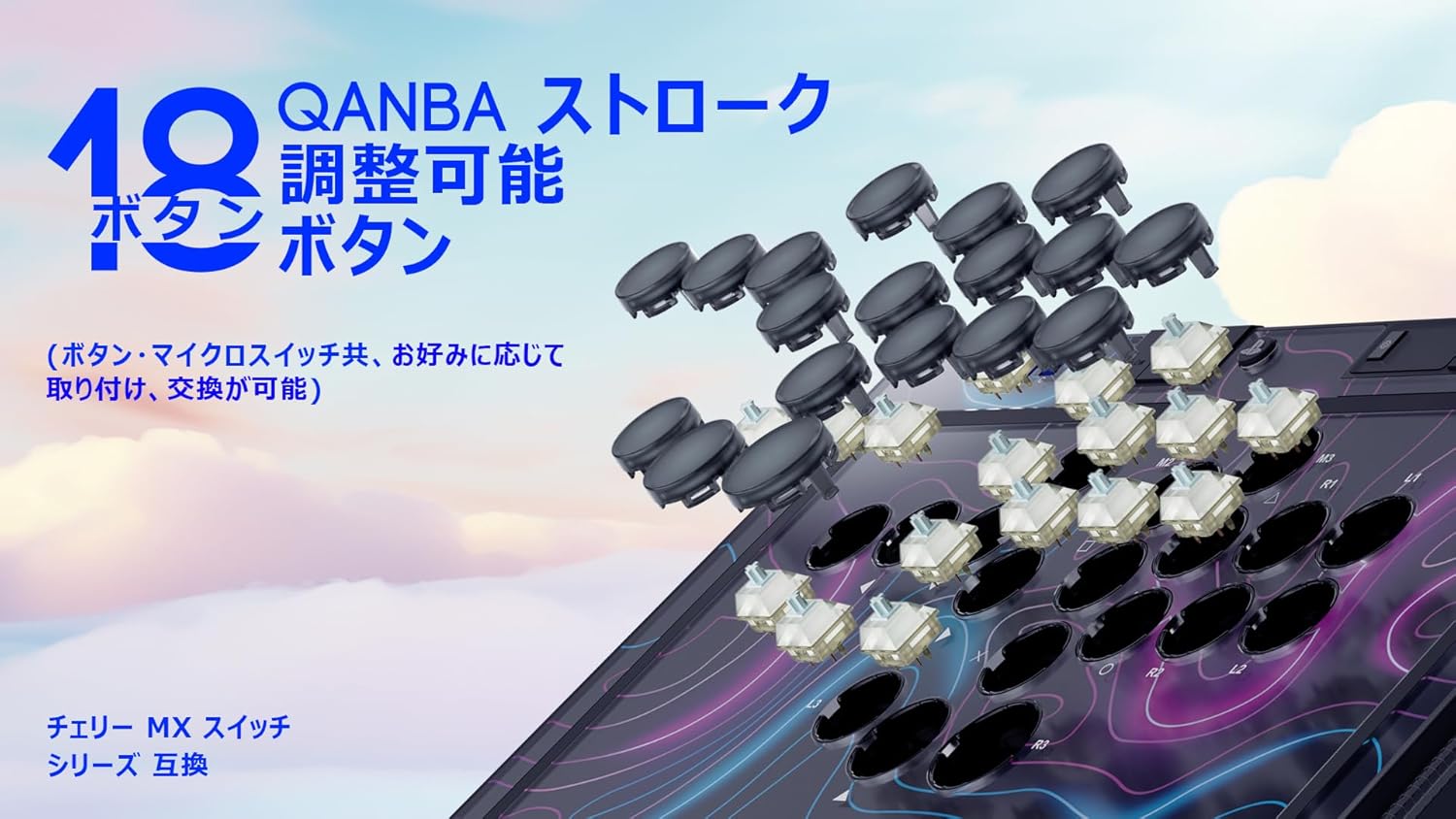
Figure 6: Illustration of the adjustable stroke buttons and swappable micro switches.
Swappable Micro Switches
The controller supports hot-swappable Cherry Silver Axis micro switches. A tool is included for easy replacement. Refer to the product's sub-images or official website for a list of compatible switches.
Customizable Artwork
The top plate artwork can be customized. Carefully remove the top panel to replace the artwork with your preferred design. Ensure all components are securely reassembled after customization.

Figure 7: Exploded view showing the customizable top plate artwork.
Interchangeable Wrist Rest
The included plastic wrist rest is detachable and can be replaced with the ergonomic memory foam wrist rest for enhanced comfort during long gaming sessions.

Figure 8: The ergonomic memory foam wrist rest.
Maintenance
- Cleaning: Use a soft, dry cloth to clean the surface of the controller. Avoid using abrasive cleaners or solvents.
- Storage: Store the controller in a cool, dry place away from direct sunlight and extreme temperatures.
- Cable Care: Handle the detachable USB-C cable with care to prevent damage. Avoid sharp bends or excessive pulling.
- Button and Switch Maintenance: If switches are replaced, ensure they are properly seated to prevent damage.
Troubleshooting
Common Issues and Solutions
- Controller Not Responding:
- Ensure the USB-C cable is securely connected to both the controller and the gaming system.
- Verify the MODE switch is set to the correct platform (PS5, PS4, or PC).
- Try connecting to a different USB port.
- Button Mapping Issues:
- When changing button mapping profiles, always remove the blanking caps from the buttons first. The controller cannot enter button mapping setting mode with the blanking caps attached.
- Ensure button mapping is not accidentally set on the blanking caps.
- SOCD Modes:
- For advanced SOCD (Simultaneous Opposing Cardinal Directions) modes, update the controller firmware to VS1.21 or later. This update enables additional modes such as Up-Priority and Last Input Priority. Refer to the official Qanba support website for firmware update instructions.
- LED Lights Not Working:
- Check the LED switch to ensure it is not set to OFF.
- Press the GLOW button to cycle through different lighting modes.
- Audio Issues (PlayStation only):
- Ensure your 3.5mm headset is fully plugged into the jack.
- Check the MUTE button to ensure the microphone is not muted.
Specifications
| Feature | Detail |
|---|---|
| Model Number | S1 |
| Product Size | 26 x 36.6 x 3 cm |
| Product Weight | 1.6 kg |
| Compatibility | PlayStation 5, PlayStation 4, PC |
| Buttons | 18 programmable, adjustable stroke buttons |
| Switches | Cherry Silver Axis (hot-swappable) |
| Connectivity | Detachable USB Type-C |
| Audio | 3.5mm Stereo Headphone/Mic Jack (PS only) |
| Lighting | RGB LED (buttons & side panels, 5 modes) |
| Age Target | 12 years and older |
| Country of Origin | China |
| Release Date | 2025/10/9 |
Warranty and Support
Warranty Information
The Qanba Sapphire Arcade S1 Leverless Controller comes with a 1-year warranty provided by the official Japanese distributor. This warranty covers manufacturing defects and malfunctions under normal use.
Customer Support
For any initial defects, malfunctions, or technical assistance, please contact the official Japanese support team. They are available to provide assistance in Japanese.
For further support, please visit the official Qanba website or contact your local distributor.

Figure 9: The controller with an optional shoulder strap for portability.

Figure 10: Close-up of the anti-slip pads on the controller's bottom surface.


