
1. Important Safety Information
Please read all safety warnings and instructions carefully before using this product. Keep this manual for future reference.
- Do not expose the speaker to extreme temperatures, direct sunlight, or high humidity.
- Avoid dropping or subjecting the speaker to strong impacts.
- Do not disassemble, repair, or modify the speaker yourself. Contact qualified service personnel for any repairs.
- Keep the speaker away from water and other liquids.
- Use only the provided charging cable and a compatible power adapter (DC 5V) to charge the speaker.
- Do not operate the speaker at excessively high volumes for prolonged periods to prevent hearing damage.
2. Product Overview
The TAMPROAD Q101 is a portable Bluetooth speaker designed to deliver powerful and clear audio with dynamic LED lighting. Its robust wooden cabinet and multiple connectivity options make it suitable for various indoor and outdoor settings.
Key Features:
- 120W Peak Power: Equipped with 2 x 3.5" woofers and 2 x 2.0" tweeters for deep bass and clear treble.
- True Wireless Stereo (TWS): Pair two Q101 speakers for an immersive stereo sound experience.
- Wooden Cabinet: Minimizes acoustic distortion for authentic sound reproduction.
- Dynamic LED Light Show: Multiple lighting effects that sync with music, creating a vibrant atmosphere.
- Multiple Connections: Supports Bluetooth, USB drive, TF card, AUX mode, and microphone input.
- Large Battery: High-capacity 10000 mAh battery for extended playtime.
- Portable Design: Features a detachable, high-strength silicone carrying strap.

Image: Internal components and power output of the TAMPROAD Q101 speaker.
3. Package Contents
Ensure all items are present in the package:
- 1 x TAMPROAD Q101 120W Bluetooth Speaker
- 1 x Type-C Charging Cable
- 1 x AUX Cable
- 1 x User Manual
4. Setup
4.1 Charging the Speaker
- Locate the Type-C charging port on the back panel of the speaker.
- Connect the provided Type-C charging cable to the speaker and a compatible DC 5V power adapter (not included).
- The charging indicator light will be red while charging. It will turn off when the battery is fully charged.
4.2 Powering On/Off
- To power on, slide the ON/OFF switch on the back panel to the 'ON' position.
- To power off, slide the ON/OFF switch to the 'OFF' position.
4.3 Bluetooth Pairing
- Ensure the speaker is powered on and in Bluetooth mode (indicated by a blue light on the control panel). If not, press the 'MODE' button to switch to Bluetooth.
- On your device (smartphone, tablet, etc.), enable Bluetooth and search for available devices.
- Select 'TAMPROAD Q101' from the list of devices.
- Once paired, the speaker will emit an audible confirmation.
4.4 True Wireless Stereo (TWS) Pairing
To achieve a true wireless stereo experience, you need two TAMPROAD Q101 speakers.
- Ensure both Q101 speakers are powered on and in Bluetooth mode, but not yet paired with any device.
- On one of the speakers, long-press the 'VOLUME/TWS' knob (the central knob). The speaker will enter TWS pairing mode.
- The speakers will automatically connect to each other. Once connected, you will hear an audible confirmation.
- Now, pair your device with one of the speakers via Bluetooth as described in section 4.3. Both speakers will play audio in stereo.

Image: TWS function with two Q101 speakers for stereo sound.
5. Operating Instructions
5.1 Control Panel Overview

Image: Detailed view of the speaker's control panel.
- Light Button: Short press to cycle through different LED light modes. Long press to turn the LED lights ON/OFF.
- EQ Button: Short press to switch between preset equalizer modes (e.g., indoor, outdoor).
- MODE Button: Short press to cycle through input modes: Bluetooth, USB, TF Card, AUX, Microphone.
- VOLUME/TWS Knob: Rotate to adjust volume. Long press to activate/deactivate TWS pairing mode (when not connected to a device).
- Previous Button: Short press to go to the previous track.
- Pause/Play Button: Short press to play or pause audio. Long press to disconnect Bluetooth.
- Next Button: Short press to go to the next track.
5.2 Playback Modes
The speaker supports various playback sources:
- Bluetooth Mode: Connect wirelessly to your Bluetooth-enabled device (refer to section 4.3).
- USB Drive Mode: Insert a USB drive containing MP3 audio files into the USB port. The speaker will automatically switch to USB mode and begin playback.
- TF Card Mode: Insert a TF (MicroSD) card containing MP3 audio files into the TF card slot. The speaker will automatically switch to TF card mode and begin playback.
- AUX Mode: Connect an external audio device using the provided 3.5mm AUX cable to the AUX input port. Press the 'MODE' button to select AUX input.
- Microphone Input: Connect a microphone (not included) to the MIC input port for karaoke or public speaking.
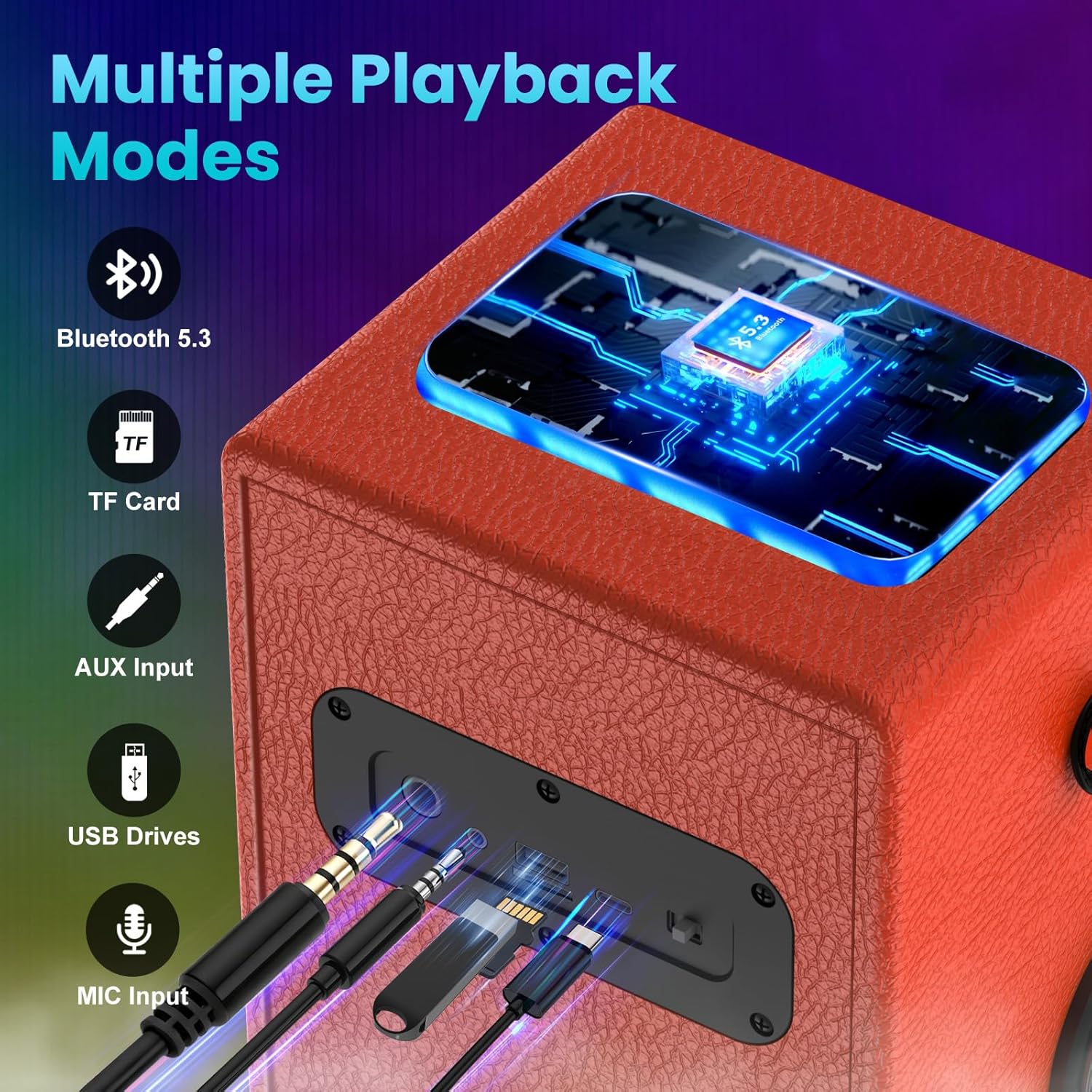
Image: Multiple connection ports on the speaker.
5.3 LED Light Show
The speaker features dynamic LED lights that can enhance your listening experience.
- Short press the 'Light' button to cycle through 6 different colorful lighting effects.
- Long press the 'Light' button to turn the LED lights ON or OFF.

Image: Various dynamic LED light modes.
6. Maintenance
Proper care ensures the longevity of your TAMPROAD Q101 speaker:
- Cleaning: Use a soft, dry cloth to wipe the exterior of the speaker. Do not use abrasive cleaners, alcohol, or chemical solvents.
- Storage: When not in use for extended periods, store the speaker in a cool, dry place away from direct sunlight and extreme temperatures.
- Battery Care: To maintain battery health, fully charge the speaker at least once every three months, even if not in regular use.
7. Troubleshooting
If you encounter issues with your speaker, refer to the following common problems and solutions:
| Problem | Possible Cause | Solution |
|---|---|---|
| Speaker does not power on. | Low battery; Power switch is OFF. | Charge the speaker fully; Slide the power switch to 'ON'. |
| Cannot pair via Bluetooth. | Speaker not in pairing mode; Device Bluetooth is off; Already paired with another device. | Ensure speaker is in Bluetooth mode; Enable Bluetooth on your device; Disconnect from other devices or long-press Play/Pause button to reset Bluetooth. |
| No sound or low volume. | Volume too low; Incorrect input mode; Device volume too low. | Increase speaker volume; Press 'MODE' to select correct input; Increase volume on your connected device. |
| TWS pairing fails. | Speakers too far apart; One speaker already paired with a device. | Ensure speakers are within close proximity; Disconnect both speakers from any devices before TWS pairing. |
| LED lights not working. | Lights are turned off. | Long press the 'Light' button to turn them on. |
8. Specifications
| Feature | Detail |
|---|---|
| Brand | TAMPROAD |
| Model Number | Q101 |
| Peak Power | 120W |
| Woofer Diameter | 3.5 Inches (x2) |
| Tweeter Diameter | 2.0 Inches (x2) |
| Audio Driver Type | Dynamic Driver |
| Connectivity Protocol | Bluetooth, USB, AUX |
| Bluetooth Version | 5.3 |
| Battery Capacity | 10000 mAh |
| Control Method | Push Button, Rotary Knob |
| Color | Orange |
| Is Waterproof | False |
9. Warranty and Support
All TAMPROAD products come with a 12-month warranty service. For any product-related inquiries, technical assistance, or warranty claims, please contact TAMPROAD customer service. We offer 24-hour customer service to ensure your satisfaction.
Please retain your proof of purchase for warranty validation.