
1. Setup Guide
1.1 What's in the Box
Your Mingdaln Smart Watch package includes the following items:
- Mingdaln Smart Watch G39diandujin
- Charging Cable
- Two Watch Straps (one pre-installed, one additional)
- User Manual (this document)
1.2 Charging the Smart Watch
Before initial use, fully charge your smart watch. Connect the magnetic charging cable to the charging contacts on the back of the watch. Plug the USB end of the cable into a standard USB power adapter (5V/1A recommended) or a computer's USB port. The watch display will indicate charging status.
Initial charge time: Approximately 2 hours.
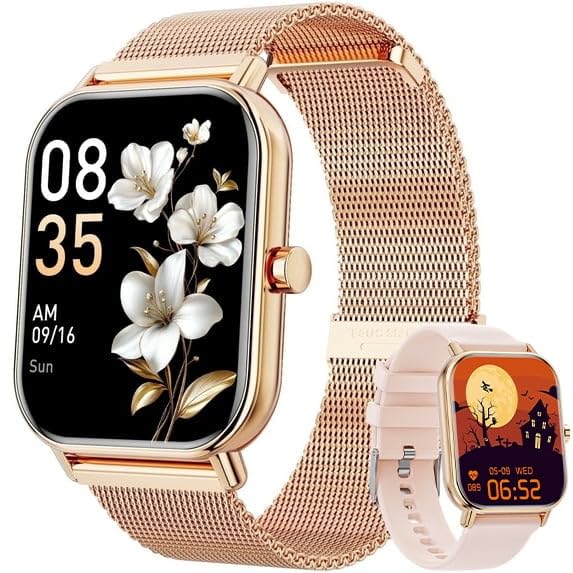
Image 1.1: The Mingdaln Smart Watch G39diandujin connected to its magnetic charging cable. This image illustrates the watch's design and how the charging cable attaches to the back of the device.
1.3 App Installation
To unlock the full functionality of your smart watch, you need to install the companion application on your smartphone. The watch is compatible with both Android and iOS devices.
- Scan the QR code provided in the quick start guide (or on the watch screen during initial setup) or search for "[Companion App Name]" in the Apple App Store (for iOS) or Google Play Store (for Android).
- Download and install the application.
- Follow the on-screen instructions to create an account or log in.
1.4 Pairing with Your Smartphone
Ensure your smartphone's Bluetooth is enabled and the smart watch is sufficiently charged.
- Open the installed companion app on your smartphone.
- Navigate to the "Device" or "Add Device" section within the app.
- The app will search for available devices. Select "Mingdaln G39diandujin" from the list.
- Confirm the pairing request on both your smartphone and the smart watch if prompted.
- Once paired, the watch will synchronize data with the app.
2. Operating Instructions
2.1 Basic Navigation
- Power On/Off: Press and hold the side button for 3-5 seconds.
- Wake Screen: Raise your wrist or press the side button.
- Touchscreen Gestures:
- Swipe Up: View notifications.
- Swipe Down: Access quick settings.
- Swipe Left/Right: Navigate through widgets/features (e.g., heart rate, activity data).
- Tap: Select an item or open an application.
- Press and Hold: Customize watch faces (on the home screen).
- Side Button: Press once to return to the home screen or go back to the previous menu.
2.2 Making and Receiving Calls
Once paired with your smartphone, the Mingdaln Smart Watch allows you to manage calls directly from your wrist.
- Receiving Calls: When a call comes in, the watch will display the caller ID. Tap the green icon to answer or the red icon to reject.
- Making Calls: Access the "Dialer" or "Contacts" feature on your watch. You can dial a number directly or select a contact to initiate a call through your connected smartphone.
2.3 Message Notifications
The watch will display notifications from your smartphone, including SMS messages, social media alerts, and app notifications. Ensure that notification permissions are enabled in the companion app on your phone.
- Swipe up from the home screen to view your notification history.
- Tap on a notification to read the full message (if supported).
2.4 Fitness Tracking and Sports Modes
The Mingdaln Smart Watch is equipped with an activity tracker and supports over 100 sports modes to monitor your physical activity.
- Activity Tracking: The watch continuously tracks steps, distance, calories burned, and sleep patterns. View daily summaries on the watch or detailed reports in the companion app.
- Sports Modes: Navigate to the "Workout" or "Sports" menu on the watch. Select your desired activity (e.g., running, cycling, swimming) to start tracking specific metrics for that exercise.
2.5 IP68 Waterproofing
The watch is IP68 waterproof, meaning it is resistant to dust and can withstand immersion in water up to 1.5 meters for up to 30 minutes. It is suitable for daily use, hand washing, and light swimming. Do not use it for diving, hot showers, or in saunas, as steam and hot water can compromise the seal.
3. Maintenance
3.1 Cleaning Your Smart Watch
Regular cleaning helps maintain the watch's appearance and functionality.
- Wipe the watch screen and body with a soft, lint-free cloth.
- For stubborn dirt, slightly dampen the cloth with water. Avoid using harsh chemicals, abrasive materials, or ultrasonic cleaners.
- Ensure the charging contacts are clean and dry before charging.
3.2 Charging Best Practices
- Use only the provided charging cable.
- Avoid charging in extremely hot or cold environments.
- Do not leave the watch on charge for extended periods after it is fully charged.
3.3 Strap Replacement
Your Mingdaln Smart Watch comes with two watch straps, allowing for customization. To replace a strap:
- Locate the quick-release pins on the underside of the watch strap where it connects to the watch body.
- Slide the pin inwards to detach the strap.
- Align the new strap with the watch body and insert one end of the pin into the lug hole.
- Slide the quick-release pin inwards, align the other end with the opposite lug hole, and release the pin. Gently tug the strap to ensure it is securely attached.
4. Troubleshooting
| Problem | Possible Solution |
|---|---|
| Watch does not power on. | Ensure the watch is fully charged. Connect it to the charger for at least 30 minutes. |
| Unable to pair with smartphone. |
|
| Notifications are not received. |
|
| Inaccurate activity tracking. |
|
| Watch screen is unresponsive. | Perform a force restart by pressing and holding the side button for approximately 10-15 seconds until the watch restarts. |
5. Specifications
| Feature | Detail |
|---|---|
| Model Number | G39diandujin |
| Brand | Mingdaln |
| Operating System | Wear OS 1.1 |
| Special Feature | Activity Tracker |
| GPS | No GPS |
| Compatible Devices | Smartphone (Android and iOS) |
| Water Resistance | IP68 (Dust and water resistant up to 1.5m for 30 mins) |
| UPC | 607603387790 |
| Display Size | 1.85 inch |
| Sports Modes | 100+ |
6. Warranty and Support
6.1 Product Warranty
Mingdaln products are covered by a limited manufacturer's warranty against defects in materials and workmanship from the date of purchase. Please refer to the warranty card included in your product packaging for specific terms and conditions, or visit the official Mingdaln website for detailed warranty information.
6.2 Customer Support
If you encounter any issues or have questions regarding your Mingdaln Smart Watch G39diandujin that are not covered in this manual, please contact our customer support team. Contact information can typically be found on the Mingdaln official website or on the packaging materials.
For the most up-to-date support resources, please visit: www.mingdaln.com/support (Note: This is a placeholder URL as no specific support link was provided.)