
1. Introduction
This manual provides detailed instructions for the assembly, safe operation, and proper maintenance of your T4TREAM Fluted Nightstand with Charging Station, model RCC24ST-NO. Please read this manual thoroughly before assembly and use to ensure correct installation and to maximize the lifespan of your product.
2. Safety Information
Observe the following safety precautions to prevent injury or damage to the product:
- Ensure all components are securely fastened before use.
- Do not exceed the maximum load capacity: Top surface 100 lbs (45 kg), each drawer 25 lbs (11 kg).
- Keep electrical components (charging station) away from water or excessive moisture.
- Do not attempt to modify the electrical charging station.
- Place the nightstand on a flat, stable surface to prevent tipping.
- Keep small parts away from children during assembly.
3. Package Contents
Before beginning assembly, verify that all parts listed below are present and undamaged. If any parts are missing or damaged, contact customer support.
- All wooden panels (labeled A, B, C, etc.)
- Hardware pack (screws, dowels, cam locks, drawer slides, handles)
- Charging Station unit (with 2 AC outlets and 2 USB ports)
- Assembly Guide
- Spare parts pack

Figure 3.1: Product dimensions and maximum load capacities. The nightstand measures 24"H x 15.75"D x 24"W. The top surface supports up to 100 lbs, and each drawer supports up to 25 lbs.
4. Setup and Assembly
Assembly is required for this nightstand. Follow the step-by-step instructions provided in the included Assembly Guide. Ensure you have a clear, spacious area for assembly and the necessary tools (typically a screwdriver).
- Unpack Components: Carefully remove all parts from the packaging. Lay them out on a soft, clean surface to prevent scratches. Verify all parts against the package contents list.
- Assemble Frame: Follow the diagrams in the Assembly Guide to connect the main wooden panels using the provided hardware. Ensure all connections are tight and secure.
- Install Drawers: Attach the drawer slides to the side panels and assemble the drawer boxes. Insert the drawers into the frame, ensuring they slide smoothly.
- Install Handles: Attach the gold metal handles to the drawer fronts.
- Integrate Charging Station: Place the charging station unit into its designated recessed area on the top surface. Ensure the power cord is routed safely and not pinched.
- Final Check: Confirm all screws are tightened and the nightstand is stable.

Figure 4.1: Key features of the nightstand, including smooth curved corners, chic metal handles, and smooth-gliding drawers, which are part of the assembly process.
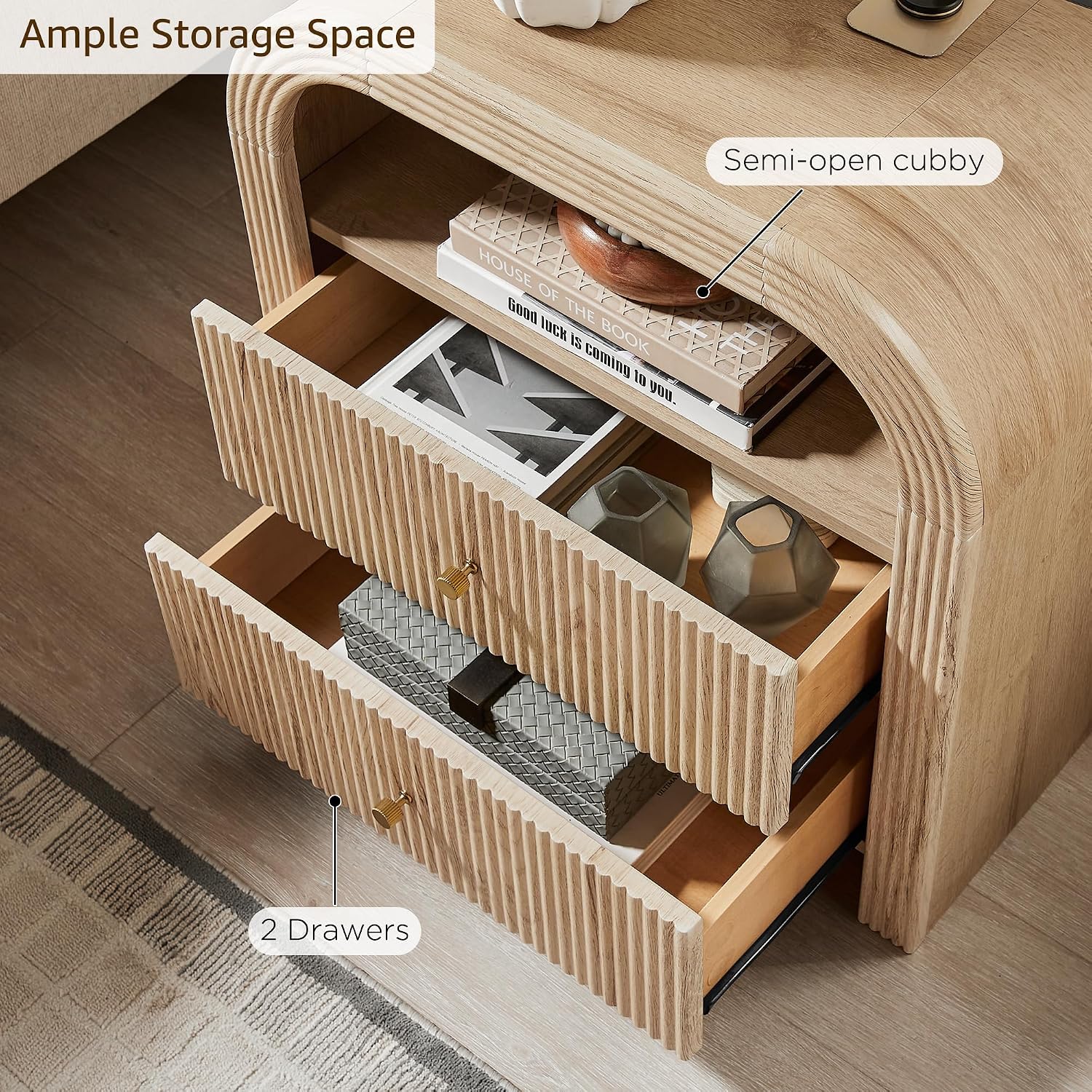
Figure 4.2: The nightstand features a semi-open cubby and two drawers, providing ample storage space for various items.
5. Operating Instructions
5.1 Using the Charging Station
The integrated charging station provides convenient power access for your electronic devices.
- Power Connection: Plug the nightstand's main power cord into a standard 125V/12A wall outlet.
- AC Outlets: Use the two 125V/12A AC outlets to power devices such as lamps, laptops, or other small appliances.
- USB Ports: Use the two 5V/2.1A USB/Type-C ports to charge smartphones, tablets, and other USB-powered devices.
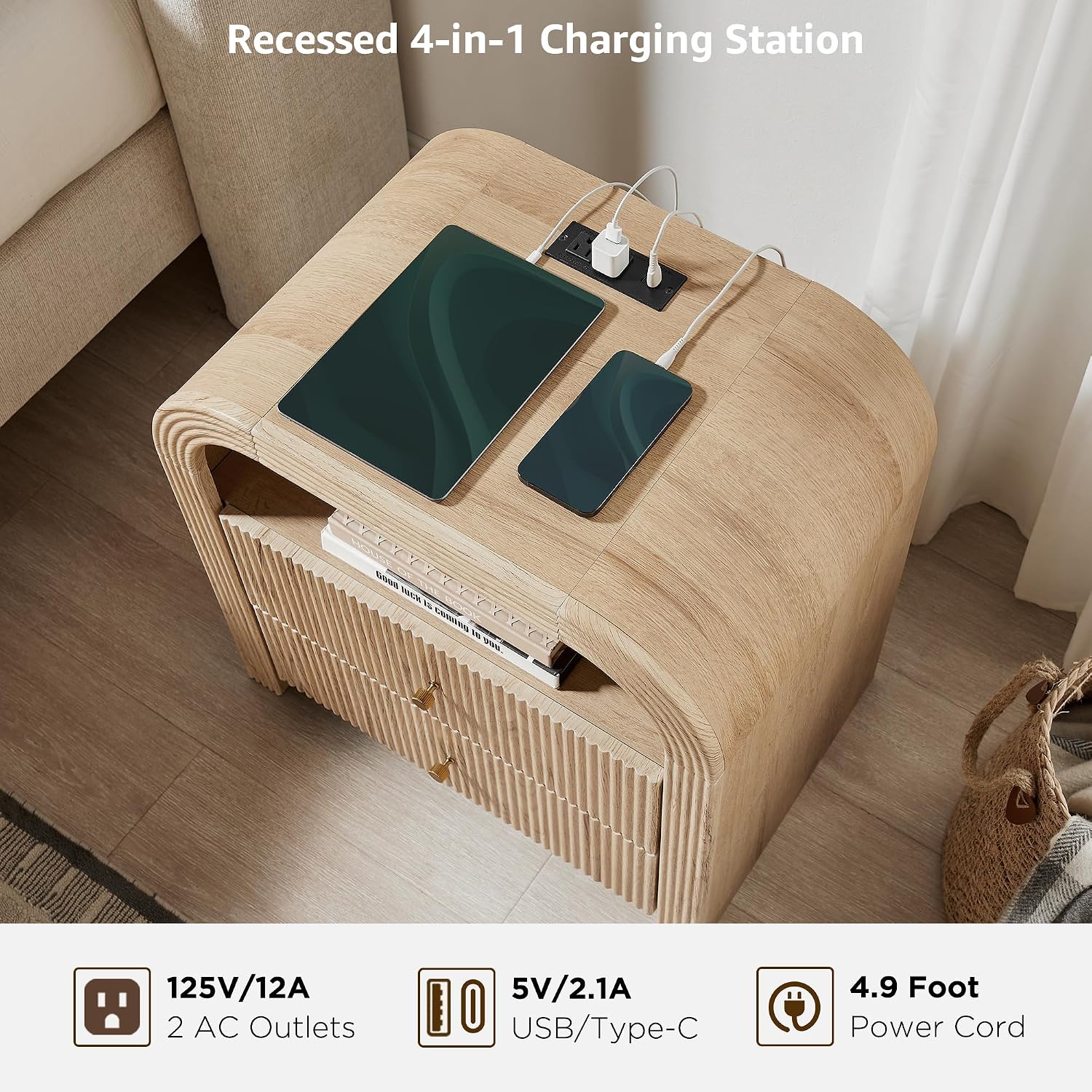
Figure 5.1: The recessed charging station features two 125V/12A AC outlets and two 5V/2.1A USB/Type-C ports, with a 4.9-foot power cord.
5.2 Storage Usage
The nightstand offers versatile storage options:
- Top Surface: Ideal for lamps, alarm clocks, books, or decorative items. Adhere to the 100 lbs (45 kg) weight limit.
- Open Cubby: Suitable for frequently accessed items like books, magazines, or small personal belongings.
- Drawers: Use the two smooth-sliding drawers for discreet storage of personal items, keeping your space tidy. Each drawer has a weight limit of 25 lbs (11 kg).
6. Maintenance
Regular maintenance will help preserve the appearance and functionality of your nightstand.
- Cleaning: Wipe surfaces with a soft, damp cloth. Avoid harsh chemicals or abrasive cleaners, which can damage the finish.
- Spills: Immediately wipe up any spills to prevent staining or water damage to the wood.
- Electrical Components: Ensure the charging station remains dry. If cleaning is necessary, unplug the unit first and wipe with a dry cloth.
- Hardware: Periodically check and tighten any loose screws or fittings to maintain stability.
- Avoid Direct Sunlight: Prolonged exposure to direct sunlight can cause fading or discoloration of the wood finish.
7. Troubleshooting
If you encounter issues with your nightstand, refer to the following common solutions:
| Problem | Possible Cause | Solution |
|---|---|---|
| Charging station not working. | Not plugged in; outlet issue; device issue. | Ensure the nightstand's power cord is securely plugged into a functional wall outlet. Test the outlet with another device. Try a different device with the charging station. |
| Drawers are stiff or not sliding smoothly. | Improper assembly; obstruction; loose hardware. | Review assembly steps for drawer slides. Check for any objects obstructing the slides. Ensure all drawer hardware is tightened. |
| Nightstand feels unstable. | Loose connections; uneven floor. | Check and tighten all assembly hardware. Ensure the nightstand is placed on a level surface. |
8. Specifications
| Feature | Detail |
|---|---|
| Brand | T4TREAM |
| Model Name | RCC24ST-NO |
| Product Dimensions (D x W x H) | 15.75"D x 24"W x 24"H (40cm x 61cm x 61cm) |
| Color | Natural Oak |
| Material Type | Engineered Wood (FSC-Certified wood, optimal MDF, P2 engineered wood) |
| Item Weight | 46 Pounds (20.8 kg) |
| Number of Drawers | 2 |
| Charging Station | 2 AC Outlets (125V/12A), 2 USB/Type-C Ports (5V/2.1A) |
| Power Cord Length | 4.9 Feet (1.5 meters) |
| Max Load Capacity (Top) | 100 lbs (45 kg) |
| Max Load Capacity (Each Drawer) | 25 lbs (11 kg) |

Figure 8.1: Construction details including the thickened frame for stability, chic metal handles, and the unique fluted panel design.
9. Warranty and Support
T4TREAM stands behind the quality of its products. For specific warranty information, please refer to the documentation included with your purchase or visit the official T4TREAM website. If you have any questions, require assistance with assembly, or need to report missing/damaged parts, please contact T4TREAM customer support directly.
For customer support, please visit: T4TREAM Store on Amazon
