
1. Introduction
This manual provides essential information for the safe and efficient operation of your DOOGEE Anywise W1 Smartwatch. Please read this manual thoroughly before using the device and retain it for future reference.
The DOOGEE Anywise W1 is a robust smartwatch designed for active lifestyles, featuring dual-band GPS, 5ATM water resistance, a 1.43-inch AMOLED display, and comprehensive health monitoring capabilities. It supports over 170 sport modes and offers Bluetooth calling functionality.
2. Package Contents
Verify that all items are present in your package:
- 1 x DOOGEE Anywise W1 Smartwatch
- 1 x Magnetic Charging Cable
- 3 x Watch Bands (various styles/colors)
- 1 x User Manual (this document)
- 1 x Service Card
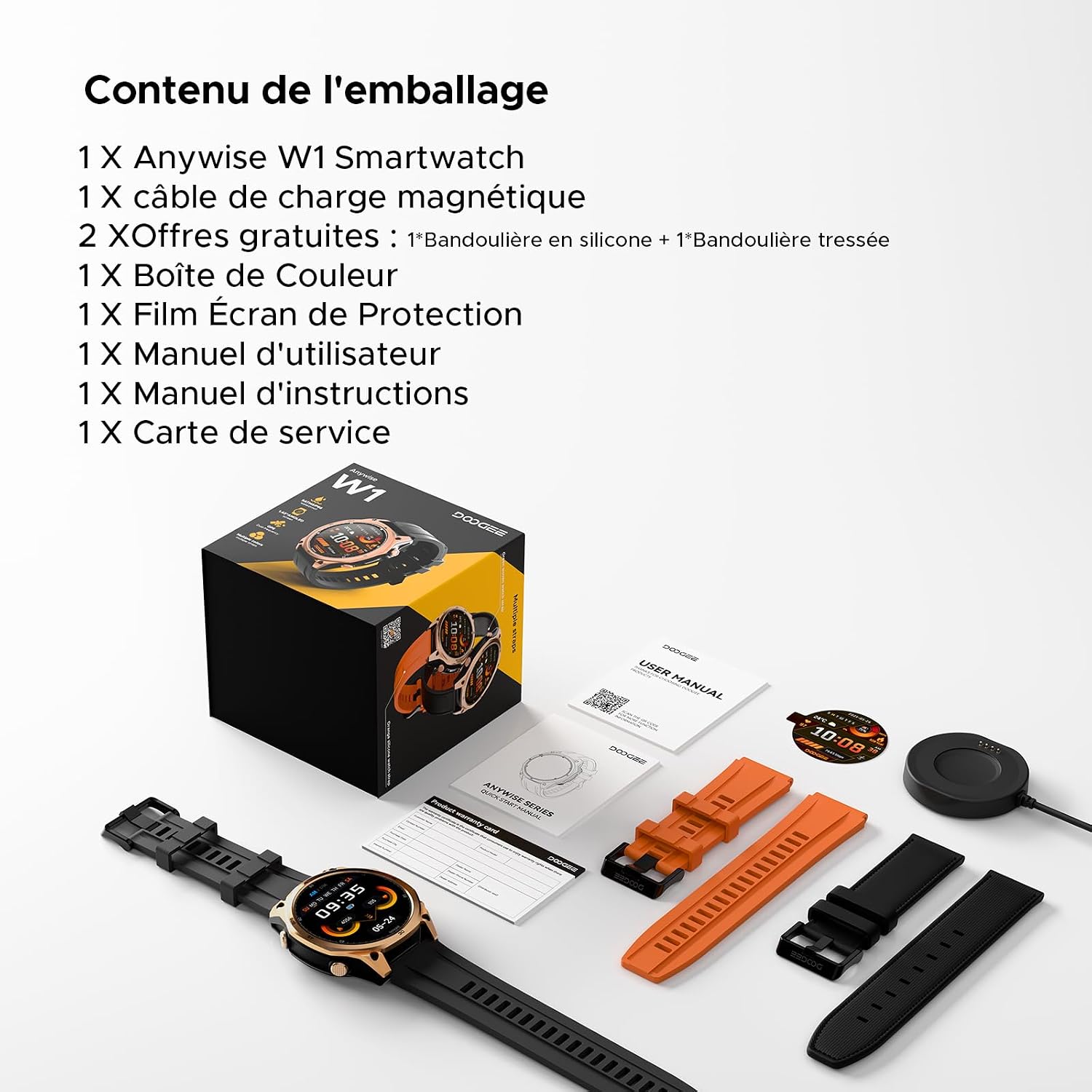
Image: The DOOGEE Anywise W1 Smartwatch, magnetic charging cable, and three watch bands are shown laid out, representing the package contents.
3. Product Overview
3.1 Watch Components
- 1.43-inch AMOLED Display: High-definition touchscreen for clear visibility.
- Physical Buttons: For navigation and function access.
- Heart Rate/Blood Oxygen Sensor: Located on the back of the watch.
- Charging Contacts: For magnetic charging cable.
- Microphone & Speaker: For Bluetooth calls and voice assistant.
- LED Flashlight: Integrated light source.

Image: The DOOGEE Anywise W1 Smartwatch with its main display showing various information such as time, date, temperature, heart rate, and step count.

Image: A close-up of the back of the DOOGEE Anywise W1 Smartwatch, highlighting the advanced health sensors for heart rate and blood oxygen monitoring.
4. Setup
4.1 Charging the Smartwatch
Before first use, fully charge your smartwatch. Connect the magnetic charging cable to the charging contacts on the back of the watch and plug the USB end into a power adapter (not included) or a computer's USB port.
- Ensure the charging contacts are clean and dry.
- The watch display will show the charging status.
- A full charge typically takes approximately 2 hours.
4.2 Power On/Off
- Power On: Press and hold the top physical button for a few seconds until the DOOGEE logo appears.
- Power Off: From the watch face, swipe down to access quick settings, then tap the power icon, or go to Settings > System > Power Off. Alternatively, press and hold the top physical button, then select 'Power Off' on the screen.
4.3 App Installation and Pairing
To unlock the full potential of your Anywise W1, download and install the companion app on your smartphone.
- Scan the QR code in the manual or on the watch screen, or search for 'Doogee Fit' in your smartphone's app store (Google Play Store for Android, Apple App Store for iOS).
- Install the 'Doogee Fit' app.
- Open the app and follow the on-screen instructions to create an account or log in.
- Enable Bluetooth on your smartphone.
- In the app, navigate to 'Device' or 'Add Device' and select 'DOOGEE Anywise W1' from the list of available devices.
- Confirm the pairing request on both your smartphone and the smartwatch.
The watch is compatible with iOS 13 and above, and Android 5.0 and above.

Image: The DOOGEE Anywise W1 Smartwatch paired with a smartphone running the 'Doogee Fit' application, demonstrating its broad compatibility with mobile devices.
4.4 Strap Installation
The DOOGEE Anywise W1 comes with interchangeable straps. To attach or detach a strap, locate the quick-release pins on the underside of the strap. Slide the pin to release or secure the strap into the watch lugs.
5. Operating Instructions
5.1 Basic Navigation
- Touchscreen: Swipe left/right to cycle through widgets, swipe up for notifications, swipe down for quick settings. Tap to select.
- Top Button: Press to return to the watch face, long press for power options.
- Bottom Button: Customizable shortcut for quick access to a specific function (e.g., sport modes).
5.2 Sport Modes
The watch supports over 170 sport modes. To access:
- From the watch face, press the bottom button (if configured) or navigate through the app list to find 'Workout' or 'Sport'.
- Select your desired activity (e.g., Walking, Running, Cycling).
- The watch will begin tracking your activity, including duration, distance, heart rate, and calories burned.
- To end a workout, swipe right or press a physical button, then select 'End'.

Image: A person cycling, wearing the DOOGEE Anywise W1 Smartwatch, which is actively tracking their workout.

Image: Visual representation of the 170+ sport modes available on the DOOGEE Anywise W1, including icons for walking, running, cycling, rowing, and elliptical training.
5.3 Health Monitoring
The Anywise W1 continuously monitors various health metrics:
- Heart Rate: Access the Heart Rate app on the watch to view real-time data and historical trends in the Doogee Fit app.
- Blood Oxygen (SpO2): Use the SpO2 app on the watch for on-demand measurements.
- Sleep Tracking: Wear the watch to bed for automatic sleep stage analysis (Awake, REM, Light, Deep sleep). View detailed reports in the app.
- Stress Monitoring: The watch can track stress levels throughout the day.
- Breathing Training: Guided breathing exercises are available to help manage stress.

Image: A person sleeping, with an overlay showing the DOOGEE Anywise W1 Smartwatch displaying detailed sleep stage analysis, including awake, REM, light, and deep sleep durations.
5.4 Bluetooth Calling
Once paired with your smartphone, you can make and receive calls directly from your watch.
- Answering Calls: When a call comes in, tap the green answer icon on the watch screen.
- Making Calls: Use the dial pad or access your contacts through the watch's phone app.
5.5 AI Voice Assistant
The watch integrates an AI voice assistant for hands-free control.
- Activate the voice assistant by tapping its icon or using a pre-set gesture/button.
- Speak commands for tasks like checking weather, setting alarms, or initiating calls.

Image: A user interacting with the DOOGEE Anywise W1 Smartwatch and their smartphone, showcasing the AI voice assistant's ability to control the phone hands-free for tasks like checking weather or sending messages.
5.6 GPS Usage
The integrated dual-band GPS (L1+L5) provides accurate location tracking for outdoor activities.
- GPS is automatically activated during outdoor sport modes.
- View your route and statistics in the Doogee Fit app after your workout.

Image: A person running on a bridge, wearing the DOOGEE Anywise W1 Smartwatch, which shows GPS navigation and activity data on its screen.
5.7 Flashlight and Compass
- Flashlight: Access the flashlight function from quick settings or the app list. The watch's LED will illuminate.
- Compass: Open the Compass app on the watch to view directional information. Ensure you are away from strong magnetic fields for accurate readings.

Image: The DOOGEE Anywise W1 Smartwatch showcasing its flashlight and compass features, with a person using the flashlight in a dark outdoor setting.
5.8 Other Features
The Anywise W1 includes additional functionalities:
- Music Control: Control music playback on your paired smartphone.
- Weather Updates: View current weather and forecasts.
- Stopwatch & Timer: For various timing needs.
- Alarm: Set alarms directly from the watch.
- Camera Remote: Use the watch as a remote shutter for your phone's camera.
- SOS Function: For emergency situations.
- Voice Recording: Record short voice memos.
- Find Phone: Locate your paired smartphone.

Image: Multiple screens of the DOOGEE Anywise W1 Smartwatch illustrating its connectivity features, including Bluetooth calls, remote photo capture, music control, and the 'find phone' function.
6. Maintenance
6.1 Cleaning
- Wipe the watch and straps regularly with a soft, damp cloth.
- Avoid using harsh chemicals or abrasive materials.
- Ensure the charging contacts are clean and dry before charging.
6.2 Water Resistance (5ATM)
The DOOGEE Anywise W1 is 5ATM water-resistant, meaning it can withstand pressures equivalent to a depth of 50 meters. This makes it suitable for swimming and showering. However, it is not recommended for diving or high-pressure water activities.
- Do not operate buttons underwater.
- Avoid exposure to hot water, steam, or detergents, which can compromise water resistance.
- After exposure to saltwater, rinse the watch with fresh water and dry thoroughly.

Image: The DOOGEE Anywise W1 Smartwatch being splashed with water, demonstrating its 5ATM water resistance, suitable for rainy days and swimming.
6.3 Battery Care
- Avoid extreme temperatures, which can degrade battery life.
- For long-term storage, charge the watch to about 50% and store it in a cool, dry place.
- The battery is non-removable. Do not attempt to replace it yourself.
7. Troubleshooting
| Problem | Possible Solution |
|---|---|
| Watch does not power on | Ensure the watch is fully charged. Press and hold the top button for 10-15 seconds to force a restart. |
| Cannot pair with smartphone | Ensure Bluetooth is enabled on your phone. Make sure the watch is discoverable. Restart both the watch and phone. Check app permissions. |
| Inaccurate health data | Ensure the watch is worn snugly on your wrist, not too tight or too loose. Clean the sensor area. Avoid excessive movement during measurements. |
| Short battery life | Reduce screen brightness, disable always-on display, limit notifications, and close unused apps. Frequent GPS use will consume more battery. |
| GPS not locking quickly | Ensure you are in an open outdoor area with a clear view of the sky. Sync GPS data via the app regularly. |
8. Specifications
| Feature | Detail |
|---|---|
| Model Name | AnywiseW1 |
| Display | 1.43-inch AMOLED, 240 x 135 resolution |
| Water Resistance | 5ATM (up to 50 meters) |
| GPS | Dual-Band GPS (L1+L5), supports GPS, GLONASS, Beidou, Galileo, QZSS, AGPS |
| Battery Capacity | 550 mAh Lithium-Polymer |
| Typical Battery Life | Up to 18 days (daily use), 50 days (standby), 40 hours (continuous GPS) |
| Connectivity | Bluetooth |
| Operating System | Proprietary |
| Compatibility | Android 5.0+ / iOS 13+ |
| Material | Titanium case |
| Sensors | Heart Rate, Blood Oxygen, Stress, Sleep Tracker, Compass |
| Special Features | 170+ Sport Modes, Bluetooth Calling, AI Voice Assistant, LED Flashlight |
9. Warranty and Support
9.1 Warranty Information
The DOOGEE Anywise W1 Smartwatch comes with a 2-year manufacturer's limited warranty from the date of purchase. This warranty covers manufacturing defects and workmanship under normal use. It does not cover damage caused by misuse, accidents, unauthorized modifications, or normal wear and tear.
Please retain your proof of purchase for warranty claims.
9.2 Customer Support
For technical assistance, troubleshooting, or warranty inquiries, please refer to the contact information provided on the included Service Card or visit the official DOOGEE website.
Online resources, including FAQs and software updates, may also be available on the DOOGEE support page.


