
NAVFS B1-E
NAVFS Smart Bird Feeder with Camera User Manual
Model: B1-E
1. Introduction
Thank you for choosing the NAVFS Smart Bird Feeder with Camera. This device allows you to observe and identify various bird species in your backyard with its integrated 2K camera, AI recognition, and solar charging capabilities. This manual provides essential information for the safe and efficient operation of your bird feeder.
2. Product Overview
2.1 Key Features
- AI Bird Identification: Recognizes over 10,000 bird species (30-day trial included).
- Dual Power Supply: Equipped with a 5200mAh rechargeable battery and a 3W solar panel for continuous operation.
- Storage Options: Supports cloud storage (30-day free trial) and local SD card storage (8-128GB, sold separately).
- High-Definition Camera: 2K lens with 160° wide-angle view, offering clear day and night vision.
- Enhanced Connectivity: Features a 2.4G WIFI connection (5G not supported) and an enhanced antenna for stable signal.
- Instant Notifications: Receive app alerts when birds are detected.
- Weatherproof Design: IP65 waterproof rating with a 1.3L large capacity container and drainage base.
- DIY Options: Includes six fruit holders and a jelly feeder for attracting diverse bird species.
2.2 Package Contents
Verify that all components are present in your package:
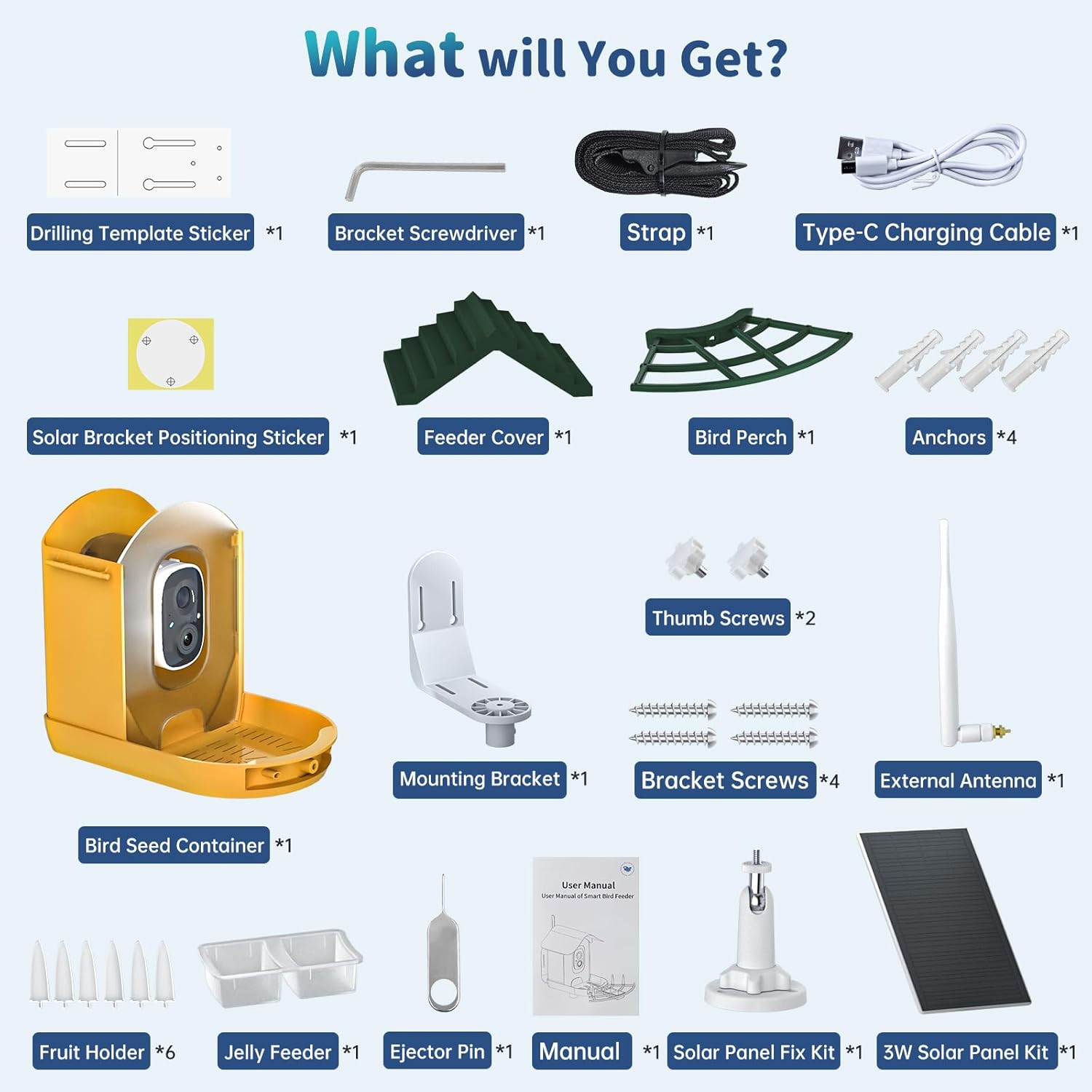
Figure 1: Included Components. The package contains the bird feeder unit, solar panel, mounting hardware, charging cable, and various accessories for bird feeding.
- Bird Seed Container with Camera Unit
- 3W Solar Panel Kit
- Mounting Bracket & Screws
- External Antenna
- Feeder Cover
- Bird Perch
- Fruit Holders (x6)
- Jelly Feeder
- Type-C Charging Cable
- Drilling Template Sticker, Solar Bracket Positioning Sticker
- Bracket Screwdriver, Ejector Pin
- User Manual (this document)
3. Setup Instructions
3.1 Charging the Battery
Before initial use, fully charge the internal 5200mAh battery using the provided Type-C charging cable. Connect the cable to the charging port on the camera unit and a standard USB power adapter (not included). The solar panel will maintain the charge during outdoor use, but an initial full charge ensures optimal performance.

Figure 2: Battery and Solar Power Supply. The feeder is powered by a 5200mAh rechargeable battery, continuously charged by a 3W solar panel.
3.2 Mounting the Bird Feeder
The NAVFS Smart Bird Feeder offers multiple installation options: wall mount, pole mount, or tree mount. Choose a location with good sunlight exposure for the solar panel and a clear view for the camera.

Figure 3: Different Installation Ways. The feeder can be mounted on a wall, pole, or tree using the provided hardware.
- Assemble the Feeder: Attach the bird perch and feeder cover to the main unit.
- Choose Mounting Method:
- Wall Mount: Use the drilling template to mark holes, drill, insert anchors, and secure the mounting bracket with screws. Attach the feeder to the bracket.
- Pole Mount: Ensure your pole has a maximum diameter of 0.97 inches. Secure the feeder to the pole using the appropriate bracket.
- Tree Mount: Use the provided strap to secure the feeder to a tree trunk.
- Install Solar Panel: Mount the solar panel in a location that receives direct sunlight for most of the day and connect its cable to the feeder unit.
- Attach External Antenna: Screw the external antenna onto the designated port on the camera unit for improved Wi-Fi signal.
3.3 App Installation and Wi-Fi Connection
Download the dedicated app for your NAVFS Smart Bird Feeder from your smartphone's app store. Follow the in-app instructions to connect the feeder to your 2.4GHz Wi-Fi network. Note: 5GHz Wi-Fi networks are not supported.
4. Operating Instructions
4.1 Filling the Feeder
Open the feeder cover and fill the main compartment with bird seed. Utilize the six fruit holders and the jelly feeder to offer a variety of food options, such as fresh fruit pieces or syrup, to attract different bird species.
4.2 AI Bird Identification and Notifications
The feeder's camera uses AI to detect and identify bird species. When a bird visits, you will receive an instant notification on your connected smartphone app, detailing the detected species.

Figure 4: Advanced AI Bird Identification. The feeder automatically identifies over 10,000 bird species.

Figure 5: Instant Notifications. Receive real-time alerts on your app when a bird is recognized.
4.3 Live Video and Recording
Access the live 2K video feed through the app to watch birds in real-time. The camera provides clear images both during the day and at night.

Figure 6: 2K High-Definition Camera. Enjoy clear day and night vision with a 160° wide-angle view.
Recorded videos are saved to either the cloud storage (subscription required after trial) or a locally installed SD card (sold separately, supports 8-128GB).

Figure 7: Supports Two Storage Methods. Choose between local SD card storage or cloud storage for your recordings.
5. Maintenance
5.1 Cleaning the Feeder
Regular cleaning is essential to prevent the spread of disease among birds. Disassemble the feeder components, clean them with mild soap and water, rinse thoroughly, and allow them to dry completely before reassembling and refilling.
5.2 Weather Resistance
The NAVFS Smart Bird Feeder is IP65 waterproof rated, designed to withstand various outdoor weather conditions. Its drainage base helps prevent water accumulation.

Figure 8: Friendly Design with Bird Feeder Camera. The feeder features IP65 weather resistance and a drainage base for outdoor durability.
6. Troubleshooting
| Problem | Possible Cause | Solution |
|---|---|---|
| Feeder not connecting to Wi-Fi | Incorrect Wi-Fi password; 5GHz network used; weak signal; feeder too far from router. | Ensure correct 2.4GHz Wi-Fi password. Move feeder closer to router or use a Wi-Fi extender. Restart feeder and router. |
| No bird detection notifications | App notifications disabled; low battery; camera obstruction; AI trial expired. | Check app notification settings. Ensure battery is charged. Clear any obstructions from camera view. Check AI subscription status. |
| Poor video quality | Dirty camera lens; poor Wi-Fi signal; low light conditions. | Clean the camera lens gently. Improve Wi-Fi signal strength. Ensure adequate lighting for optimal night vision. |
| Battery not charging via solar panel | Insufficient sunlight; solar panel obstructed or dirty; faulty connection. | Relocate solar panel to an area with direct sunlight. Clean the solar panel surface. Check cable connections. Manually charge via Type-C cable if needed. |
7. Specifications
- Model: B1-E
- Brand: NAVFS
- Material: Acrylonitrile Butadiene Styrene (ABS)
- Product Dimensions: 12.01"L x 7.28"W x 10.87"H
- Item Weight: 2.65 Pounds
- Power Source: Battery Powered (5200mAh Lithium Ion, included) & Solar Powered (3W Solar Panel)
- Camera Resolution: 2K HD
- Field of View: 160° Wide Angle
- Connectivity: 2.4Ghz Wi-Fi (5G not supported)
- Storage: Cloud Storage (subscription after trial), SD Card (8-128GB, sold separately)
- Waterproof Rating: IP65
- Capacity: 1.3 Liters (seed container)
- Special Features: Built-In Camera, Rain Proof, Removable Roof, AI Bird Identification
8. Warranty and Support
For warranty information and technical support, please refer to the contact details provided in the product packaging or visit the official NAVFS website. Our customer service team is available to assist you with any questions or issues you may encounter.

Figure 9: After-sales Service Support. Contact our support team for assistance.