
1. Introduction
The GoPro Fluid Pro AI 3-Axis Gimbal Stabilizer is designed for videographers, vloggers, and content creators seeking enhanced video stabilization and intelligent subject tracking. This premium gimbal is compatible with mobile phones, GoPro cameras, and select compact point-and-shoot cameras, offering a versatile solution for capturing smooth, professional-quality footage. It features an integrated AI subject tracking module, a built-in fill light, and a robust design capable of supporting heavier camera setups.
2. What's Included
Carefully unpack your GoPro Fluid Pro AI Gimbal Stabilizer and verify that all the following components are present:
- Gimbal Unit
- AI Tracking Module
- Mobile Phone Mounting Bracket
- GoPro Camera Mounting Bracket
- GoPro Finger Adapter
- Thumb Screw
- Tripod Base
- Gimbal USB-C Charging Cable
- Camera USB-C Charging Cable
- Zippered Case
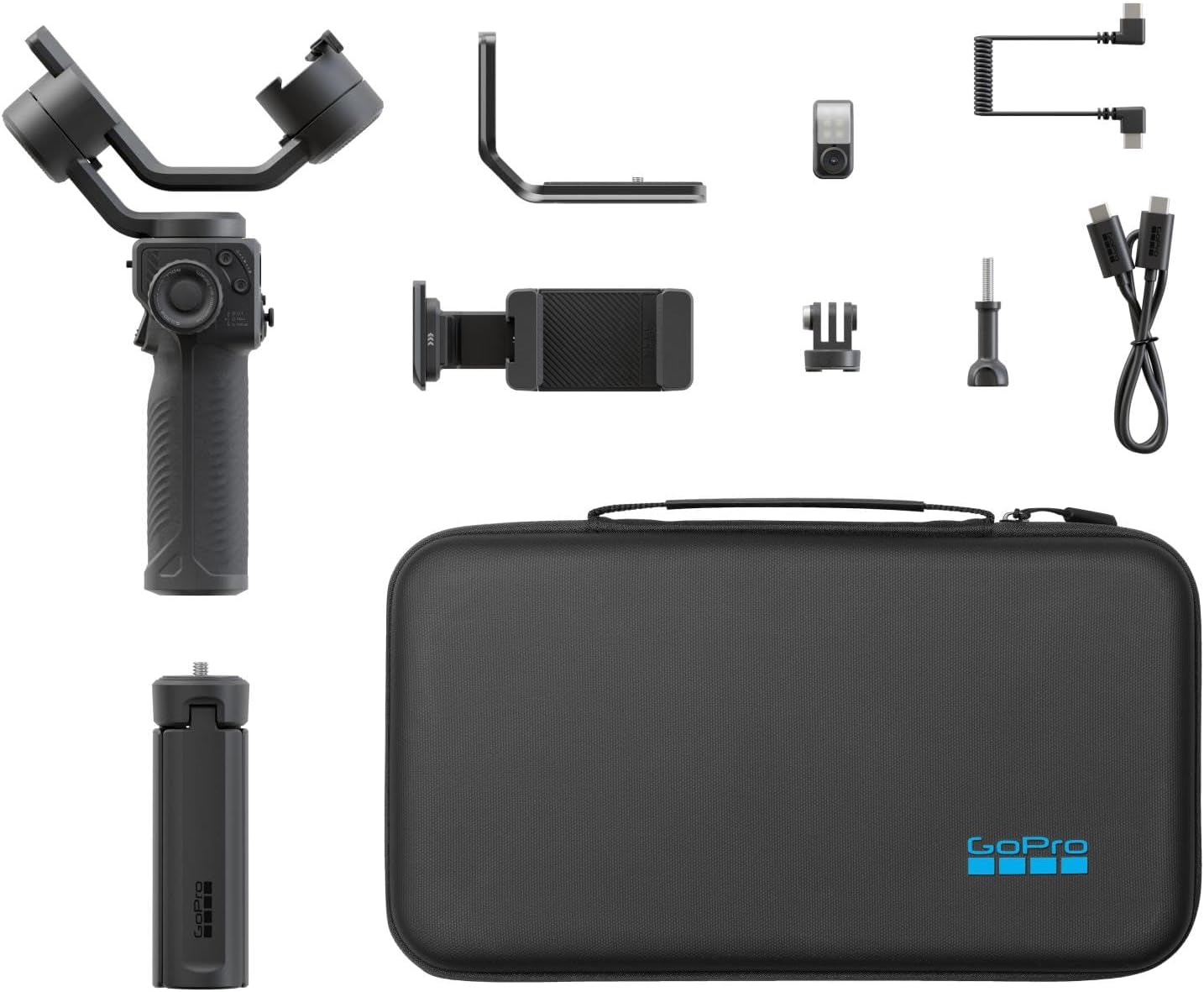
Image: All included components for the GoPro Fluid Pro AI Gimbal Stabilizer, neatly arranged with the gimbal, various mounts, cables, and zippered case.
3. Product Overview
The Fluid Pro AI Gimbal is engineered for stability and intelligent functionality. Its 3-axis design ensures smooth footage across various movements, while the AI tracking module provides precise subject recognition and follow capabilities. The integrated fill light enhances lighting conditions for superior video quality.

Image: The GoPro Fluid Pro AI Gimbal Stabilizer shown with a smartphone securely mounted, ready for use.

Image: The GoPro Fluid Pro AI Gimbal Stabilizer shown with a GoPro camera mounted, demonstrating its compatibility.
Key Features:
- Professional 3-Axis Stabilization: Ensures smooth, cinematic footage by compensating for unwanted camera movements.
- AI Subject Tracking: An intelligent module that locks onto a person's face or body, automatically keeping them in frame with precision.
- Integrated Fill Light: Provides adjustable illumination for balanced lighting in various shooting conditions.
- Wireless Camera Control: Offers convenient control over compatible GoPro cameras (HERO9 Black, HERO10 Black, HERO11 Black, HERO12 Black, HERO13 Black) via Bluetooth.
- Versatile Device Compatibility: Supports mobile phones, GoPro cameras, and select compact point-and-shoot cameras with interchangeable mounts.
- Extended Battery Life & Device Charging: Long-lasting battery (up to 18 hours gimbal-only, 11 hours with AI tracking, 6 hours with AI tracking and 100% fill light) can also charge your phone or camera.
- Intuitive Control Interface: Easy-to-use controls, including a roller for precise motor rotation, focus, and fill light adjustments.

Image: A detailed view of the gimbal's control panel, highlighting the joystick, mode buttons, and focus/roll wheel.

Image: A close-up of the AI Tracking Module and the integrated fill light, showing their placement on the gimbal.
4. Setup and Assembly
4.1. Attaching Your Device
- Select the Correct Mount: Choose either the Mobile Phone Mounting Bracket or the GoPro Camera Mounting Bracket based on your device. For GoPro cameras, attach the GoPro Finger Adapter to the camera before mounting.
- Secure the Device: Carefully place your smartphone or GoPro into the chosen mounting bracket. Ensure it is firmly secured and centered.
- Attach to Gimbal: Slide the mounted device onto the gimbal's quick-release plate and lock it into position.

Image: The gimbal with a smartphone attached, standing on its tripod base, illustrating a stable setup.

Image: The gimbal with a GoPro camera attached, standing on its tripod base, showing an alternative device setup.
4.2. Balancing the Gimbal
Proper balancing is crucial for optimal performance and battery life. Adjust the gimbal arms until your device remains level and stable when the gimbal is powered off. Refer to the detailed balancing instructions in the full user manual for precise adjustments.
4.3. Connecting Devices
For wireless control, pair your compatible GoPro camera (HERO9 Black, HERO10 Black, HERO11 Black, HERO12 Black, HERO13 Black) or smartphone via Bluetooth. Consult your device's manual for specific Bluetooth pairing instructions.
5. Operating Instructions
5.1. Power On/Off
Press and hold the power button for 3 seconds to power the gimbal on or off.
5.2. Gimbal Modes
The gimbal offers various modes for different shooting scenarios. Use the mode button (M) to cycle through modes such as Pan Follow, Lock Mode, and POV (Point of View). Each mode provides distinct stabilization characteristics for creative control.

Image: A user holding the gimbal with a GoPro, demonstrating handheld operation and control access.
5.3. AI Subject Tracking
Activate the AI Tracking Module to enable automatic subject tracking. The module can be oriented for forward or rear-facing tracking. It identifies and follows a person's face or body, ensuring they remain centered in the frame. Hand gestures can also be used for easy self-capture activation.

Image: A user crouching to adjust the gimbal on its tripod, potentially setting up for AI tracking.
5.4. Integrated Fill Light
The built-in LED fill light can be adjusted for color temperature and brightness using the gimbal's controls. This feature is ideal for improving lighting in low-light conditions or for adding a professional touch to your shots.
5.5. Device Charging
The gimbal's long-lasting battery can serve as a power bank to charge your smartphone or camera during extended shooting sessions. Connect your device using the appropriate USB-C charging cable.

Image: The gimbal connected to a smartphone via a cable, indicating that it is charging the phone.
5.6. GoPro Fluid App
Download the GoPro Fluid App for access to intuitive video and photo capture tools, advanced gimbal settings, and creative features designed to maximize your gimbal's potential.
6. Maintenance
To ensure the longevity and optimal performance of your GoPro Fluid Pro AI Gimbal Stabilizer, follow these maintenance guidelines:
- Cleaning: Use a soft, dry cloth to clean the gimbal. Avoid using harsh chemicals or abrasive materials.
- Storage: Store the gimbal in its zippered case in a cool, dry place when not in use.
- Battery Care: For extended storage, charge the battery to approximately 50-60% every three months to maintain battery health.
- Avoid Overloading: Do not exceed the recommended weight capacity for mounted devices.
7. Troubleshooting
If you encounter issues with your gimbal, consider the following common troubleshooting steps:
- Gimbal Not Stabilizing: Ensure the device is properly balanced. Recalibrate the gimbal if necessary (refer to the full manual for calibration steps).
- Connection Issues: Verify Bluetooth is enabled on both the gimbal and your device. Ensure your device is compatible with the gimbal's Bluetooth functionality.
- Power Issues: Check the battery level. If the gimbal does not power on, ensure it is fully charged.
- AI Tracking Malfunction: Ensure the AI Tracking Module is clean and unobstructed. Confirm proper lighting conditions for optimal tracking performance.
For more detailed troubleshooting or persistent issues, please refer to the comprehensive online user manual or contact GoPro customer support.
8. Specifications
| Feature | Specification |
|---|---|
| Item Package Dimensions L x W x H | 13.66 x 7.87 x 2.87 inches |
| Package Weight | 1.32 Kilograms |
| Item Dimensions LxWxH | 3.15 x 7.87 x 14.17 inches |
| Item Weight | 551 Grams |
| Brand Name | GoPro |
| Warranty Description | Limited Lifetime Warranty |
| Model Name | AGMSS |
| Color | Black |
| Number of Items | 1 |
| Manufacturer | GoPro |
| Part Number | AGMSS-011 |
| Included Components | Gimbal, AI Tracking Module, Mobile Phone Mounting Bracket, GoPro Camera Mounting Bracket, GoPro Finger Adapter, Thumb Screw, Tripod Base, Gimbal USB-C Charging Cable, Camera USB-C Charging Cable, Zippered Case |
| ASIN | B0FSNXF34L |
| Compatible Devices | Smartphones and GoPro Cameras |
| UPC | 810116384327 |
| Compatible Camcorder Models | GoPro HERO10 Black, GoPro HERO11 Black, GoPro HERO12 Black, GoPro HERO13 Black, GoPro HERO9 Black |
9. Warranty and Support
The GoPro Fluid Pro AI Gimbal Stabilizer comes with a Limited Lifetime Warranty. For detailed terms and conditions, please refer to the warranty information provided with your product packaging or visit the official GoPro website.
For technical support, product registration, or to access additional resources, please visit the GoPro Support Page.


