
Guide Sensmart TU 635 LRF 3.0
Guide Sensmart TU 635 LRF 3.0 Thermal Riflescope
User Instruction Manual
Introduction
The Guide Sensmart TU 635 LRF 3.0 Thermal Riflescope is an advanced optical device designed for precision and reliability in various environments. This manual provides essential information for the proper setup, operation, and maintenance of your device. Please read it thoroughly before use to ensure optimal performance and safety.
This thermal riflescope integrates high-performance thermal imaging with a laser rangefinder and ballistic calculator, offering enhanced capabilities for hunters, professionals, and tactical users.
Key Features
- High-Performance Thermal Imaging: 640x512 resolution with a 35mm lens for clear visibility and up to 2800yd detection range.
- Magnification: 3x base magnification and 8x digital zoom for precise targeting.
- Integrated Laser Rangefinder: Accurately locate targets up to 1600 yards (Safety Level-Class I, Power Output <1mW).
- AMOLED Display: 1920x1080 wide AMOLED display for superior contrast and detail.
- Shutterless Design: Provides uninterrupted visuals, eliminating clicking sounds and image freezing for real-time footage.
- Customizable Reticles: 10 reticle options and 7 color palettes with adjustable brightness and contrast.
- Durability: IP68 protection ensures reliable performance in challenging conditions.
- Connectivity: Dual-band Wi-Fi for seamless integration with mobile devices.
Package Contents
Verify that all items are present and in good condition upon unpacking:
- Guide Sensmart TU 635 LRF 3.0 Thermal Riflescope
- QD 30MM Scope Mount
- Carrying Bag
- Rubber Eyecup
- 2x 18650 Batteries
- Battery Charger

Image: Included accessories for the Guide TU 635 LRF 3.0 Thermal Scope, showing the scope mount, rubber eyecup, carrying bag, 18650 batteries, charger, and 5V adapter.
Setup Guide
1. Battery Installation
- Locate the battery compartment on the side of the riflescope.
- Turn the lever to align with the white dot to unlock the battery cap.
- Insert the 18650 rechargeable battery(ies) according to the polarity indicators.
- Securely close the battery cap by turning the lever back to its locked position.
The device operates on 18650 batteries, providing approximately 5 hours of runtime per battery. Two batteries are included, offering up to 10 hours of continuous use.

Image: The side of the thermal scope showing the battery compartment and USB-C interface, highlighting the 12-hour battery life with 18650 standard batteries.
2. Mounting the Riflescope
Attach the QD 30MM Scope Mount to your rifle's Picatinny rail. Ensure the mount is securely fastened to prevent movement during use. The scope is designed to withstand recoil from up to .375 H&H Magnum or 12-gauge shotgun.

Image: Diagram illustrating key components of the TU 635 LRF 3.0, including the Laser Rangefinder, Central Focus Wheel, Digital Zoom Lever, 640x512 Thermal Sensor, and QD 30mm Scope Mount.
3. Adjusting the Eyecup and Diopter
The rubber eyecup at the back can be adjusted or removed. It helps protect your eye from recoil and focuses your vision. Adjust the diopter ring near the eyecup to fine-tune the display for your individual eyesight, ensuring a clear image.
Operating Instructions
1. Power On/Off and Standby
- Power On: Press and hold the power button (located on the side) to turn on the device.
- Power Off: Press and hold the power button for 3 seconds until a prompt appears on the screen, then confirm to power off.
- Standby Mode: Briefly press and release the power button to enter or exit standby mode. This conserves battery while allowing for quick reactivation.
2. Focus and Zoom
- Focus Ring: Use the focus ring at the front of the scope to achieve a sharp image of your target.
- Digital Zoom: Utilize the digital zoom lever for enhanced targeting precision. The scope offers 3x base magnification and up to 8x zoom.
3. Laser Rangefinder (LRF)
The integrated LRF is located on the side of the optic. It can measure distances up to 1600 yards. Activate the LRF via the designated button to obtain precise range data, which can be displayed on the screen.
4. Ballistic Calculator
The TU 635 LRF 3.0 features a ballistic calculator. You can program ballistic data into the optic, often through a connected mobile application, to assist with shot placement at various ranges.
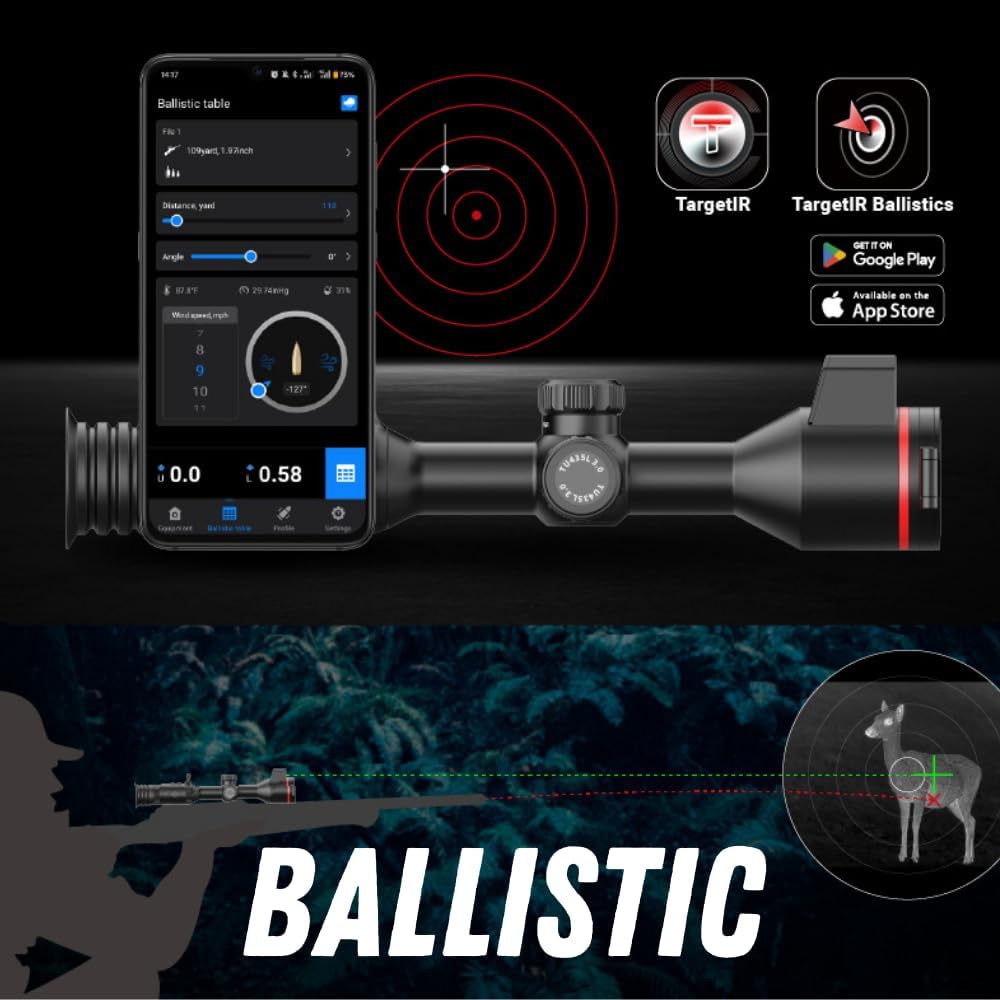
Image: The ballistic calculator interface shown on a smartphone screen, integrated with the Guide TU 635 LRF 3.0, using the TargetIR app.
5. Reticle Settings and Color Palettes
The riflescope offers 10 reticle options and 7 color palettes. These can be adjusted via the device's menu or a connected mobile application to suit your preference and environmental conditions. Adjustable brightness and contrast are also available for optimal visibility.
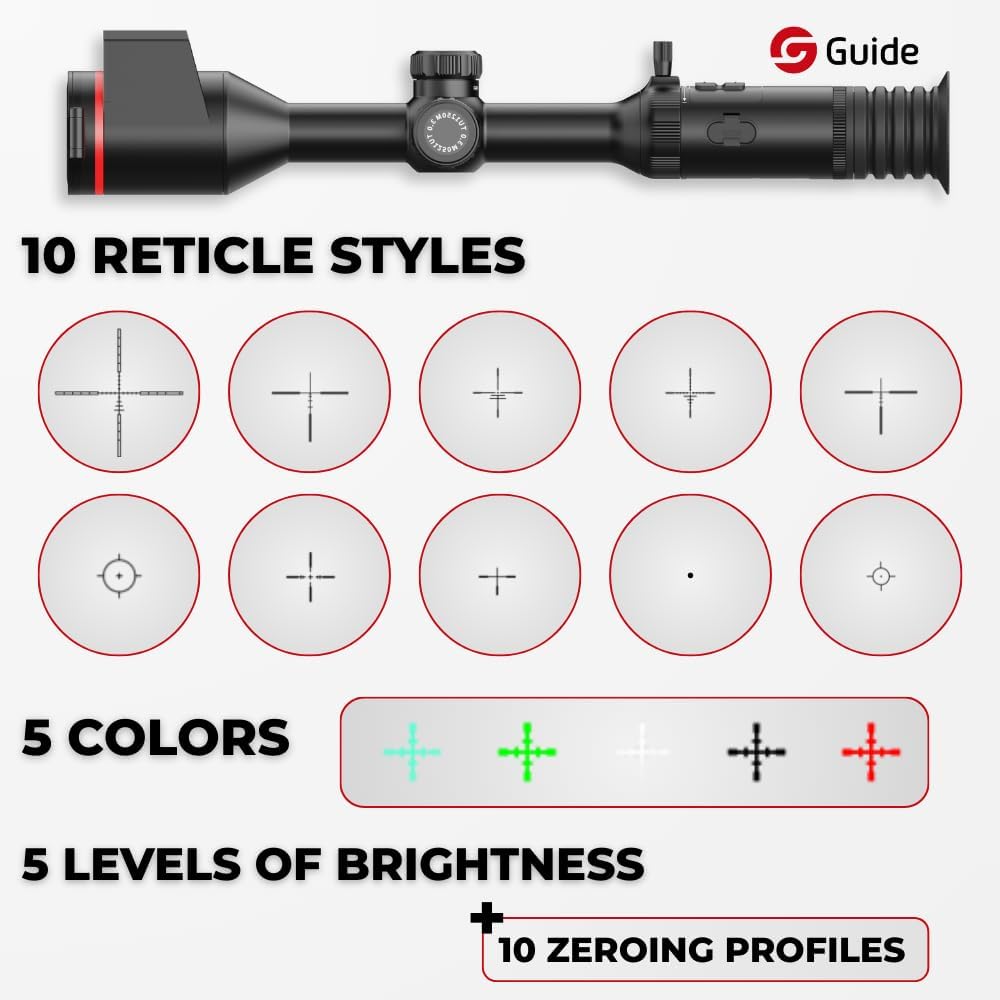
Image: Display of 10 reticle styles, 5 color options, 5 levels of brightness, and 10 zeroing profiles available on the Guide TU 635 LRF 3.0.
6. Video Recording and Wi-Fi Connectivity
The device has a built-in video camera (1024x768 resolution) for recording footage. You can transfer videos and photos via the USB-C port. The riflescope also features dual-band Wi-Fi, allowing you to connect your smartphone via a dedicated app (e.g., 'Storm S6 R'). This enables live streaming and manipulation of controls directly from your phone. The app is not required for basic scope operation.
Maintenance
- Cleaning: Use a soft, lint-free cloth to clean the lenses and exterior of the device. Avoid abrasive materials or harsh chemicals.
- Battery Care: Always use the provided charger for the 18650 batteries. Store batteries in a cool, dry place when not in use.
- USB-C Port: Ensure the USB-C port cover is fully secured to maintain the device's IP68 waterproof rating.
- Storage: Store the riflescope in its carrying bag in a dry, temperature-controlled environment.
Troubleshooting
- Device Not Powering On: Check battery charge and ensure batteries are correctly inserted.
- Unclear Image: Adjust the diopter and focus ring. Ensure lenses are clean.
- Wi-Fi Connectivity Issues: Ensure the Wi-Fi function is enabled on the scope and your mobile device. Verify you are connecting to the correct network (e.g., 'Storm S6 R').
- Laser Rangefinder Inaccuracy: Ensure the target is within the effective range (up to 1600 yards) and there are no obstructions.
For persistent issues, refer to the full user manual or contact customer support.
Specifications
| Attribute | Value |
|---|---|
| Brand | Guide Sensmart |
| Model Name | Guide TU 635 LRF 3.0 |
| Color | Black |
| Style | Tactical |
| Product Dimensions | 11.3"L x 3.5"W x 3.5"H |
| Item Weight | 47.6 Ounces |
| Material | Metal |
| Magnification Minimum | 3 x |
| Magnification Maximum | 8 x |
| Objective Lens Diameter | 35 Millimeters |
| Compatible Devices | Rifle |
| Mounting Type | Integral Mount |
| Night Vision | Yes |
| Eye Relief | 35 Millimeters |
| Reticle Type | Duplex |
Warranty and Support
The Guide Sensmart TU 635 LRF 3.0 Thermal Riflescope comes with a 10-Year Warranty. For technical support, service, or warranty claims, please contact Guide Sensmart customer service. Refer to the official Guide Sensmart website for the most up-to-date contact information and support resources.
Related documentsTU 635 LRF 3.0


Ask a question about this manual
Ask about setup, troubleshooting, compatibility, parts, safety, or missing instructions. Manuals+ will review the question and use this page’s manual context to help answer it.