
Introduction
Thank you for choosing the JUMMICO VC-0769A-3-0925 Smart Self-Cleaning Cat Litter Box. This manual provides detailed instructions for the setup, operation, maintenance, and troubleshooting of your new device. Please read it thoroughly to ensure safe and efficient use, providing a clean and comfortable environment for your feline companion.
Important Safety Information
- Always ensure the device is placed on a stable, level surface.
- Do not immerse the main unit in water or other liquids.
- Keep children and pets away from the device during operation to prevent injury.
- Unplug the device before cleaning or performing any maintenance.
- Use only the provided power adapter.
- Do not use the device if any part is damaged. Contact customer support for assistance.
Package Contents
Upon unboxing, you should find the following components:
- Main Unit (with pre-installed rotating drum)
- Cat Ear Shaped Top Cover
- Waste Collection Drawer
- 4 Support Legs
- Cleaning Brush
- Scented Pebble with Holder
- Power Adapter
- User Manual
- Plastic Waste Bags
Setup Guide
- Unboxing: Carefully remove all components from the packaging. Note the secure packaging with thick padding and protection around main parts.
- Remove Shipping Protection: Locate and remove all shipping tape and the red safety tabs that secure the rotating drum during transit.
- Install Support Legs: Turn the main unit upside down. Insert the four support legs into their designated slots on the base until they click into place.
- Prepare Waste Drawer: Take the waste collection drawer. Line it with one of the provided plastic waste bags, ensuring it fits snugly. Insert the scented pebble into its holder and place it inside the waste drawer to help control odors.
- Insert Waste Drawer: Slide the prepared waste drawer into the base of the main unit until it locks securely.
- Attach Top Cover: Place the cat ear shaped top cover securely onto the top of the main unit.
- Connect Power: Plug the power adapter into the designated port at the back of the unit, then connect it to a power outlet.
The entire assembly process is straightforward and typically takes about 10 minutes.
Video: Assembly and Unboxing Guide. This video demonstrates the unboxing process, removal of protective packaging, assembly of the support legs, and preparation of the waste drawer.
Operating Instructions
Automatic Cleaning Cycle
The JUMMICO Smart Self-Cleaning Cat Litter Box is designed for convenience. After your cat uses the litter box, the system automatically initiates a cleaning cycle. The internal drum slowly rotates, sifting the clean litter and separating clumps, which are then deposited into the sealed waste drawer below. The clean litter is returned to the main compartment, ensuring a fresh and hygienic environment for every use.

Image: The automatic cleaning mechanism sifting litter, ensuring a clean surface after each use.
Quiet Operation
The cleaning process is remarkably quiet, operating at approximately 35 decibels. This ensures that neither you nor your cat will be disturbed by the cleaning cycles, even during nighttime hours.

Image: A cat sleeping peacefully next to the litter box, illustrating its ultra-silent operation.
Smart App Control
Connect your litter box to the dedicated mobile application via 2.4 GHz Wi-Fi. The app allows you to:
- Monitor your cat's weight, visit frequency, and duration.
- Receive alerts and track your pet's health status in real-time.
- Adjust cleaning settings and ambient lighting.

Image: A user interacting with the mobile application to monitor cat activity and control litter box settings.
Odor Control System
The litter box features a triple-action odor control system:
- A sealed waste collection bin prevents odors from escaping.
- An integrated scent filter neutralizes unpleasant smells.
- The overall design helps contain odors within the unit.

Image: Visual representation of the odor control system, highlighting the sealed waste bin and scent filter.
Advanced Safety Sensors
Equipped with 9 intelligent sensors (infrared, weight, and radar), the litter box ensures your cat's safety. The anti-pinch protection system immediately stops operation if any movement is detected, preventing accidents.
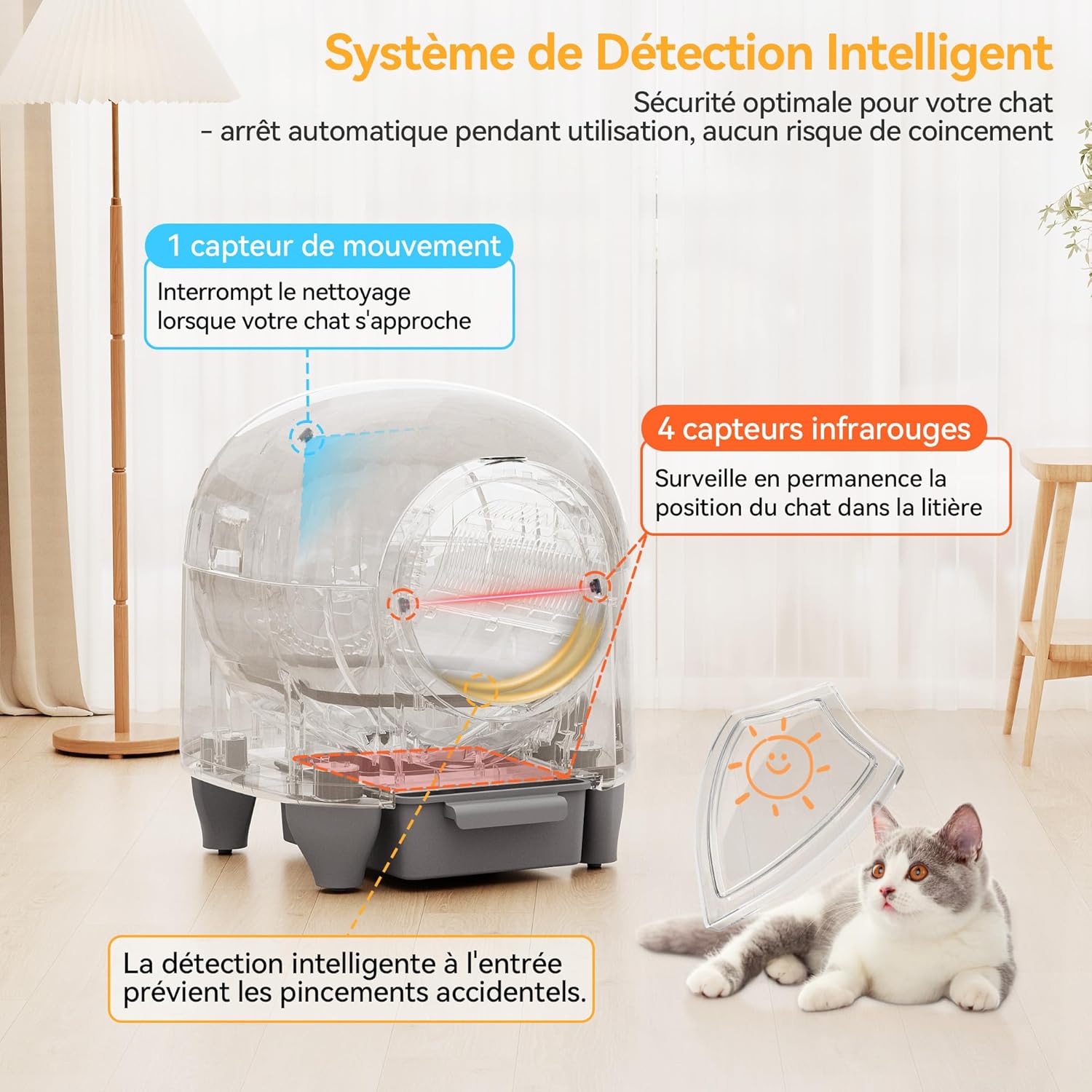
Image: A diagram illustrating the placement and function of the 9 intelligent sensors for enhanced safety.
Video: Overview of Automatic Litter Box Features. This video demonstrates the cat's interaction with the litter box, the automatic cleaning cycle, and the mobile app interface for monitoring and control.
Maintenance
Waste Bag Replacement
The integrated 8.5-liter waste collector allows for up to 10 days of autonomous operation for a single cat. To replace the waste bag:
- Unlock and pull out the waste collection drawer from the base.
- Carefully tie the used waste bag and dispose of it.
- Line the drawer with a new plastic waste bag.
- Reinsert the waste drawer into the base until it clicks into place.
Cleaning the Unit
Regular cleaning ensures optimal performance and hygiene. Unplug the device before cleaning.
- Wipe the exterior of the unit with a soft, damp cloth.
- The rotating drum can be removed for thorough cleaning. Unlock the drum, remove it, clean with mild soap and water, rinse, and dry completely before reassembling.
- Use the provided cleaning brush for quick spot cleaning of the interior.
Troubleshooting
| Issue | Possible Cause | Solution |
|---|---|---|
| No response after connecting to power. | Power cord not properly connected. | Check if the power cord is properly connected. |
| Unable to connect to Wi-Fi. | Incorrect Wi-Fi password or network issues. | Ensure correct Wi-Fi password and that your device supports 2.4 GHz Wi-Fi. |
| Litter box not cleaning automatically. | Automatic mode not activated or cat detected. | Ensure automatic mode is active. If a cat is detected, the cleaning cycle will be delayed. |
| Drum not rotating correctly. | Drum not installed securely. | Ensure the drum is properly secured. |
| Anti-pinch function triggered abnormally. | Obstruction or sensor malfunction. | Check for obstructions. Clean infrared sensors. |
| Indicator lights flashing rapidly. | Error or malfunction. | Refer to the app for specific error codes or contact support. |
| Cat's actual weight differs from displayed weight. | Device not placed on a flat surface or movement during weighing. | Place the device on a flat, stable surface. Ensure no movement during weighing. |
Specifications
- Model Number: VC-0769A-3-0925
- Dimensions (L x W x H): 51 x 53 x 55 cm
- Product Weight: 13 Kilograms
- Color: White
- Material: Polypropylene (PP)
- Capacity: 90 Liters (litter compartment), 8.5 Liters (waste collector)
- Special Features: Cover, Smart App Control, 9 Safety Sensors, Odor Control
- Specific Uses: Cat Litter Box
- UPC: 788418912022
Warranty and Support
The JUMMICO VC-0769A-3-0925 Smart Self-Cleaning Cat Litter Box comes with a 24-month warranty from the date of purchase. This warranty covers manufacturing defects and malfunctions under normal use conditions.
For any questions, technical support, or warranty claims, please contact JUMMICO customer service through your retailer or the official JUMMICO website. Please have your model number and proof of purchase ready when contacting support.