
1. Introduction
Thank you for choosing the THREEKEY Qi2 25W Fast Charging Pad. This magnetic wireless charger is designed to provide efficient and safe charging for your compatible devices, featuring Qi2.2 certification, a high-speed cooling fan, and strong magnetic alignment. This manual provides essential information for setup, operation, maintenance, and troubleshooting to ensure optimal performance and longevity of your device.

Image 1.1: THREEKEY Qi2 25W Wireless Charger highlighting its official Qi2 25W certification.
2. Package Contents
Please verify that all items listed below are included in your package:
- Wireless Charging Pad (x2)
- 6.6ft USB Type-C to C Cable (x2)
- 45W Adapter (x2)
- User Manual (x1)

Image 2.1: Contents of the THREEKEY CW305 package, including two charging pads, cables, and adapters.
3. Safety Information
To ensure safe operation and prevent damage, please read and adhere to the following safety guidelines:
- Do not expose the charger to water, moisture, or extreme temperatures.
- Avoid dropping or subjecting the charger to strong impacts.
- Do not disassemble, modify, or attempt to repair the device. This will void the warranty.
- Keep the charger away from medical implants (e.g., pacemakers) to prevent interference.
- Use only the provided cables and adapters, or certified equivalents, to ensure optimal performance and safety.
- Ensure proper ventilation around the charger during use.
- The charger features overheating protection. If it becomes excessively hot, disconnect it immediately.

Image 3.1: The THREEKEY charger is designed for safe and fast charging, including features for restful sleep.
4. Setup Guide
Follow these steps to set up your THREEKEY Qi2 25W Fast Charging Pad:
- Connect the Cable: Insert one end of the provided USB Type-C to C cable into the charging port on the THREEKEY Wireless Charging Pad.
- Connect the Adapter: Insert the other end of the USB Type-C to C cable into the provided 45W power adapter.
- Power On: Plug the 45W power adapter into a wall outlet. The charging pad is now ready for use.
- Place Your Device: Place your compatible device (e.g., iPhone) onto the center of the charging pad. The magnetic alignment will automatically snap your device into the optimal charging position.

Image 4.1: The 6.6ft cable provides flexibility for charging your device comfortably.
5. Operating Instructions
Using your THREEKEY Qi2 25W Fast Charging Pad is straightforward:
- Magnetic Alignment: The charger features strong magnets that automatically align your MagSafe-compatible device for optimal charging efficiency. Simply place your device on the pad, and it will snap into place.
- Charging Indication: The charging pad may feature an indicator light (e.g., blue light) to confirm that charging is active. Refer to the product's visual cues for status.
- Cooling Fan: The built-in high-speed cooling fan activates automatically to maintain a safe temperature during charging, preventing overheating. It features an optional quiet smart fan with an on/off switch for user preference.
- Flexible Orientation: Once magnetically attached, your device can be rotated between horizontal and vertical orientations without interrupting charging.
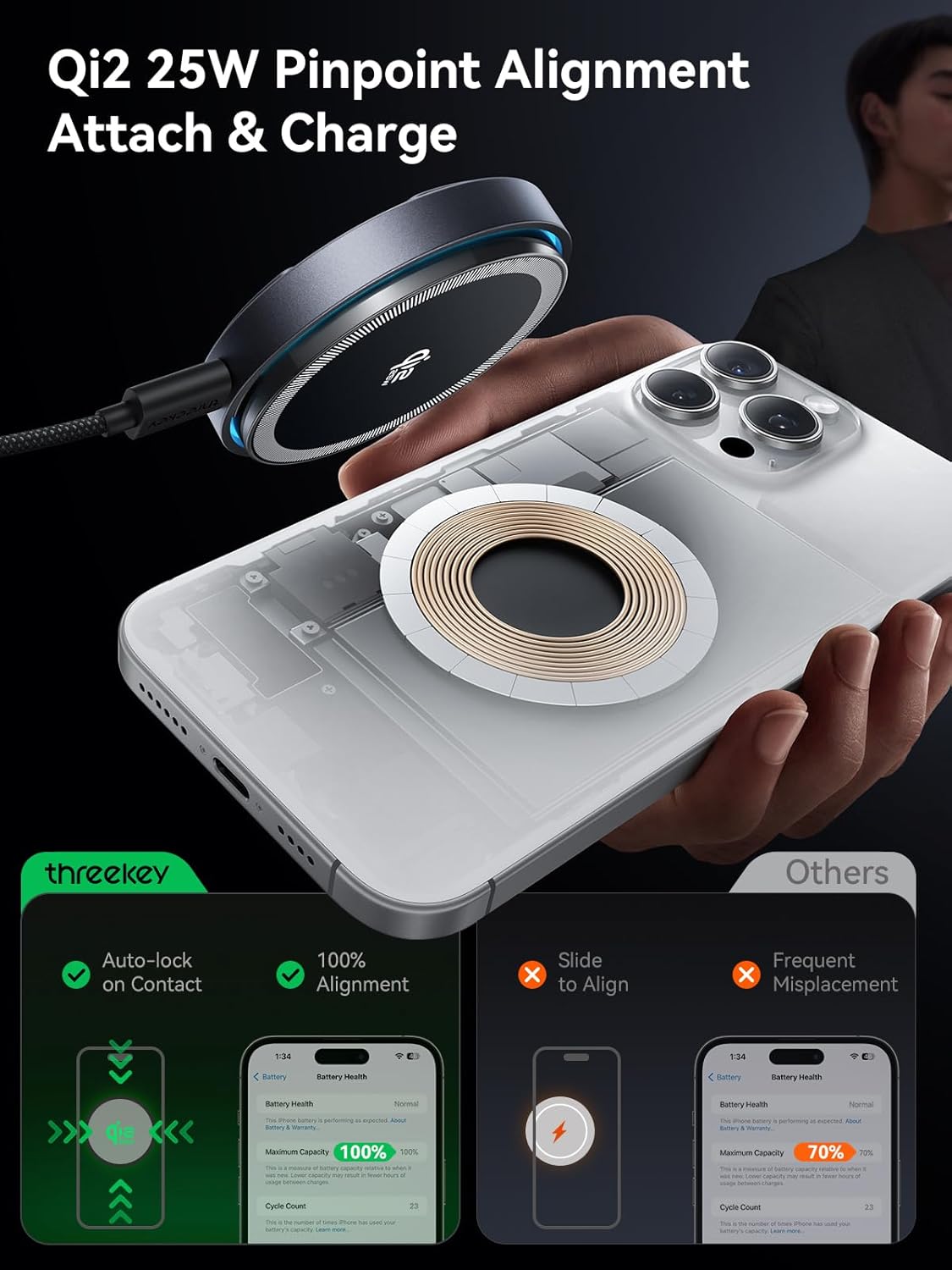
Image 5.1: The magnetic alignment ensures precise and efficient charging every time.

Image 5.2: The integrated cooling fan actively dissipates heat, ensuring stable and fast charging.
6. Compatibility
The THREEKEY Qi2 25W Fast Charging Pad offers wide compatibility with various devices:
- 25W Fast Charging: For iPhone 17/16 series (with iOS 26 or later).
- 15W Charging: For iPhone 16 series (before iOS 26), iPhone 15-12 series, Samsung Galaxy S25 series, and Google Pixel 10 series.
- 5W Charging: For AirPods models with a wireless charging case.
Important Note: Please avoid using cases thicker than 2.5mm, as this may interfere with magnetic alignment and charging efficiency. For optimal 25W charging, ensure your device is running iOS 26 or later and use the included 45W adapter.

Image 6.1: Compatibility chart for various devices and charging speeds.

Image 6.2: Impact of case thickness on charging performance.
7. Maintenance
Proper care ensures the longevity of your charging pad:
- Cleaning: Disconnect the charger from power before cleaning. Use a soft, dry cloth to wipe the surface. Do not use harsh chemicals or abrasive materials.
- Storage: When not in use, store the charger in a cool, dry place away from direct sunlight.
- Cable Care: The included nylon braided cable is designed for durability. Avoid sharp bends or excessive pulling to prevent damage.

Image 7.1: The durable nylon braided cable is built to withstand extensive use.
8. Troubleshooting
If you encounter issues with your charging pad, refer to the following solutions:
| Problem | Possible Cause | Solution |
|---|---|---|
| Device not charging |
|
|
| Slow charging |
|
|
| Charger or device overheating |
|
|
| Magnetic alignment issues |
|
|
9. Specifications
| Feature | Detail |
|---|---|
| Model Number | CW305 |
| Brand | THREEKEY |
| Wattage | 25 Watts (Max) |
| Input Voltage | 15 Volts |
| Connector Type | USB Type C |
| Cable Length | 6.6 ft (Nylon Braided) |
| Special Features | Qi2 Officially Certified, High-Speed Cooling Fan, MagSafe Compatible, Optimal Magnetic Auto-Align, Overheating Protection |
| Dimensions | 6.18 x 5.75 x 1.53 inches (Package) |
| Item Weight | 15.5 ounces |
| Color | Black |
10. Warranty and Support
THREEKEY offers a 36-month warranty for this product. If you encounter any issues or have questions regarding your wireless charger, please do not hesitate to contact our customer service team. We are committed to providing friendly and professional support.
For support, please refer to the contact information provided on the product packaging or visit the official THREEKEY website.


