
Ascher Ultra Bright USB Rechargeable Bike Light Set (Model HJ-040) Instruction Manual
Powerful Bicycle Front Headlight and Back Taillight
1. Product Overview
The Ascher Ultra Bright USB Rechargeable Bike Light Set provides enhanced visibility and safety for cyclists. This set includes a powerful front headlight and a compact rear taillight, both designed for easy installation and convenient USB recharging.

Image 1: Ascher Ultra Bright USB Rechargeable Bike Light Set, showing the front headlight and rear taillight.
2. Package Contents
- 1 x Ascher Front Headlight
- 1 x Ascher Rear Taillight
- 1 x Headlight Mounting Bracket
- 1 x Taillight Silicone Mount Strap
- 2 x USB Charging Cables
- 1 x Instruction Manual
Image 2: Visual representation of the Ascher Bike Light Set package contents, including headlight, taillight, mounts, USB cables, and manual.
3. Setup and Installation
3.1 Headlight Installation
- Attach the mounting bracket to your bicycle's handlebar. The bracket features a silicone strap designed to fit various handlebar sizes.
- Secure the strap firmly around the handlebar.
- Slide the headlight onto the mounting bracket until it clicks securely into place. Ensure the light is facing forward and is angled appropriately for optimal visibility.
3.2 Taillight Installation
- Wrap the silicone mount strap for the taillight around your bicycle's seat post. The strap has four openings to ensure a tight fit.
- Secure the strap. The taillight can be mounted either horizontally or vertically based on preference.
- Ensure the taillight is firmly attached and visible from the rear.
No tools are required for installation, allowing for easy attachment and removal.

Image 3: Detailed steps for installing both the front headlight on the handlebar and the rear taillight on the seat post.

Image 4: Important installation tip: Ensure the light slides onto the bracket until it clicks into place for secure attachment.
Video 1: A seller-provided video demonstrating the installation process and various features of the Ascher Bike Light Set.
4. Operating Instructions
4.1 Powering On/Off and Mode Selection
Both the headlight and taillight feature a one-touch switch for operation. Press the power button to cycle through the available lighting modes.
Headlight Modes:
- Full Brightness
- Half Brightness
- Slow Flashing
- Fast Flashing
Taillight Modes:
The taillight also offers multiple modes, typically including solid and various flashing patterns for optimal visibility.

Image 5: Illustration of the four distinct light mode options for both the headlight and taillight, enhancing safety in various conditions.

Image 6: A graphic representation of the four light modes: Full Brightness, Half Brightness, Fast Flashing, and Slow Flashing.
5. Charging and Battery Life
Both the front headlight and back taillight are USB rechargeable. They feature built-in lithium batteries for convenience.
- Headlight Battery: 2000 mAh rechargeable lithium battery.
- Taillight Battery: 330 mAh rechargeable lithium battery.
5.1 Charging Procedure
- Locate the USB charging port on each light.
- Connect the provided USB charging cables to the lights and to a standard USB power source (e.g., computer, wall adapter, power bank).
- The headlight features an indicator that turns red when the battery power is low, signaling the need for a recharge.
- Charge until the indicator light changes (e.g., turns green or off) to signify a full charge.

Image 7: Both the headlight and taillight are shown connected via USB cables to a power bank for convenient recharging.
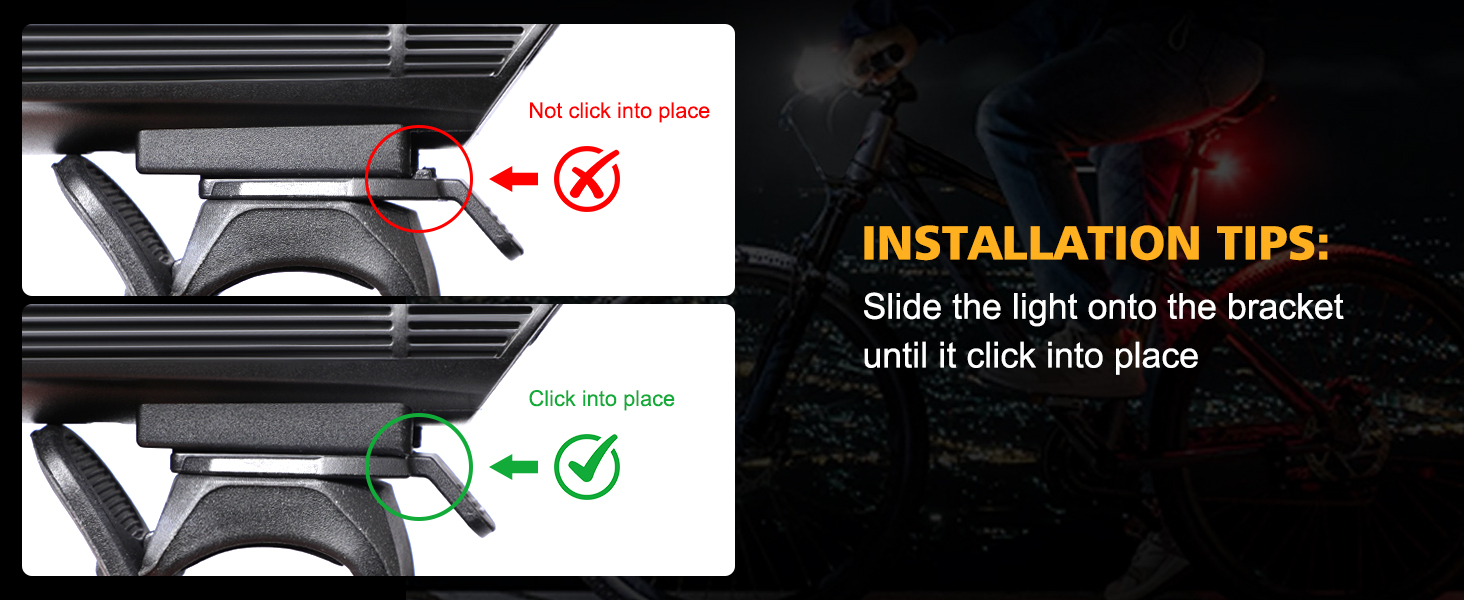
Image 8: A graphic highlighting the USB rechargeable capability of the bike light set, compatible with any device featuring a micro USB charging port.
6. Maintenance
To ensure optimal performance and longevity of your Ascher Bike Light Set, follow these maintenance guidelines:
- Cleaning: Wipe the lights with a soft, damp cloth to remove dirt and debris. Avoid using abrasive cleaners or solvents.
- Charging: Recharge the batteries regularly, especially if the lights will not be used for an extended period, to maintain battery health.
- Storage: Store the lights in a cool, dry place when not in use.
- Water Resistance: The lights are rated IPX4 waterproof, meaning they are resistant to splashing water from any direction. They are suitable for use in rainy conditions but should not be submerged in water.

Image 9: The headlight and taillight are shown with water droplets, illustrating their IPX4 waterproof rating for use in various weather conditions.
7. Troubleshooting
If you encounter any issues with your Ascher Bike Light Set, please consider the following common solutions:
- Light Not Turning On: Ensure the battery is fully charged. Connect the light to a USB power source and allow it to charge for at least 2-3 hours.
- Light Dim or Flickering: This usually indicates a low battery. Recharge the light.
- Light Not Staying Attached: Verify that the mounting bracket/strap is correctly installed and tightened. For the headlight, ensure it clicks into place on the bracket.
- Charging Issue: Try using a different USB cable or power source to rule out a faulty component. Ensure the charging port is clean and free of debris.
If problems persist, please contact customer support for further assistance.
8. Specifications
| Feature | Specification |
|---|---|
| Brand | Ascher |
| Model Number | HJ-040 |
| Material | Aluminum, Plastic, Silicone |
| Power Source | USB Rechargeable Battery Powered |
| Headlight Battery Capacity | 2000 mAh |
| Taillight Battery Capacity | 330 mAh |
| Brightness (Headlight) | 300 Lumen (Max Output) |
| Light Modes | 4 (Full Brightness, Half Brightness, Slow Flashing, Fast Flashing) |
| Water Resistance Level | IPX4 (Water Resistant) |
| Mounting Type | Handlebar Mount (Headlight), Seat Mount (Taillight) |
| Item Package Dimensions | 6.57 x 5.2 x 1.46 inches |
| Package Weight | 0.2 Kilograms |
9. Warranty and Support
Information regarding specific warranty terms and conditions for the Ascher Ultra Bright USB Rechargeable Bike Light Set (Model HJ-040) is not explicitly provided in the product details. For any warranty claims or detailed support inquiries, please refer to the retailer's return policy or contact Ascher customer service directly through their official channels.