
Introduction
Thank you for choosing the iPormis Twin Bed Frame with Storage, Model B2. This manual provides essential instructions for the safe assembly, proper use, and effective maintenance of your new bed frame. Please read all instructions carefully before beginning assembly and retain this manual for future reference.
Safety Information
- Careful around sharp edges: Exercise caution during unpacking and assembly to avoid injury from sharp edges on metal components.
- Proper assembly: Ensure all parts are correctly assembled and tightened according to the instructions. Improper assembly can lead to instability and potential injury.
- Load capacity: Do not exceed the recommended load capacity for the storage drawers. The overall bed frame is designed for standard twin mattress and user weight.
- Children and pets: Keep small parts and packaging materials away from children and pets during assembly.
- Tools: Use appropriate tools as specified in the assembly section.
- Location: Assemble the bed frame on a soft, clean surface (e.g., carpet) to prevent scratching the product or your floor.
Package Contents
Before assembly, verify that all components listed below are present. If any parts are missing or damaged, please contact iPormis customer support.
- Headboard Section (1)
- Footboard Section (1)
- Side Rails (2)
- Center Support Legs (3)
- Metal Slat System (1 set)
- Storage Drawers (2)
- Hardware Pack (bolts, washers, nuts, Allen wrench) (1)
- Instruction Manual (1)
Note: The "Metal Bed Frame x 1" listed in product specifications refers to the complete bed frame unit.
Assembly Instructions
Assembly typically requires two adults. Please follow these steps carefully.
Step 1: Unpack and Identify Components
Carefully remove all components from the packaging. Lay them out on a clean, soft surface. Refer to the "Package Contents" list to ensure all parts are present.
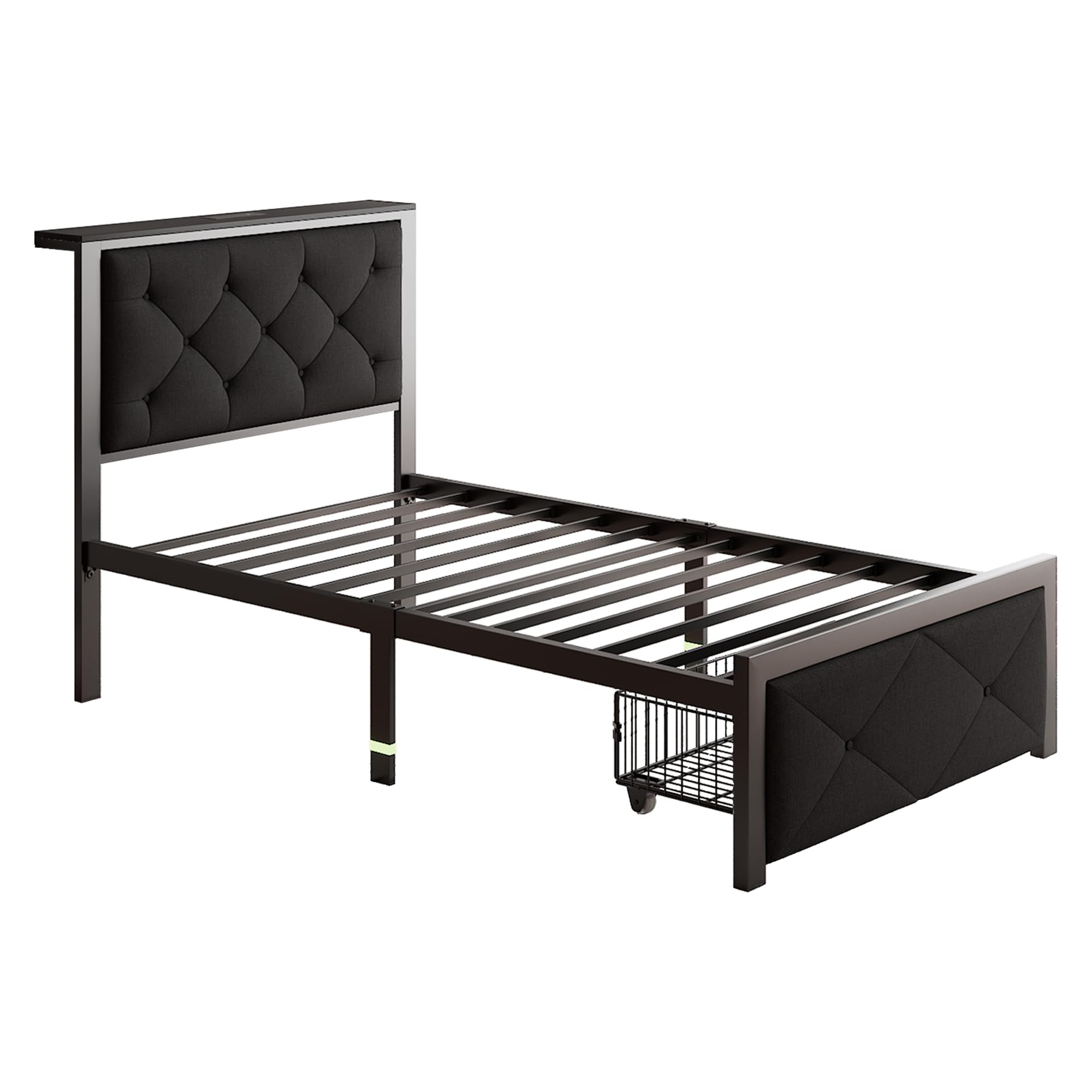
Image: Fully assembled iPormis Twin Bed Frame with Storage, black metal frame with upholstered headboard and footboard, and a wire storage basket on wheels.
Step 2: Attach Side Rails to Headboard and Footboard
- Align the pre-drilled holes on the side rails with the corresponding holes on the headboard and footboard posts.
- Insert bolts through the holes and secure with washers and nuts. Hand-tighten all connections initially.
Step 3: Install Center Support Legs
- Attach the center support legs to the designated points on the bed frame's central beam or crossbars.
- Ensure the legs are oriented correctly to provide maximum stability. Tighten securely.
Step 4: Place Metal Slat System
- Unroll or place the metal slat system onto the side rails.
- Secure the slat system to the side rails using the provided fasteners (if applicable) to prevent shifting.
- Ensure all slats are evenly spaced and firmly seated. This bed frame does not require a box spring.
Step 5: Assemble and Insert Storage Drawers
- Assemble the storage drawers according to their specific instructions, attaching wheels if separate.
- Slide the assembled drawers under the bed frame. The drawers are designed to roll freely on the floor.
Step 6: Final Tightening
Once all components are in place, go back and fully tighten all bolts and connections using the provided Allen wrench. Do not overtighten.
Usage
- Mattress Placement: Place your twin-sized mattress directly onto the metal slat system. A box spring is not required for this bed frame.
- Storage Drawers: The two storage drawers are designed for lightweight items. Pull them out gently from under the bed when accessing contents. Do not overload the drawers; refer to the load capacity in the safety section.
- Movement: When moving the bed frame, lift it rather than dragging it to prevent damage to the frame or your flooring.
Maintenance
- Cleaning: Wipe the metal frame with a soft, damp cloth. Avoid harsh chemicals or abrasive cleaners. For the upholstered sections, use a fabric cleaner suitable for the material, spot cleaning as needed.
- Hardware Check: Periodically check all bolts and connections to ensure they remain tight. Re-tighten if necessary to maintain stability.
- Drawer Wheels: Keep the drawer wheels free of debris to ensure smooth operation.
Troubleshooting
- Squeaking Noises:
Solution: Check all bolts and connections and tighten them. Ensure the mattress is properly seated on the slats. If the issue persists, disassemble and reassemble the affected section, ensuring all parts are correctly aligned.
- Storage Drawer Not Sliding Smoothly:
Solution: Check for any obstructions under the bed or in the drawer's path. Clean the wheels and ensure they are free of hair or debris. Verify the drawer is assembled correctly and not overloaded.
- Bed Frame Feels Unstable:
Solution: Re-check all assembly steps, paying close attention to the tightening of all hardware. Ensure the bed is on a level surface. Verify that all center support legs are making firm contact with the floor.
Specifications
| Model Number: | B2 |
| Size: | Twin |
| Product Dimensions: | 80"L x 41"W x 38"H |
| Material: | Metal (Frame), Upholstered (Headboard/Footboard) |
| Color: | Black |
| Item Weight: | 49 pounds |
| Special Feature: | No Box Spring Needed, Integrated Storage Drawers |
| Assembly Required: | Yes |
Warranty and Support
For warranty information or technical support, please contact iPormis customer service. Details can typically be found on the product packaging or the official iPormis website. Please have your model number (B2) and purchase date available when contacting support.
For further assistance, you may visit the iPormis Store on Amazon.