
Introduction
Welcome to the PUSUN PT-Smart Pro Tennis Ball Machine user manual. This guide provides essential information for the safe and effective use of your new tennis training equipment. Please read this manual thoroughly before operating the machine to ensure proper setup, operation, and maintenance. This machine is designed to enhance your tennis skills, offering various training modes and control options.

Image: The PUSUN PT-Smart Pro Tennis Ball Machine, showcasing its compact design and ball capacity.
Important Safety Information
To prevent injury or damage to the machine, always observe the following safety precautions:
- Read and understand all instructions before use.
- Keep hands, feet, and clothing clear of the ball throwing wheels and other moving parts during operation.
- Ensure the machine is placed on a stable, level surface before operation.
- Use only standard tennis balls. Do not use wet, damaged, or non-standard balls, as this may cause jamming or damage.
- Keep children and pets at a safe distance from the machine during operation.
- Do not attempt to open or repair the machine yourself. Contact customer support for assistance.
- Use only the provided charger and battery. Improper charging can lead to fire or electric shock.
- Disconnect the power supply before cleaning or performing any maintenance.
What's in the Box
Upon unpacking, verify that all components are present:
- PUSUN PT-Smart Pro Tennis Ball Machine
- External 25.6V 6AH Lithium Battery
- Remote Controller
- Power Adapter/Charger
- User Manual (this document)
Setup Guide
1. Unpacking and Initial Assembly
Carefully remove all components from the packaging. The PT-Smart Pro features a detachable ball hopper and movable wheels for easy transport and storage. Attach the hopper securely to the main unit if it is not already assembled. Extend the retractable handle for mobility.
2. Battery Connection and Charging
Connect the external 25.6V 6AH lithium battery to the machine using the provided cable. Ensure a secure connection. Before first use, fully charge the battery using the supplied power adapter. A full charge provides up to 6 hours of continuous use.

Image: Connecting the external 25.6V 6AH lithium battery to the machine.
3. Ball Loading
Open the ball hopper and load up to 115+ standard tennis balls. Ensure balls are dry and clean to prevent machine malfunction.
4. App Installation and Pairing
Download the official PUSUN app from your smartphone's app store (available for iPhone/Android). Follow the in-app instructions to pair your device with the PT-Smart Pro machine via Bluetooth. This enables advanced control and programming features.
Operating Instructions
1. Powering On/Off
Locate the power switch on the machine. Flip it to the 'ON' position to power on. The machine will perform a brief self-check. To power off, flip the switch to the 'OFF' position.
2. Control Methods
The PT-Smart Pro offers three convenient ways to control its functions:
- Smartphone App: Provides comprehensive control over all settings, including AI Smart Generate functions and custom programming.
- Remote Controller: A 15-key remote allows for quick adjustments to basic settings during play.
- iWatch Control: For seamless control directly from your iWatch, offering convenience during practice.

Image: Overview of the smartphone app, remote controller, and iWatch control options.
3. Adjusting Settings
Customize your training experience by adjusting the following parameters:
- Ball Speed: Adjustable up to 75 mph (120 km/h).
- Frequency: Custom intervals from 1.8 to 8 seconds per ball.
- Elevation Angle: Adjust the trajectory of the ball.
- Spin: Apply topspin or backspin to balls for varied practice.
4. Training Modes
The PT-Smart Pro offers 12 professional training modes to enhance your skills:
- Fixed Spot: Delivers balls to a consistent location.
- Random: Sends balls to various unpredictable locations across the court.
- Lob: High trajectory shots.
- Topspin: Balls with forward rotation.
- Backspin: Balls with backward rotation.
- AI Smart Generate: Creates unpredictable ball routines mimicking real match scenarios.
- And other specialized modes for comprehensive training.
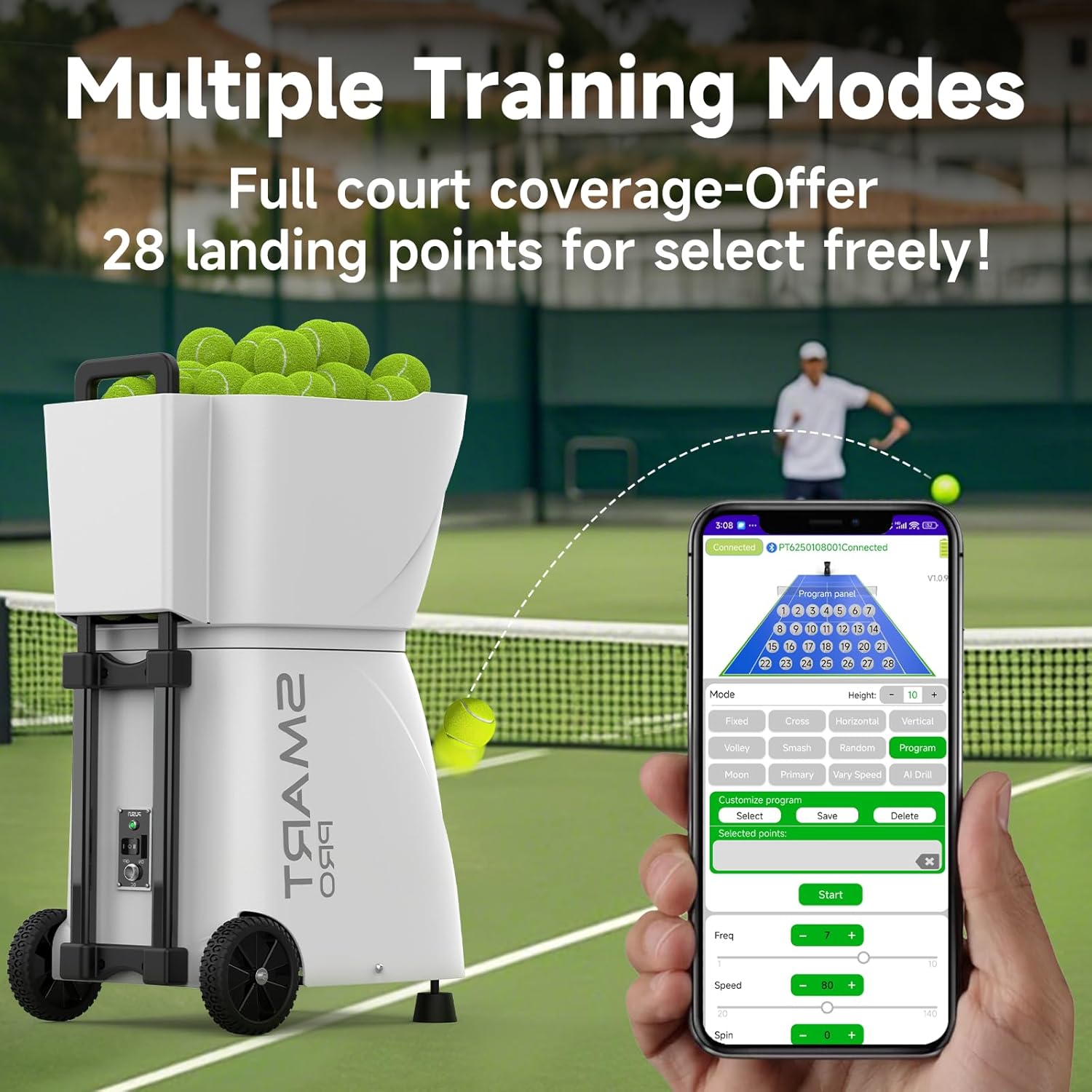
Image: The smartphone app interface showing various training modes and court landing points.
Maintenance
1. Cleaning
Regularly clean the machine to ensure optimal performance. Use a soft, dry cloth to wipe down the exterior. For the ball throwing wheels, ensure they are free of dirt or debris. Do not use abrasive cleaners or solvents.
2. Battery Care
To prolong battery life, fully charge the battery after each use. If storing the machine for an extended period, charge the battery to approximately 50% and store it in a cool, dry place. Recharge every 3-6 months to prevent deep discharge.
3. Storage
The PT-Smart Pro's detachable ball hopper and movable wheels allow for compact storage. Detach the hopper and store the machine in a dry, protected area when not in use. Avoid extreme temperatures.
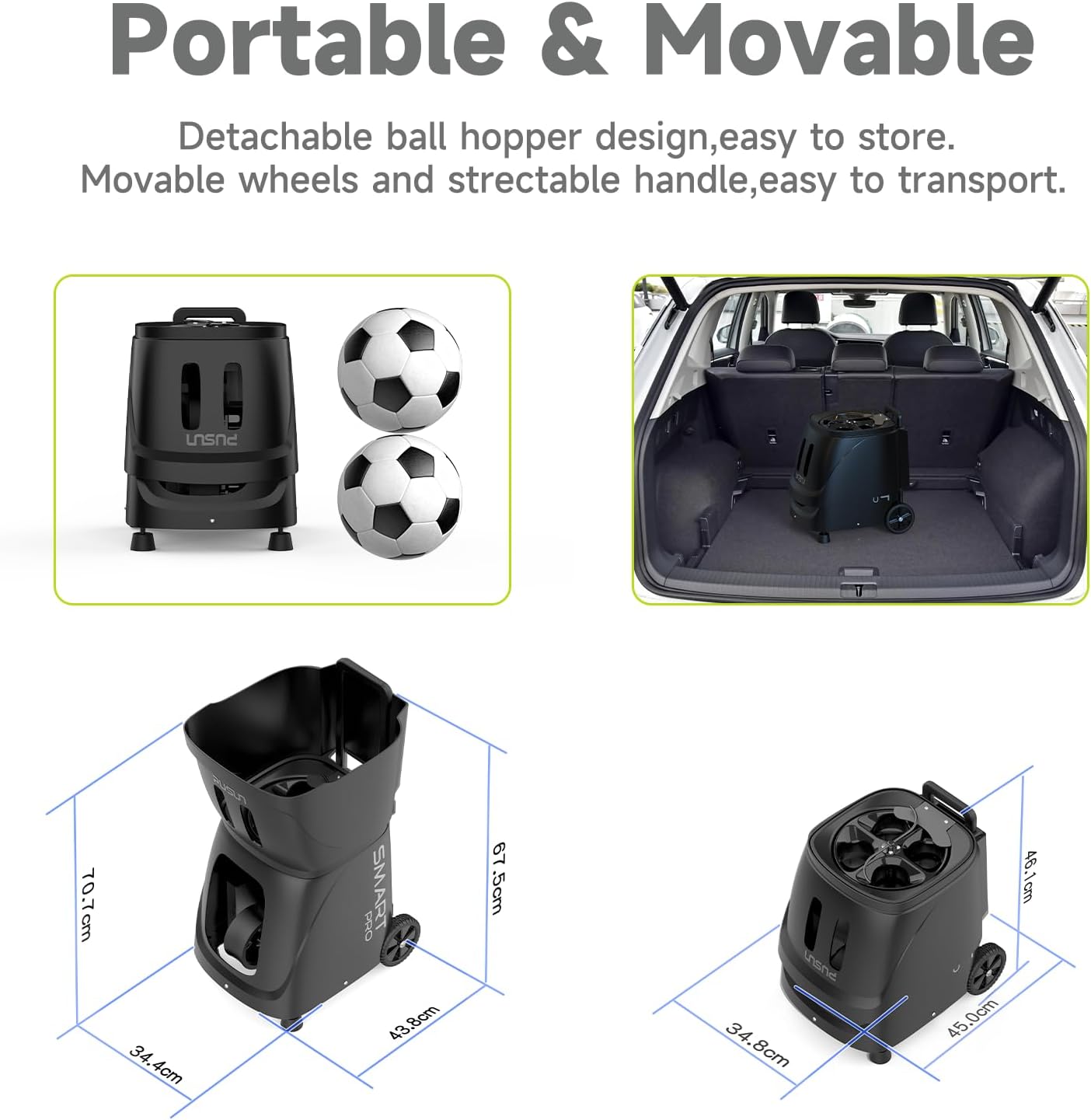
Image: Diagrams showing the machine's dimensions and its compact storage configuration.
Troubleshooting
If you encounter issues with your PT-Smart Pro, refer to the following common solutions:
- Machine not powering on: Ensure the battery is fully charged and properly connected. Check the power switch position.
- Balls not feeding: Verify that the ball hopper is not empty and that balls are not jammed. Use only dry, standard tennis balls.
- Inconsistent ball delivery: Check for debris on the throwing wheels. Ensure the machine is on a stable surface.
- Remote/App not connecting: Ensure the machine is powered on and within range. Re-pair the device if necessary. Check battery levels in the remote.
- Short battery life: Ensure the battery is fully charged before use. Battery performance can decrease over time; consider replacement if significantly degraded.
For persistent issues, please contact customer support.
Specifications
| Feature | Detail |
|---|---|
| Model Name | PT-SMART PRO |
| Brand | PUSUN |
| Item Dimensions (LxWxH) | 17.2 x 13.5 x 27.8 inches |
| Item Weight | 33 Pounds |
| Package Dimensions (LxWxH) | 24.3 x 20.7 x 15.9 inches |
| Package Weight | 48.5 Pounds |
| Material | ABS+METAL |
| Color | Black |
| Ball Capacity | 115+ balls |
| Battery Life | Up to 6 hours (25.6V 6AH Lithium Battery) |
| Max Ball Speed | 75 MPH (120 km/h) |
| Feed Interval | 1.8 - 8 seconds per ball |
| Control Methods | App (iPhone/Android), Remote Controller, iWatch |
| Training Modes | 12 professional modes (fixed spot, random, lob, topspin, backspin, AI Smart Generate, etc.) |
| Suggested Users | Unisex-adult |
Warranty Information
The PUSUN PT-Smart Pro Tennis Ball Machine comes with a 3-year warranty. This warranty covers manufacturing defects and ensures the product meets its specified performance standards under normal use. Please retain your proof of purchase for warranty claims.
Customer Support
If you have any questions, require technical assistance, or need to make a warranty claim, please contact PUSUN customer service directly. We are committed to providing a satisfactory response within 12-24 hours.
Please refer to the contact information provided with your purchase or visit the official PUSUN website for support details.
