
HG Power HA350ME
HG Power 14 Inch Attic Fan with Speed Controller User Manual
Model: HA350ME
1. Introduction
Thank you for choosing the HG Power 14 Inch Attic Fan with Speed Controller. This exhaust fan is designed for efficient ventilation in various environments such as attics, garages, sheds, basements, gables, and chicken coops. Featuring a powerful EC motor and automatic shutters, it provides high airflow with low noise operation. This manual provides essential information for safe installation, operation, and maintenance of your fan.
2. Safety Information
Please read all safety instructions carefully before installing or operating the fan. Failure to follow these instructions may result in electric shock, fire, or serious injury.
- Always disconnect power before servicing or cleaning the fan.
- Ensure the power source matches the fan's voltage requirements (110 Volts).
- Do not operate any fan with a damaged cord or plug.
- Avoid placing fingers or foreign objects into the fan blades or grille.
- Install the fan in a location where it is protected from direct water exposure, unless specifically designed for such conditions. This model is water resistant.
- Ensure proper grounding to prevent electrical hazards.
- Keep children and pets away from the fan during operation.
- Consult a qualified electrician if you are unsure about wiring or electrical connections.
3. Package Contents
Verify that all items are present in the package:
- 14" Exhaust Fan
- Cord and Plug
- Speed Controller
- Manual
- Screws
4. Specifications
| Feature | Detail |
|---|---|
| Brand | HG Power |
| Model Number | HA350ME |
| Electric Fan Design | Exhaust Fan (Shutter Type) |
| Size | 14 Inch |
| Air Flow Capacity | 1294 CFM |
| Speed | 1495 RPM |
| Power Source | AC |
| Voltage | 110 Volts |
| Wattage | 71 watts |
| Noise Level | 59 Decibels |
| Product Dimensions | 16.54"D x 7.36"W x 16.54"H |
| Blade Length | 13.5 Inches |
| Special Feature | Water Resistant, Stepless Speed Control |
| Mounting Type | Wall Mount |
| Indoor/Outdoor Usage | Indoor, Outdoor |
| Recommended Uses | Attic, Basement, Chicken Coop, Garage, Shed, Greenhouse Ventilation |
Note: The fan features a robust metal body and solid aluminum shutters for durability and corrosion resistance.
5. Setup & Installation
The HG Power 14 Inch Attic Fan is designed for easy wall-mounted installation with pre-assembled parts. The recommended installation opening size is approximately 14 x 14 inches.
5.1 Installation Steps:
- Prepare the Opening: Create a 14 x 14 inch opening in the desired wall location. Ensure the location is structurally sound and allows for proper airflow.
- Position the Fan: Carefully insert the fan into the prepared opening. The fan should fit snugly.
- Secure the Fan: Use the provided screws to secure the fan to the wall through the pre-drilled holes on the fan's frame. Ensure it is firmly mounted.
- Connect Power: Plug the fan's 8-foot long power cord into a standard 110V AC outlet.
- Connect Speed Controller (if applicable): If your model includes a speed controller, connect it inline with the power cord as per its specific instructions.
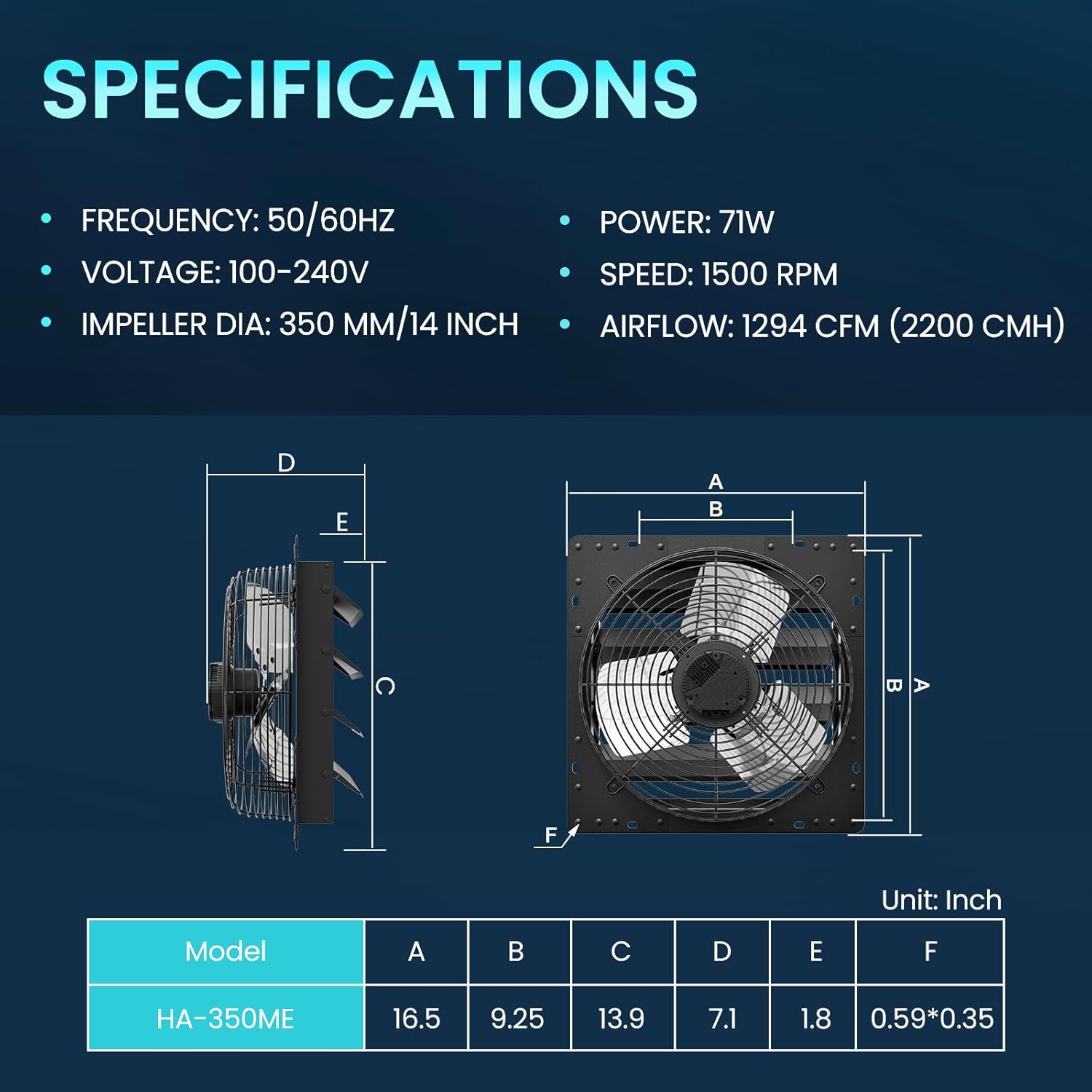
Figure 5.1: Fan Dimensions and Specifications. The diagram illustrates the fan's overall dimensions and key specifications for installation planning.

Figure 5.2: Wall-mounted installation of the HG Power 14 Inch Exhaust Fan, showing the 2.5m/8ft long power cable and the stepless speed controller.
5.2 Visual Installation Guide:
Video 5.1: Installation of the HG Power Exhaust Fan in a Chicken Coop. This video demonstrates the practical steps for installing the fan in a typical chicken coop environment, highlighting the ease of setup.
6. Operating Instructions
The HG Power 14 Inch Attic Fan is designed for straightforward operation.
6.1 Power On/Off:
- Plug the fan into a compatible power outlet.
- If your model has an ON/OFF switch, use it to power the fan on or off.
6.2 Stepless Speed Control:
Your fan comes with a stepless speed controller, allowing you to precisely adjust the fan's speed from 0% to 100% to meet your ventilation needs.
- Locate the speed controller unit.
- Rotate the dial on the controller clockwise to increase fan speed and counter-clockwise to decrease it.
- Adjust the speed until the desired airflow and noise level are achieved.

Figure 6.1: Stepless Speed Controller. This image illustrates the speed controller dial, which allows for precise adjustment of the fan's operational speed from 0% to 100%.
6.3 Automatic Shutters:
The fan is equipped with automatic shutters that open when the fan is running and close automatically when the fan is turned off. This feature helps to prevent backdrafts, rain, and foreign objects from entering the ventilated space when the fan is not in use.
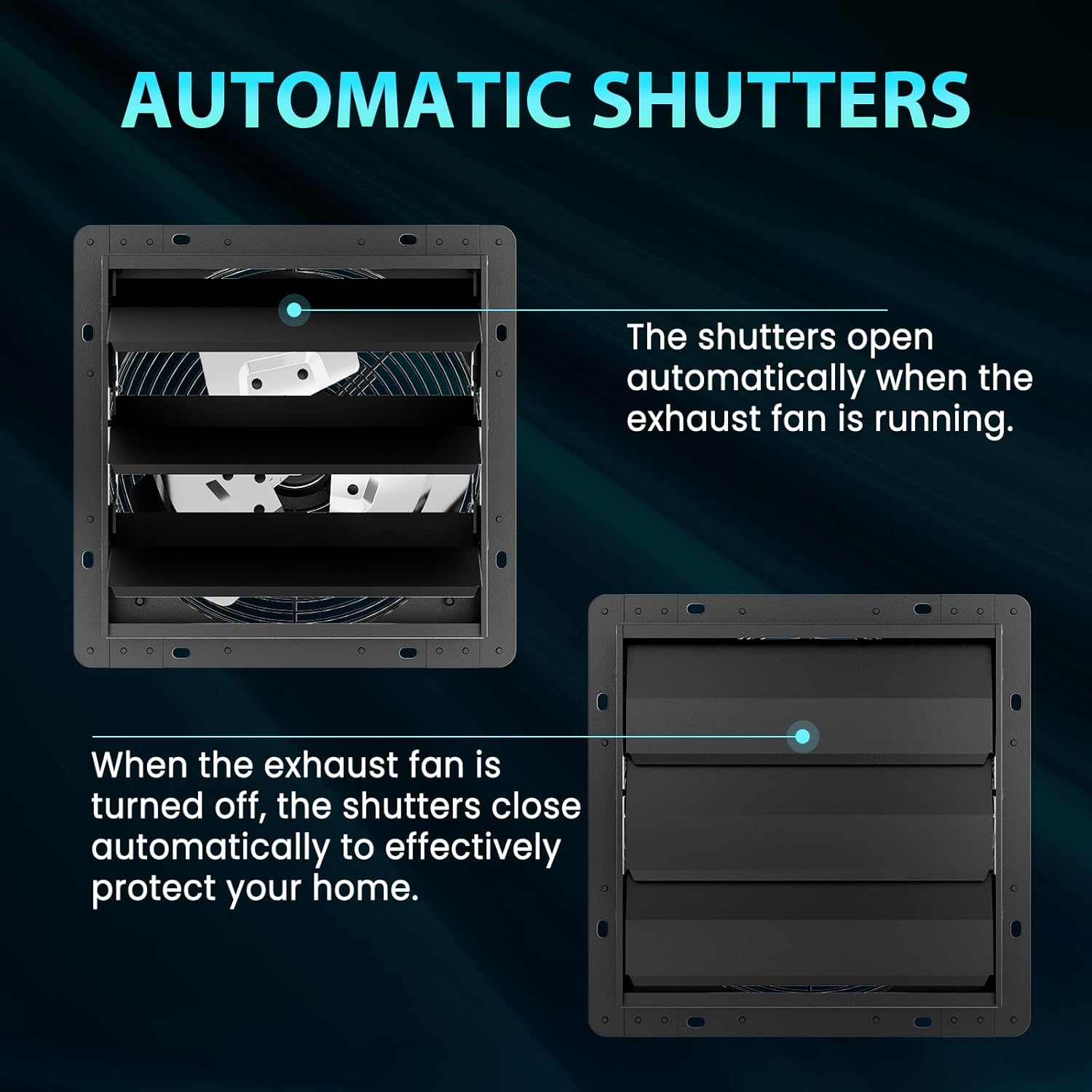
Figure 6.2: Automatic Shutters Operation. This diagram visually explains how the shutters open when the fan is active and close when it is turned off, providing protection and preventing unwanted airflow.
6.4 Applications:
This versatile exhaust fan is suitable for various applications to improve air quality and temperature regulation.

Figure 6.3: Multi-Use Performance. This image displays the fan's versatility, showing its effective use in environments such as chicken coops, greenhouses, attics, and garages for optimal ventilation.
7. Maintenance
Regular maintenance ensures optimal performance and longevity of your HG Power fan.
- Cleaning: Periodically clean the fan blades, grille, and shutters to prevent dust and debris buildup, which can reduce efficiency. Use a soft cloth and mild detergent if necessary. Ensure the fan is completely dry before reconnecting power.
- Inspection: Regularly inspect the power cord for any signs of damage. Check that all mounting screws are tight and secure.
- Lubrication: The EC motor is designed for long-term, maintenance-free operation and typically does not require lubrication.
Caution: Always disconnect the fan from the power supply before performing any maintenance.
8. Troubleshooting
If you encounter issues with your fan, refer to the following common troubleshooting steps:
| Problem | Possible Cause | Solution |
|---|---|---|
| Fan does not turn on. | No power, loose connection, faulty switch/controller. | Check power outlet, ensure plug is secure. Verify ON/OFF switch or speed controller is in the 'ON' position. |
| Reduced airflow. | Blocked grille/shutters, dirty blades, low speed setting. | Clean any obstructions from the grille or blades. Adjust speed controller to a higher setting. |
| Unusual noise during operation. | Loose components, foreign object in fan, motor issue. | Disconnect power and inspect for loose parts or foreign objects. If noise persists, contact customer support. |
| Shutters not opening/closing properly. | Obstruction, mechanism issue. | Ensure no debris is blocking the shutters. Check for smooth movement. |
9. Warranty & Support
For warranty information or technical support, please contact HG Power customer service. Keep your purchase receipt and model number (HA350ME) handy for faster service.
You can visit the official HG Power store for more information: HG Power Store
Related documentsHA350ME


Ask a question about this manual
Ask about setup, troubleshooting, compatibility, parts, safety, or missing instructions. Manuals+ will review the question and use this page’s manual context to help answer it.