
1. Introduction
Thank you for choosing the WELLFIT 10% Incline Walking Pad Treadmill, Model WFWP003. This manual provides essential information for the safe and efficient operation, setup, and maintenance of your new fitness equipment. Please read this manual thoroughly before use and retain it for future reference.
This versatile treadmill is designed for both home and under-desk use, offering a compact solution for integrating physical activity into your daily routine. It features smart connectivity, adjustable speed, and an incline capability to enhance your workout experience.
2. Important Safety Information
To reduce the risk of serious injury, read all important precautions and instructions in this manual before using the treadmill. WELLFIT assumes no responsibility for personal injury or property damage sustained by or through the use of this product.
- Always place the treadmill on a level, stable surface.
- Keep children and pets away from the treadmill during operation.
- Ensure adequate clearance around the treadmill (at least 2 feet on sides and 6 feet at the rear).
- Do not operate the treadmill if it has a damaged cord or plug, or if it is not working properly.
- Wear appropriate athletic footwear. Do not use the treadmill barefoot or in socks.
- Consult a physician before beginning any exercise program.
- Do not use the treadmill in wet or damp conditions.
- Always unplug the treadmill before cleaning or performing maintenance.
3. Package Contents
Upon unpacking your WELLFIT Walking Pad Treadmill, please verify that all the following components are included:
- WELLFIT Walking Pad Treadmill (Model WFWP003)
- Remote Control (with batteries included)
- Power Cord
- Lubricant for belt maintenance
- Incline Feet (4 units)
- User Manual
- Assembly Tools (L-shaped hex wrench, wrench)
4. Setup Instructions
4.1 Unpacking and Placement
Carefully remove the treadmill from its packaging. Place the treadmill on a flat, stable surface, ensuring there is sufficient space around it for safe operation.
4.2 Installing Incline Feet
For an inclined walking experience, attach the four provided incline feet to the designated points on the treadmill base. Refer to the included manual diagram for precise installation. These feet elevate the front of the treadmill, providing a 10% incline.
4.3 Power Connection
Connect the power cord to the port located at the front of the treadmill. Plug the other end of the power cord into a grounded electrical outlet. Ensure the connection is secure.
5. Operating Instructions
5.1 Powering On/Off
Locate the red power button on the front of the treadmill. Press this button to turn the unit on. A beep will sound, and the LED display will illuminate. To turn off, press the red power button again or use the remote control.
5.2 Using the Remote Control
The included remote control allows for convenient operation. It features buttons for Start/Pause, Speed Increase (+), and Speed Decrease (-).
- Start/Pause: Press to begin or temporarily stop the treadmill belt. After pressing start, there will be a 3-second countdown before the belt begins to move at a very slow initial speed.
- Speed Increase (+): Press to increase the belt speed. Speed adjusts in 0.2 MPH increments.
- Speed Decrease (-): Press to decrease the belt speed.
5.3 Understanding the LED Display
The integrated LED console displays real-time workout data, cycling through various metrics:
- SPEED: Current speed in Miles Per Hour (MPH).
- TIME: Duration of your workout.
- DIST: Distance covered during your workout.
- CAL: Estimated calories burned.
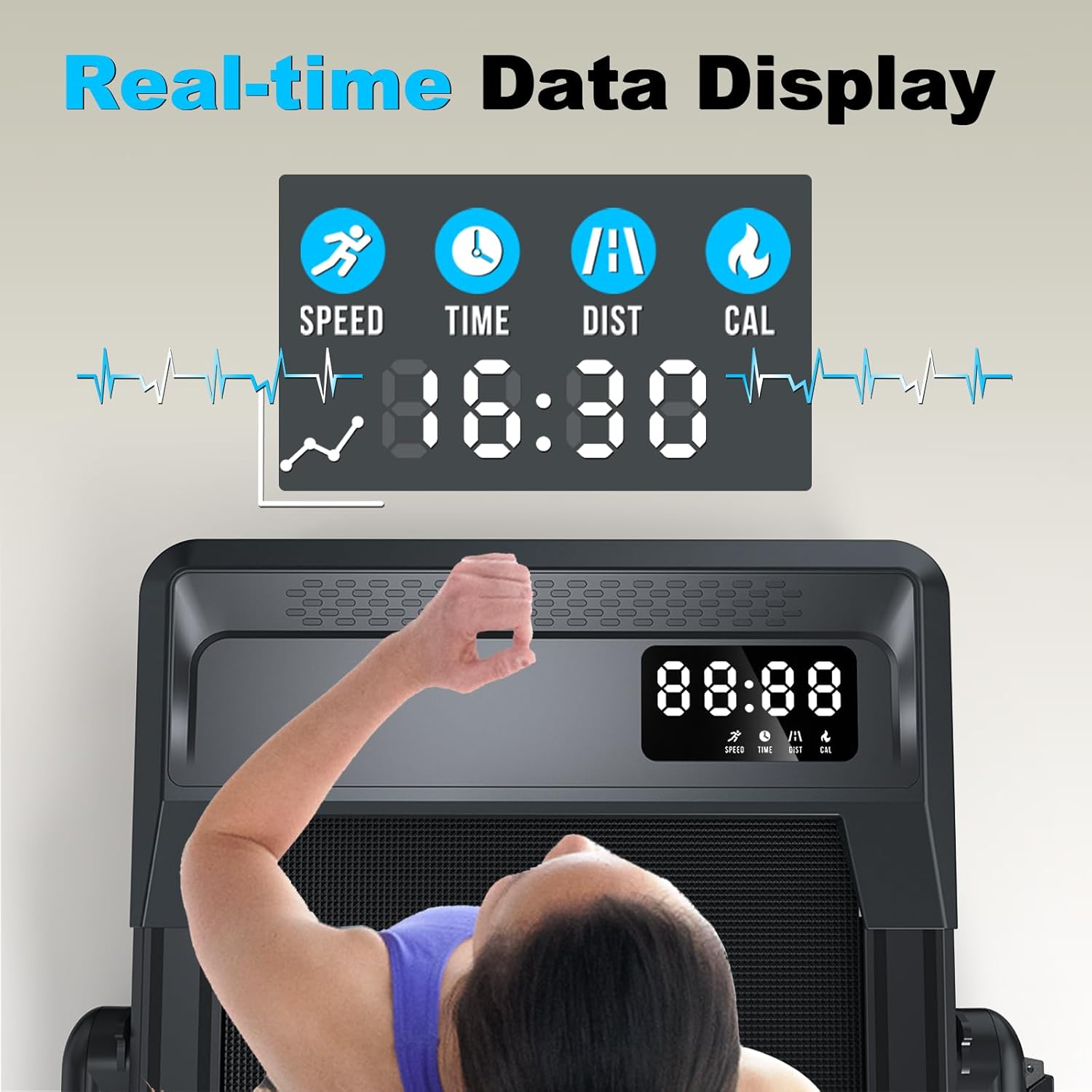
Figure 1: Real-time data display on the LED console.
5.4 Operating Modes
The treadmill supports various operating modes to suit your activity level:
- Walking Mode: Speed range 0.6 - 3.8 MPH. Ideal for casual walking or under-desk use.
- Running Mode: Speed range 0.6 - 7.6 MPH. Suitable for jogging and running.
- Working Mode: Speed range 1.0 - 3.0 MPH. Designed for use while working at a standing desk.

Figure 2: Visual representation of running and walking speed ranges.

Figure 3: The treadmill in working mode, suitable for under-desk use.
5.5 Voice Control Functionality
The treadmill supports voice control through the WELLFIT Fitness App. Connect your device via Bluetooth to use voice commands for starting, stopping, and adjusting speed. For example, say "Speed up!" or "Okay" to confirm commands.

Figure 4: Smart treadmill with voice control via the WELLFIT app.

Figure 5: Visual representation of voice command interaction.
5.6 Mute System for Quiet Operation
To mute the treadmill in STANDBY MODE, hold down the "Speed +" button on the remote for 3 seconds. When the machine is running, the "Speed +" button will only accelerate the belt.

Figure 6: Mute system for undisturbed use.
6. Product Features
- Smart Connectivity: Features Bluetooth and Wi-Fi connectivity, compatible with KINOMAP, Apple Health, and voice control functionality for an enhanced workout experience.
- Versatile Design: Functions as both a standard treadmill with handlebar support (if purchased separately or used with a standing desk) and an under-desk walking pad when folded for space-saving convenience.
- Performance Specifications: Reaches speeds up to 7.6 MPH with 10% incline capability, powered by a 3.0HP motor for smooth operation.
- Capacity & Durability: Supports up to 360 pounds, constructed with a sturdy carbon steel frame, and features an LED display for tracking calories burned.
- Convenience Features: Arrives fully assembled with included lubricant. Compact dimensions of 57"L x 5"W x 25"H (folded) make it suitable for home use and easy storage.
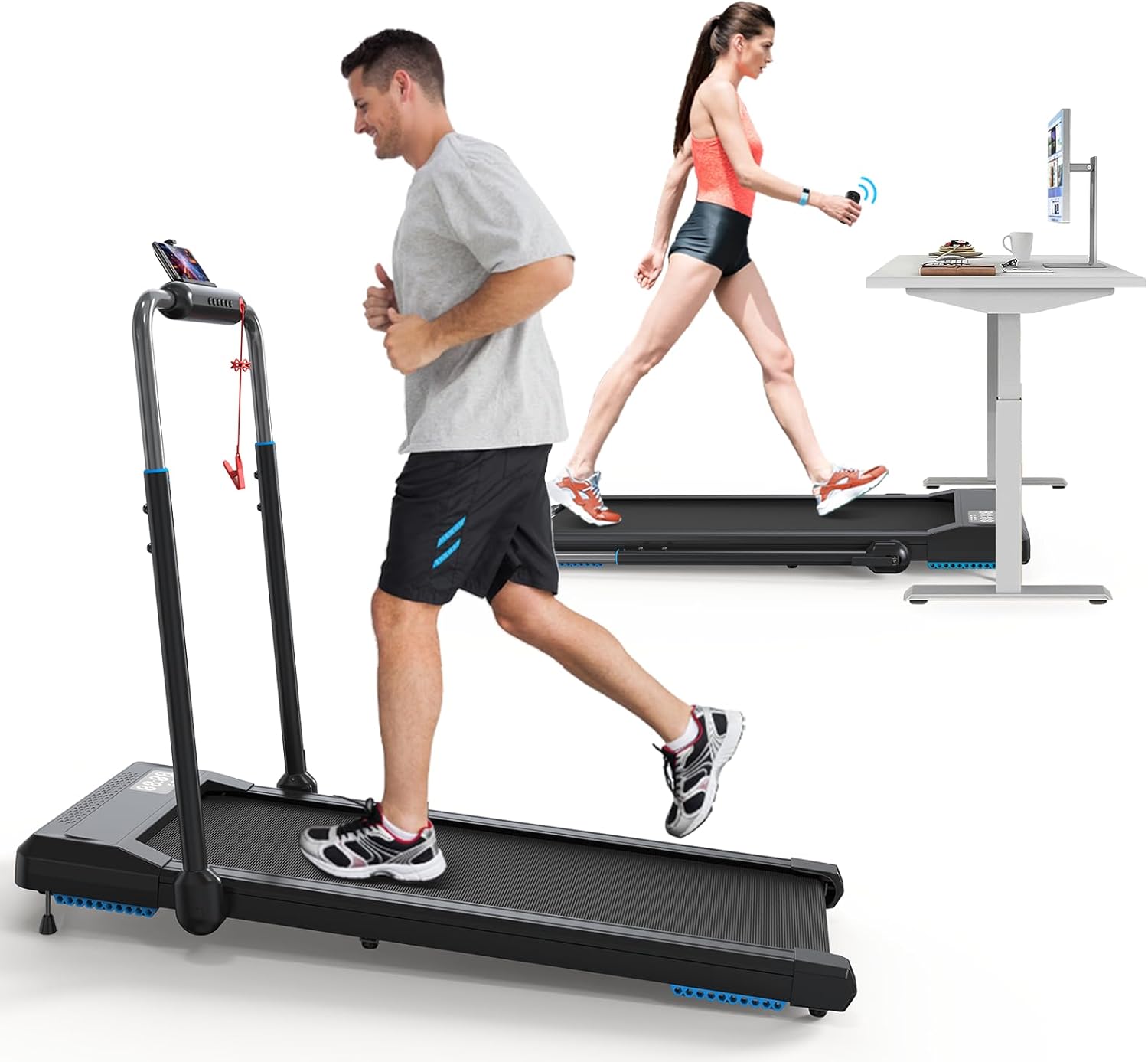
Figure 7: The WELLFIT Walking Pad Treadmill in both running and under-desk walking configurations.

Figure 8: The 3-in-1 folding treadmill design, compatible with various fitness apps.

Figure 9: Easy folding, moving, and storage capabilities of the treadmill.
7. Maintenance
7.1 Belt Lubrication
Regular lubrication of the running belt is crucial for optimal performance and longevity of your treadmill. Use the provided lubricant as instructed in the separate lubrication guide or follow these general steps:
- Turn off and unplug the treadmill.
- Carefully lift the edge of the running belt.
- Apply a small amount of lubricant evenly to the center of the deck, underneath the belt.
- Plug in the treadmill and run it at a low speed (e.g., 1 MPH) for 2-3 minutes to distribute the lubricant.
Frequency of lubrication depends on usage. For light use (1-3 hours/week), lubricate every 3 months. For moderate use (4-7 hours/week), lubricate every 2 months. For heavy use (8+ hours/week), lubricate monthly.
7.2 Cleaning
Wipe down the treadmill surfaces with a damp cloth after each use to remove sweat and dust. Do not use abrasive cleaners or solvents. Ensure the treadmill is unplugged before cleaning.
8. Troubleshooting
If you encounter any issues with your WELLFIT Walking Pad Treadmill, please refer to the following common solutions:
- Treadmill does not power on: Ensure the power cord is securely plugged into both the treadmill and a working electrical outlet. Check the red power button is pressed.
- Belt stops or slips: The running belt may require lubrication (refer to Section 7.1) or tension adjustment. Consult the full user manual for belt tensioning instructions.
- Remote control not responding: Check if the remote control batteries are correctly inserted. Ensure there are no obstructions between the remote and the treadmill's receiver.
- Unusual noises: Turn off the treadmill immediately. Inspect the belt for any foreign objects or damage. If the noise persists, contact customer support.
For further assistance, please contact WELLFIT customer support.
9. Specifications
| Brand | WELLFIT |
| Model Name | WFWP003 (Folding treadmill) |
| Color | Black Silver |
| Product Grade | Residential |
| Product Dimensions (LxWxH) | 52"D x 45"W x 25"H |
| Item Weight | 56 Pounds |
| Material | Carbon Steel |
| Maximum Speed | 7.6 Miles per Hour |
| Minimum Speed | 0.6 Miles per Hour |
| Maximum Incline Percentage | 10% (Manual Incline) |
| Maximum Horsepower | 3 Horsepower |
| Maximum Weight Recommendation | 360 Pounds |
| Deck Length | 44 Inches |
| Deck Width | 16 Inches |
| Folded Size (LxWxH) | 57" x 5" x 25" |
| Display Type | LED |
| Power Source | Corded Electric |
| Control Program Name | Kinomap, WELLFIT (App) |
| Metrics Measured | Calories Burned, Distance, Speed, Time |
| Assembly Required | No (Arrives fully assembled) |
10. Warranty and Support
The WELLFIT Walking Pad Treadmill comes with a 2-year warranty. For warranty claims, technical support, or any questions regarding your product, please contact WELLFIT customer service. Refer to your purchase documentation for specific contact details.


