
1. Introduction
This manual provides essential information for the safe and efficient use of your vivo T4R 5G smartphone. Please read this manual carefully before using your device to ensure proper operation and to prevent damage.
The vivo T4R 5G is a high-performance smartphone featuring 5G connectivity, a powerful processor, advanced camera system, and a durable design. It operates on the Android operating system.
2. Setup
2.1. Package Contents
Verify that your package contains the following items:
- vivo T4R 5G Smartphone
- (Other accessories such as charger, USB cable, SIM ejector tool, and protective case may vary by region and package.)
2.2. Inserting SIM Cards
- Locate the SIM card tray on the side of your device.
- Insert the SIM ejector tool into the small hole next to the tray and press firmly until the tray pops out.
- Place your Nano-SIM cards into the designated slots on the tray. This device supports Dual SIM functionality.
- Carefully reinsert the tray into the phone.
Ensure the phone is powered off before inserting or removing SIM cards.
2.3. Initial Charging and Power On
Before first use, fully charge your vivo T4R 5G. Connect the USB Type C cable to the phone's charging port and the other end to a power adapter. The device features a 5500 Milliamp Hours battery.
To power on, press and hold the Power button located on the side of the device until the vivo logo appears on the screen.

Image: The vivo T4R 5G smartphone being charged, highlighting its 5700mAh battery capacity and 44W fast charging capability.
3. Operating Your Device
3.1. Basic Navigation
Your vivo T4R 5G features a Touchscreen interface and a 3D Curved Display. Navigate through the Android operating system using gestures and taps. The display is a Curved AMOLED with a maximum resolution of 2392 × 1080 Pixels, 387 Pixels Per Inch (PPI), and a 120Hz Fast Refresh Rate for smooth visuals.

Image: The vivo T4R 5G showcasing its ultra-slim body and curved AMOLED display with a 120Hz fast refresh rate and HDR+ support.
3.2. Camera Usage
The device is equipped with an advanced camera system for capturing photos and videos:
- Rear Cameras: Three cameras, including a 48 MP Optical Sensor Resolution main camera.
- Front Camera: One front camera.
- Features: LED Flash, High Dynamic Range (HDR) shooting mode.
- Video: Supports 4K Video Capture Resolution.

Image: Detailed camera specifications for the vivo T4R 5G, including a 32 MP 4K selfie camera, a 50 MP Sony 4K OIS main camera, and a 2 MP Bokeh camera.
3.3. Connectivity
Your vivo T4R 5G supports various connectivity options:
- Cellular Technology: 5G for ultra-fast internet speeds.
- Wireless Network Technology: LTE.
- Navigation: GPS Geotagging Functionality and Supported Satellite Navigation System (GPS).
3.4. Storage and Performance
The device comes with 256 GB of internal Memory Storage Capacity, with Flash Memory Supported Size Maximum of 256 GB. It is powered by a Snapdragon CPU Model with a Processor Speed of 2.6 GHz and 12 GB RAM Memory Installed Size, ensuring smooth multitasking and app performance.
4. Maintenance
4.1. Cleaning Your Device
To clean your smartphone, use a soft, lint-free cloth. Avoid using harsh chemicals, abrasive cleaners, or compressed air, as these can damage the screen or finish. For stubborn smudges, slightly dampen the cloth with water.
4.2. Water and Dust Protection
The vivo T4R 5G features Industry Leading Water & Dust Protection with IP68 and IP69 ratings. While the device is Water Resistant, it is not waterproof. Avoid intentional submersion in water, exposure to pressurized water, or use in extreme conditions. Damage caused by liquid exposure is not covered under warranty.
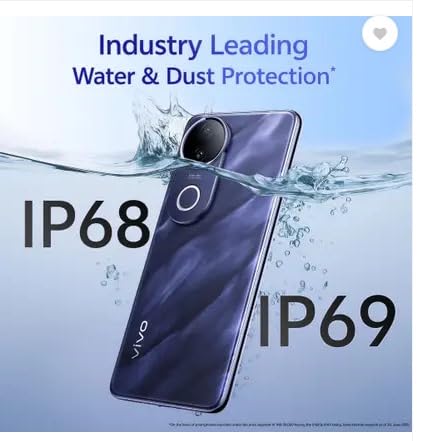
Image: The vivo T4R 5G smartphone submerged in water, illustrating its IP68 and IP69 water and dust protection ratings.
4.3. Software Updates
Regularly check for and install software updates to ensure your device has the latest features, security patches, and performance improvements. Updates are typically found in the device's settings menu under 'System' or 'Software Update'.
5. Troubleshooting
If you encounter issues with your vivo T4R 5G, try the following basic troubleshooting steps:
- Device not responding: Press and hold the Power button for about 10-15 seconds to force a restart.
- Battery draining quickly: Check background app usage, reduce screen brightness, disable unnecessary features like GPS or Wi-Fi when not in use.
- Apps crashing: Clear the cache and data for the problematic app in Settings > Apps. If the issue persists, reinstall the app.
- Connectivity issues: Toggle Airplane Mode on and off. Restart your device. Check your SIM card insertion.
- Poor call quality: Ensure you are in an area with good network coverage.
For more complex issues, refer to the official vivo support website or contact customer service.
6. Specifications
| Feature | Specification |
|---|---|
| Brand | vivo |
| Model Series | T4R 5G |
| Operating System | Android |
| RAM Memory Installed Size | 12 GB |
| CPU Model | Snapdragon |
| CPU Speed | 2.6 GHz |
| Memory Storage Capacity | 256 GB |
| Flash Memory Supported Size Maximum | 256 GB |
| Colour | Twilight Blue |
| SIM Card Slot Count | Dual SIM |
| Connector Type | USB Type C |
| Human Interface Types | Touchscreen |
| Water Resistance Level | Water Resistant (IP68 & IP69 implied from images) |
| Headphones Jack | No headphone jack |
| Optical Sensor Resolution (Main Camera) | 48 MP |
| Number of Rear Facing Cameras | 3 |
| Number of Front Cameras | 1 |
| Video Capture Resolution | 4k |
| Battery Power | 5500 Milliamp Hours |
| Item Weight | 190 Grams |
| Item Dimensions (L x W x H) | 16.3 x 7.7 x 0.7 Centimeters |
| Display Type | Curved Amoled |
| Maximum Display Resolution | 2392 × 1080 Pixels |
| Display Pixel Density | 387 Pixels Per Inch (PPI) |
| Cellular Technology | 5G |
| Wireless Network Technology | LTE |
| Model Year | 2025 |
7. Warranty Information
Your vivo T4R 5G smartphone comes with a 1 Year Warranty from the date of purchase. This warranty covers manufacturing defects under normal use. Please retain your proof of purchase for warranty claims.
The warranty does not cover damage caused by accidents, misuse, unauthorized modifications, or liquid exposure (despite water resistance features).
8. Support and Contact Information
For technical support, service, or further inquiries, please contact vivo customer service or visit the official vivo website.
- Manufacturer: VIVO
- Packer Contact Information: Vivo Mobile India Private Limited PLOT NO 8, SECTOR 24, YAMUNA EXPRESSWAY AREA, GAUTAM BUDDHA NAGAR, UP INDIA-201310
- Online Support: Visit the official vivo Store for product information and support resources.


