
1. Important Safety Information
Please read all instructions carefully before assembly and use. Retain this manual for future reference.
- Always follow the assembly instructions carefully.
- Do not exceed the maximum weight limit of 200 lbs (90.7 kg).
- Ensure the desk is placed on a level surface.
- Keep the power cord away from heat sources and liquids.
- Always turn off and unplug the desk when not in use or when performing maintenance.
- Keep the control panel out of reach of children and pets to prevent accidental operation.
- Avoid placing objects that could be damaged by movement under the desk.
2. Product Overview
The SEDETA Corner Electric Standing Desk is designed for ergonomic flexibility, allowing users to switch between sitting and standing positions. It features a height-adjustable mechanism, a built-in storage drawer, and an integrated power strip.

Image 2.1: Overview of the SEDETA Corner Electric Standing Desk.
Key Features:
- Electric height adjustment from 28.3 inches to 46.9 inches.
- LED display with 3 customizable memory presets.
- Integrated storage drawer.
- Built-in power strip with 2 USB ports and 3 AC outlets.
- Quiet motor operation (under 40 dB).
- Sturdy alloy steel frame with engineered wood tabletop.
3. Setup and Assembly
Assembly is required for this product. Please refer to the separate assembly guide included in your product packaging for detailed step-by-step instructions. Ensure all components are present before beginning assembly.
Pre-Assembly Checklist:
- Verify all parts are included as per the assembly guide.
- Ensure you have the necessary tools (not all tools may be included).
- Clear a spacious area for assembly.
Initial Setup:
- Once assembled, place the desk in its desired corner location.
- Connect the power cord to a grounded electrical outlet.
- Ensure all cables are securely connected to the control box and motors.
4. Operating Instructions
Control Panel Functions:
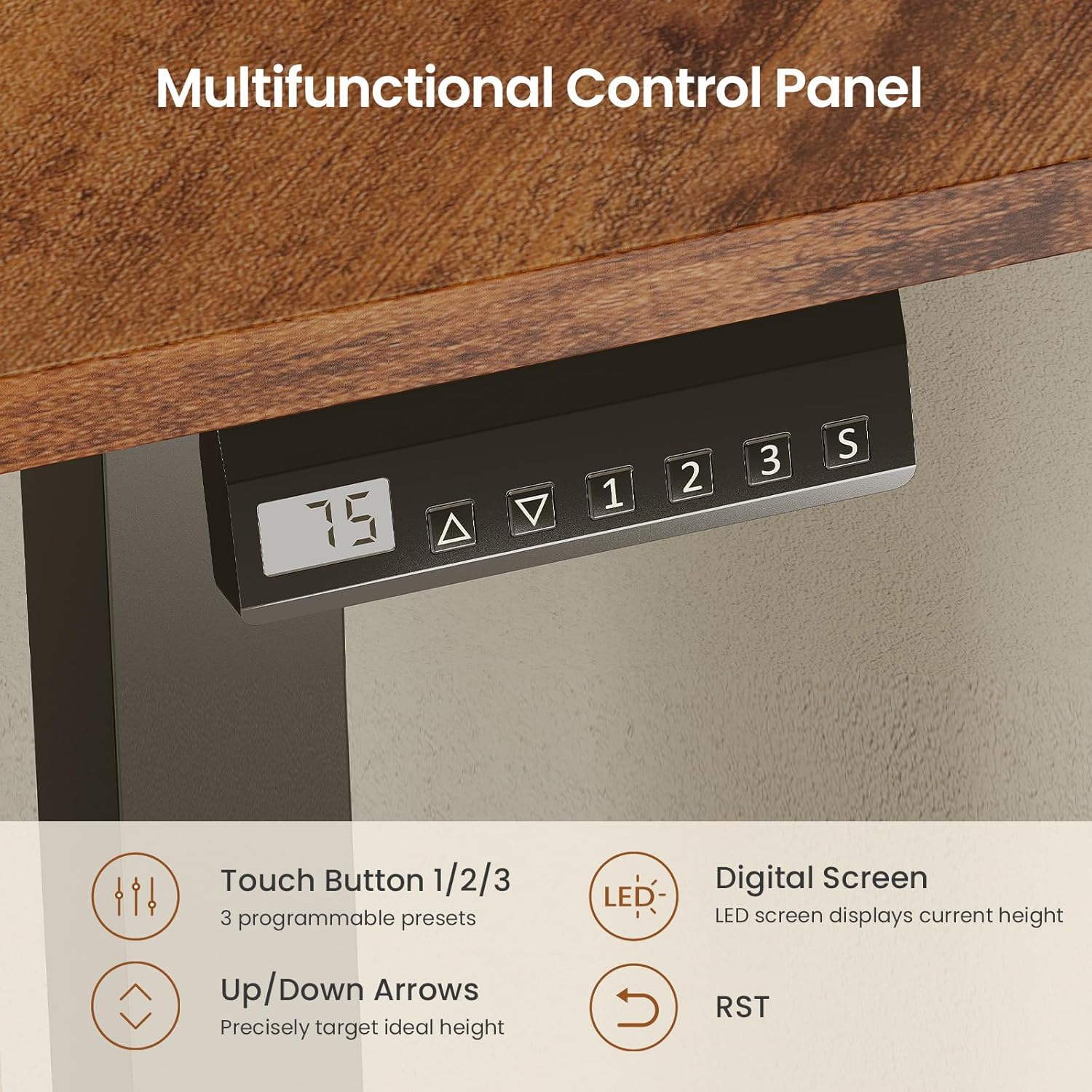
Image 4.1: Multifunctional Control Panel with LED display and memory presets.
- Up/Down Arrows (▲ / ▼): Press and hold to adjust the desk height continuously. Release to stop at the desired height. The LED screen displays the current height.
- Memory Presets (1, 2, 3): To save a height, adjust the desk to the desired position, then press the 'S' button followed by the desired number (1, 2, or 3). To recall a saved height, simply press the corresponding number button.
- 'S' Button: Used to save memory presets.
- 'RST' Button: Used for resetting the desk (refer to Troubleshooting for details).
Height Adjustment Range:

Image 4.2: The desk offers flexible height adjustment from 28.3 inches to 46.9 inches.
The desk can be adjusted from a minimum height of 28.3 inches to a maximum height of 46.9 inches. This allows for comfortable sitting and standing positions for various users.
Integrated Power Strip:
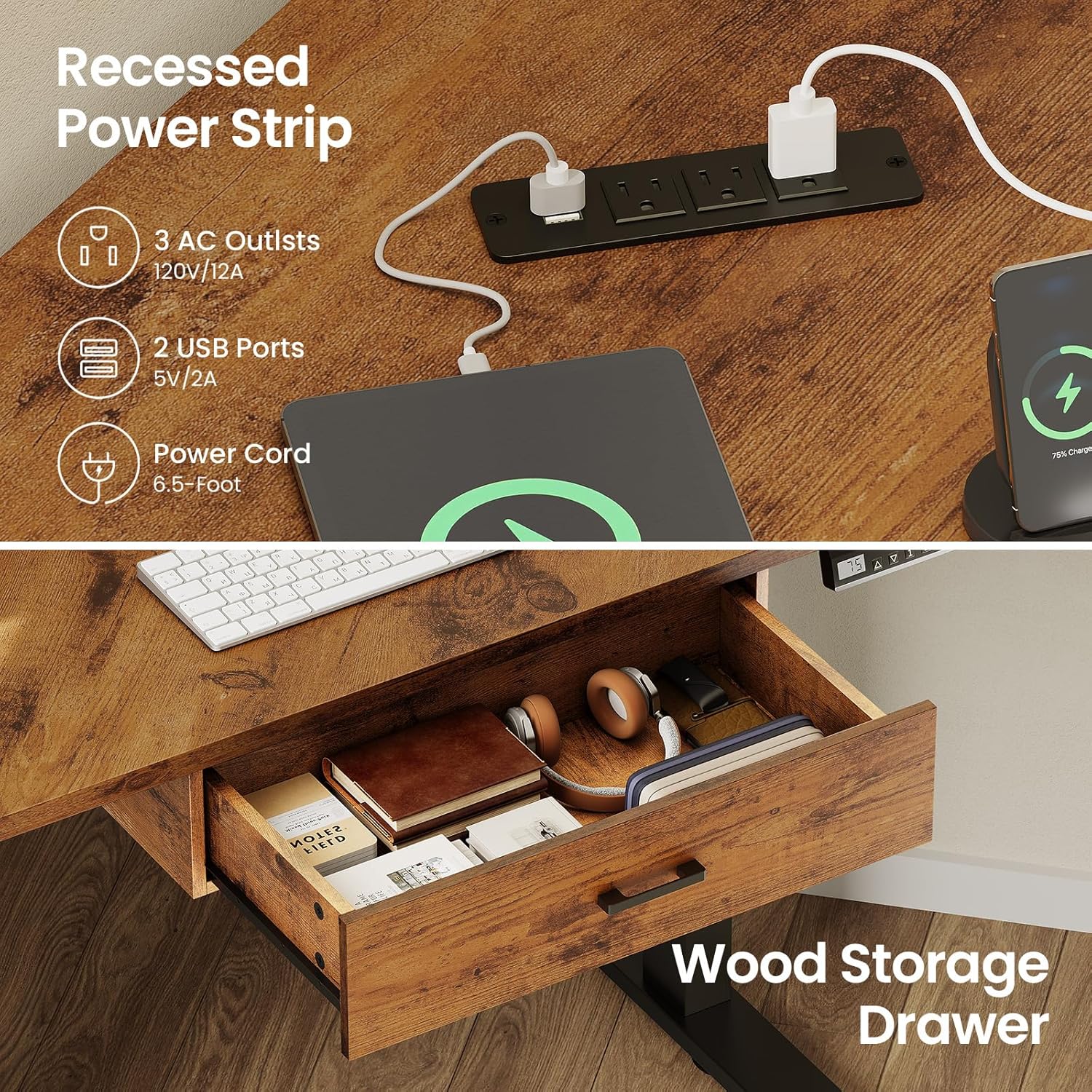
Image 4.3: Recessed power strip and integrated storage drawer.
The desk includes a recessed power strip with 3 AC outlets (120V/12A) and 2 USB ports (5V/2A) for convenient charging and powering of your devices. The power cord is 6.5 feet long.
Storage Drawer:
A built-in storage drawer provides space for small office supplies, keeping your desktop organized and clutter-free.
5. Maintenance
Regular maintenance ensures the longevity and proper functioning of your standing desk.
- Cleaning: Wipe the desk surface and frame with a soft, damp cloth. Avoid abrasive cleaners or harsh chemicals.
- Cable Management: Periodically check that all cables are securely connected and not pinched or damaged.
- Motor Inspection: Listen for any unusual noises during operation. If you hear grinding or excessive noise, discontinue use and refer to the troubleshooting section.
- Weight Distribution: Ensure weight is evenly distributed on the desk surface, especially when adjusting height.
6. Troubleshooting
If you encounter issues with your desk, please refer to the following common solutions:
| Problem | Possible Cause | Solution |
|---|---|---|
| Desk does not move or stops mid-movement. | Power disconnected, overload, or motor error. | Check power connections. Reduce weight on the desk. Perform a reset. |
| Uneven height adjustment. | Obstruction or motor synchronization issue. | Clear any obstructions. Perform a reset to re-synchronize motors. |
| LED display shows an error code. | Specific system error. | Refer to the full assembly manual for specific error code meanings or perform a reset. |
Reset Procedure:
If the desk is not functioning correctly, a reset may resolve the issue. Consult your assembly manual for the exact reset procedure, which typically involves pressing and holding the 'RST' button until the desk moves to its lowest position and then slightly up, indicating a successful reset.
7. Specifications
| Feature | Detail |
|---|---|
| Model Number | B0FSKJFWGY |
| Brand | SEDETA |
| Desk Design | Corner Electric Standing Desk |
| Product Dimensions (D x W x H) | 32"D x 32"W x 28.3"H (at lowest height) |
| Minimum Height | 28.3 inches |
| Maximum Height | 46.9 inches |
| Maximum Weight Recommendation | 200 lbs (90.7 kg) |
| Base Material | Alloy Steel |
| Top Material Type | Engineered Wood |
| Noise Level | Under 40 dB during operation |
| Power Strip | 3 AC Outlets (120V/12A), 2 USB Ports (5V/2A) |
| Power Cord Length | 6.5 feet |
| Number of Drawers | 1 |
| Assembly Required | Yes |
8. Warranty Information
Specific warranty details for the SEDETA Corner Electric Standing Desk are not provided in this manual. Please refer to the warranty card included with your product packaging or visit the official SEDETA website for comprehensive warranty terms and conditions.
9. Customer Support
If you require further assistance, have questions about assembly, operation, or troubleshooting that are not covered in this manual, please contact SEDETA customer support. Contact information can typically be found on the product packaging, the official SEDETA website, or through your retailer.