
vivo T4R 5G
vivo T4R 5G Smartphone User Manual
Model: T4R 5G
1. Introduction
Welcome to the user manual for your new vivo T4R 5G smartphone. This guide provides essential information to help you set up, operate, maintain, and troubleshoot your device. The vivo T4R 5G is designed for high performance, featuring 5G connectivity, 12 GB RAM, 256 GB internal storage, and an advanced camera system, all encased in a sleek design.
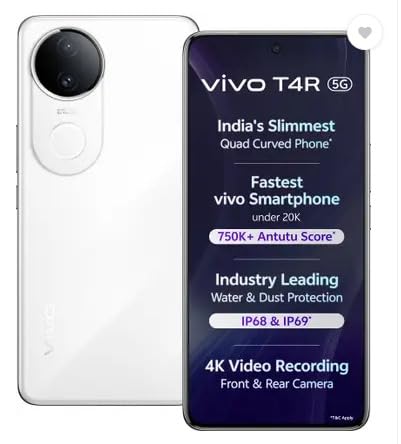
Figure 1: Front view of the vivo T4R 5G smartphone highlighting its main features.
Please read this manual carefully to ensure proper use and to maximize the benefits of your device.
2. Initial Setup
2.1. Unboxing and Package Contents
Upon opening the package, ensure all items are present:
- vivo T4R 5G Smartphone
- USB Type-C Cable
- Power Adapter
- SIM Ejector Tool
- Quick Start Guide
- Warranty Card
2.2. Inserting SIM Cards
- Locate the SIM card tray on the side of your phone.
- Insert the SIM ejector tool into the small hole next to the tray and press gently until the tray pops out.
- Place your Nano-SIM cards (up to two) into the designated slots on the tray. Ensure the gold contacts face downwards.
- Carefully push the tray back into the phone until it clicks into place.
2.3. Powering On and Initial Configuration
- Press and hold the Power button until the vivo logo appears.
- Follow the on-screen instructions to select your language, connect to a Wi-Fi network, and set up your Google account.
- You will be prompted to set up security features such as a PIN, pattern, or password. It is recommended to also set up the Fingerprint Recognition for quick and secure unlocking.
3. Operating Your vivo T4R 5G
3.1. Basic Navigation
The vivo T4R 5G features a responsive Curved AMOLED Touchscreen. Use gestures such as swiping, tapping, and pinching to navigate the interface, open apps, and zoom.
3.2. Calls and Messaging
- Making Calls: Open the Phone app, enter the number, and tap the call icon.
- Sending Messages: Open the Messages app, tap the new message icon, enter the recipient and your message.
3.3. Network Connectivity
Your device supports 5G cellular technology for ultra-fast data speeds. To enable or disable mobile data, swipe down from the top of the screen to access the Quick Settings panel.
To connect to Wi-Fi:
- Go to Settings > Network & internet > Wi-Fi.
- Toggle Wi-Fi on and select your desired network. Enter the password if prompted.
3.4. Camera Usage
The vivo T4R 5G is equipped with a versatile camera system:
- Rear Cameras: Three cameras, with a main 48 MP Optical Sensor Resolution.
- Front Camera: One front camera, featuring a 32 MP Selfie Camera.
- Video Recording: Supports 4K Video Recording from both front and rear cameras.
- Shooting Modes: Includes High Dynamic Range (HDR) and other modes for various scenarios.
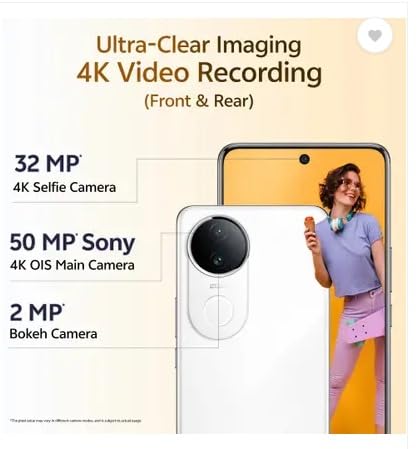
Figure 2: Camera specifications of the vivo T4R 5G.
Open the Camera app to access various modes and settings. Tap the shutter button to take photos or start/stop video recording.
3.5. Battery Management
Your phone is powered by a 5700 Milliamp Hours (mAh) battery. To charge, connect the provided USB Type-C cable to the phone and the power adapter, then plug it into a wall outlet.
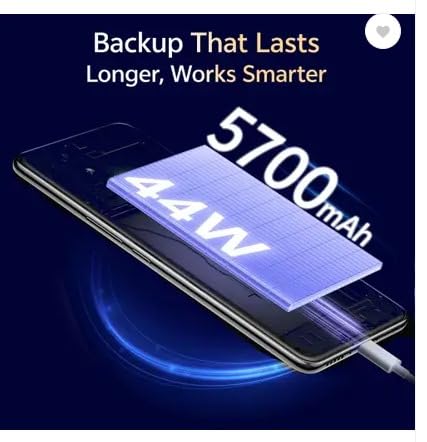
Figure 3: The vivo T4R 5G features a 5700mAh battery with 44W charging.
For optimal battery life, avoid extreme temperatures and use only approved charging accessories.
4. Maintenance and Care
4.1. Cleaning Your Device
Use a soft, lint-free cloth to clean the screen and body of your phone. Avoid using harsh chemicals or abrasive materials, as these can damage the display and finish.
4.2. Software Updates
Regularly check for and install software updates to ensure your device has the latest features, security patches, and performance improvements. Go to Settings > System > System update.
4.3. Water and Dust Resistance
The vivo T4R 5G features IP68 and IP69 water and dust resistance. While designed to withstand splashes and dust, it is not fully waterproof. Avoid submerging the device in water or exposing it to high-pressure water jets. If the phone gets wet, dry it thoroughly before charging or using ports.
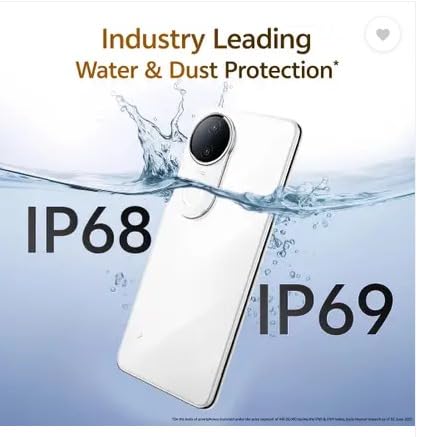
Figure 4: The vivo T4R 5G offers IP68 and IP69 water and dust protection.
5. Troubleshooting
This section addresses common issues you might encounter with your vivo T4R 5G.
5.1. Phone Not Turning On
- Ensure the battery is charged. Connect the phone to its charger and wait a few minutes before attempting to power on again.
- Press and hold the Power button for at least 10-15 seconds to perform a forced restart.
5.2. Apps Crashing or Freezing
- Close the problematic app and reopen it.
- Clear the app's cache and data via Settings > Apps > [App Name] > Storage > Clear cache/Clear data.
- Ensure the app is updated to its latest version.
5.3. Network Connectivity Issues
- Toggle Airplane Mode on and off.
- Restart your phone.
- Check your SIM card insertion and ensure it is properly seated.
- Reset network settings via Settings > System > Reset options > Reset Wi-Fi, mobile & Bluetooth.
5.4. Charging Problems
- Ensure the charging cable and adapter are securely connected and undamaged.
- Try a different power outlet.
- Clean the USB Type-C port on your phone gently with a dry, soft brush to remove any debris.
5.5. Factory Reset (Last Resort)
If issues persist, you may consider a factory reset. Warning: This will erase all data on your phone. Back up important data before proceeding. Go to Settings > System > Reset options > Erase all data (factory reset).
6. Specifications
Detailed technical specifications for the vivo T4R 5G:
| Feature | Specification |
|---|---|
| Brand | vivo |
| Model | T4R 5G |
| Operating System | Android |
| RAM Memory | 12 GB |
| Internal Storage | 256 GB |
| CPU Model | Snapdragon |
| CPU Speed | 2.6 GHz |
| Display Type | Curved AMOLED |
| Maximum Display Resolution | 2392 × 1080 Pixels |
| Display Refresh Rate | 120Hz (from image) |
| Peak Brightness | 4500 Nits |
| Rear Camera (Main) | 48 MP Optical Sensor Resolution (3 cameras total) |
| Front Camera | 32 MP (1 camera total) |
| Video Capture Resolution | 4K |
| Battery Capacity | 5700 Milliamp Hours |
| Connector Type | USB Type C |
| SIM Card Slot Count | Dual SIM |
| Cellular Technology | 5G |
| Biometric Security | Fingerprint Recognition |
| Water Resistance Level | IP68 & IP69 (Water Resistant) |
| Item Dimensions | 16.3 x 7.7 x 0.7 Centimeters |
| Item Weight | 183.5 Grams |
7. Warranty Information
Your vivo T4R 5G smartphone comes with a 1 Year Warranty from the date of purchase. This warranty covers manufacturing defects under normal use. Please refer to the warranty card included in your package for full terms and conditions, including details on what is covered and how to make a claim.
Keep your proof of purchase for warranty service.
8. Customer Support
For further assistance, technical support, or service inquiries regarding your vivo T4R 5G, please visit the official vivo website or contact their customer service. You can find contact details and support resources on the vivo India website.
Manufacturer: VIVO Mobile India Private Limited
Address: PLOT NO 8, SECTOR 24, YAMUNA EXPRESSWAY AREA, GAUTAM BUDDHA NAGAR, UP INDIA-201310
Related documentsT4R 5G


Ask a question about this manual
Ask about setup, troubleshooting, compatibility, parts, safety, or missing instructions. Manuals+ will review the question and use this page’s manual context to help answer it.