
YIYEIE Y0095
YIYEIE 1/2" Drive Digital Torque Adapter Instruction Manual
Model: Y0095
Introduction
This manual provides detailed instructions for the safe and effective use of your YIYEIE 1/2" Drive Digital Torque Adapter, Model Y0095. This device is designed to convert any standard ratchet into a precision digital torque wrench, offering accurate torque measurement for various applications including automotive, motorcycle, and home repairs. Please read this manual thoroughly before operation and retain it for future reference.
Safety Information
- Always wear appropriate personal protective equipment, such as safety glasses, when using this tool.
- Ensure the adapter is securely attached to the drive tool and the fastener before applying torque.
- Do not exceed the maximum torque capacity of the adapter (100 Ft-lb / 135 Nm) to prevent damage to the tool or fastener.
- Keep the tool clean and dry. Store it in its protective case when not in use.
- This tool is not insulated. Do not use it on live electrical circuits.
Package Contents
Verify that all items are present upon unpacking:
- YIYEIE 1/2" Drive Digital Torque Adapter (Model Y0095)
- 1/4" Adapter
- 3/8" Adapter
- Storage Case
- Instruction Manual
- AAA Batteries (pre-installed or included separately)
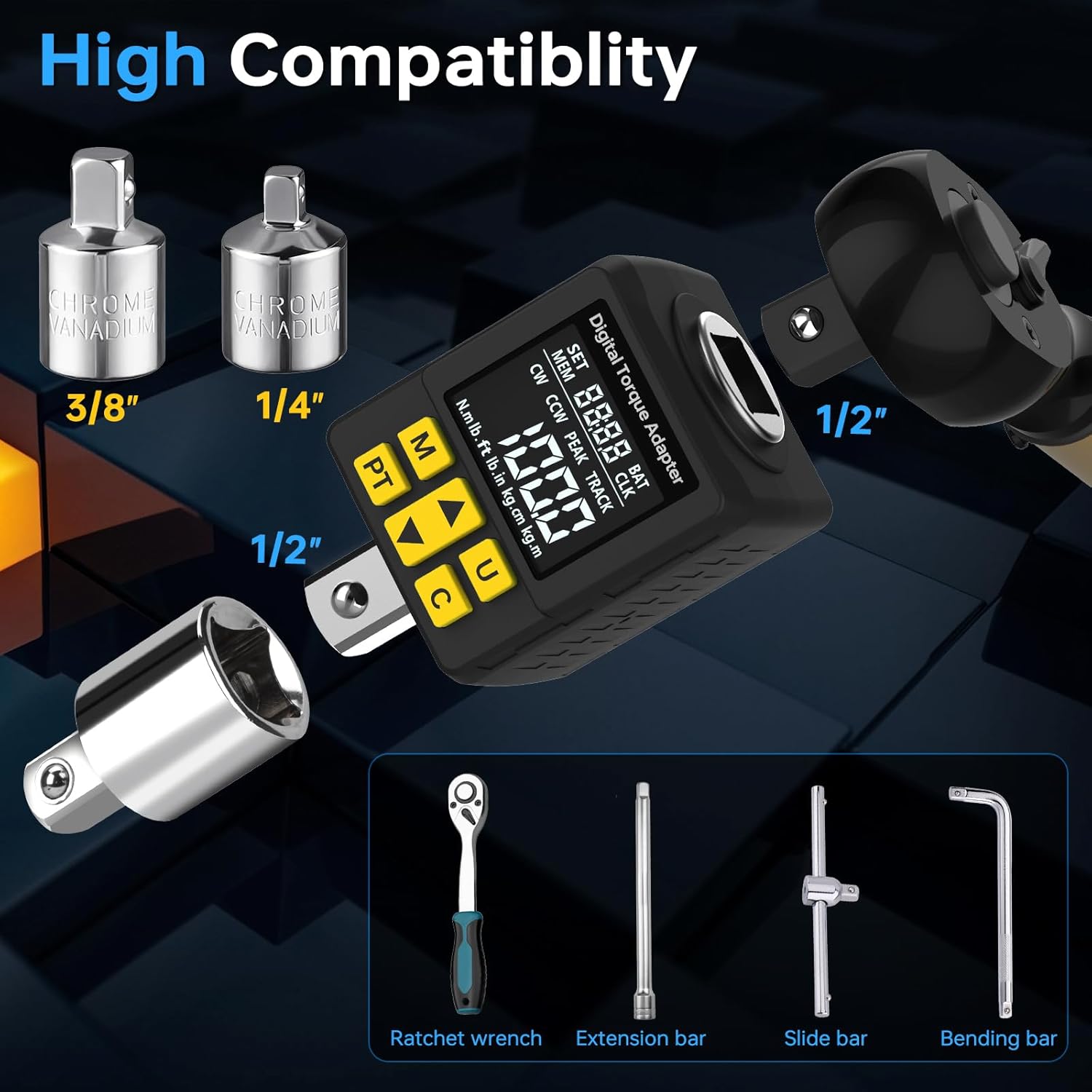
Image: The YIYEIE Digital Torque Adapter, along with its 1/4" and 3/8" drive adapters, user manual, and a durable storage case.
Product Overview and Components
The YIYEIE Digital Torque Adapter features a 1.4-inch LCD color screen and intuitive controls for precise torque measurement. Key components and display indicators are detailed below:
- LCD Color Screen: Displays torque values, units, modes, and alerts. Long press the "U" button to switch between green, blue, and red screen colors for improved visibility.
- Buttons:
- M (Memory/Save Confirmation): Used to save settings or query stored data.
- PT (Mode Switch): Toggles between Peak and Track modes.
- Up/Down Arrows: Adjust values for preset torque or navigate menus.
- U (Torque Unit Switch): Changes the measurement unit (N·m, lb·ft, lb·in, kg·cm, kg·m).
- C (Power On/Off/Clear/Confirm): Powers the device on or off, clears current readings, or confirms selections.
- Drive Head: 1/2" square drive for connecting to ratchets and sockets.
- Adapters: Includes 1/4" and 3/8" adapters for broader compatibility.

Image: A close-up of the digital torque adapter showing the display and button functions, including SET, MEM, BAT, CLK, CW/CCW, PEAK/TRACK, torque display area, and unit indication.
Setup
1. Battery Installation
The device requires AAA batteries. Use the included screwdriver to open the battery compartment, insert the batteries according to polarity, and close the compartment securely.
2. Attaching the Adapter
- Select the appropriate drive size (1/2", 3/8", or 1/4") for your application.
- Insert the digital torque adapter onto your ratchet or breaker bar. Ensure it is firmly seated.
- Attach the desired socket or fastener to the adapter's output drive.

Image: The digital torque adapter connected to a standard ratchet, demonstrating its integration into existing tool sets.
Operating Instructions
1. Power On/Off
Press the C button to power on the device. The device will automatically shut down after 3 minutes of inactivity to conserve battery life. Press C again to power off manually.
2. Unit Selection
Press the U button to cycle through the available torque units: N·m, lb·ft, lb·in, kg·cm, kg·m. Select the unit appropriate for your task.

Image: The digital torque adapter's screen highlighting the five selectable torque units for versatile use.
3. Mode Selection (Peak/Track)
Press the PT button to switch between Peak mode and Track mode.
- Peak Mode: Displays the maximum torque value applied during the tightening process. The display will hold this peak value until reset.
- Track Mode: Displays the torque value in real-time as it is being applied. The display updates continuously.

Image: A comparison of the digital torque adapter's display in Peak mode (showing maximum torque) and Track mode (showing live torque readings).
4. Setting Preset Torque Values
The adapter allows for setting up to 30 preset torque values. This is useful for repetitive tasks requiring specific torque settings.
- Enter the preset setting mode (refer to the detailed manual for specific button sequences).
- Use the Up/Down arrow buttons to adjust the desired torque value.
- Press the M button to save the preset.
- When applying torque, the device will provide smart alerts as you approach and reach the preset value.

Image: The digital torque adapter's display illustrating the color and sound alerts: green for 80% target torque (intermittent beep), blue for 90% (quicker beep), and red for 100% (constant beep).
5. Data Management
The adapter can store up to 500 data sets. This feature is beneficial for quality control and record-keeping.
- Access stored data by pressing the M button (short press) to cycle through memory slots.
- Data can be viewed and deleted as needed. Consult the full instruction manual for specific steps on data management.

Image: The digital torque adapter displaying its capability to store 30 preset values and 500 groups of measured data.
6. Smart Alert System
The adapter provides visual and audible alerts to prevent over-torquing:
- At 80% of the preset torque, the screen turns green with an intermittent beep.
- At 90% of the preset torque, the screen turns blue with a quicker beep.
- At 100% of the preset torque, the screen turns red with a constant beep.
These alerts help ensure precise torque application and prevent damage to fasteners or components.
Compatibility
The YIYEIE Digital Torque Adapter is designed for broad compatibility with various tools and applications:
- Drive Size: Features a 1/2" drive head and includes 1/4" and 3/8" adapters, making it compatible with most standard ratchets, extension bars, and other drive tools.
- Applications: Suitable for a wide range of tasks in automotive, motorcycle, mechanical, and pipeline repairs.

Image: The digital torque adapter demonstrating its high compatibility with different drive sizes and tools, including ratchets and extension bars.
Maintenance
- Cleaning: Wipe the adapter with a clean, dry cloth after each use. Do not use abrasive cleaners or solvents.
- Storage: Store the adapter in its provided carrying case in a dry, cool place to protect it from dust, moisture, and impact.
- Battery Care: Remove batteries if the device will not be used for an extended period to prevent leakage.
- Calibration: Each digital torque adapter is calibrated to ASME & DIN-ISO traceable standards. Regular calibration checks are recommended to maintain accuracy, especially after heavy use or impact.
Troubleshooting
If you encounter issues with your digital torque adapter, consider the following common solutions:
- Device not powering on: Check battery installation and ensure batteries are not depleted. Replace if necessary.
- Inaccurate readings: Ensure the adapter is securely attached and the correct unit is selected. Avoid dropping the device, as this can affect calibration.
- Display issues: If the screen is dim or flickering, replace the batteries.
- No alerts: Verify that a preset torque value has been set correctly.
For further assistance, please refer to the complete user manual or contact YIYEIE customer support.
Specifications
| Model Number | Y0095 |
| Drive Size | 1/2 inch (includes 1/4" and 3/8" adapters) |
| Torque Range | 5-100 Ft-lb / 6.8-135 Nm |
| Accuracy | ±1% Clockwise, ±2% Counterclockwise |
| Units | N·m, lb·ft, lb·in, kg·cm, kg·m |
| Display | 1.4-inch LCD Color Screen (Green, Blue, Red) |
| Preset Groups | 30 |
| Data Storage | Up to 500 data sets |
| Auto-Shutdown | 3 minutes of inactivity |
| Material | Chrome Vanadium Steel, Plastic |
| Power Source | AAA Batteries (Alkaline) |
| Item Weight | 1.12 pounds |
| Package Dimensions | 6.14 x 5.04 x 2.48 inches |
Warranty and Support
For warranty information, technical support, or service inquiries, please refer to the contact details provided in the original product packaging or visit the official YIYEIE website. Keep your purchase receipt as proof of purchase for warranty claims.
Ask a question about this manual
Ask about setup, troubleshooting, compatibility, parts, safety, or missing instructions. Manuals+ will review the question and use this page’s manual context to help answer it.