
1. Introduction
Thank you for choosing the Akitas C10P Bagless Vacuum Cleaner. This appliance is designed for efficient and thorough cleaning of various floor types, including delicate hard floors, carpets, and upholstery. Please read this manual carefully before operating the vacuum cleaner to ensure safe and optimal performance. Keep this manual for future reference.
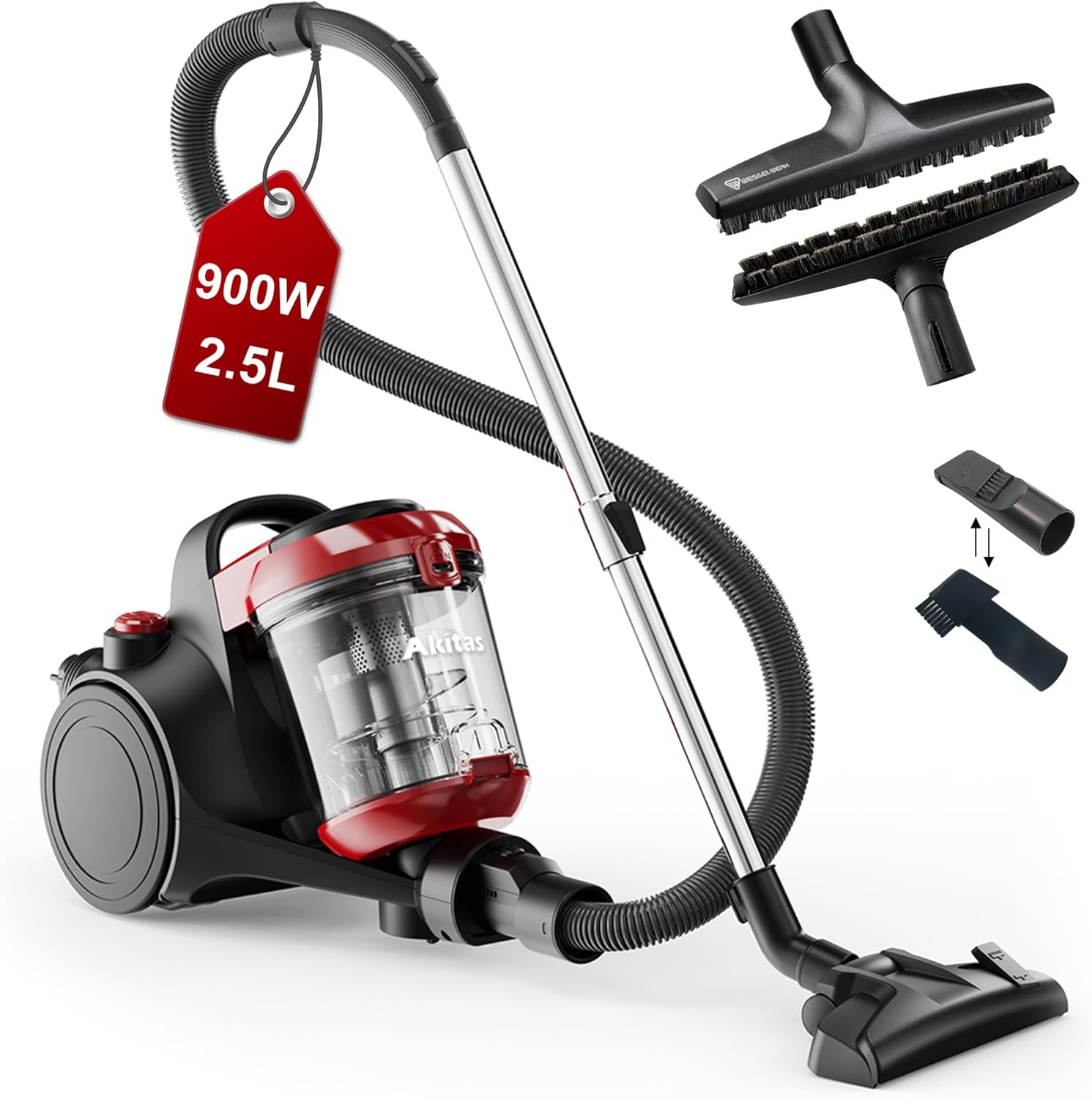
Image 1.1: The Akitas C10P Bagless Vacuum Cleaner in a living room setting.
2. Important Safety Instructions
When using electrical appliances, basic safety precautions should always be followed, including the following:
- Read all instructions before using this appliance.
- Do not leave the appliance unattended when plugged in. Unplug from outlet when not in use and before servicing.
- To reduce the risk of electric shock, do not use outdoors or on wet surfaces.
- Do not allow to be used as a toy. Close attention is necessary when used by or near children.
- Use only as described in this manual. Use only manufacturer's recommended attachments.
- Do not use with damaged cord or plug. If appliance is not working as it should, has been dropped, damaged, left outdoors, or dropped into water, return it to a service center.
- Do not pull or carry by cord, use cord as a handle, close a door on cord, or pull cord around sharp edges or corners. Do not run appliance over cord. Keep cord away from heated surfaces.
- Do not unplug by pulling on cord. To unplug, grasp the plug, not the cord.
- Do not handle plug or appliance with wet hands.
- Do not put any object into openings. Do not use with any opening blocked; keep free of dust, lint, hair, and anything that may reduce air flow.
- Keep hair, loose clothing, fingers, and all parts of body away from openings and moving parts.
- Do not pick up anything that is burning or smoking, such as cigarettes, matches, or hot ashes.
- Do not pick up flammable or combustible liquids such as gasoline, or use in areas where they may be present.
- Do not use without dust cup and/or filters in place.
- Turn off all controls before unplugging.
- Use extra care when cleaning on stairs.
3. Package Contents
Verify that all components are present and in good condition upon opening the package:
- Akitas C10P Vacuum Cleaner Unit
- Long Flexible Hose
- Telescopic Tube
- Wessel Werk D320 Hard Floor Brush (with natural horsehair bristles)
- Crevice Tool
- Upholstery Tool / 2-in-1 Brush
- User Manual

Image 3.1: Overview of the Akitas C10P vacuum cleaner and its included accessories.
4. Assembly
Follow these steps to assemble your Akitas C10P vacuum cleaner:
- Connect the Flexible Hose: Insert the larger end of the flexible hose into the suction inlet on the main vacuum unit until it clicks securely into place.
- Attach the Telescopic Tube: Connect the handle end of the flexible hose to the wider end of the telescopic tube.
- Attach the Floor Brush: Connect the Wessel Werk D320 hard floor brush or the 2-in-1 brush to the narrower end of the telescopic tube. Ensure it is firmly attached.
- Insert Accessories: The crevice tool and upholstery tool can be stored on the vacuum unit or attached directly to the hose handle or telescopic tube for specific cleaning tasks.
5. Operation
5.1 Powering On/Off
Plug the power cord into a suitable electrical outlet. Press the power button (marked with an 'I/O' symbol) located on the top of the main unit to turn the vacuum cleaner on or off.

Image 5.1: Top view of the vacuum cleaner, highlighting the power button and cable rewind button.
5.2 Using the Wessel Werk D320 Hard Floor Brush
The Akitas C10P includes a specialized Wessel Werk D320 hard floor brush with natural horsehair bristles. This brush is designed for gentle yet effective cleaning of sensitive hard floors such as parquet, laminate, and tiles, preventing scratches.

Image 5.2: Illustration of the benefit of horsehair bristles for gentle floor care compared to nylon.

Image 5.3: Detailed diagram of the Wessel Werk D320 hard floor brush, emphasizing its design for durability and gentle cleaning.
5.3 Using the 2-in-1 Brush
The included 2-in-1 brush is versatile for cleaning both carpets and hard floors. Adjust the brush mode by pressing the foot pedal on the brush head:
- Carpet Mode: Retract the bristles for optimal suction on carpets and rugs.
- Hard Floor Mode: Extend the bristles for effective cleaning on hard surfaces.
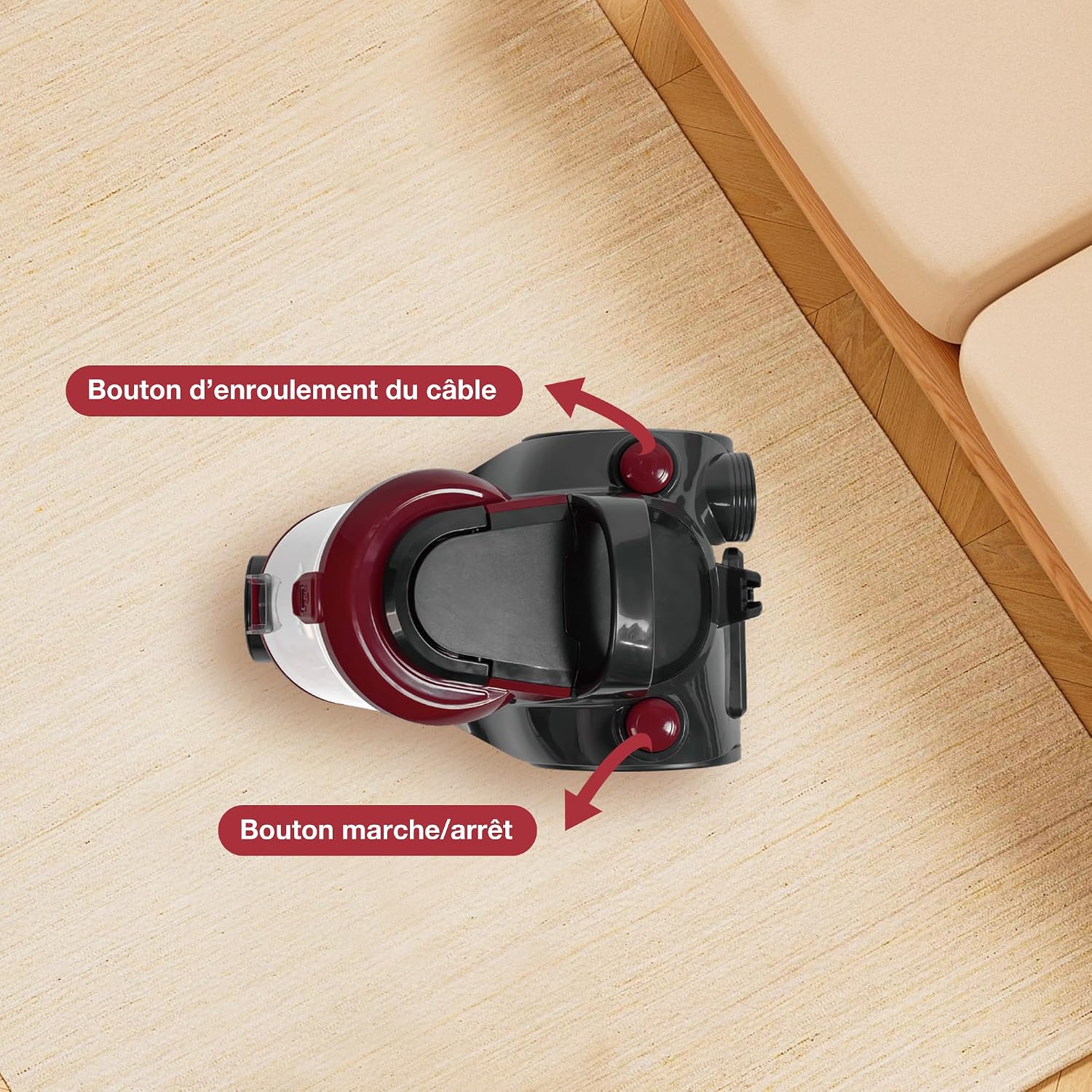
Image 5.4: The 2-in-1 brush demonstrating its carpet and hard floor modes.
5.4 Using the Crevice Tool
Attach the crevice tool directly to the hose handle or the telescopic tube to clean narrow gaps, corners, and hard-to-reach areas such as between sofa cushions or along skirting boards.

Image 5.5: Demonstrating the use of the crevice tool for cleaning tight spaces.
5.5 Cable Rewind
After use, gently pull the power cord slightly to activate the automatic cable rewind function. The cord will retract into the unit. Guide the cord to prevent it from whipping.
5.6 Extended Reach
The Akitas C10P features a 6-meter power cable and a telescopic tube, providing an extended working radius of up to 9 meters. This allows for greater freedom of movement and cleaning larger areas without frequently changing power outlets.

Image 5.6: A user demonstrating the vacuum cleaner's extended reach in a spacious room.
6. Maintenance
Regular maintenance ensures the longevity and optimal performance of your Akitas C10P vacuum cleaner.
6.1 Emptying the Dust Container
The transparent 2.5-liter dust container should be emptied regularly, especially when the maximum fill line is reached. This maintains suction power and prevents blockages.
- Ensure the vacuum cleaner is unplugged from the power outlet.
- Press the release button to detach the dust container from the main unit.
- Position the dust container over a waste bin. Press the bottom release button to open the container flap and empty the contents.
- Close the flap securely and reattach the dust container to the vacuum unit until it clicks into place.

Image 6.1: Hygienic emptying of the dust container with a single button press.
6.2 Cleaning the HEPA Filter
The HEPA filter and pre-filter system are washable. Regular cleaning is essential for maintaining filtration efficiency and preventing motor strain.
- Unplug the vacuum cleaner. Remove the dust container.
- Carefully remove the HEPA filter and pre-filter foam from the dust container.
- Rinse the filters under cold running water until the water runs clear. Do not use detergents or hot water.
- Allow the filters to air dry completely for at least 24 hours before reinserting them. Do not use a hairdryer or other heating devices.
- Ensure filters are completely dry before reassembling the vacuum cleaner.
6.3 General Cleaning
Wipe the exterior of the vacuum cleaner with a soft, damp cloth. Do not use abrasive cleaners or solvents. Check the hose and attachments for blockages and remove any debris.
7. Troubleshooting
If you encounter issues with your Akitas C10P, refer to the following table for common problems and solutions:
| Problem | Possible Cause | Solution |
|---|---|---|
| No power | Not plugged in; Power outlet fault; Power button not pressed. | Check plug connection; Test outlet with another appliance; Press power button firmly. |
| Loss of suction | Dust container full; Filters clogged; Hose/attachments blocked. | Empty dust container; Clean/replace filters; Check and clear blockages in hose/attachments. |
| Unusual noise | Blockage in hose/brush; Motor issue. | Check and clear blockages; If noise persists, contact customer support. |
| Dust escaping | Dust container not properly closed; Filters not correctly installed or damaged. | Ensure dust container is securely closed; Reinstall filters correctly; Replace damaged filters. |
8. Technical Specifications
| Feature | Specification |
|---|---|
| Model Name | C10P |
| Brand | Akitas |
| Power | 800 Watts (Max 900W) |
| Voltage | 230 Volts |
| Dust Capacity | 2.5 Liters |
| Filter Type | HEPA Filter |
| Special Features | Wessel Werk D320 Parquet Nozzle, Turbo-brush (if applicable), HEPA Filter |
| Cord Length | 6 meters |
| Working Radius | Up to 9 meters |
| Item Weight | 4.2 Kilograms |
| Dimensions (L x W x H) | 33.5L x 28W x 50.5H centimeters |
| Noise Level | 76 Decibels |
9. Customer Support
For any questions, technical assistance, or warranty claims, please contact Akitas customer support through your retailer or the official Akitas website. Please have your model number (C10P) and purchase information ready when contacting support.


