
1. Important Safety Instructions
Please read all instructions carefully before installation and use. Keep this manual for future reference.
- Ensure all components are present and undamaged before beginning assembly.
- Wear appropriate safety gear, such as gloves and eye protection, during installation.
- Do not attempt to modify the mailbox structure, as this may compromise its security features and durability.
- When drilling, ensure no electrical wires or plumbing are present in the wall or post.
- Keep keys in a secure location and do not leave them inside the mailbox.
2. Package Contents
Verify that all the following items are included in your package:
- VEVOR WR-001 Post Mount Mailbox
- Mail Flag
- 3 Keys
- Washers & Nuts (quantity as needed for installation)
- Four 1.57 inch / 40 mm Screws
3. Product Overview and Features
The VEVOR WR-001 Post Mount Mailbox is designed for secure and convenient mail and package delivery. It features robust construction and anti-theft mechanisms.

Image 3.1: Overview of the VEVOR WR-001 Post Mount Mailbox, highlighting its anti-pry lock cylinder and automatic baffle closure for enhanced security.
- Anti-Pry & Anti-Theft Design: Equipped with an anti-pry lock and an innovative baffle door that automatically closes to prevent fishing theft.
- Ample Storage Space: Measures approximately 21.06 x 10.63 x 11.22 inches, accommodating various mail types and small packages up to 8.27 x 3.94 x 15.75 inches.
- Durable & Weather-Resistant: Constructed from heavy-duty galvanized steel with a rust-resistant coating and a magnetic door for weather protection.
- Outgoing Mail Protection: Features a hidden outgoing mail clip and a closable design to reduce theft risk, along with a flag to notify carriers.

Image 3.2: Detailed view of the mailbox's comprehensive security features, including the lock, baffle, and outgoing mail slot.
4. Setup and Installation
The VEVOR WR-001 mailbox is designed for easy installation on most standard mailbox posts. A VEVOR mailbox post (sold separately) is recommended for optimal compatibility.
4.1 Pre-Installation Check
- Identify the desired location for your mailbox, ensuring it complies with local postal regulations.
- Confirm that the mounting surface (post or wall) is stable and capable of supporting the mailbox's weight.
- Review the pre-drilled holes on the bottom of the mailbox and compare them to your mounting surface.

Image 4.1: Visual guide for quick and easy installation, illustrating the pre-drilled holes, mounting process, and securing steps.
4.2 Installation Steps
- Prepare the Mounting Surface: If the pre-drilled holes on the mailbox do not align with your existing post, use an adapter plate or a wooden block to drill new holes. Do not drill directly into the mailbox, as this may affect its durability and warranty.
- Position the Mailbox: Carefully place the mailbox onto the chosen post or mounting surface, aligning the holes.
- Secure the Mailbox: Use the provided four 1.57 inch / 40 mm screws, washers, and nuts to firmly attach the mailbox to the post. Ensure all fasteners are tightened securely to prevent wobbling.

Image 4.2: The mailbox features universal mounting holes for flexible installation, compatible with most standard posts, including VEVOR posts (sold separately).
5. Operating Instructions
5.1 Receiving Mail and Packages
- Mail carriers can deposit letters and small packages into the upper slot. The baffle door will automatically close after mail is inserted, preventing unauthorized access.
- Larger packages (up to 8.27 x 3.94 x 15.75 inches) can be placed through the upper opening into the secure lower compartment.

Image 5.1: The mailbox offers ample storage capacity for various mail items, including small packages.
5.2 Retrieving Mail
- Use one of the provided keys to unlock the lower compartment door.
- Open the door to access your mail and packages.
- Close and lock the door securely after retrieving your mail.
5.3 Sending Outgoing Mail
- Place outgoing mail into the designated clip within the upper compartment. This keeps it hidden from view.
- Raise the red mail flag to signal to the mail carrier that there is outgoing mail for pickup.
- Lower the flag once the mail has been collected.
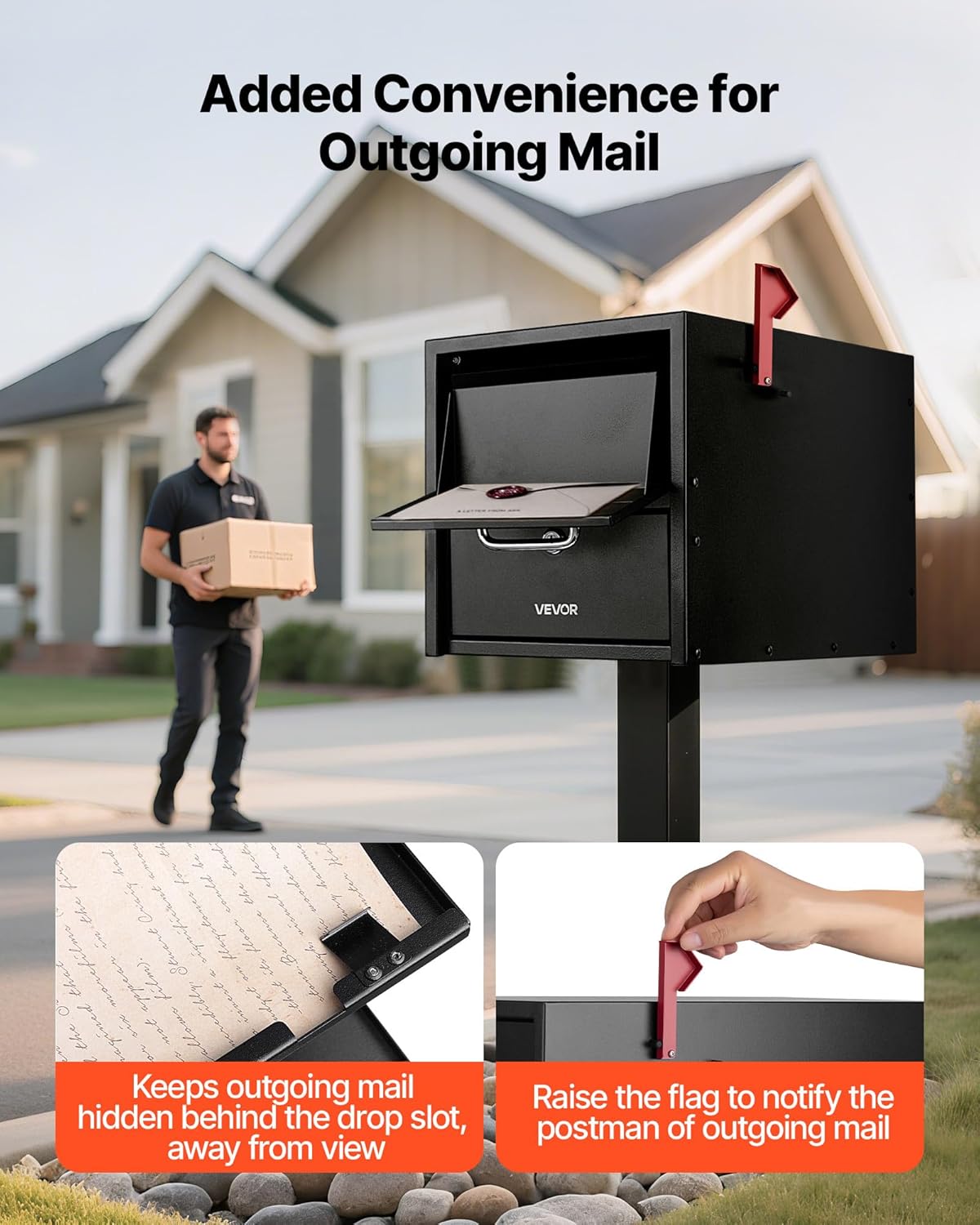
Image 5.2: The mailbox provides added convenience for outgoing mail with a hidden slot and a visible flag for carrier notification.
6. Maintenance
Regular maintenance will ensure the longevity and optimal performance of your VEVOR WR-001 Post Mount Mailbox.
- Cleaning: Wipe the exterior surfaces with a soft, damp cloth to remove dirt and debris. Avoid abrasive cleaners that could damage the finish.
- Lock Mechanism: Periodically apply a small amount of graphite lubricant to the lock cylinder to ensure smooth operation.
- Inspection: Regularly check for any signs of wear, rust, or damage. Address any issues promptly to maintain security and weather resistance.
- Weather Protection: The magnetic door closure helps keep rain out. Ensure the door closes completely after each use.

Image 6.1: The mailbox is constructed from impact-resistant, heavy-duty galvanized steel with a rust-resistant coating and features a magnetic door to protect mail from moisture.
7. Troubleshooting
If you encounter any issues with your VEVOR WR-001 Post Mount Mailbox, refer to the following common problems and solutions:
| Problem | Possible Cause | Solution |
|---|---|---|
| Key does not turn in lock. | Lock mechanism is stiff or obstructed. | Apply graphite lubricant to the lock cylinder. Ensure the key is fully inserted. |
| Mailbox door does not close properly. | Obstruction or misalignment. | Check for debris around the door hinges or magnetic closure. Ensure the mailbox is level. |
| Mail appears wet inside. | Door not fully closed or seal compromised. | Ensure the magnetic door closes completely. Inspect for any damage to the mailbox structure that could allow water entry. |
| Mailbox feels loose on the post. | Mounting screws are loose. | Tighten all mounting screws, nuts, and washers. |
8. Specifications
Detailed specifications for the VEVOR WR-001 Post Mount Mailbox:

Image 8.1: Dimensional diagram of the VEVOR WR-001 Post Mount Mailbox.
| Feature | Detail |
|---|---|
| Item Model Number | WR-001 |
| Main Material | Galvanized Steel |
| Color | Black |
| Net Weight | 15.43 lbs / 7.0 kg |
| Box Dimensions (L x W x H) | 21.06 x 10.63 x 11.22 in / 535 x 270 x 285 mm |
| Maximum Parcel Size | 8.27 x 3.94 x 15.75 in / 210 x 100 x 400 mm |
| Mounting Type | Post Mount |
| Security Features | Lockable, Anti-Pry, Anti-Theft Baffle Door |
| Included Accessories | Mail Flag, 3 Keys, Washers & Nuts, 4 Screws |
9. Warranty and Support
VEVOR products are designed for durability and performance. For specific warranty information or technical support, please refer to the warranty card included with your product or visit the official VEVOR website. Please have your model number (WR-001) and purchase date available when contacting support.
For further assistance, you may contact VEVOR customer service through their official channels.