
1. Product Overview
This Asixxsix Photovoltaic Combiner Box is designed for solar power generation systems, offering essential protection and efficient power management. It is suitable for both grid-connected and off-grid solar installations.
Key Features:
- Comprehensive Protection: Includes surge protection, anti-reverse connection, and overload protection to ensure the safety and reliability of your solar panel system.
- Integrated 15A Fuses: Equipped with two separate 15A fuses (10x38mm) to safeguard the solar photovoltaic panel and inverter. This design helps optimize cable lengths and can enhance the system's power output.
- IP65 Waterproof Casing: Constructed from high-quality, rust-resistant, and flame-retardant plastic. The IP65 rating ensures durability in various outdoor environments. A transparent cover allows for easy visual inspection of internal components.
- Surge Protector: Features a 20-40KA surge protector. A green indicator signifies normal operation, while a red indicator alerts to a lightning strike, requiring prompt module replacement.
- Wide Application: Ideal for outdoor use in on-grid and off-grid photovoltaic solar power systems, including photovoltaic panels, RV solar systems, and 12V, 24V, 36V, 48V DC photovoltaic solar power applications.
2. Safety Information
Please read and understand all safety instructions before installation and operation. Failure to follow these instructions may result in electric shock, fire, or serious injury.
- Installation should only be performed by qualified personnel.
- Always disconnect power from the solar panels and inverter before performing any installation, maintenance, or troubleshooting.
- Ensure proper grounding of the combiner box.
- Do not open the combiner box or attempt repairs while power is connected.
- Verify correct polarity (+/-) for all connections to prevent damage to the system.
- Use appropriate personal protective equipment (PPE) during installation.
3. Package Contents
Verify that all items are present and undamaged upon unpacking:
- 1 x Asixxsix Solar Combiner Box
- 4 x Mounting Screws
- 4 x Expansion Pipes (Wall Anchors)
- 1 x Printed User Manual
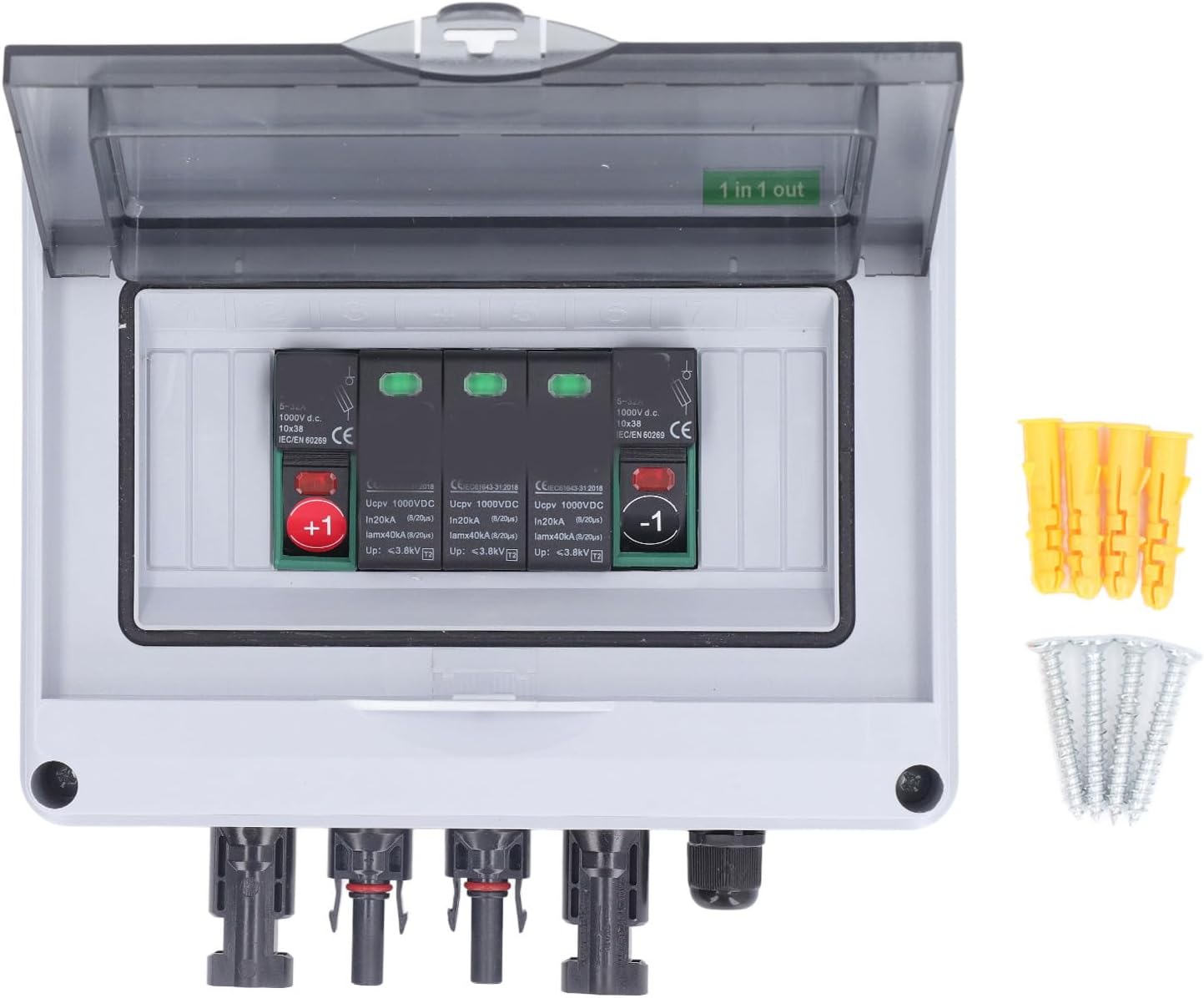
Image: Asixxsix Photovoltaic Combiner Box with included mounting screws and expansion pipes.
4. Specifications
| Parameter | Value |
|---|---|
| Type | PV Combiner Box |
| Material | PC, ABS |
| Input Chains | 1 |
| Output Chains | 1 |
| Maximum Voltage | 1000 VDC |
| Protection Rating | IP65 |
| Impact Resistance | IK10 |
| Cable Entry | PG 2.5-6 mm², PV 2.5-6 mm² |
| Cable Output | PG 2.5-6 mm², PV 2.5-6 mm² |
| DC Surge Protector Max Operating Voltage (Ucpv) | 1000 VDC |
| DC Surge Protector Max Discharge Current | 40KA |
| DC Fuse Holder Rated Operating Voltage | 1000 VDC |
| Fuse Type | 10x38 mm 10-30A (15A integrated) |
| Dimensions (L x W x H) | Approx. 200 x 188 x 90 mm / 7.9 x 7.4 x 3.5 inches |

Image: Dimensions of the Asixxsix Photovoltaic Combiner Box.
5. Setup and Installation
Follow these steps for proper installation of the photovoltaic combiner box:
- Choose Mounting Location: Select a suitable outdoor location that is easily accessible for maintenance, protected from direct mechanical impact, and allows for proper cable routing.
- Mount the Box: Use the provided mounting screws and expansion pipes to securely fasten the combiner box to a wall or sturdy surface. Ensure it is level.
- Prepare Cables: Strip the insulation from your solar panel DC input cables and inverter DC output cables according to the connector requirements.
- Connect Solar Panel Input: Connect the positive (+) and negative (-) DC cables from your solar panel array to the corresponding input terminals on the combiner box. Ensure correct polarity. The box is labeled "1 in 1 out".
- Connect Inverter Output: Connect the positive (+) and negative (-) DC cables leading to your inverter to the corresponding output terminals on the combiner box. Double-check polarity.
- Secure Connections: Ensure all cable connections are tight and secure to prevent loose contacts and potential hazards.
- Close and Seal: Close the transparent cover of the combiner box and ensure all latches are securely fastened to maintain the IP65 waterproof rating.

Image: Internal view of the combiner box with open lid, showing fuse holders and input/output connectors.

Image: Detailed view of the DC input and output connectors.
6. Operating Instructions
Once properly installed and connected, the Asixxsix Photovoltaic Combiner Box operates automatically to protect your solar power system. The primary operational aspect for the user is monitoring the surge protector status.
- Normal Operation: The surge protector indicator will display green, indicating that the system is functioning correctly and protected.
- Surge Event Indication: If the surge protector indicator turns red, it signifies that a lightning strike or significant surge event has occurred, and the surge protection module needs replacement. Refer to the Troubleshooting section for details.

Image: Internal view showing the surge protector modules, typically displaying green for normal operation.
7. Maintenance
Regular maintenance ensures the longevity and optimal performance of your combiner box.
- Visual Inspection (Monthly): Periodically inspect the exterior of the combiner box for any signs of physical damage, cracks, or loose connections. Check the transparent cover for clarity.
- Surge Protector Check (Monthly): Visually check the color of the surge protector indicator. It should be green. If it is red, the module needs replacement.
- Cleaning (As Needed): Clean the exterior of the box with a soft, damp cloth to remove dust and dirt. Do not use abrasive cleaners or solvents. Ensure the transparent cover remains clear for visibility.
- Fuse Replacement (As Needed): If a fuse blows, disconnect all power to the combiner box before opening it. Replace the blown 15A fuse (10x38mm) with an identical type and rating.
8. Troubleshooting
This section addresses common issues you might encounter.
- Issue: Surge protector indicator is red.
Solution: This indicates that the surge protector has activated due to a voltage surge (e.g., lightning strike). The surge protection module needs to be replaced. Disconnect all power, open the box, and replace the red module with a new one of the same specifications. - Issue: No power output from the solar system.
Solution:- Check all DC cable connections to ensure they are secure and have correct polarity.
- Inspect the fuses inside the combiner box. If a fuse is blown (filament broken), replace it with a new 15A (10x38mm) fuse after disconnecting power.
- Verify that the solar panels are receiving adequate sunlight and are functioning correctly.
- Check the inverter for any error codes or indicators.
- Issue: Water ingress inside the box.
Solution: Immediately disconnect all power. Check if the transparent cover is properly closed and latched. Inspect the cable glands for proper sealing. If damage to the casing is found, the box may need replacement to maintain its IP65 rating.
9. Applications
The Asixxsix Photovoltaic Combiner Box is versatile and can be integrated into various solar power setups:
- Photovoltaic Power Stations: Essential for managing and protecting larger solar installations.
- Photovoltaic Charging Stations: Ensures safe and efficient power delivery for EV charging or other battery systems.
- Household Use: Suitable for residential solar panel systems, providing protection for home energy generation.
- Photovoltaic Irrigation Systems: Ideal for agricultural applications where solar power drives irrigation pumps.

Image: Examples of applications for photovoltaic systems, where the combiner box provides critical protection.
10. Warranty and Support
For warranty information, technical support, or service inquiries, please refer to the specific warranty card included with your product or contact your retailer/seller directly. Keep your purchase receipt as proof of purchase.