
Vissani VAP09R1AWT
Vissani 3-in-1 Portable Air Conditioner User Manual
Model: VAP09R1AWT
Introduction
This manual provides essential instructions for the safe operation, installation, and maintenance of your Vissani 3-in-1 Portable Air Conditioner, Model VAP09R1AWT. This unit is designed to provide cooling, dehumidification, and fan functions for rooms up to 150 square feet. Please read all instructions thoroughly before initial use.
Important Safety Instructions
Please read all instructions carefully before using this appliance. Failure to follow these instructions may result in electric shock, fire, or personal injury. Keep this manual for future reference.
- Always connect the unit to a grounded 3-prong outlet. Do not remove the grounding prong or use an adapter.
- Do not operate the unit with a damaged power cord or plug. If the power cord is damaged, it must be replaced by the manufacturer, its service agent, or similarly qualified persons to avoid a hazard.
- Do not block air vents or exhaust openings. Ensure adequate clearance around the unit for proper airflow.
- Keep flammable materials, such as aerosols, away from the unit.
- Unplug the unit from the power outlet before cleaning, performing maintenance, or moving it.
- Do not use the unit in wet areas such as bathrooms or laundries where it may come into contact with water.
- Ensure proper installation of the exhaust hose to prevent hot air recirculation and maintain cooling efficiency.
- This appliance is not intended for use by persons (including children) with reduced physical, sensory or mental capabilities, or lack of experience and knowledge, unless they have been given supervision or instruction concerning use of the appliance by a person responsible for their safety.
Package Contents
Verify that all items are present in the package upon unboxing:
- Vissani Portable Air Conditioner Unit
- Remote Control
- Window Installation Kit (includes exhaust hose, window slider kit, and adapters)
- User Manual (this document)
Product Overview
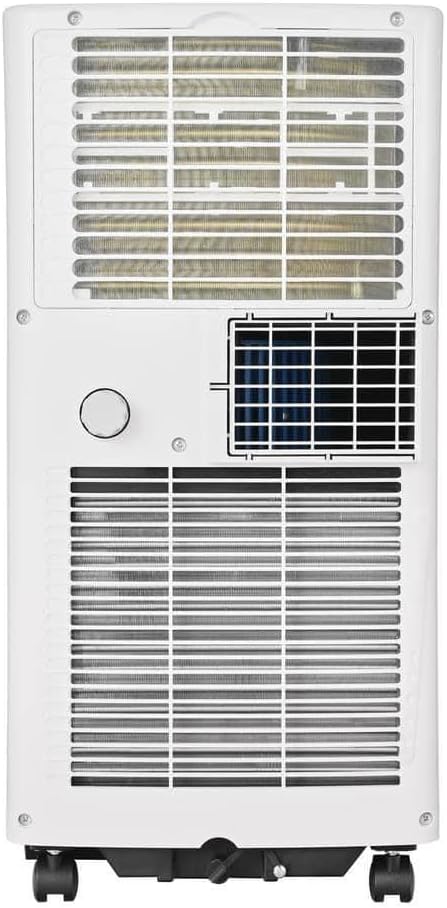
Familiarize yourself with the main components and general appearance of your portable air conditioner.

The unit features a compact design with integrated caster wheels for easy mobility between rooms.


Setup and Installation
The Vissani portable air conditioner requires proper installation of the window kit to vent hot exhaust air outside. Correct installation is crucial for efficient cooling performance.
Window Kit Assembly
- Attach one end of the exhaust hose to the unit's exhaust port. Twist or click into place until secure.
- Connect the window exhaust adapter to the other end of the exhaust hose.
- Adjust the window slider kit to fit your window opening. Extend or retract the panels as needed.
- Place the assembled window slider kit securely in the window frame. Close the window against the kit to seal it.
- Insert the window exhaust adapter into the opening of the window slider kit.
- Ensure all connections (unit to hose, hose to adapter, adapter to window kit) are secure to prevent air leakage, which can reduce efficiency.


Operating Instructions
Your Vissani portable AC offers three operating modes: Cool, Dehumidify, and Fan. It can be controlled via the unit's control panel or the included remote control.
Control Panel and Remote Control
The control panel on top of the unit allows direct access to all functions. The remote control provides convenient operation from a distance. Ensure batteries are correctly inserted into the remote control.
Operating Modes
- Cool Mode: Select this mode for air conditioning. Use the temperature adjustment buttons to set your desired room temperature. The unit will cool the room to the set temperature and cycle on/off to maintain it.
- Dehumidify Mode: This mode removes excess moisture from the air. The fan speed is typically fixed at a low setting in this mode. For continuous dehumidification, ensure the continuous drainage option is set up (refer to the Maintenance section).
- Fan Mode: Circulates air without cooling. Select desired fan speed (low, medium, high) to provide a refreshing breeze.
Timer Function
The 24-hour programmable timer allows you to set the unit to turn on or off automatically after a specified period. To set the timer, press the 'Timer' button on the control panel or remote, then use the temperature adjustment buttons to select the desired delay time (in hours). Press 'Timer' again to confirm.
Maintenance
Regular maintenance ensures optimal performance, improves air quality, and extends the lifespan of your portable air conditioner.
Air Filter Cleaning
The air filter should be cleaned every two weeks or more frequently depending on usage and air quality. A dirty filter can significantly reduce cooling efficiency and airflow.
- Unplug the unit from the power outlet before cleaning.
- Locate and remove the air filter (typically found on the back or side of the unit).
- Wash the filter with warm, soapy water. Rinse thoroughly to remove all dirt and debris.
- Allow the filter to air dry completely before reinstalling. Do not expose to direct sunlight or heat.
- Reinsert the dry filter into the unit, ensuring it is properly seated.
Drainage
The unit collects condensate during cooling and dehumidifying operations. Periodically drain the collected water from the drainage port at the bottom rear of the unit. For continuous dehumidification, connect a standard garden hose (not included) to the continuous drainage port and direct it to a floor drain or suitable receptacle.
Storage
Before storing the unit for an extended period (e.g., during off-season):
- Drain all accumulated water completely from the unit.
- Clean the air filter as described above.
- Run the unit in fan-only mode for a few hours to ensure internal components are thoroughly dry.
- Unplug the unit and carefully coil the power cord.
- Store the unit in a dry, upright position, preferably in its original packaging, away from extreme temperatures.
Troubleshooting Guide
Before contacting customer support, review the following common issues and their potential solutions.
| Problem | Possible Cause | Solution |
|---|---|---|
| Unit does not turn on | No power supply; power cord unplugged; circuit breaker tripped; unit's internal safety switch activated. | Ensure unit is securely plugged into a functional, grounded outlet; check and reset the circuit breaker if tripped; press the reset button on the plug if available. |
| Insufficient cooling | Dirty air filter; blocked air intake/exhaust; room size exceeds capacity; windows/doors open; exhaust hose not properly installed or kinked. | Clean the air filter; clear any obstructions from air inlets and outlets; ensure the room size is within 150 sq. ft.; close all windows and doors; verify exhaust hose installation and ensure it is straight. |
| Unit is noisy or vibrating excessively | Unit not on a level surface; fan obstruction; loose components. | Place the unit on a flat, stable surface; check for foreign objects in the fan area; contact support if noise persists after checking. |
| Water leakage | Drain plug not securely closed; unit tilted; internal water tank full (if applicable and not continuously drained). | Ensure the drain plug is securely closed; place the unit on a level surface; drain accumulated water from the unit. |
| Remote control not working | Dead batteries; obstruction between remote and unit; remote not pointed at receiver. | Replace batteries with new ones; remove any obstructions; ensure remote is pointed directly at the unit's receiver. |
Product Specifications
| Feature | Detail |
|---|---|
| Model Number | VAP09R1AWT |
| Cooling Capacity (DOE) | 5,000 BTU |
| Coverage Area | Up to 150 sq. ft. |
| Functions | Air Conditioner, Dehumidifier, Fan |
| Voltage | 115 Volts |
| Wattage | 450 watts |
| Noise Level | 50-52 dBA |
| Item Weight | 45.9 pounds |
| Product Dimensions (D x W x H) | Approximately 15 x 16 x 12 inches |
| Color | White |
| Included Components | Remote Control, Window Installation Kit |
Warranty and Customer Support
For specific warranty information regarding your Vissani Portable Air Conditioner, Model VAP09R1AWT, please refer to the warranty card included with your product packaging. It is recommended to retain your purchase receipt as proof of purchase for any warranty claims.
For technical assistance, troubleshooting beyond this guide, or to inquire about replacement parts, please contact Vissani customer support. Contact details can typically be found on the product packaging, the official Vissani website, or the included warranty documentation.
Related documentsVAP09R1AWT


Ask a question about this manual
Ask about setup, troubleshooting, compatibility, parts, safety, or missing instructions. Manuals+ will review the question and use this page’s manual context to help answer it.