
Product Overview
This manual provides instructions for the DERCASS Full Size Gaming Loft Bed, designed to integrate a sleeping area with a functional workspace and storage. It features a built-in desk, storage shelves, LED lighting, and a charging station, making it suitable for various bedroom configurations.
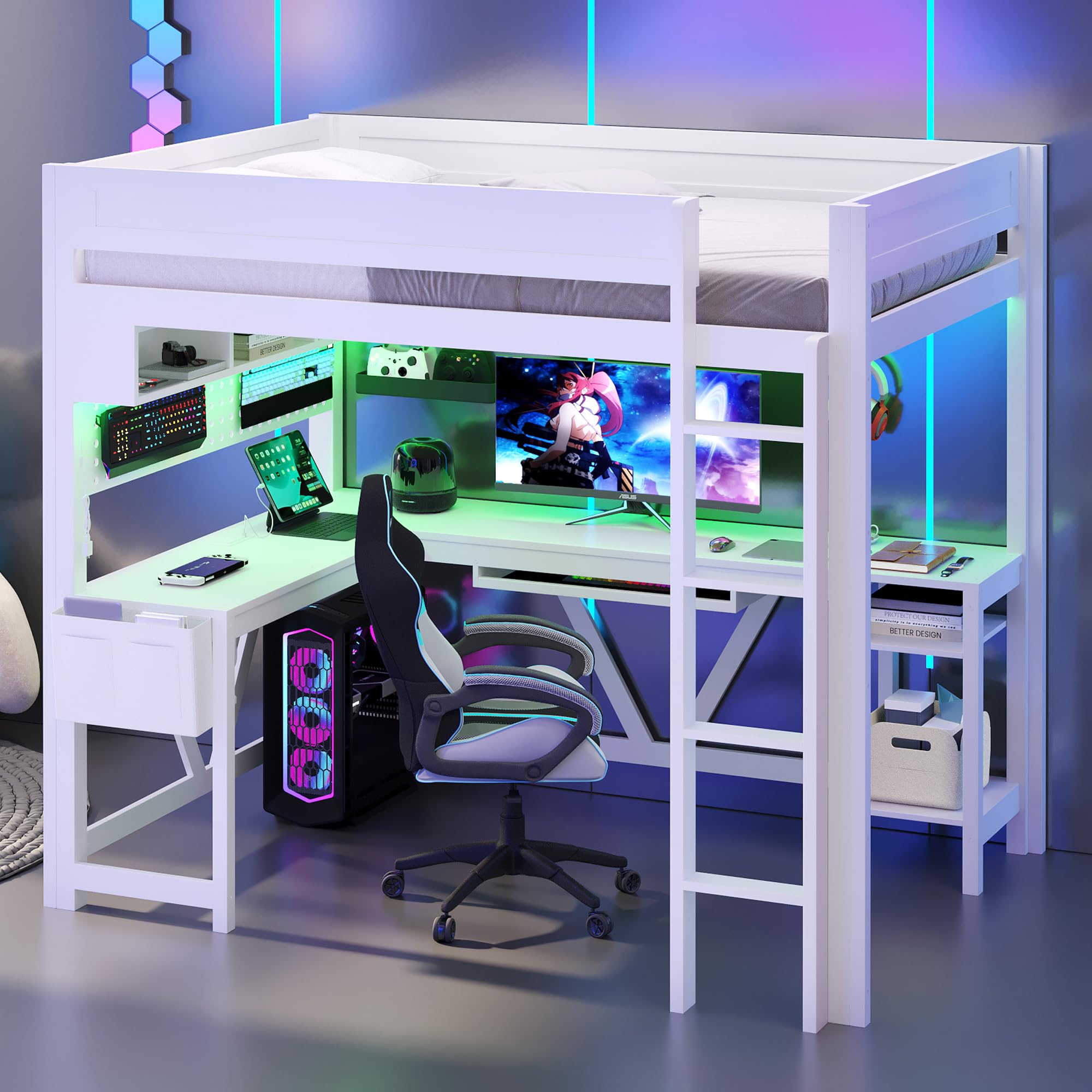
Image: Overall view of the DERCASS Full Size Gaming Loft Bed in white, showcasing the integrated desk, storage, and ladder.
Setup and Assembly
Assembly of the DERCASS Gaming Loft Bed is required. Please follow these general guidelines. Refer to the included assembly diagrams and hardware for detailed, step-by-step instructions.
- Unpack Components: Carefully unpack all boxes and identify all parts against the provided parts list. Ensure no components are missing or damaged.
- Prepare Workspace: Clear a spacious area for assembly. It is recommended to assemble the bed in the room where it will be used.
- Assemble Frame: Begin by assembling the main wooden frame components according to the diagrams. Ensure all connections are secure but do not fully tighten all fasteners until the entire frame is aligned.
- Install Desk and Storage: Attach the built-in desk and storage shelves to the main frame as indicated in the instructions.
- Attach Ladder and Guardrails: Securely attach the integrated ladder and full-length guardrails to the loft bed frame. These are crucial for safety.
- Install Bed Slats: Place and secure the wood slats onto the bed frame. These slats provide mattress support and eliminate the need for a box spring.
- Connect Electrical Components: Install the LED light strip and connect the charging station (2 standard plug outlets and 2 USB ports) as per the electrical connection instructions. Ensure all cables are routed safely and securely.
- Final Tightening: Once all components are in place and aligned, fully tighten all fasteners. Do not overtighten.
Safety Note: Always ensure all fasteners are securely tightened before use. Regularly check and retighten fasteners as needed to maintain stability.

Image: Front view of the assembled loft bed, showing the desk area and ladder.
Operating Instructions
LED Lighting System
The loft bed includes an integrated LED light strip located within the storage shelves. This light strip offers 7 adjustable colors to customize your environment.
- Power On/Off: Locate the power switch for the LED lights, typically found near the light strip or on its power cable.
- Color Adjustment: Use the provided controller (if applicable) or integrated button to cycle through the 7 available colors.

Image: The loft bed's desk area with the LED lights illuminated in a green hue, highlighting the integrated lighting feature.
Charging Station
The built-in desk is equipped with a charging station that includes 2 standard plug outlets and 2 USB ports. This allows for convenient charging of electronic devices such as phones, tablets, and laptops, or powering lamps and other small appliances.
- Power Connection: Ensure the charging station's power cord is securely plugged into a functional wall outlet.
- Usage: Plug your devices directly into the available standard outlets or USB ports.
Important: Do not overload the charging station. Refer to the maximum power rating if specified on the unit or in the detailed assembly instructions.
Maintenance
To ensure the longevity and safety of your DERCASS Gaming Loft Bed, follow these maintenance guidelines:
- Cleaning: Wipe the surfaces of the bed frame, desk, and shelves with a dry cloth. Avoid using harsh chemicals or abrasive cleaners, which can damage the finish.
- Fastener Check: Periodically inspect all bolts, screws, and other fasteners. Retighten any loose connections to maintain structural integrity and prevent wobbling.
- Electrical Components: Ensure all electrical cords for the LED lights and charging station are free from damage and properly secured. Do not attempt to repair damaged electrical components; contact qualified personnel if issues arise.
- Weight Capacity: Adhere to the recommended weight capacity for the bed (600 lbs) and desk to prevent structural damage.
Troubleshooting
This section addresses common issues you might encounter with your loft bed.
- Bed Wobbles or Squeaks:
- Check all assembly bolts and screws. Tighten any loose fasteners.
- Ensure the bed is placed on a level surface.
- LED Lights Not Working:
- Verify the LED light strip's power cord is securely plugged into a functional wall outlet.
- Check the power switch on the light strip or its controller.
- Ensure there are no visible damages to the light strip or wiring.
- Charging Station Not Providing Power:
- Confirm the charging station's power cord is firmly plugged into a working wall outlet.
- Test the wall outlet with another device to ensure it is functional.
- Avoid overloading the outlets; try plugging in one device at a time.
If you encounter issues not listed here or if troubleshooting steps do not resolve the problem, please contact customer support.
Product Specifications

Image: Detailed dimension diagram of the DERCASS Full Size Gaming Loft Bed, indicating length, width, and height measurements for various components.
| Brand | DERCASS |
| Model Number | B0FSF69SRZ |
| Color | White |
| Size | Full |
| Style | Modern |
| Frame Material | Pine Wood + MDF |
| Overall Product Dimensions (L x W x H) | 80.7'' x 56.1'' x 70.9'' |
| Full Bed Dimensions | 76'' x 54.5'' |
| Recommended Mattress Thickness | 6'' |
| Number of Bed Slats | 14 |
| Weight Capacity | 600 lbs |
| Product Weight | 182 lbs |
| Special Features | Charging Station (2 Standard Plug Outlets & 2 USB Ports), Desk, LED Lighting (7 colors), Storage Shelves, No Box Spring Needed |
| Assembly Required | Yes |
Warranty Information
Specific warranty details for the DERCASS Gaming Loft Bed are typically provided with your purchase documentation or can be obtained directly from the manufacturer or authorized seller. Please retain your proof of purchase for any warranty claims.
Common warranty coverage may include defects in materials and workmanship for a specified period from the date of purchase. Damage resulting from improper assembly, misuse, neglect, or unauthorized modifications is generally not covered.
Customer Support
For any questions, concerns, or assistance regarding your DERCASS Gaming Loft Bed, please contact the seller or manufacturer directly. When contacting support, please have your model number (B0FSF69SRZ) and proof of purchase readily available.
The seller, HighQualityLife, can be contacted through the platform where the purchase was made. They are committed to resolving any issues you may encounter.