
AKIRES 2103-MB
AKIRES 38-Inch Portable Electric Tower Space Heater
Model: 2103-MB
1. Introduction and Product Overview
This manual provides essential instructions for the safe and efficient operation of your AKIRES 38-inch portable electric tower space heater. This 1500W PTC ceramic heater features multiple heating modes, an adjustable thermostat, a 24-hour timer, 70-degree oscillation, and a 3D virtual flame effect for enhanced ambiance. Please read this manual thoroughly before use and retain it for future reference.

Image 1.1: AKIRES 38-inch portable electric tower space heater with remote control and top panel display.
2. Important Safety Information
WARNING: To reduce the risk of fire, electric shock, or injury, read and understand all instructions before using this heater.
- Always plug heaters directly into a wall outlet/receptacle. Never use with an extension cord or relocatable power tap (outlet/power strip).
- This heater is hot when in use. To avoid burns, do not let bare skin touch hot surfaces. Use handles when moving this heater.
- Keep combustible materials, such as furniture, pillows, bedding, papers, clothes, and curtains at least 3 feet (0.9 m) from the front of the heater and keep them away from the sides and rear.
- Extreme caution is necessary when any heater is used by or near children or invalids and whenever the heater is left operating and unattended.
- Do not operate any heater with a damaged cord or plug or after the heater malfunctions, has been dropped or damaged in any manner.
- Do not use outdoors.
- To disconnect heater, turn controls to OFF, then remove plug from outlet.
- Do not insert or allow foreign objects to enter any ventilation or exhaust opening as this may cause an electric shock or fire, or damage the heater.
- To prevent a possible fire, do not block air intakes or exhaust in any manner. Do not use on soft surfaces, like a bed, where openings may become blocked.
- This heater includes multiple safety features:
- Overheating Protection: The heater automatically disconnects power if internal temperatures exceed safe levels.
- Tip-Over Protection: A built-in switch automatically turns off the heater if it is accidentally tipped over or lifted from the ground.
- Flame-Retardant Materials: Constructed from premium flame-retardant materials for enhanced safety.
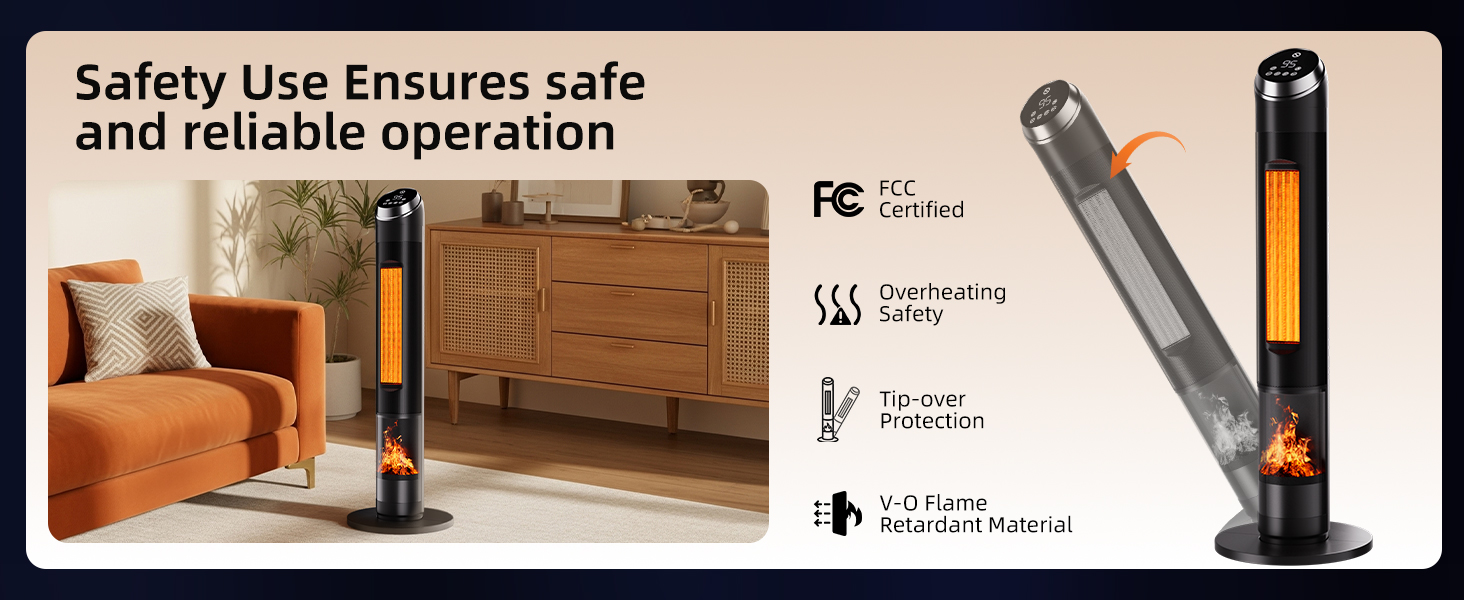
Image 2.1: Overview of AKIRES heater safety features.
3. Package Contents
Please check the package contents upon unboxing to ensure all items are present:
- Heater Fuselage (1)
- Front Base Plate (1)
- Rear Base Plate (1)
- Instruction Manual (1)
- Remote Control (1)
- Self-Tapping Screws (8)
4. Setup and Installation
Follow these steps to correctly assemble the base of your AKIRES tower heater:
- Prepare the Base: Take the front and rear base plates.
- Route the Power Cord: Pass the power cord of the heater through the central hole located in the middle of one of the base plates.
- Assemble Base Plates: Align and connect the front base plate and the rear base plate together to form a complete circular base.
- Attach Base to Fuselage: Align the screw holes on the assembled base plate with the corresponding holes on the bottom of the heater fuselage. Secure the base using the provided self-tapping screws.
- Secure Power Cord: Ensure the power cord is securely placed within the designated buckle or channel on the baseplate to prevent damage or tripping hazards.
Video 4.1: Visual guide for the specific installation steps of the heater base.
Initial Preparation
- Remove Protective Film: Gently peel off any protective film from the top control panel of the heater.
- Remote Control Battery: Open the battery compartment of the remote control and remove any protective tab or film from the battery before use.
Video 4.2: Demonstration of removing the protective film from the heater's display panel.
5. Operating Instructions
Your AKIRES heater can be operated using either the touch controls on the top panel or the included remote control. Ensure the heater is plugged into a suitable 120V AC outlet.
Power On/Off
- Press the Power button (
 ) on the control panel or remote to turn the heater on or off.
Heating Modes
The heater offers two primary heating modes and an ECO mode:
- Low Heat: Provides a lower heat output.
- High Heat (1500W): Delivers maximum heat output for rapid warming.
- ECO Mode: Automatically adjusts power consumption based on the ambient temperature to maintain your desired setting efficiently.
Press the Mode button ( ) to cycle through the available heating modes.

Image 5.1: Illustration of the 1500W PTC ceramic heating technology for fast and efficient warmth.

Image 5.2: The heater is designed for rapid heat generation, warming spaces quickly.

Image 5.3: Energy-Saving ECO Mode adjusts power based on ambient temperature.
Temperature Adjustment
The precise, adjustable thermostat allows you to set the indoor temperature between 50°F and 99°F (10°C to 37°C). The heater will automatically stop heating once the room reaches your desired temperature.
- Use the Up (
 ) and Down (
 ) buttons on the control panel or remote to adjust the target temperature.
Oscillation Function
The heater features a 70-degree oscillation function to evenly distribute warmth across your space.
- Press the Oscillation button (
 ) on the control panel or remote to activate or deactivate oscillation.
Video 5.4: Overview of heater features including fast heating, 3D flame, remote control, adjustable thermostat, and 80-degree oscillation.
Video 5.5: Demonstrates the fast heating, wide oscillation, and safety features of the 38-inch space heater.
24-Hour Timer
Set the heater to operate for a specific duration, from 1 to 24 hours, after which it will automatically turn off.
- Press the Timer button (
 ) on the control panel or remote to set the desired operating time.

Image 5.6: The 24-hour timer function allows for scheduled operation, ideal for use in bedrooms due to low noise levels.
Video 5.7: Highlights the heater's ability to provide warmth, 80-degree oscillation, and quiet operation (low 36dB) for comfortable use.
3D Virtual Flame Effect
Enhance the ambiance of your room with a realistic 3D flame effect.
- Press the Flames button (
 ) on the control panel or remote to turn the flame effect on or off.
Remote and Manual Control
The heater can be controlled via the intuitive touch panel on top of the unit or the included remote control, offering convenience and flexibility.

Image 5.8: Control the heater conveniently with either the remote or the integrated touch panel.
6. Maintenance
Regular maintenance ensures optimal performance and longevity of your heater.
- Cleaning: Always unplug the heater and allow it to cool completely before cleaning. Use a soft, damp cloth to wipe the exterior surfaces. Do not use abrasive cleaners or solvents.
- Dust Removal: Use a vacuum cleaner with a brush attachment to gently remove dust from the air intake and exhaust grilles.
- Storage: When not in use, store the heater in a cool, dry place. It is recommended to cover it to protect against dust.

Image 6.1: The heater is designed for effortless clean-up and features a convenient carry handle.
7. Troubleshooting
If your heater is not operating correctly, please refer to the following common issues and solutions:
- Heater does not turn on:
- Ensure the power cord is securely plugged into a working electrical outlet.
- Check if the circuit breaker has tripped.
- Verify that the tip-over switch on the bottom of the heater is fully engaged (heater is on a flat, firm surface).
- Confirm that the protective film has been removed from the control panel and the battery tab from the remote.
- Heater stops operating unexpectedly:
- The overheating protection may have activated. Unplug the heater, allow it to cool for 30 minutes, then plug it back in. Ensure there are no obstructions to airflow.
- The tip-over protection may have activated. Ensure the heater is on a stable, level surface.
- Heat output is low:
- Ensure the heater is set to High Heat (1500W) mode.
- Check the thermostat setting; increase the target temperature if necessary.
8. Specifications
| Feature | Detail |
|---|---|
| Brand | AKIRES |
| Model Number | 2103-MB |
| Special Features | Adjustable Temperature, Child Lock, Flame Resistant, Overheat Protection, Remote Control, Tip-Over Protection |
| Color | Matte Black |
| Form Factor | Tower |
| Indoor/Outdoor Usage | Indoor |
| Product Dimensions | 12.1"D x 12.1"W x 37.5"H |
| Mounting Type | Free Standing |
| Room Type | Bathroom, Garage, Indoor, Bedroom, Home Office, Kitchen, Living Room, Nursery, Study Room |
| Fuel Type | Electric |
| Number of Speeds | 2 |
| Voltage | 120 Volts (AC) |
| Min Temperature Setting | 50 Degrees Fahrenheit |
| Max Temperature Setting | 99 Degrees Fahrenheit |
| Item Weight | 8.23 pounds |
9. Warranty and Support
For warranty information or technical support, please refer to the contact details provided on the product packaging or visit the official AKIRES website. Keep your purchase receipt as proof of purchase for any warranty claims.
Related documents2103-MB

Ask a question about this manual
Ask about setup, troubleshooting, compatibility, parts, safety, or missing instructions. Manuals+ will review the question and use this page’s manual context to help answer it.