
Introduction
This manual provides detailed instructions for the assembly, operation, and maintenance of your Dowinx QL-66B3 Big and Tall Office Chair. Designed for enhanced comfort and ergonomic support, this chair features a dual-layer backrest, a two-way rotational massage lumbar system, a spacious contoured seat, and adjustable components. Please read this manual thoroughly before assembly and use to ensure proper function and longevity of your chair.

Figure 1: Dowinx QL-66B3 Big and Tall Office Chair (Grey)
Important Safety Information
- Do not exceed the maximum weight capacity of 400 pounds.
- Ensure the chair is stable before sitting.
- Use caution when moving the chair to avoid tipping.
Setup and Assembly
Follow these steps to assemble your Dowinx QL-66B3 Office Chair. It is recommended to have a second person assist with certain steps.
Video 1: Dowinx QL-66B3 Office Chair Assembly Guide
- Unpack Components: Carefully remove all parts from the packaging. Verify that all components listed in the parts list are present.
- Attach Casters to Base: Insert the five casters into the holes at the end of each leg of the chair base. Press firmly until they click into place.
- Insert Gas Lift: Place the gas lift cylinder into the center hole of the assembled chair base.
- Assemble Seat Mechanism: Attach the seat mechanism to the underside of the seat cushion using the provided screws. Ensure the "FRONT" label on the mechanism faces the front of the seat.
- Attach Armrests: Secure the armrests to the sides of the seat cushion using the designated screws.
- Connect Backrest to Seat: Align the backrest with the seat cushion and attach it using the provided screws.
- Attach Footrest: Slide the footrest assembly into the designated slots under the seat.
- Mount Seat Assembly onto Gas Lift: Carefully place the assembled seat and backrest onto the gas lift cylinder, ensuring it is centered and stable.
- Install Lumbar Support Pillow: Position the massage lumbar support pillow on the backrest. It can be adjusted vertically for optimal comfort.

Figure 2: Chair Dimensions for proper setup
Operating Instructions
Chair Height Adjustment
To adjust the chair height, locate the lever on the right side under the seat. Pull the lever upwards while lifting your weight off the seat to raise the chair. To lower the chair, pull the lever upwards while remaining seated.
Recline Function
The chair features a recline function from 100° to 135°. To recline, pull the lever on the left side of the seat upwards and lean back to your desired angle. Release the lever to lock the backrest in position. To return to an upright position, pull the lever and lean forward slightly.

Figure 3: Recline and relax between 100° to 135°
Adjustable Armrests
The armrests can be adjusted vertically. Locate the button on the side of each armrest. Press the button and move the armrest up or down to your preferred height. Release the button to lock it.
Retractable Footrest
To extend the footrest, pull it outwards from underneath the seat. To retract, push it back in until it is fully stored.
Massage Lumbar Support
The lumbar support pillow features a two-way rotational massage system. Connect the USB cable from the pillow to a power source (e.g., USB adapter, power bank). Press the power button on the side of the pillow to activate the massage function. Press again to change rotation direction or turn off the light. Press and hold to turn off the massage function.
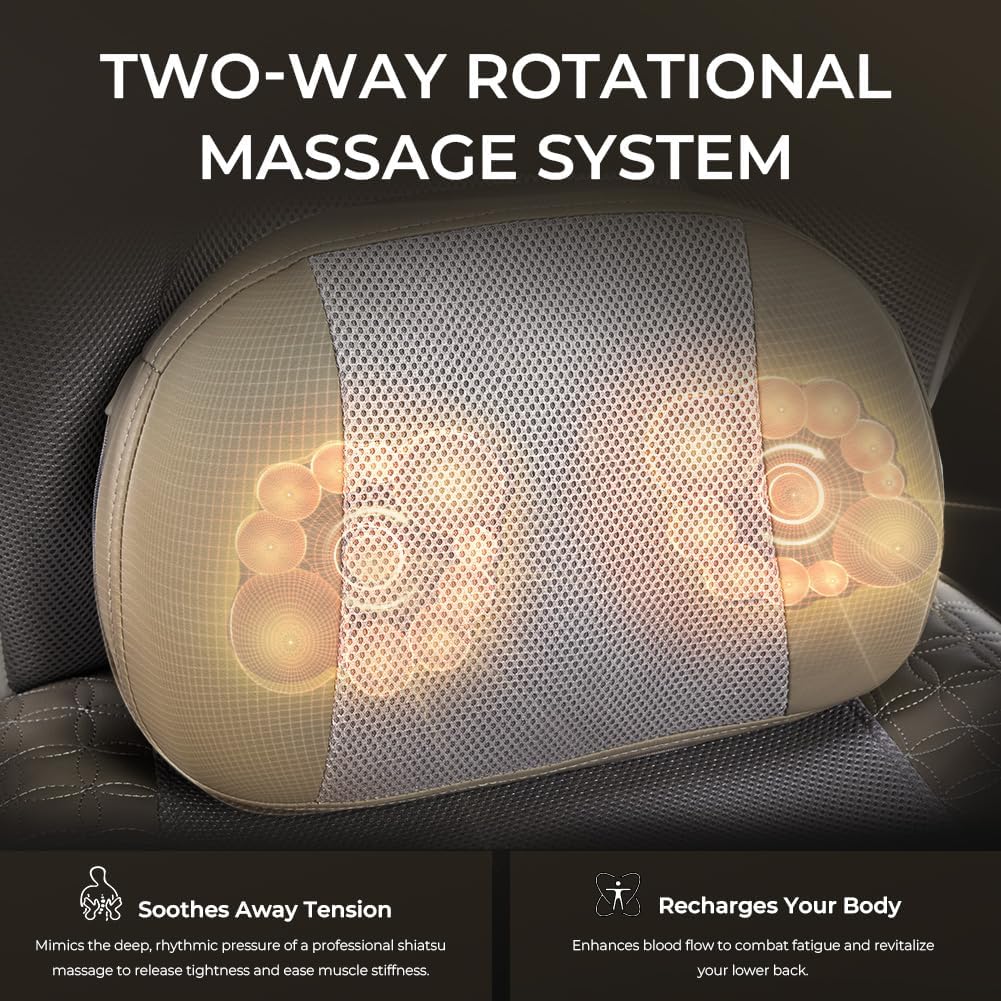
Figure 4: Dual-Rotation Massage System for lumbar support
Maintenance
To maintain the quality and appearance of your chair, follow these simple care instructions:
- Cleaning: Wipe clean with a damp cloth. Avoid harsh chemicals or abrasive cleaners.
- Inspection: Periodically check all screws and bolts to ensure they are tight. Re-tighten as necessary.
- Caster Care: Keep casters free of debris to ensure smooth movement.
Troubleshooting
- Chair does not adjust height: Ensure the gas lift lever is fully engaged and that there are no obstructions. If the issue persists, the gas lift may need replacement.
- Chair wobbles: Check all assembly screws and bolts to ensure they are securely tightened. Ensure the chair is on a flat, even surface.
- Massage function not working: Verify that the USB cable is securely connected to both the pillow and a working power source. Check the power button on the pillow.
- Casters not rolling smoothly: Inspect casters for hair or debris and remove any obstructions.
Specifications
| Feature | Detail |
|---|---|
| Brand | Dowinx |
| Model Name | QL-66B3 |
| Color | Grey |
| Product Dimensions | 22.8"D x 21.7"W x 40"H |
| Weight Capacity | Up to 400 lbs |
| Material | Mesh and PU Leather, Foam Fill |
| Special Feature | Big and Tall, Massage Lumbar Support, Adjustable Armrest, Retractable Footrest |
| Back Style | Mesh Back |
| Recommended Uses | Office, Gaming |
| Product Care Instructions | Wipe Clean |
Warranty and Support
For customer support, please visit the Dowinx Store on Amazon. Information regarding protection plans (2-Year, 3-Year, or Complete Protect) is available at the time of purchase. This product is returnable until January 31, 2026.