
1. Introduction
This manual provides essential instructions for the installation, operation, and maintenance of your HUIYEETEX DC24V Electric Chain Window Opener. This system is designed to automate the opening and closing of various window types, including clerestory, casement, skylight, and roof vent windows, enhancing accessibility and ventilation.
The opener features a 300mm (12-inch) chain stroke and supports both basic on/off control and smart home integration via Wi-Fi (with an additional receiver). Please read this manual thoroughly before installation and use to ensure proper function and safety.
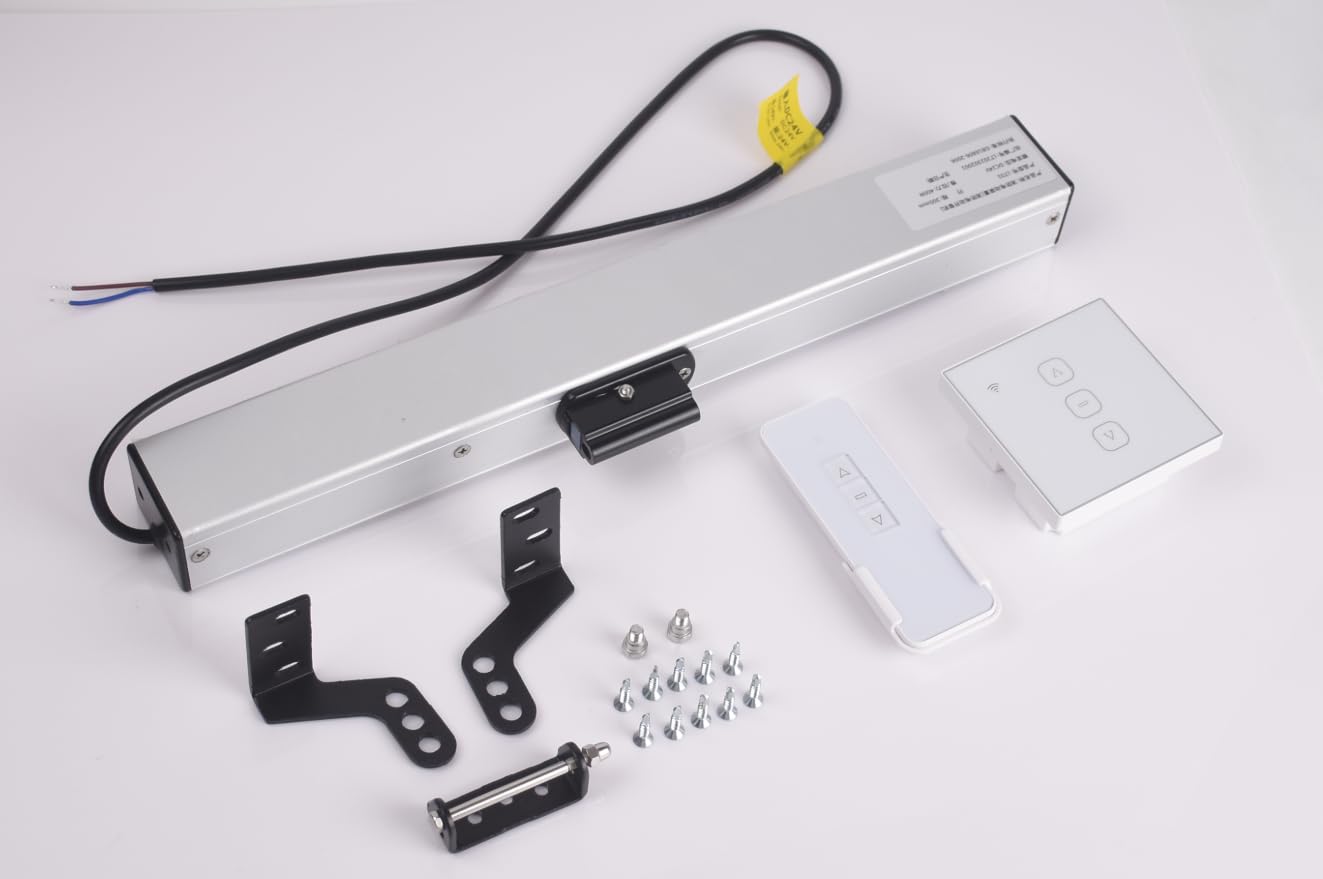
Figure 1: The HUIYEETEX DC24V Electric Chain Window Opener. This image displays the main opener unit, an RF remote control, and various mounting brackets, illustrating the complete kit for installation.
2. Safety Information
Important Safety Instructions:
- This device operates on DC24V low-voltage power. It must be used with a corresponding AC120V to DC24V power adapter or control box. Do not plug directly into a standard wall outlet (AC120V) without the appropriate adapter, as this will damage the unit and pose a safety risk.
- Installation should be performed by a qualified individual or with careful adherence to these instructions.
- Ensure all wiring connections are secure and insulated to prevent electrical hazards.
- Keep hands and loose clothing clear of the chain mechanism during operation to prevent injury.
- Do not allow children to operate the window opener unsupervised.
- Regularly inspect the unit and mounting hardware for signs of wear or damage. Discontinue use and consult support if any issues are found.
- Do not attempt to modify or repair the unit yourself. Refer to qualified service personnel.
3. Package Contents
Verify that all components are present in your package:
- 1x Motorized Window Opener Unit
- 1x RF Receiver
- 1x RF Remote Control
- 1x Set of Mounting Brackets and Hardware
- 1x Instruction Manual (this document)
Note: An AC120V to DC24V power adapter or control box is required for operation and may be sold separately. An additional Wi-Fi receiver is required for smart control features.
4. Setup and Installation
Before beginning installation, ensure you have the necessary tools (e.g., drill, screwdriver, measuring tape) and that the window type and opening distance are compatible with the opener's 300mm (12-inch) stroke.
- Prepare the Window: Ensure the window operates smoothly and is free from obstructions. Clean the mounting surfaces.
- Mount the Opener:
- Position the motorized opener unit on the window frame or wall, ensuring it is level and aligned with the window's opening path.
- Use the provided mounting brackets and hardware to securely fasten the opener. Refer to the diagrams in the included hardware guide for specific mounting configurations for your window type.
- Attach the end of the chain to the window sash using the appropriate bracket, ensuring a secure connection that allows for full extension and retraction.
- Electrical Connection:
- Connect the DC24V power cables from the opener to the RF receiver.
- Connect the RF receiver to a compatible AC120V to DC24V power adapter or control box. Do not connect directly to AC mains.
- Ensure all connections are tight and properly insulated.
- Pairing the Remote (RF Receiver):
- Follow the instructions provided with the RF receiver to pair it with the RF remote control. Typically, this involves pressing a pairing button on the receiver and then a button on the remote.
- Optional: Wi-Fi Smart Control Setup:
- If using an additional Wi-Fi receiver (sold separately), connect it according to its specific instructions.
- Download the recommended smartphone app and follow the in-app instructions to connect the Wi-Fi receiver to your home network and pair it with the window opener.
- Integrate with Amazon Alexa or Google Assistant as per the Wi-Fi receiver's guide.
5. Operation
5.1 Basic On/Off Control (RF Remote)
Once the opener is powered and the RF remote is paired, you can operate the window:
- Press the "Open" button on the RF remote to extend the chain and open the window.
- Press the "Close" button on the RF remote to retract the chain and close the window.
- Press the "Stop" button to halt the window at any desired position.
5.2 Smart Control (Wi-Fi, requires additional receiver)
If you have installed and configured the optional Wi-Fi receiver:
- Smartphone App: Use the dedicated smartphone application to open, close, or stop the window remotely from anywhere with an internet connection.
- Voice Commands: Integrate with Amazon Alexa or Google Assistant to control the window using voice commands (e.g., "Alexa, open the living room window").
- Scheduling: Set up schedules within the app to automatically open or close windows at specific times.
6. Maintenance
Regular maintenance ensures the longevity and reliable operation of your window opener.
- Cleaning: Periodically wipe the exterior of the opener unit with a soft, dry cloth. Do not use abrasive cleaners or solvents.
- Chain Inspection: Inspect the chain for any signs of wear, rust, or damage. Ensure it moves freely without obstruction.
- Lubrication: Lightly lubricate the chain and moving parts with a silicone-based lubricant annually, or as needed, to ensure smooth operation. Avoid over-lubrication.
- Mounting Hardware: Check all mounting screws and brackets periodically to ensure they remain tight and secure.
- Electrical Connections: Verify that all electrical connections are secure and free from corrosion.
7. Troubleshooting
If you encounter issues with your window opener, refer to the following common problems and solutions:
| Problem | Possible Cause | Solution |
|---|---|---|
| Opener does not respond to remote/app. | No power; Remote not paired; Wi-Fi receiver disconnected. |
|
| Window does not open/close fully. | Obstruction; Incorrect stroke setting; Chain damage. |
|
| Unusual noise during operation. | Lack of lubrication; Loose mounting; Internal issue. |
|
8. Specifications
| Feature | Detail |
|---|---|
| Model Number | LT01-DC24V-300mm-YC817-01FD |
| Brand | HUIYEETEX |
| Power Input | DC24V (requires AC120V to DC24V adapter/control box) |
| Stroke Length | 300mm (12 inches) |
| Control Methods | RF Remote Control, Wi-Fi Smart Control (with additional receiver) |
| Compatible Window Types | Clerestory, Casement, Skylight, Roof Vent, Awning Windows |
| Included Components | 1x Motorized Opener, 1x RF Receiver, 1x RF Remote, 1x Mounting Brackets |
9. Warranty and Support
9.1 Warranty Information
HUIYEETEX products are manufactured to high-quality standards. For specific warranty terms and conditions, please refer to the warranty card included with your product or visit the official HUIYEETEX website. Keep your proof of purchase for warranty claims.
9.2 Customer Support
If you have any questions, require technical assistance, or need to report an issue, please contact HUIYEETEX customer support. Contact details can typically be found on the product packaging, the official website, or your purchase documentation.
When contacting support, please have your product model number (LT01-DC24V-300mm-YC817-01FD) and purchase date available.