
1. Product Overview
The COZII Professional 2000W Blender is designed for efficient blending of various ingredients. It features a powerful 2000W motor, multiple speed settings, and preset programs to simplify food preparation. This blender is suitable for making smoothies, crushing ice, preparing frozen drinks, and creating purees.
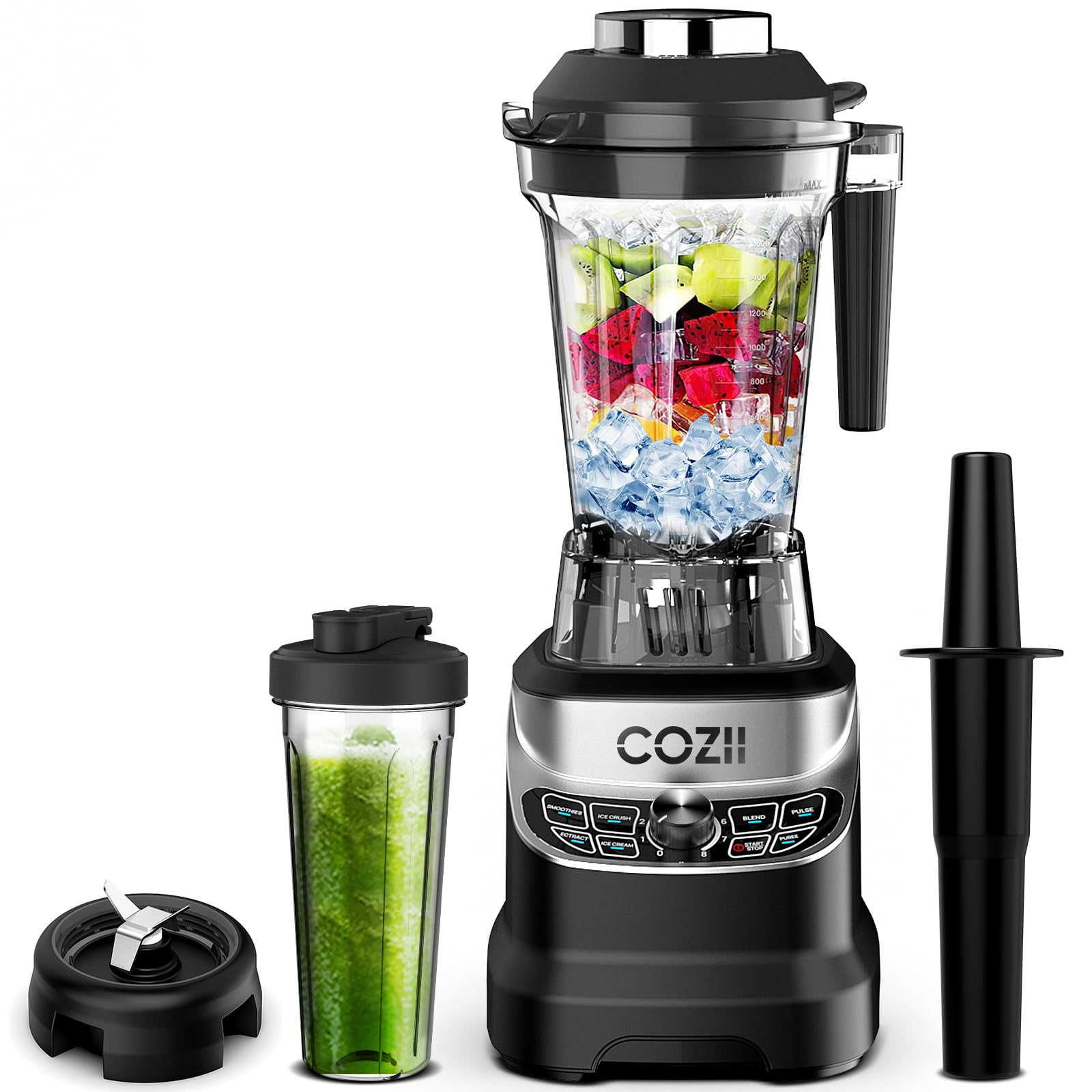
Figure 1: COZII Professional 2000W Blender with main pitcher and to-go cup.
2. Product Components
The COZII Professional 2000W Blender includes the following components:
- Motor Base: Contains the 2000W motor and control panel.
- 64 oz / 1.85 L Pitcher: Large capacity blending container with lid.
- 21 oz / 600 mL To-go Cup: Personal blending cup with a separate blade base and travel lid.
- Tamper: For pushing ingredients down towards the blades during blending.
- Cleaning Brush: For detailed cleaning of blades and pitcher.

Figure 2: Exploded view of the COZII Blender components.
3. Setup
- Unpack: Carefully remove all components from the packaging.
- Clean: Wash the pitcher, lids, and blade assemblies with warm, soapy water before first use. Rinse thoroughly and dry. The pitcher and to-go cup are dishwasher safe.
- Placement: Place the motor base on a clean, dry, and stable surface. Ensure the power cord is accessible.
- Assembly: For the 64oz pitcher, place it securely onto the motor base. For the 21oz to-go cup, fill with ingredients, screw on the blade assembly, then invert and place onto the motor base.
Video 1: Demonstration of unboxing and initial setup of the COZII Blender, showing the main pitcher and to-go cup assembly.
4. Operating Instructions
The COZII Blender offers both preset programs and manual speed control for versatile blending.
4.1. Control Panel Overview

Figure 3: The blender's touch control panel with preset programs and speed dial.
- 7 Preset Programs: Smoothies, Ice Crush, Ice Cream, Extract, Blend, Pulse, Puree.
- 8 Speed Control: A rotary dial allows for precise manual speed adjustment from 1 (low) to 8 (high).
- Start/Stop Button: Initiates or halts the blending process.
4.2. Using Preset Programs
- Ensure the pitcher or to-go cup is securely placed on the motor base.
- Press the 'Start/Stop' button to activate the control panel.
- Select the desired preset program (e.g., 'Smoothies', 'Ice Crush'). The blender will automatically adjust timing and speed.
- Press 'Start/Stop' again to begin the program. The blender will stop automatically once the program is complete.
4.3. Manual Speed Control
- Ensure the pitcher or to-go cup is securely placed on the motor base.
- Press the 'Start/Stop' button to activate the control panel.
- Rotate the speed dial to your desired setting (1-8).
- Press 'Start/Stop' to begin blending. Press 'Start/Stop' again to stop.
4.4. Using the To-Go Cup
- Add ingredients to the 21oz to-go cup.
- Screw the blade assembly firmly onto the open end of the cup.
- Invert the cup and place it onto the motor base, ensuring it locks into position.
- Select a preset program or use manual speed control as described above.
- Once blending is complete, remove the cup from the base, unscrew the blade assembly, and replace it with the travel lid.
Video 2: Demonstration of using the interchangeable to-go cup for personal blends.
4.5. Using the Tamper
The tamper can be used with the 64oz pitcher when blending thick or frozen mixtures. Remove the small cap from the pitcher lid and insert the tamper. Use it to push ingredients towards the blades. The tamper is designed to prevent contact with the blades when the lid is properly in place.
Video 3: Demonstration of blending and using the tamper for thick mixtures.
5. Cleaning and Maintenance
Proper cleaning ensures the longevity and hygiene of your blender.
5.1. Self-Cleaning Function
- After use, rinse the pitcher or to-go cup.
- Fill the pitcher halfway with warm water and add a drop of dish soap.
- Secure the lid and place it on the motor base.
- Run the blender on a low speed or use the 'Clean' preset (if available) for 30-60 seconds.
- Rinse thoroughly with clean water.
5.2. Dishwasher Safe Components
The 64oz pitcher, 21oz to-go cup, and their respective lids and blade assemblies are dishwasher safe (top rack recommended).

Figure 4: Blender components are dishwasher safe for easy cleaning.
6. Troubleshooting
If you encounter issues with your COZII Blender, please refer to the following common solutions:
- Blender does not start: Ensure the power cord is securely plugged into a working outlet. Verify that the pitcher or to-go cup is correctly assembled and locked onto the motor base.
- Ingredients not blending: Add more liquid to the mixture. Use the tamper to push ingredients towards the blades. Increase the speed setting.
- Overheating: If the motor stops unexpectedly, the blender may have overheated. Unplug the unit and allow it to cool down for at least 15-20 minutes before attempting to use it again. Reduce load or liquid amount for future use.
7. Specifications
| Feature | Detail |
|---|---|
| Brand | COZII |
| Model Number | ZM 5010 |
| Power | 2000 Watts |
| Capacity (Pitcher) | 1.85 Liters (64 oz) |
| Capacity (To-go Cup) | 600 mL (21 oz) |
| Number of Speeds | 8 |
| Controls Type | Touch |
| Material Type Free | BPA Free |
| Container Material | Plastic |
| Product Dimensions | 9.05"D x 7.08"W x 18.9"H |
| Item Weight | 11.42 pounds |
8. Warranty and Support
The COZII Professional 2000W Blender comes with a 3-Year Limited Warranty. For warranty claims, technical support, or any product-related inquiries, please contact COZII customer service. You can find more information and support on the COZII Store on Amazon.


