
1. Introduction and Overview
The Brondi Amico Tuo 4G (Flipper) is a user-friendly mobile phone designed for simplicity and ease of use. It features large backlit keys, a clear internal display, and an external display for convenient notification viewing when the flip is closed. This device includes a remote control function, allowing family members to assist with settings, and an SOS button for immediate emergency contact.
This manual provides detailed instructions on how to set up, operate, maintain, and troubleshoot your Brondi Amico Tuo 4G mobile phone.
2. What's in the Box
Please check the package contents to ensure all items are present:
- Brondi Amico Tuo 4G Mobile Phone
- Charging Cradle
- Type-C Charger
- Battery
- User Manual (this document)
3. Key Features
The Brondi Amico Tuo 4G (Flipper) offers several features designed for ease of use and safety:
- Large Backlit Keys: Provides a comfortable keyboard that is clearly visible even in low-light conditions.
- Voice Announcement of Dialed Numbers: The phone can audibly repeat the numbers you dial.
- Active Flip: Answer incoming calls by opening the flip and end calls by closing it.
- Remote Control: Allows authorized family members to remotely intervene and assist with phone settings.
- See & Call: Quickly call favorite contacts by selecting their photo.
- SOS Button: Located on the back, this button sends emergency SMS messages and calls pre-set emergency numbers when pressed.
- 11 Direct Memories: Quick access keys for easily contacting important numbers.
- 3 Dedicated Quick Keys: M1, M2, and Camera buttons for immediate access to frequently used functions.
- Camera with LED Flash: Capture photos and record important moments with ease.
- Hands-free and Vibration: Offers amplified listening and clear alerts, useful in noisy environments.
- FM Radio and Multimedia Player: Enjoy music and view multimedia content.
- Bluetooth 5.1 + EDR: Ensures stable connection with other Bluetooth-enabled devices.
- Expandable Memory: Features a MicroSD slot supporting up to 32GB for additional storage.
- Dual Display: Includes an internal 2.4-inch display and an external 1.77-inch display for immediate control and notifications.
- Dual SIM 4G and VoLTE: Modern connectivity for clear calls and the ability to manage two phone numbers.
- Battery Life: Provides up to 300 minutes of talk time and 180 hours of standby time.
4. Setup Guide
4.1 Inserting SIM Card(s) and MicroSD Card
1. Open the back cover of the phone.
2. Carefully remove the battery if it is already inserted.
3. Locate the SIM card slot(s) and MicroSD card slot. This phone supports Dual SIM 4G.
4. Insert your SIM card(s) into the designated slots, ensuring the gold contacts face downwards and the card is correctly oriented as indicated by the diagram near the slot.
5. If desired, insert a MicroSD card (up to 32GB) into its slot for additional storage.
4.2 Inserting the Battery
1. After inserting the SIM and MicroSD cards, place the battery into the battery compartment, aligning the gold contacts on the battery with the contacts in the phone.
2. Gently press down on the battery until it is securely in place.
3. Replace the back cover, ensuring it clicks firmly into position.
4.3 Charging the Phone
Before first use, fully charge the phone's battery.
1. Connect the Type-C charger cable to the charging port on the phone or place the phone in the charging cradle.
2. Plug the charger into a power outlet.
3. The charging indicator on the phone will illuminate. Once fully charged, the indicator may change color or turn off.
4. Disconnect the charger once charging is complete.
4.4 Powering On/Off
To power on: Press and hold the Power/End Call button (usually red) until the screen lights up.
To power off: Press and hold the Power/End Call button, then select 'Power off' from the options on the screen.
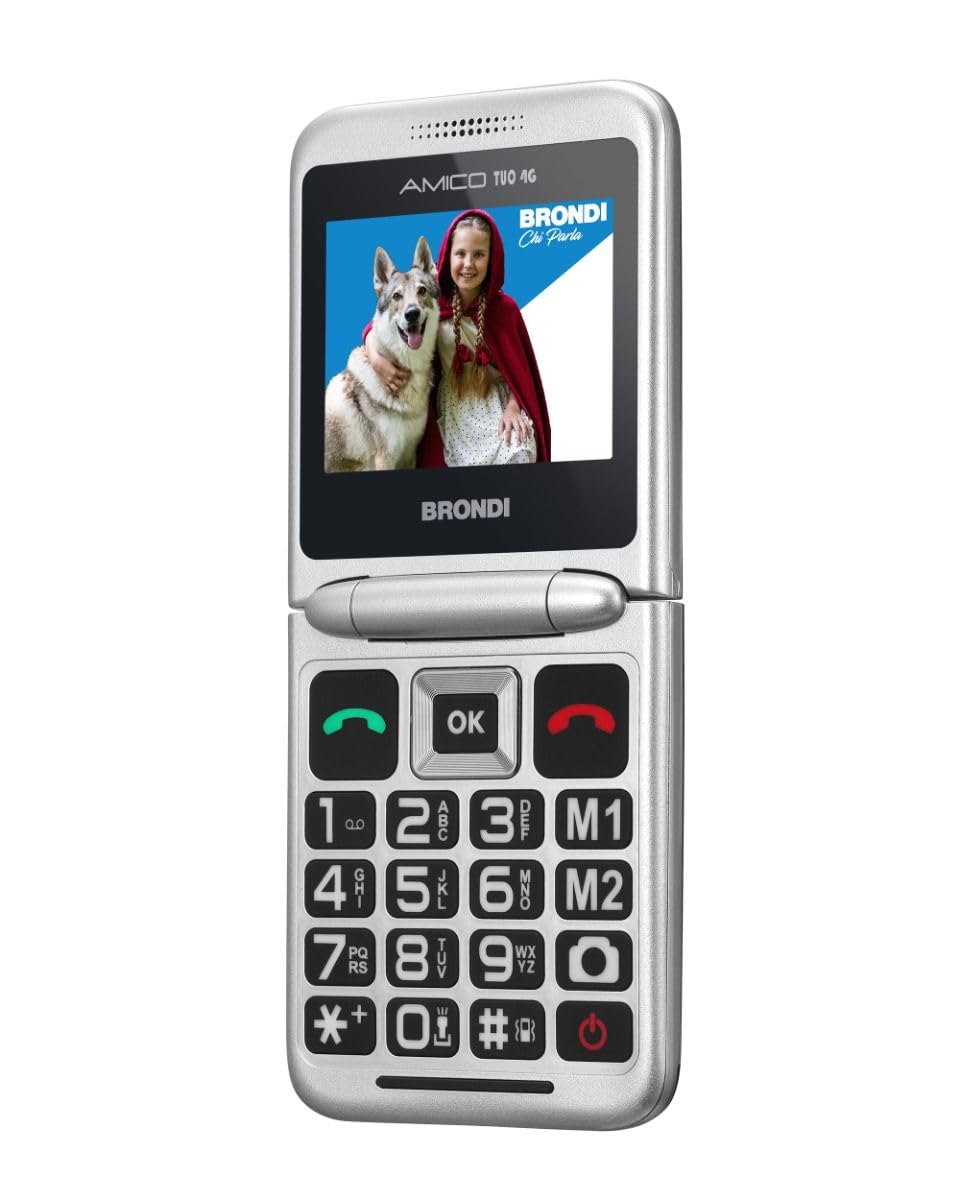
Image 1: Brondi Amico Tuo 4G (Flipper) mobile phone in its closed position, showing the external display.

Image 2: Brondi Amico Tuo 4G (Flipper) mobile phone in its open position, displaying the internal screen and large keypad.
5. Operating Instructions
5.1 Making and Receiving Calls
Making a Call:
- Open the phone's flip.
- Dial the desired number using the large keypad. The phone will announce the dialed numbers if the feature is enabled.
- Press the Green Call button to initiate the call.
- Alternatively, use the M1, M2, or other direct memory keys to call pre-saved contacts.
Receiving a Call:
- When the phone rings, open the flip to answer the call (Active Flip feature).
- To end a call, close the flip or press the Red End Call button.
5.2 Using the SOS Function
The SOS button is a critical safety feature. Ensure it is configured correctly.
Setting Emergency Numbers:
- Navigate to the phone's settings menu.
- Find the 'SOS Settings' or 'Emergency Settings' option.
- Add up to five emergency contact numbers. These numbers will be called sequentially and receive an emergency SMS when the SOS button is activated.
Activating SOS:
- In an emergency, press and hold the SOS button located on the back of the phone for a few seconds.
- The phone will automatically send an emergency SMS to the pre-set numbers and then begin calling them one by one until a connection is made.
5.3 Camera Usage
1. Press the dedicated Camera quick key or navigate to the Camera application from the menu.
2. Frame your shot using the internal display.
3. Press the 'OK' button or the designated camera button to take a photo.
4. The LED flash will activate automatically in low light conditions or can be manually controlled via camera settings.
5.4 FM Radio and Multimedia Player
Access the 'FM Radio' or 'Multimedia Player' from the main menu to listen to radio stations or play audio/video files stored on your MicroSD card.
5.5 Bluetooth Connectivity
1. Go to 'Settings' and then 'Bluetooth'.
2. Turn Bluetooth on.
3. Search for available devices and select the device you wish to pair with.
4. Follow the on-screen prompts to complete the pairing process.
5.6 Remote Control Functionality
The remote control feature allows trusted family members to manage certain phone settings remotely. For detailed setup and usage of this feature, please refer to the specific instructions provided in the phone's software or contact Brondi customer support.
6. Maintenance
To ensure the longevity and optimal performance of your Brondi Amico Tuo 4G (Flipper) phone, follow these maintenance guidelines:
- Cleaning: Use a soft, dry cloth to clean the phone's exterior. Avoid using liquid cleaners or aerosols, as they may damage the device.
- Battery Care: Avoid extreme temperatures. Do not expose the battery to direct sunlight or very cold conditions. Charge the battery regularly, but avoid overcharging or letting it completely drain for extended periods.
- Storage: When not in use for extended periods, store the phone in a cool, dry place.
- Water Resistance: This device is not water-resistant. Avoid exposure to water or high humidity.
7. Troubleshooting
If you encounter issues with your phone, try the following troubleshooting steps:
- Phone Not Turning On: Ensure the battery is correctly inserted and fully charged. Try connecting the charger and attempting to power on again.
- No Signal/Call Issues: Check if the SIM card is correctly inserted. Ensure you are in an area with network coverage. Restart the phone.
- Battery Not Charging: Verify that the charger and cable are properly connected to both the phone/cradle and the power outlet. Check if the charger or cable is damaged.
- SOS Function Not Working: Confirm that emergency numbers are correctly saved in the SOS settings. Ensure the phone has network signal to send SMS and make calls.
- Screen Issues: If the screen is unresponsive or frozen, try restarting the phone by removing and reinserting the battery (if possible) or performing a forced restart (refer to specific device instructions if available).
If problems persist, please contact Brondi customer support.
8. Specifications
| Feature | Specification |
|---|---|
| Brand | Brondi |
| Model Name | Flipper |
| Operating System | Proprietary |
| CPU Model | MediaTek Helio |
| Memory Capacity | 1 GB |
| Resolution | 240 x 320 |
| Wireless Service Provider | All carriers |
| Cellular Technology | 4G |
| Connectivity Technology | 4G, Bluetooth 5.1 |
| Color | Black |
| Data Storage Capacity | 1 GB |
| Number of SIM Card Slots | Dual SIM |
| USB Port Type | USB-C |
| Form Factor | Flip |
| User Interface Interaction Type | Alphanumeric Keypad |
| Water Resistance Level | Not water-resistant |
| Maximum Supported Flash Memory Size | 32 GB |
| Camera Description | Camera with LED Flash |
| Camera Flash | LED Flash |
| Battery Capacity | 1000 mAh |
| Phone Talk Time | 300 Minutes |
| Average Battery Life in Use | 300 Minutes |
| GPS Functionality | False |
| Screen Type | LCD |
| Maximum Screen Resolution | 480 x 270 |
| Wireless Technology | LTE |
| Manufacturer | Brondi |
| Model Series | Amico Tuo |
| Specific Product Uses | Senior Citizens Communication |
9. Warranty and Support
9.1 Product Warranty
The Brondi Amico Tuo 4G (Flipper) mobile phone comes with a 2-year manufacturer's warranty. Please retain your proof of purchase for warranty claims. The warranty covers manufacturing defects under normal use conditions.
9.2 Customer Support
For technical assistance, warranty claims, or further inquiries, please contact Brondi customer service through their official website or the contact information provided in your product packaging.


