
1. Product Overview
The OnePlus 15 is an advanced Android smartphone designed for high performance and extended usage. It features a powerful Snapdragon 8 Elite Gen 5 processor, a large 7,300mAh battery, and a vibrant 6.78-inch 165 Hz AMOLED display. The device is equipped with a triple 50 MP camera system for detailed photography and offers robust durability with IP66/IP68/IP69 and IP19K ratings for dust and water resistance.
Key Features:
- Massive 7,300 mAh Battery: Provides extended power for all-day use and beyond.
- Tri-Chip System: Integrates the Snapdragon 8 Elite Gen 5, a dedicated Wi-Fi chip, and a CPU scheduler for optimized performance, connectivity, and efficiency.
- Triple 50 MP Camera System: Captures high-quality images with wide, ultra-wide, and telephoto capabilities.
- Durable Design: Built to resist dust and water, with IP66/IP68/IP69 and IP19K ratings for enhanced protection.
- 6.78-inch 165 Hz AMOLED Display: Delivers vivid colors, smooth motion, and exceptional clarity.
2. What's in the Box
Verify that all items are present in your product packaging:
- OnePlus 15 Smartphone x1
- Charger x1
- USB Data Cable x1
- SIM Ejector Tool x1
- Quick Guide x1
- Safety Guide x1

Image: Contents of the OnePlus 15 retail box, showing the smartphone, charger, USB data cable, SIM ejector tool, quick guide, and safety guide.
3. Setup
3.1 SIM Card Installation
- Locate the SIM card tray on the side of your OnePlus 15.
- Insert the provided SIM ejector tool into the small hole on the SIM tray. Press firmly until the tray pops out.
- Place your Nano-SIM card(s) into the tray with the gold contacts facing down. Ensure they are correctly oriented according to the tray's outline.
- Carefully push the SIM tray back into the phone until it is flush with the device.
3.2 Initial Power On and Configuration
- Press and hold the Power button (located on the right side of the device) until the OnePlus logo appears.
- Follow the on-screen prompts to select your language, connect to a Wi-Fi network, and set up your Google account.
- You may be prompted to transfer data from an old device. Follow the instructions or skip this step to set up as a new device.
- Configure security settings such as fingerprint unlock, face unlock, or a PIN/pattern.

Image: Front view of the OnePlus 15 smartphone, showcasing its display and front camera.
4. Operating Your Device
4.1 Screen and Navigation
The OnePlus 15 features a 6.78-inch 165 Hz AMOLED display. Navigate the interface using touch gestures:
- Tap: Select an item or activate a function.
- Swipe: Scroll through screens or lists.
- Pinch: Zoom in or out on images and web pages.
- Long Press: Access contextual menus or move icons.
4.2 Buttons and Ports
Familiarize yourself with the physical controls and connections:
- Power Button: Located on the right side. Press to wake/sleep the screen, long press to power off or restart.
- Volume Buttons: Located on the left side. Adjust media volume, ringtone volume, and alarm volume.
- USB Type-C Port: Located at the bottom. Used for charging, data transfer, and connecting Type-C headphones.
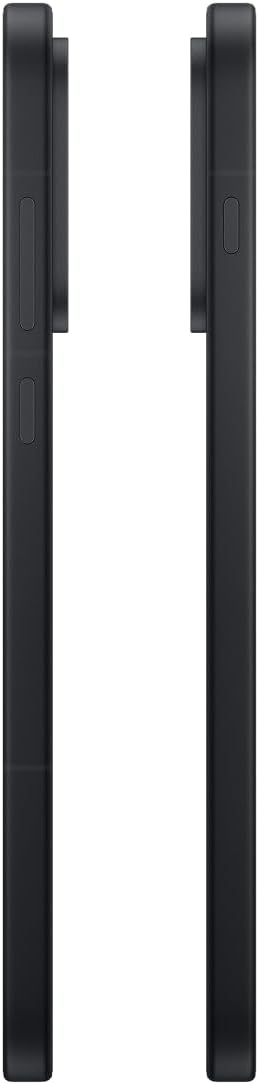
Image: Side view of the OnePlus 15, showing the placement of the power and volume buttons.
4.3 Camera Usage
The OnePlus 15 features a versatile triple 50 MP camera system. To open the camera app, tap the camera icon on your home screen or lock screen.
- Switch Modes: Swipe left or right on the screen to switch between Photo, Video, Portrait, and other modes.
- Zoom: Pinch in or out on the viewfinder, or tap the zoom icons (e.g., 0.6x, 1x, 2x) to adjust magnification.
- Capture: Tap the shutter button to take a photo or start/stop video recording.
- Settings: Access camera settings for features like flash, timer, aspect ratio, and more.

Image: Back view of the OnePlus 15, highlighting the triple 50 MP camera system.
4.4 Battery Management
Your OnePlus 15 is equipped with a 7,300 mAh battery. To optimize battery life:
- Adjust screen brightness and set a shorter screen timeout.
- Disable Wi-Fi, Bluetooth, and GPS when not in use.
- Close background apps that are consuming power.
- Utilize Battery Saver mode when your battery is low.
- Use the provided charger and USB cable for optimal fast charging.
5. Maintenance
5.1 Cleaning Your Device
To clean your OnePlus 15:
- Use a soft, lint-free cloth to wipe the screen and back panel.
- For stubborn smudges, slightly dampen the cloth with water or a screen cleaner.
- Avoid using harsh chemicals, abrasive materials, or compressed air.
5.2 Software Updates
Regular software updates provide new features, security enhancements, and bug fixes. To check for updates:
- Go to Settings > About device > OxygenOS version.
- Tap Check for updates.
- If an update is available, follow the on-screen instructions to download and install it. Ensure your device has sufficient battery and is connected to Wi-Fi before updating.
6. Troubleshooting
If you encounter issues with your OnePlus 15, try the following common troubleshooting steps:
- Device unresponsive: Press and hold the Power button for about 10 seconds to force a restart.
- Apps crashing: Clear the cache and data for the problematic app in Settings > Apps > [App Name] > Storage & cache.
- Battery draining quickly: Review battery usage in Settings > Battery to identify power-hungry apps. Adjust settings as described in Section 4.4.
- Network connectivity issues: Toggle Airplane Mode on and off, restart your device, or reset network settings in Settings > System settings > Backup and reset > Reset phone > Reset Wi-Fi, mobile & Bluetooth.
- Screen protector installation: For assistance with screen protector installation, refer to the following video guide:
Video: Installation guide for a screen protector on the OnePlus 15 5G. This video demonstrates the steps to correctly apply a screen protector to your device.
7. Specifications
| Model Name | OnePlus 15 |
| Item Model Number | CPH2749 |
| Product Dimensions | 6.36 x 3.02 x 0.33 inches |
| Item Weight | 1.29 pounds |
| Operating System | Android 16 |
| CPU Model | Snapdragon 8 Elite Gen 5 |
| CPU Speed | 4.61 GHz |
| RAM Memory Installed Size | 12 GB |
| Memory Storage Capacity | 256 GB |
| Screen Size | 6.78 Inches |
| Resolution | 2772*1272 |
| Refresh Rate | 165 Hz |
| Battery Capacity | 7300 Milliamp Hours |
| Phone Talk Time | 68.7 Hours |
| Connectivity Technologies | Bluetooth, Infrared, NFC, USB, Wi-Fi |
| Special Features | Dual SIM, Wireless Charging |
| Manufacturer | OnePlus |
8. Important Safety Information
Please read all safety information before using your device to ensure safe and proper use. Improper use may cause damage to the device or personal injury.
- Do not expose the device to extreme temperatures or direct sunlight for prolonged periods.
- Use only approved chargers, batteries, and accessories.
- Avoid dropping or subjecting the device to severe impact.
- Keep the device away from water and liquids, despite its water resistance ratings, to prevent potential damage.
- Do not attempt to disassemble or modify the device.
9. Warranty and Support
Your OnePlus 15 is covered by a manufacturer's warranty. For detailed warranty information, technical support, or service inquiries, please visit the official OnePlus website or contact customer service.
You can find additional support and product information on the OnePlus Store.


