
1. Introduction
The VATOS 3-in-1 Electric Spinning Toss Game offers three distinct play modes: Bean Bag Toss, Ring Toss, and Musical Jump. This versatile game set features an electric spinning base with adjustable speed settings, vibrant lights, and cheerful music, designed for both indoor and outdoor use. It encourages physical activity, refines motor skills, and provides entertainment for multiple players.
2. What's in the Box
Verify that all components are present before assembly:
- 1 x Electric Spinning Base
- 4 x Glow Tubes
- 4 x Throwing Buckets
- 12 x Bean Bags
- 12 x Balls
- 12 x Toss Rings (16cm)
- 1 x Remote Control
- 1 x 3.7V Rechargeable Lithium-ion Battery
- 1 x USB Charging Cable
- Various Connectors (including 1 three-way, 1 two-way, 3 white, 1 red)
- 4 x Base Brackets

Image: All components included in the VATOS 3-in-1 Electric Spinning Toss Game set.
3. Setup and Assembly
Follow these steps to assemble your game set:
- Charge the Battery: Connect the provided 3.7V Lithium-ion battery to the USB charging cable and charge it fully.
- Install Battery: Once charged, open the battery compartment on the underside of the Electric Spinning Base and insert the battery. Secure the compartment cover.
- Attach Base Brackets: Insert the four gray base brackets into the designated slots on the Electric Spinning Base to ensure stability.
- Insert Glow Tubes: Place the four colored glow tubes into the central openings of the spinning base.
- Attach Throwing Buckets (for Toss Games): Use the gray connectors to attach the four throwing buckets to the top of the glow tubes. Ensure they are securely fastened.
- Assemble Musical Jump Arms (for Musical Jump Game): For the Musical Jump game, use the three-way and two-way connectors with the glow tubes to create the rotating arms.
- Activate Lights and Power: Turn on the power switch located on the underside of the spinning base. Activate the individual light switches on each glow tube and throwing bucket.
Video: Demonstrates the easy installation process for the VATOS 3-in-1 Electric Spinning Toss Game.

Image: Detailed assembly instructions for the three different game modes.
4. Operating Instructions
The VATOS 3-in-1 Electric Spinning Toss Game offers multiple ways to play. Use the remote control to manage the game's features.
Remote Control Functions:
- ON/OFF Button: Powers the game on or off.
- Music Button: Toggles music on or off.
- Light Button: Toggles lights on or off.
- '+' Button: Increases the rotation speed (3 speed levels available).
- '-' Button: Decreases the rotation speed.
- Rotation Button: Toggles rotation on or off.

Image: Remote control for adjusting game settings.
Game Modes:
Switch between the following game modes by reconfiguring the setup as shown in the assembly section.
4.1. Bean Bag & Ball Toss Game
In this mode, players aim to toss bean bags or balls into the rotating buckets. Adjust the spinning speed for varying difficulty levels. The lights and music enhance the play experience.
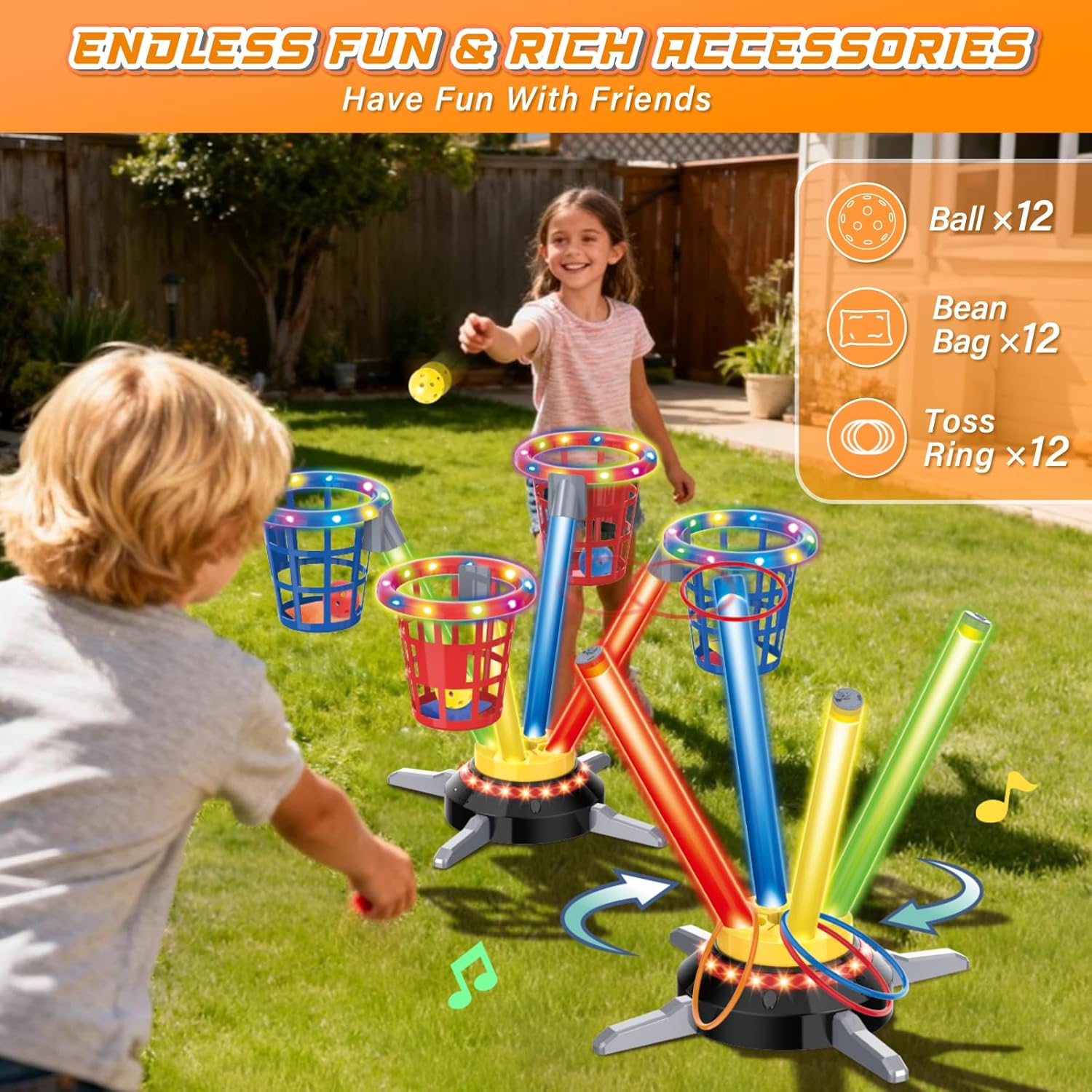
Image: Kids enjoying the Bean Bag & Ball Toss game.
4.2. Ring Toss Game
For the Ring Toss game, players throw rings to land them on the glow tubes. The spinning motion adds a challenge, and the lights make it suitable for evening play.

Image: Kids engaged in the Ring Toss game.
4.3. Musical Jump Game
In Musical Jump mode, the game transforms into a jumping challenge. Players must jump over the rotating arms as they spin, synchronized with music. This mode promotes agility and coordination.

Image: Kids participating in the Musical Jump game.
Video: Overview of the VATOS 3-in-1 Bean Bag & Ring Toss Game, including Musical Jumping.
Video: Demonstrates the three game modes: Bean Bag Toss, Ring Toss, and Musical Jumping.
Video: Shows the VATOS 3-in-1 Electric Spinning Toss Game Set in action.
5. Maintenance
- Cleaning: Wipe down all plastic components with a soft, damp cloth. Do not immerse the electric base or battery in water.
- Storage: When not in use, disassemble the game and store all components in a dry, cool place away from direct sunlight.
- Battery Care: Ensure the battery is fully charged before long-term storage and recharge periodically to maintain battery health.
6. Troubleshooting
- Game not powering on: Ensure the battery is fully charged and correctly installed in the electric spinning base. Check that the power switch on the base is in the 'ON' position.
- Lights not working: Verify that the individual light switches on the glow tubes and throwing buckets are turned on. Check the remote control's light button.
- Spinning base not rotating: Confirm the battery is charged and installed. Check the remote control's rotation button and speed settings. Ensure no obstructions are preventing rotation.
- Remote control not responding: Ensure the remote control has working batteries. Point the remote directly at the electric spinning base.
7. Specifications
| Feature | Detail |
|---|---|
| Brand | VATOS |
| Model Name | Toss Games |
| Material | Plastic (Child-safe ABS) |
| Item Dimensions (L x W x H) | 12 x 7 x 7 inches |
| Power Source | 3.7V Li-ion Battery (Rechargeable via USB) |
| Number of Pieces | 35 |
| Specific Uses | Indoor, Outdoor |
| Number of Players | Multiple |
8. Warranty and Support
This product comes with a 1-Year Limited Warranty from VATOS. For warranty claims or technical support, please refer to the contact information provided with your purchase or visit the official VATOS website.
Return Policy: A 30-day return/replacement policy is typically offered for this product. Please check with your retailer for specific return details.