
1. Product Overview
The MOFT MagSafe Wallet & Phone Stand is a versatile accessory designed for convenience and organization. It functions as both a secure card holder and a hands-free phone stand. Crafted from durable MOVAS Vegan Leather, it offers a slim profile and RFID blocking technology to protect your personal information.
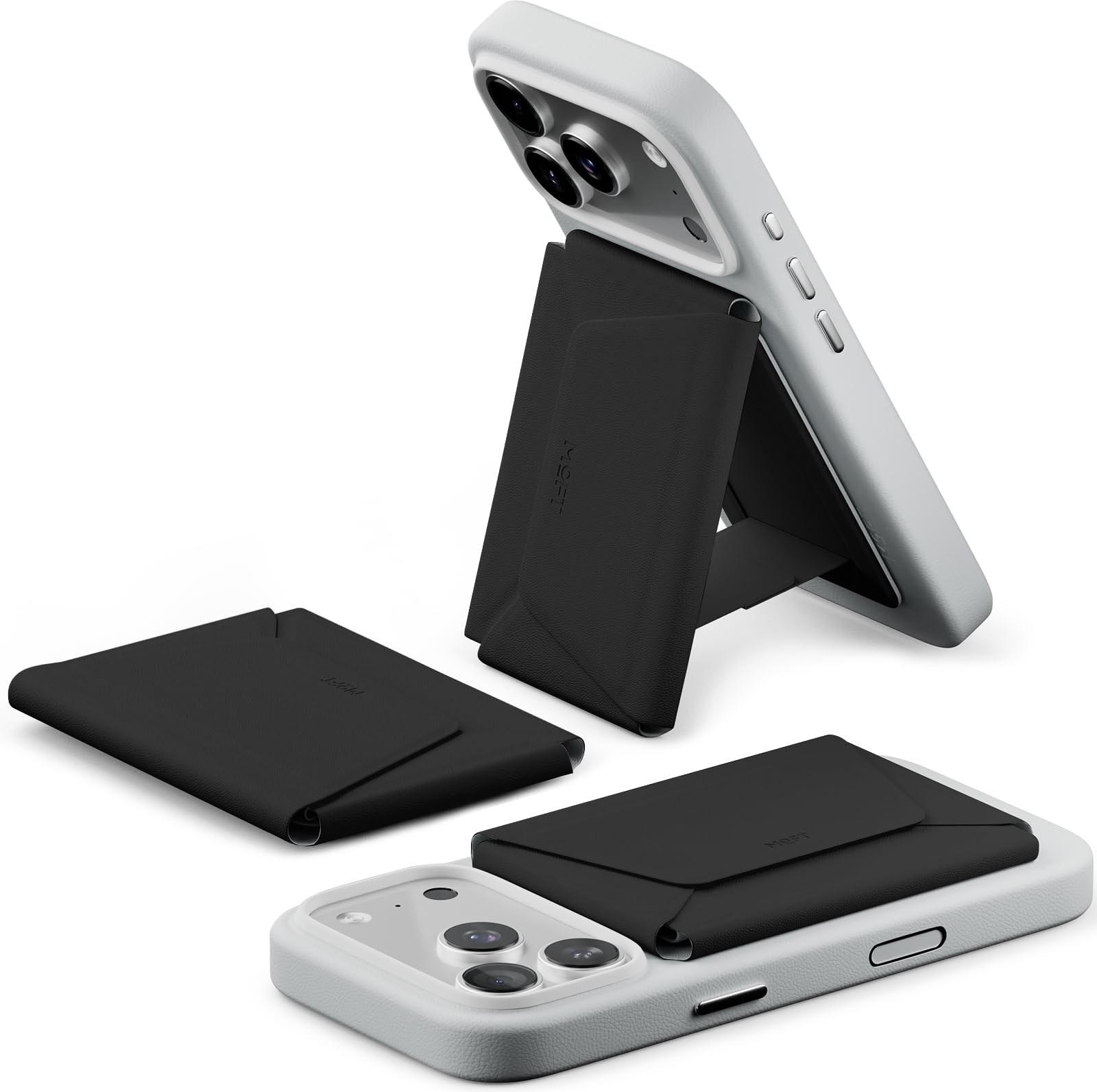
Image: The MOFT MagSafe Wallet & Phone Stand in Jet Black, showcasing its compact design.
Key features include:
- Integrated phone stand for hands-free viewing.
- Secure storage for up to 8 cards.
- RFID blocking for data protection.
- Slim and lightweight design for everyday carry.
- Constructed from MOVAS Vegan Leather for durability and a premium feel.
2. Setup Instructions
2.1 Attaching to MagSafe Compatible Devices
The MOFT MagSafe Wallet & Phone Stand is designed to magnetically attach to MagSafe compatible iPhones (iPhone 12 series and newer) or MagSafe compatible phone cases. Simply align the wallet with the MagSafe area on your phone or case until it snaps securely into place.

Image: A blue MOFT MagSafe Wallet being attached to the back of an iPhone, demonstrating the magnetic snap feature.
2.2 Using with Non-MagSafe Phones (Metal Ring Included)
For phones that are not MagSafe compatible, a metal ring is included to enable magnetic attachment. Follow these steps:
- Prepare your phone with its case, the MagSafe wallet, and the metal ring.
- Magnetically attach the MagSafe wallet to the non-adhesive side of the metal ring.
- Peel off the top layer of the metal ring's adhesive.
- Carefully apply the metal ring to the back of your phone case. Ensure the case has a flat back and no coatings (e.g., TPU, PC, or aluminum cases). Avoid rubber, leather, cloth, wood, glass, or painted cases.
- Press firmly and leave it on for 24 hours before use to ensure strong adhesion.

Image: A step-by-step diagram illustrating the installation of the metal ring for non-MagSafe phone compatibility.
3. Operation
3.1 Storing and Accessing Cards
The wallet features a dual-compartment design for organized storage of up to 8 cards. To access your cards, use the unique side-pull mechanism. A gentle tug will smoothly present your cards. For fastest access, keep your most-used card in the front slot.

Image: A hand demonstrating the quick-access pull tab to retrieve a card from the MOFT wallet.
The wallet also includes dedicated slots for coins, keys, or SIM cards, and a SIM ejector tool slot for comprehensive organization.
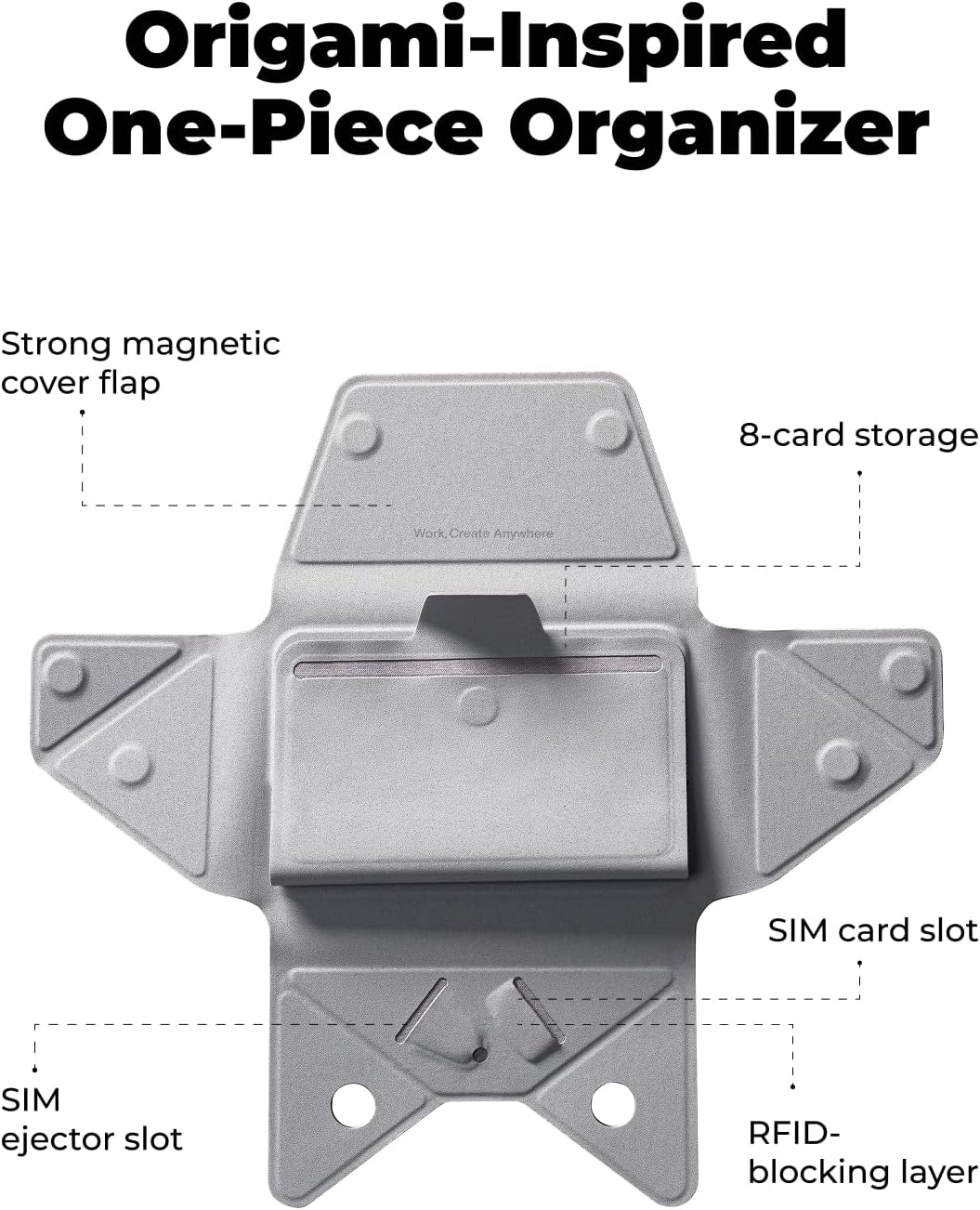
Image: An unfolded view of the MOFT wallet, highlighting its various compartments for cards, SIM cards, and other small items.
3.2 Using the Phone Stand Feature
The integrated stand allows for hands-free use. Simply fold the wallet into its stand configuration. It offers a practical 60-degree fold, suitable for various viewing angles, whether for video calls, scrolling, or watching content.

Image: An iPhone with the MOFT wallet deployed as a stand, positioned on a desk for hands-free viewing.
3.3 Official Product Videos
Watch these official videos from MOFT Tech for visual demonstrations of the product's features and usage:
Video: MOFT Minimalist Travel Wallet for Men & Women. This video demonstrates the compact design and card storage capabilities.
Video: MOFT 8-Card Holder. This video highlights the wallet's capacity to hold up to 8 cards.
Video: How to Use Your Card Holder. This video provides a detailed guide on how to effectively use the card holder feature.
Video: MOFT Snap Field Wallet. This video showcases the overall functionality and design of the Snap Field Wallet.
4. Maintenance
The MOFT MagSafe Wallet & Phone Stand is crafted from MOVAS Vegan Leather, known for its durability and resistance to wear. To maintain its appearance and longevity:
- Cleaning: Wipe with a soft, damp cloth. Avoid harsh chemicals or abrasive cleaners.
- Storage: Store in a cool, dry place away from direct sunlight when not in use.
- Avoid Overstuffing: While designed for up to 8 cards, consistent overstuffing may stretch the material over time.
5. Troubleshooting
5.1 Magnetic Stripe Card Demagnetization
Due to the built-in magnets, magnetic stripe cards (e.g., hotel key cards, older transit cards) may be at risk of demagnetization if stored directly against the magnetic surface for extended periods. It is not recommended to store magnetic stripe cards or dual interface cards in the wallet if demagnetization is a concern. Most modern credit/debit cards use EMV chips and are not affected by magnets.

Image: The MOFT wallet highlighting its RFID blocking layer for data protection.
5.2 Wallet Not Attaching Securely
- MagSafe Compatibility: Ensure your phone or case is MagSafe compatible.
- Metal Ring Adhesion: If using the metal ring, ensure it was applied correctly and allowed 24 hours to cure. Check that the phone case material is suitable (flat back, no rubber/cloth/wood/glass/painted surfaces).
- Obstructions: Ensure there are no foreign objects or debris between the wallet and your phone/case.
6. Specifications
| Feature | Detail |
|---|---|
| Brand | MOFT |
| Model Name | Phone Wallet |
| Model Number | MB005S |
| Color | Jet Black |
| Material | MOVAS Leather |
| Special Features | Card Holder, Compact, Lightweight, RFID Protected |
| Wallet Compartment Type | Coin, Credit Card, ID Card, Paper Money |
| Closure Type | Snap |
| Number of Card Slots | 8 |
| Item Dimensions (D x W x H) | 4"D x 2.8"W x 0.6"H |
| Item Weight | 79 g |
| UPC | 840131323278 |
7. Warranty and Support
For warranty information, product support, or to contact customer service, please visit the official MOFT website or refer to the documentation included with your purchase. MOFT offers a standard return policy with a duration of 30 days for refunds or replacements.
Online Support: Visit the MOFT Store on Amazon