
1. Introduction
This manual provides instructions for the Binardat 10-Port 2.5G Unmanaged Ethernet Switch, Model 2G10-08210GS. This device is designed to enhance network speed and efficiency for various applications, including home entertainment, gaming, Network Attached Storage (NAS), and small business networks. It features 8x2.5G Base-T ports and 2x10G SFP+ ports, offering flexible and high-speed data transfer capabilities.
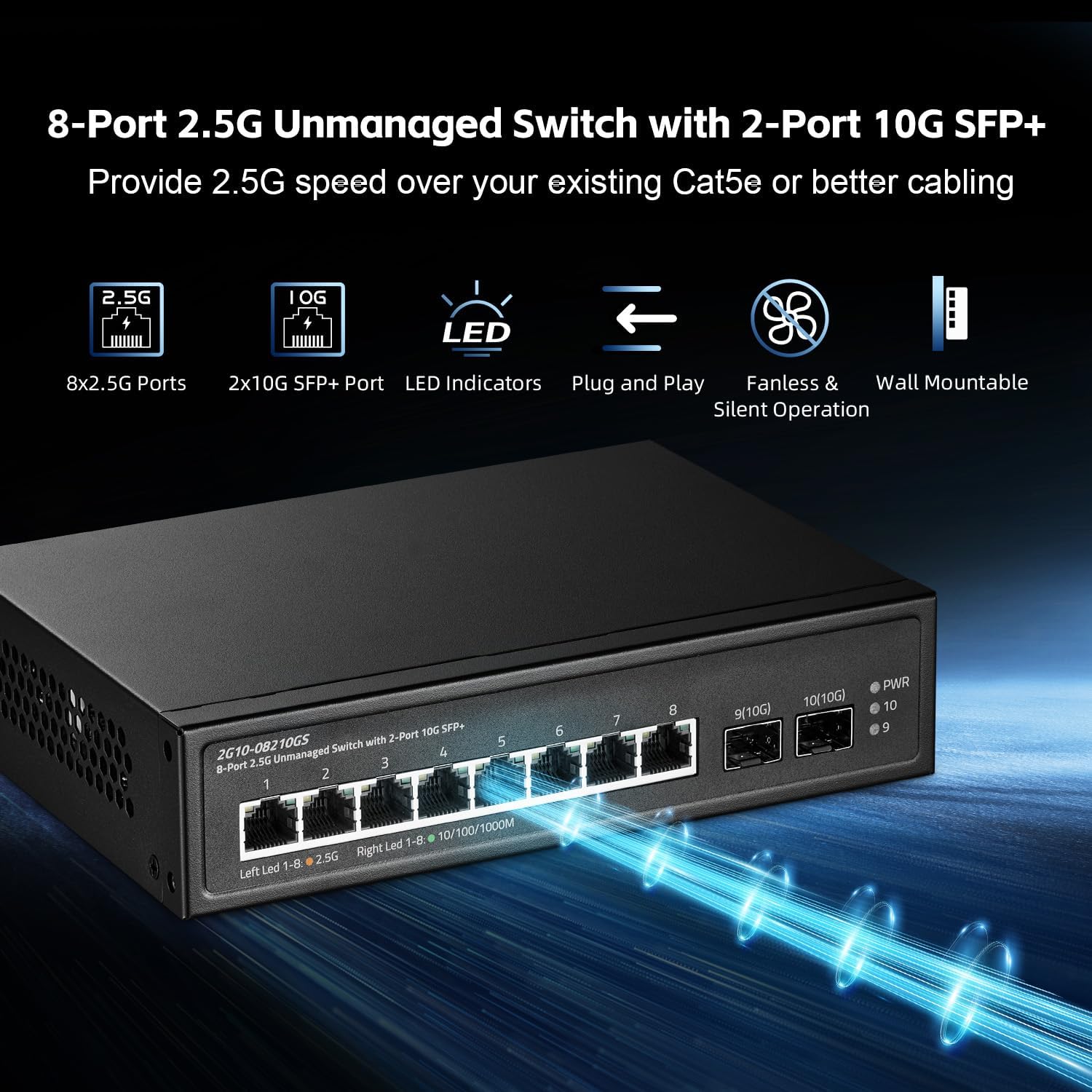
Image 1.1: Binardat 10-Port 2.5G Unmanaged Ethernet Switch, highlighting 8x2.5G ports and 2x10G SFP+ ports.
2. Package Contents
Please verify that all items are present in your package:
- Binardat 2.5G Unmanaged Ethernet Switch (Model 2G10-08210GS)
- Power Cable
3. Product Overview
The Binardat 2G10-08210GS switch is a fanless, unmanaged device designed for quiet and reliable operation. It features a durable metal casing and supports both desktop placement and wall mounting.
3.1 Front Panel and LED Indicators
The front panel includes all network ports and LED indicators for monitoring the switch's status and port activity.
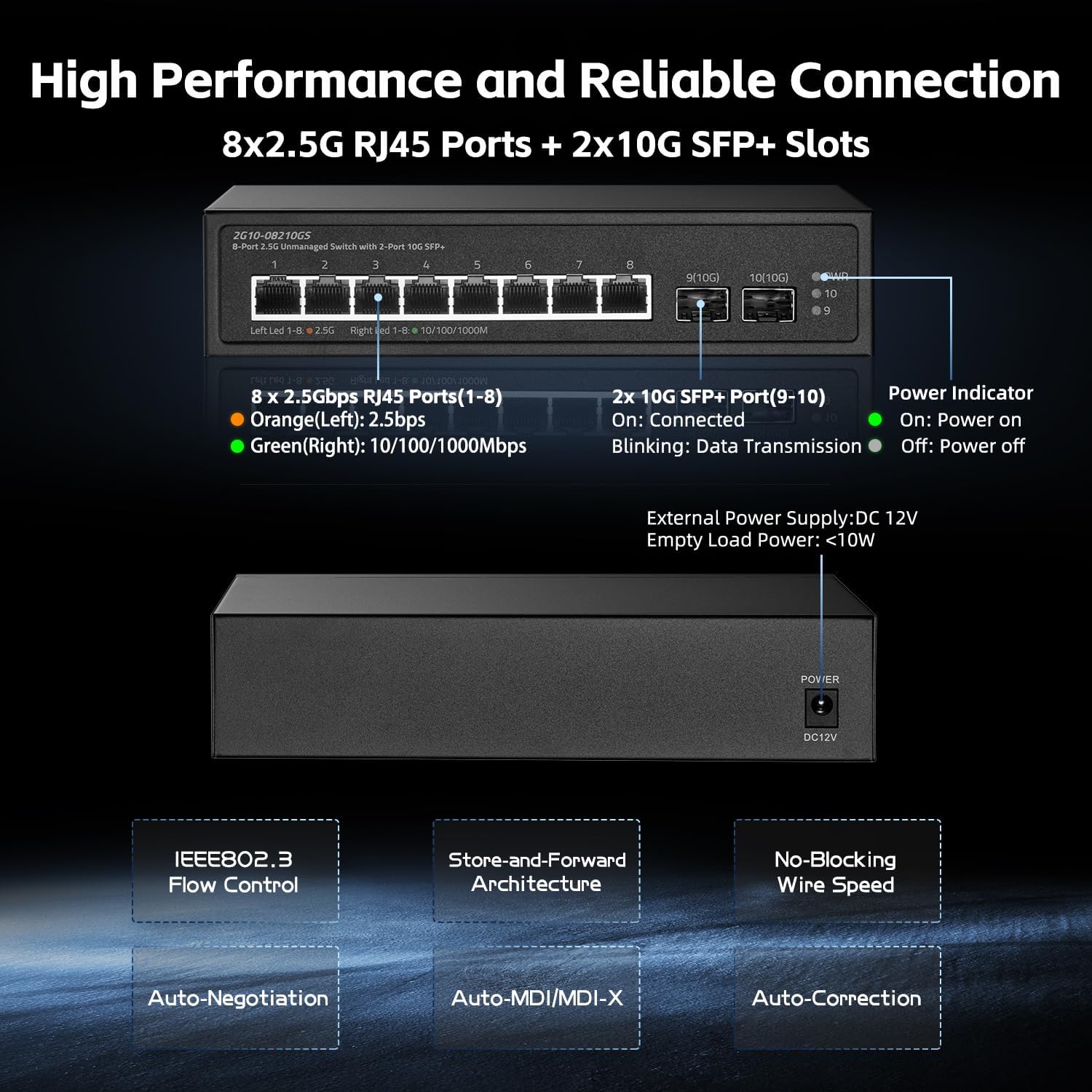
Image 3.1: Detailed view of the switch's front panel, including RJ45 and SFP+ ports, and LED indicators.
- 8x 2.5Gbps RJ45 Ports (1-8): These ports automatically detect and adapt to 2500Mbps, 1000Mbps, or 100Mbps speeds.
- 2x 10G SFP+ Slots (9-10): These slots support 1G/10G SFP+ modules (modules not included) for high-speed fiber optic connections.
- Power Indicator (PWR):
- On: Device is powered on.
- Off: Device is powered off.
- Port LED Indicators (Left LED 1-8, Right LED 1-8, 9/10G, 10/10G):
- RJ45 Ports (1-8):
- Left LED (Orange): Indicates a 2.5Gbps connection.
- Right LED (Green): Indicates a 10/100/1000Mbps connection.
- SFP+ Ports (9-10):
- On: Port is connected.
- Blinking: Data transmission is active.
- RJ45 Ports (1-8):
3.2 Rear Panel
The rear panel typically contains the power input port.
- DC 12V Power Input: Connect the provided power adapter here.
4. Setup
The Binardat 2G10-08210GS is an unmanaged switch, requiring no complex configuration. It operates on a plug-and-play basis.
4.1 Basic Connection Steps
- Connect Power: Connect the provided power cable to the DC 12V power input on the switch and then to a power outlet. The Power LED (PWR) will illuminate.
- Connect Network Devices: Connect your network devices (e.g., computers, NAS, routers, gaming PCs, WiFi 7/6 APs) to the RJ45 ports (1-8) using Ethernet cables. For 2.5G speeds, ensure you use Cat5e or better cabling.
- Connect SFP+ Modules (Optional): If using 10G SFP+ connections, insert compatible SFP+ modules into slots 9-10 and connect fiber optic cables to your 10G devices.
The switch supports Auto MDI/MDIX, so you do not need to worry about using straight-through or crossover cables. It will automatically detect and adjust.

Image 4.1: Illustration of the switch's plug-and-play functionality and wall-mountable design.
5. Operating Instructions
Once connected, the switch operates automatically. The LED indicators provide visual feedback on the network status.
5.1 Monitoring Network Status
- Observe the Power LED (PWR) to confirm the switch is powered on.
- Check the Left (Orange) and Right (Green) LEDs on RJ45 ports to determine the link speed of connected devices.
- For SFP+ ports, a solid LED indicates a connection, while a blinking LED signifies active data transmission.
5.2 Typical Applications
This switch is versatile and suitable for various high-bandwidth applications:

Image 5.1: Examples of network upgrades and applications for the Binardat switch, including NAS, WiFi APs, gaming PCs, and 4K/8K video.
- Home Entertainment: Stream 4K/8K video content smoothly.
- Gaming: Reduce latency and improve online gaming experience with 2.5G connections.
- NAS (Network Attached Storage): Accelerate file transfers and backups to and from your NAS.
- Small Offices: Provide high-speed connectivity for multiple workstations and servers.
- WiFi 7/6 APs: Connect high-speed wireless access points to maximize their performance.
6. Maintenance
The Binardat 2G10-08210GS switch is designed for low maintenance and reliable operation.
6.1 Fanless Design
The fanless design ensures silent operation and reduces power consumption. It also means there are no moving parts to wear out, contributing to a longer lifespan and less need for maintenance.
6.2 Cooling
Equipped with dual-sided heatsinks, the switch maintains optimal operating temperatures even during continuous 24/7 operation. This design ensures reliable performance across a wide operating temperature range of -10℃ to 55℃.
6.3 Cleaning
To clean the device, gently wipe the exterior with a soft, dry cloth. Do not use liquid or aerosol cleaners.
7. Troubleshooting
If you encounter issues with your Binardat switch, refer to the following common troubleshooting steps:
- No Power:
- Ensure the power cable is securely connected to both the switch and a working power outlet.
- Verify that the power outlet is functional.
- No Link/Connection:
- Check that Ethernet cables are securely plugged into both the switch port and the connected device.
- Ensure the connected device is powered on and its network adapter is functioning correctly.
- Try a different Ethernet cable or port on the switch.
- Slow Network Speed:
- For 2.5G speeds, ensure you are using Cat5e or higher-rated Ethernet cables.
- Verify that your connected devices (e.g., network adapter, router, NAS) support 2.5G or 10G speeds.
- Check the port LED indicators to confirm the link speed. An orange LED for RJ45 ports indicates 2.5Gbps.
- SFP+ Port Issues:
- Ensure the SFP+ module is correctly inserted and compatible with the switch.
- Verify that the fiber optic cable is properly connected and undamaged.
- Check the SFP+ port LED for link status.
8. Specifications
| Feature | Description |
|---|---|
| Brand | Binardat |
| Model Number | 2G10-08210GS |
| Port Count | 10 (8x 2.5G Base-T RJ45, 2x 10G SFP+) |
| Interface | RJ45, SFP+ |
| Data Transfer Rate | 80 Gbps (Backplane Bandwidth) |
| Switch Type | Unmanaged |
| Included Components | 2.5G Switch, Power Cable |
| Color | Black |
| Operating Temperature | -10℃ to 55℃ |
| Power Input | DC 12V |
9. Warranty and Support
9.1 Warranty Information
This Binardat product comes with a 1-year warranty from the date of purchase. This warranty covers manufacturing defects and malfunctions under normal use. It does not cover damage caused by misuse, accidents, unauthorized modifications, or natural disasters.
9.2 Technical Support
For technical assistance, troubleshooting, or warranty claims, please contact Binardat customer support through the retailer where you purchased the product or visit the official Binardat website for contact information.

