
1. Introduction
Thank you for choosing the Urageuxy Professional Wi-Fi 14-in-1 Weather Station. This device is designed to provide comprehensive and accurate weather data for your home or garden. This manual will guide you through the setup, operation, and maintenance of your weather station, ensuring you get the most out of its advanced features. Please read these instructions carefully before use and retain them for future reference.
2. Safety Information
- Do not expose the indoor console to water or extreme humidity.
- Ensure the outdoor sensor is installed in a location protected from extreme weather conditions that could cause physical damage.
- Use only the specified power adapter for the indoor console.
- Do not attempt to disassemble or repair the device yourself. Contact customer support for assistance.
- Keep batteries out of reach of children. Dispose of used batteries responsibly.
3. Package Contents
Please check the package contents to ensure all components are present:
- Indoor control console
- Outdoor transmitter (multi-sensor array)
- Temperature and humidity sensor (integrated into outdoor transmitter)
- Mounting accessories for outdoor sensor
- Power adapter for indoor console
- User Manual
4. Setup
4.1 Outdoor Sensor Installation
The outdoor sensor array measures wind speed, wind direction, rainfall, UV index, light intensity, temperature, and humidity. Proper placement is crucial for accurate readings.
- Choose a Location: Select an open area, free from obstructions like buildings or trees, to ensure accurate wind and rain measurements. For temperature, avoid direct sunlight exposure if possible, or ensure the sensor's radiation shield is effective.
- Mounting: Use the provided mounting accessories to securely attach the sensor to a pole or suitable structure. Ensure it is level for accurate rain collection.
- Power: Install batteries (not included) into the outdoor sensor compartment. The sensor also features a solar panel for extended battery life.

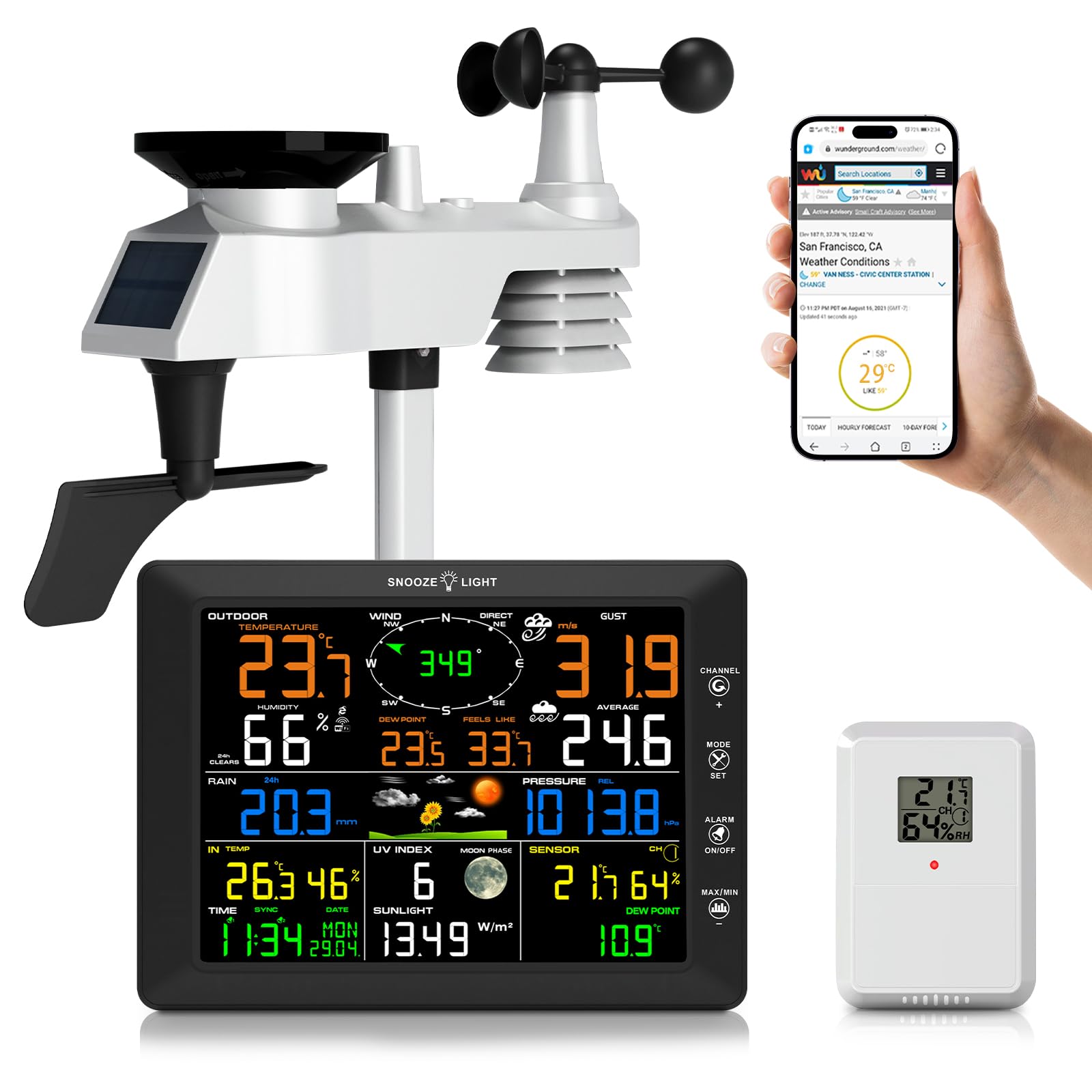
This image displays the complete Urageuxy Professional Wi-Fi 14-in-1 Weather Station system. It features the multi-sensor outdoor unit, including an anemometer, wind vane, rain gauge, and solar panel, alongside the indoor color display console. A smartphone screen is also visible, indicating app connectivity for data monitoring.
4.2 Indoor Console Setup
The indoor console displays all collected weather data and allows for configuration.
- Power On: Connect the power adapter to the indoor console and plug it into a power outlet. The display will light up.
- Sensor Synchronization: The console will automatically attempt to connect with the outdoor sensor. Ensure the sensor is powered on and within the 100-meter wireless transmission range. Allow a few minutes for initial data reception.
- Basic Settings: Set the time, date, and preferred units (e.g., °C/°F, km/h/mph, mm/inch) using the console's buttons.
This image illustrates the significant size difference and detailed layout of the Urageuxy weather station's 20.5 cm color display console compared to a standard, smaller display. It highlights the console's frame dimensions of 21.5x16x2.2 cm and LCD dimensions of 17x12.45 cm, providing a clear visual of the expansive screen for easy data readability.
4.3 Wi-Fi Connection and Data Synchronization
Connect your weather station to your home Wi-Fi network to synchronize data with online weather services.
- Access Wi-Fi Settings: Navigate to the Wi-Fi setup menu on the indoor console.
- Connect to Network: Select your 2.4 GHz Wi-Fi network and enter the password. The station does not support 5 GHz networks.
- Online Services: Once connected, you can configure the station to upload data to platforms like Weather Underground and Weather Cloud. Follow the on-screen instructions or refer to the dedicated section in the full manual for detailed steps on linking your accounts.
5. Operating Instructions
5.1 Display Overview
The 20.5 cm color LCD provides a clear and intuitive display of all weather parameters. Data is presented in various sections for easy readability.

A detailed view of the Urageuxy weather station's color LCD, presenting various real-time weather data. The screen shows indoor and outdoor temperature and humidity, wind speed and direction, atmospheric pressure, and a graphical weather forecast with icons for sun, clouds, and rain. This visual helps users understand the comprehensive data presentation.
5.2 Data Interpretation
The display shows the following measurements:
- Indoor/Outdoor Temperature & Humidity: Current readings for both environments.
- Wind Speed & Direction: Real-time wind data, including gusts and average speed.
- Rainfall: Daily, weekly, and monthly precipitation totals.
- UV Index & Light Intensity: Current ultraviolet radiation levels and sunlight intensity.
- Atmospheric Pressure: Current barometric pressure and historical trends.
- Dew Point & Wind Chill: Calculated values for environmental comfort and risk assessment.
- Weather Forecast: Graphical icons indicating predicted weather conditions.
- Moon Phase: Current lunar phase.
5.3 Alarm Functions
The weather station features customizable alarm thresholds for various parameters:
- You can set high/low alerts for temperature, humidity, wind speed, atmospheric pressure, UV index, and precipitation.
- When a set threshold is reached, the console will provide an audible or visual notification.
- Refer to the console's menu for detailed instructions on setting and managing alarms.
5.4 Manual Calibration
For sustained accuracy, the station supports manual calibration of certain sensors. Consult the advanced settings menu on the console for calibration options and procedures.
6. Maintenance
6.1 Cleaning
- Indoor Console: Wipe the display and casing with a soft, dry cloth. Avoid abrasive cleaners or solvents.
- Outdoor Sensor: Periodically clean the rain collector funnel and wind sensors to remove debris (leaves, insects) that could affect accuracy. Use a damp cloth for the casing.
6.2 Sensor Replacement
The integrated Swiss-made temperature and humidity sensor is designed for high precision and is replaceable. If you suspect a malfunction or significant inaccuracy, contact customer support for guidance on replacement parts and procedures.
6.3 Battery Replacement
The outdoor sensor requires batteries for operation, supplemented by its solar panel. Replace batteries when the low battery indicator appears on the indoor console to ensure continuous data transmission.
7. Troubleshooting
If you encounter issues with your weather station, please refer to the following common problems and solutions:
| Problem | Possible Cause | Solution |
|---|---|---|
| No outdoor sensor data on console | Low batteries in outdoor sensor; Sensor out of range; Interference | Replace outdoor sensor batteries; Move sensor closer to console; Relocate sensor away from electronic interference. |
| Wi-Fi connection fails | Incorrect password; Not a 2.4 GHz network; Router issues | Verify Wi-Fi password; Ensure you are connecting to a 2.4 GHz network; Restart your router and console. |
| Inaccurate rain readings | Rain collector blocked; Sensor not level | Clean the rain collector funnel; Ensure the outdoor sensor is mounted perfectly level. |
| Inaccurate wind readings | Wind cups/vane obstructed; Sensor not in open area | Clear any obstructions around the wind sensors; Relocate the sensor to a more open area. |
8. Specifications
- Model: FT0300B
- Dimensions (L x W x H): 45 x 29 x 18 cm
- Weight: 1.45 Kilograms
- Display Type: LCD Color Display
- Connectivity Technology: Wi-Fi (2.4 GHz)
- Power Source: Wired (console), Batteries/Solar (outdoor sensor)
- Outdoor Temperature Range: -40 °C to 60 °C
- Temperature Accuracy: ±0.3 °C
- Outdoor Humidity Range: 1% to 99%
- Humidity Accuracy: ±0.3% (1% to 90%)
- Wireless Transmission Range: Up to 100 meters (open air)
- Special Features: High-resolution color screen, data upload to Weather Underground/Weather Cloud, customizable notifications, precise rainfall/sunlight/UV index tracking.
9. Warranty Information
Urageuxy products are manufactured to high-quality standards and are warranted against manufacturing defects. For specific warranty terms and conditions, please refer to the warranty card included with your product or visit the official Urageuxy website. Keep your purchase receipt as proof of purchase.
10. Customer Support
If you have any questions, require technical assistance, or need to report an issue, please contact Urageuxy customer support. You can typically find contact information on the official Urageuxy website or through the retailer where you purchased the product. Please have your model number (FT0300B) and purchase details ready when contacting support.


