
1. Introduction
Thank you for choosing the Pxwaxpy Portable Charger Power Bank 60800mAh, Model T5. This high-capacity power bank is designed to provide reliable and fast charging for a wide range of electronic devices. With its massive 60800mAh capacity, 25W USB-C fast charging, 3 built-in cables, and multiple output/input options, it is an ideal companion for travel and daily use. This manual provides essential information for safe and efficient operation of your device.
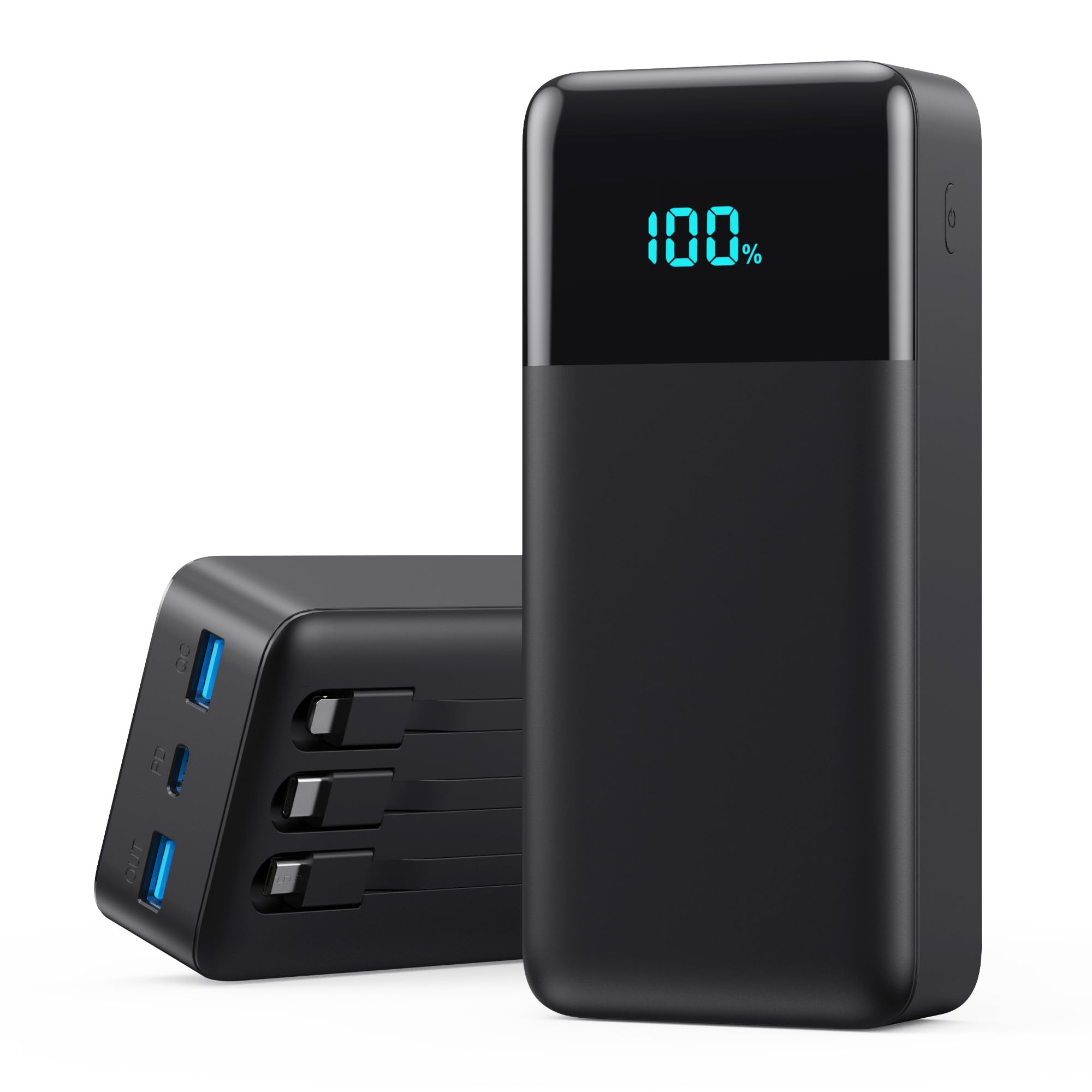
Image 1: Pxwaxpy Portable Charger Power Bank, Model T5. This image shows the black power bank with its LED display and integrated cables.
2. What's in the Box
Please check the package contents upon unboxing:
- 1 x Pxwaxpy 60800mAh Portable Charger Power Bank with 3 Built-in Cables and 3 USB Ports
- 1 x Charging Cable (for recharging the power bank)
- 1 x User Manual
3. Product Features
- Massive 60800mAh Capacity: Provides multiple charges for most smartphones and USB-powered devices, suitable for extended use.
- 3 Built-in Charging Cables: Includes Type-C, for iPhone, and Micro USB cables, eliminating the need to carry separate cords.
- Smart LED Display: Shows the real-time remaining power percentage for convenient monitoring.
- 6 Output Ports & 2 Input Options: Allows simultaneous charging of up to 6 devices and offers flexible recharging methods for the power bank itself.
- 25W PD & QC4.0 Fast Charging: Delivers up to 3 times faster charging for compatible devices, significantly reducing charging time.
- Universal Compatibility: Supports a wide range of fast charging protocols (PD3.0/QC3.0/QC4.0/DCP/FCP/AFC) for various devices including iPhone, Galaxy, Google Pixel, LG, Moto, iPads, and Android tablets.
- Advanced Safety Features: Built-in multi-layer protection system prevents over-charging, over-discharging, short circuits, and overheating.
4. Setup
4.1 Initial Charging of the Power Bank
- Before first use, fully charge the power bank.
- Connect the provided charging cable to one of the power bank's input ports (USB-C or Micro USB).
- Connect the other end of the charging cable to a suitable USB wall adapter (not included) or a computer's USB port.
- The LED display will show the charging progress. Allow several hours for a full charge, especially for the initial charge.
4.2 Checking Battery Level
The integrated LED display shows the current battery percentage of the power bank. Press the power button once to activate the display.
5. Operating Instructions
5.1 Charging Your Devices
The power bank offers multiple ways to charge your devices:
- Using Built-in Cables:
- Identify the correct built-in cable (Type-C, for iPhone, or Micro USB) for your device.
- Gently pull out the desired cable from its storage slot on the power bank.
- Connect the cable to your device's charging port.
- The power bank will automatically begin charging your device.
- Using USB Output Ports:
- Connect your device's original charging cable to one of the USB-A or USB-C output ports on the power bank.
- Connect the other end of your cable to your device.
- The power bank will automatically begin charging your device.
5.2 Simultaneous Charging
You can charge up to 6 devices simultaneously using a combination of the built-in cables and the USB output ports. The power bank will distribute power efficiently among connected devices.
6. Maintenance
- Cleaning: Use a soft, dry cloth to clean the surface of the power bank. Avoid using harsh chemicals or abrasive materials.
- Storage: Store the power bank in a cool, dry place away from direct sunlight, extreme temperatures, and humidity.
- Battery Care: To prolong battery life, fully charge the power bank at least once every three months if not in regular use. Avoid completely draining the battery frequently.
- Handling: Do not drop, disassemble, or attempt to repair the power bank yourself. This may void the warranty and pose safety risks.
7. Troubleshooting
| Problem | Possible Solution |
|---|---|
| Device not charging from power bank. |
|
| Power bank not charging. |
|
| Slow charging. |
|
8. Specifications
| Feature | Detail |
|---|---|
| Model Number | T5 |
| Battery Capacity | 60800 milliamp-hours (mAh) |
| Connector Type | USB Type C + for iPhone + Micro USB (built-in cables) |
| Special Feature | 6-in-1 Portable Charger with built-in cables, 6 outputs, 2 inputs, 25W PD QC 4.0 Fast Charging |
| Number of Ports | 3 (additional USB-A and USB-C ports) |
| Voltage | 12 volts (max output) |
| Amperage | 3 A (max output) |
| Battery Cell Type | Lithium Ion |
| Item Weight | 1.2 pounds (approx. 544g) |
| Item Dimensions (L x W x Thickness) | 6.02" x 2.76" x 1.69" (approx. 15.29 x 7.01 x 4.29 cm) |
9. Warranty
This Pxwaxpy Portable Charger Power Bank comes with a 1-year warranty from the date of purchase. This warranty covers manufacturing defects and malfunctions under normal use. It does not cover damage caused by misuse, accidents, unauthorized modifications, or natural disasters. Please retain your proof of purchase for warranty claims.
10. Support
If you encounter any issues or have questions regarding your Pxwaxpy Portable Charger Power Bank that are not addressed in this manual, please contact the manufacturer or seller for assistance. Refer to your purchase documentation for specific contact details.


