
1. Overview
The NBD K200 is a compact digital camera designed for capturing high-quality photos and videos. It features a 64MP photo resolution, 4K video recording capabilities, 16X digital zoom, and autofocus. Its lightweight design and user-friendly interface make it suitable for various users, including beginners and travelers.

Image: Overview of the NBD K200 camera highlighting its 64MP, 4K, Beauty Mode, Backlight Portrait, Auto Focus, 16X Zoom, Smart Stabilization, and Built-in Filters features.
Package Contents
Ensure all items are present in the package:
- NBD K200 Digital Camera Body
- 64GB TF Card (MicroSD Card)
- USB-C Cable
- Neck Strap
- User Manual (this document)

Image: The NBD K200 camera, USB cable, card reader, 64GB memory card, lens cleaning cloth, and camera wrist strap, presented as a complete kit.
2. Setup
2.1 Charging the Battery
Before first use, fully charge the camera battery. The camera uses a Lithium Ion battery.
- Insert the battery into the camera's battery compartment.
- Connect the camera to a power source using the provided USB-C cable.
- The charging indicator light will show the charging status. A full charge typically allows for over 300 photos.

Image: The NBD K200 camera connected via USB-C cable to a power bank, illustrating the charging process and highlighting its powerful battery life for approximately 300 photos per charge.
2.2 Inserting the Memory Card
The camera supports microSD cards. A 64GB TF card is included.
- Locate the memory card slot on the camera.
- Insert the TF card into the slot with the gold contacts facing the correct direction until it clicks into place.
- To remove, press the card gently until it springs out.
3. Operating the Camera
3.1 Power On/Off
Press and hold the power button to turn the camera on or off.
3.2 Basic Controls
The camera features a Multi-Functional Roller Button for simplified operation.
- Roller Button: Used for one-touch mode switching and precise zoom adjustment. Roll left to zoom out, roll right to zoom in.
- Shutter Button: Press to take a photo or start/stop video recording.
- Mode Button: Cycles through different shooting modes.
- Flash Button: Activates the built-in flash.
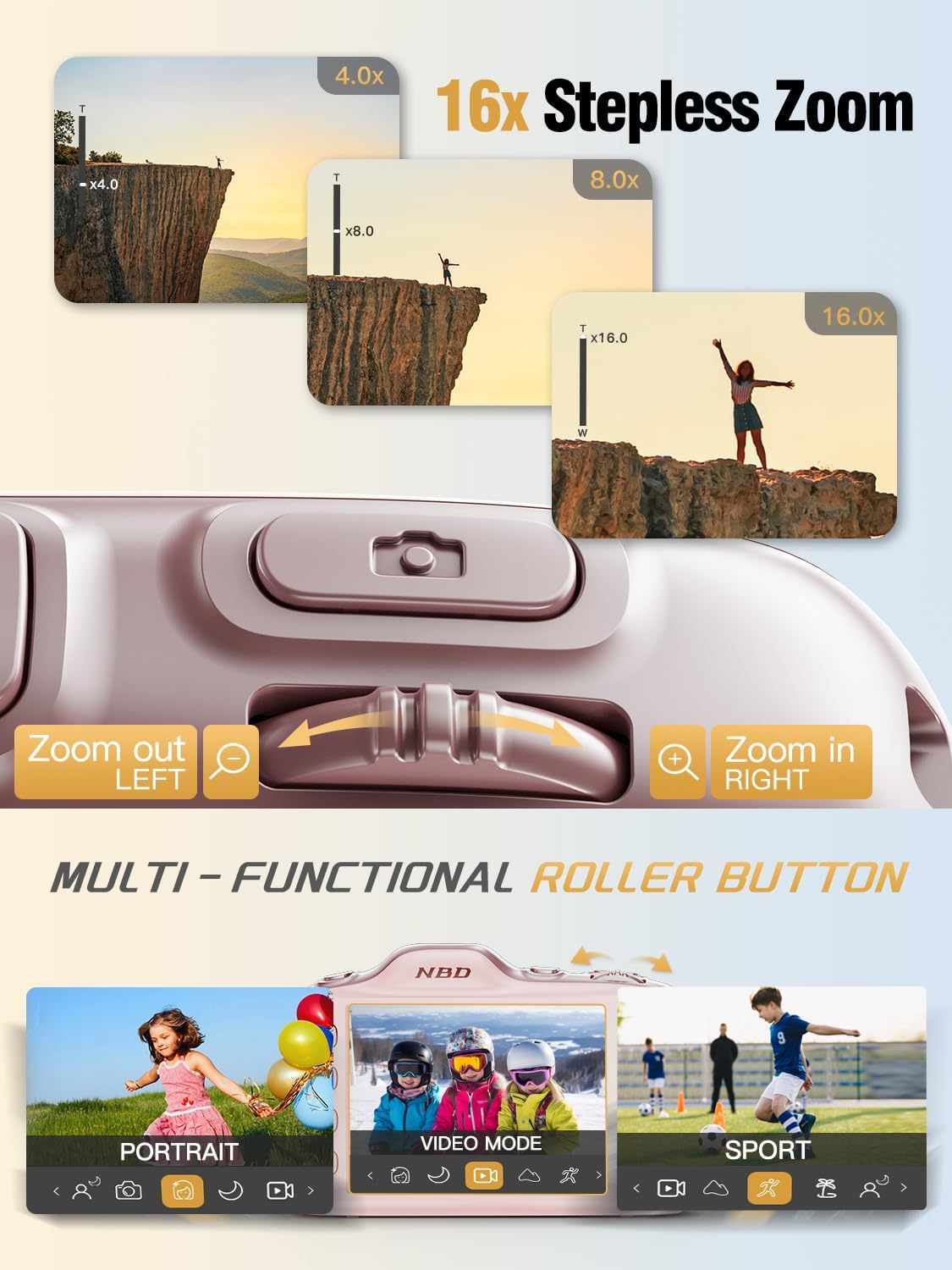
Image: Close-up of the NBD K200 camera's top, highlighting the 16x stepless zoom roller button for zooming in and out, and the mode switch for selecting different shooting modes like Portrait, Video, and Sport.
3.3 Taking Photos
The camera features autofocus for clear images.
- Point the camera at your subject. The autofocus system will automatically detect and focus.
- Use the roller button to adjust the 16X digital zoom as needed.
- Press the shutter button fully to capture the photo.

Image: A woman holding the NBD K200 camera, with the screen displaying an autofocus frame around a subject's face, illustrating the camera's auto-focus capability for effortless portrait photography.
3.4 Recording Videos
The camera supports 4K video recording at various frame rates (24, 30, 60 FPS).
- Switch to video mode using the mode button or roller.
- Press the shutter button to start recording. A red indicator will typically appear on the screen.
- Press the shutter button again to stop recording.

Image: A young girl running through a field with balloons, illustrating the NBD K200 camera's 4K 30FPS cinema capture capability for smooth, ultra HD video recording.
3.5 Shooting Modes and Features
The NBD K200 offers several modes and features to enhance your photography.
- Beauty Mode: Enhances facial features for portraits and selfies.
- Night Mode: Optimizes settings for low-light conditions, smoothing grain and balancing tones.
- Portrait Mode: Designed for capturing natural radiance in subjects, balancing tones and softening light.
- Sport Mode: Ideal for capturing fast-moving subjects with anti-shake stabilization.
- Burst Mode: Captures multiple photos in quick succession (up to 10FPS) for action shots.
- Built-in Filters: Apply various creative filters like Vintage, Cool Tone, Warm Tone, Sepia, Sketch, and Japan Style.
- Self-Timer: Options for 3, 5, 7, or 10-second delays for group shots or selfies.

Image: A circular diagram illustrating the NBD K200 camera's various shooting modes, including Photo, Video, Night Mode, Portrait Mode, Burst Mode, and Beauty Mode, with example images for each.

Image: Examples of built-in filters available on the NBD K200 camera, including Vintage, Cool Tone, Warm Tone, Sepia, Sketch, and Japan Style, demonstrating how they alter image ambiance.
3.6 Transferring Files
Transfer photos and videos to a computer or smartphone using the USB-C cable.
- Connect the camera to your device using the USB-C cable.
- The camera will appear as a removable storage device.
- Drag and drop files to your desired location.
4. Maintenance
4.1 Battery Care
- Charge the battery fully before extended storage.
- Avoid exposing the battery to extreme temperatures.
- Use only the provided or approved charging cables and adapters.
4.2 Cleaning the Camera
- Use a soft, lint-free cloth to clean the camera body.
- For the lens, use a specialized lens cleaning cloth and solution. Avoid touching the lens directly.
- Do not use harsh chemicals or abrasive materials.
4.3 Storage
- Store the camera in a cool, dry place away from direct sunlight.
- If storing for a long period, remove the battery.
- Keep the camera in its protective case or a soft pouch to prevent scratches.
5. Troubleshooting
If you encounter issues, refer to the following common solutions:
| Problem | Possible Solution |
|---|---|
| Camera does not power on | Ensure the battery is charged and correctly inserted. |
| Cannot take photos/videos | Check if the memory card is inserted and has sufficient space. Ensure the camera is not in playback mode. |
| Images are blurry | Ensure autofocus is engaged. Check for smudges on the lens. Hold the camera steady or use anti-shake feature. |
| Camera not recognized by computer | Ensure the USB-C cable is securely connected. Try a different USB port or cable. |
| Flash not working | Ensure the flash is enabled in the camera settings or via the dedicated flash button. |
6. Specifications
Detailed technical specifications for the NBD K200 Digital Camera:
| Feature | Detail |
|---|---|
| Brand | NBD |
| Model Name | K200 |
| Effective Still Resolution | 64 MP |
| Video Resolution | 4K (2160p) |
| Frame Rate | 24, 30, 60 FPS |
| Zoom | 16X Digital Zoom |
| Autofocus | Yes (Contrast Detection) |
| Image Stabilization | Anti-shake |
| Photo Sensor Technology | CMOS (1/2.4-inch) |
| Aperture | F1.8 |
| Minimum Shutter Speed | 1/4000 seconds |
| Display Type | LCD (2.8 Inches, Color Screen) |
| Storage Media | microSD (up to 64GB included) |
| File Format (Photo) | JPEG (Fine Quality) |
| File Format (Video) | MOV |
| Battery Type | Lithium Ion |
| Connectivity | USB-C |
| Item Weight | 0.26 Kilograms (approx. 121g) |
| Water Resistance Level | Not Water Resistant |
7. Warranty and Support
For warranty information and technical support, please refer to the contact details provided with your purchase or visit the official NBD website. Keep your proof of purchase for warranty claims.